
Anyone who owns a pair of Sennheiser Momentum 4 headphones eventually runs into a moment where the pairing list gets messy, the touch controls stop responding, or the sound just feels off after a firmware update. Learning how to reset Sennheiser Momentum 4 to factory settings is the fastest fix for most of these hiccups, and the process only takes a couple of minutes once the correct button sequence is known.
Quick Summary Table
- Device: Sennheiser Momentum 4 Wireless (model M4AEBT)
- Fastest method: Hold the multi-function button for 20 seconds while the headphones are off
- Alternative method: Factory reset through the Sennheiser Smart Control app
- Time needed: Under 2 minutes
- Result: All Bluetooth pairings and custom settings are erased
- Note: A factory reset is different from a basic hardware restart
Method 1: Reset Using the Multi-Function Button
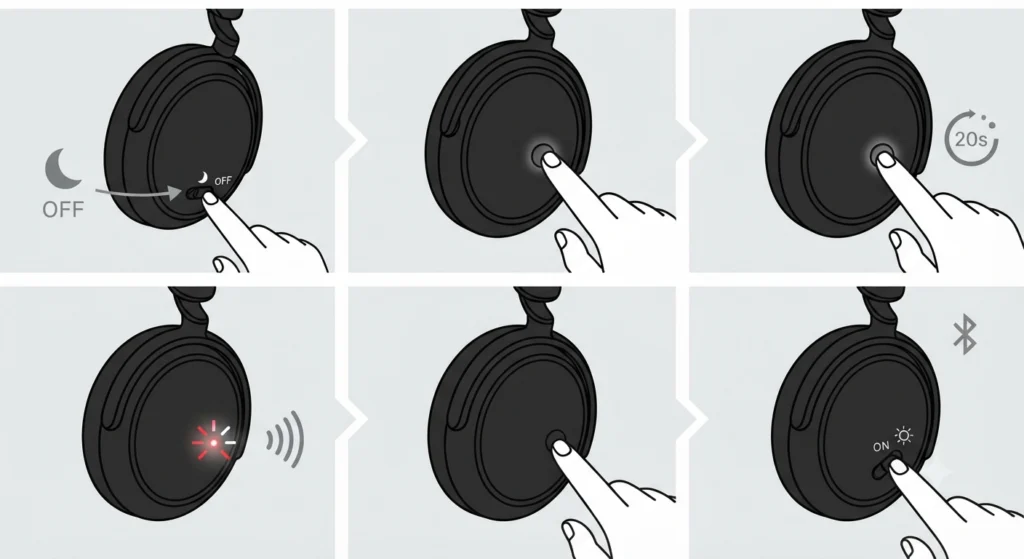
This is the most direct way to restore the headphones to their original state, and it works even if the Smart Control app is not installed or the headphones refuse to connect to any device.
- Step 1: Turn off the Momentum 4 headphones completely using the power switch.
- Step 2: Locate the multi-function button on the right ear cup.
- Step 3: Press and hold the multi-function button for about 20 seconds without releasing it early.
- Step 4: Listen for a tone prompt while watching for the red and white LEDs to flash briefly.
- Step 5: Release the button once the flashing stops. The headphones are now reset to factory settings.
- Step 6: Power the headphones back on and pair them again as if they were brand new.
Pro-Tip: A factory reset wipes every saved Bluetooth pairing, so it helps to also forget the Momentum 4 entry on the phone or laptop being used, then re-pair the Bluetooth connection from scratch for the cleanest possible link between the two devices.
Method 2: Reset Through the Sennheiser Smart Control App
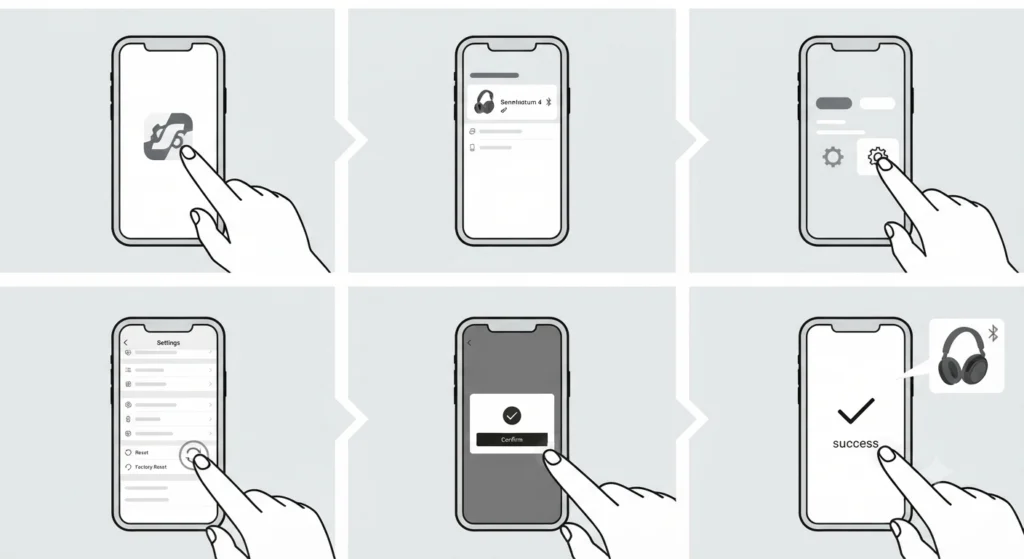
Some people prefer a guided reset instead of counting seconds with a button, and the Smart Control app makes that possible in a few taps.
- Step 1: Download and open the Sennheiser Smart Control app on a paired smartphone.
- Step 2: Connect the Momentum 4 headphones to the phone via Bluetooth.
- Step 3: Open the app and go to the Settings tab.
- Step 4: Scroll down and select the factory reset or factory default settings option.
- Step 5: Confirm the action when prompted inside the app.
- Step 6: Wait for the app to confirm the reset is complete, then reconnect the headphones as a new device.
Hardware Reset vs Factory Reset
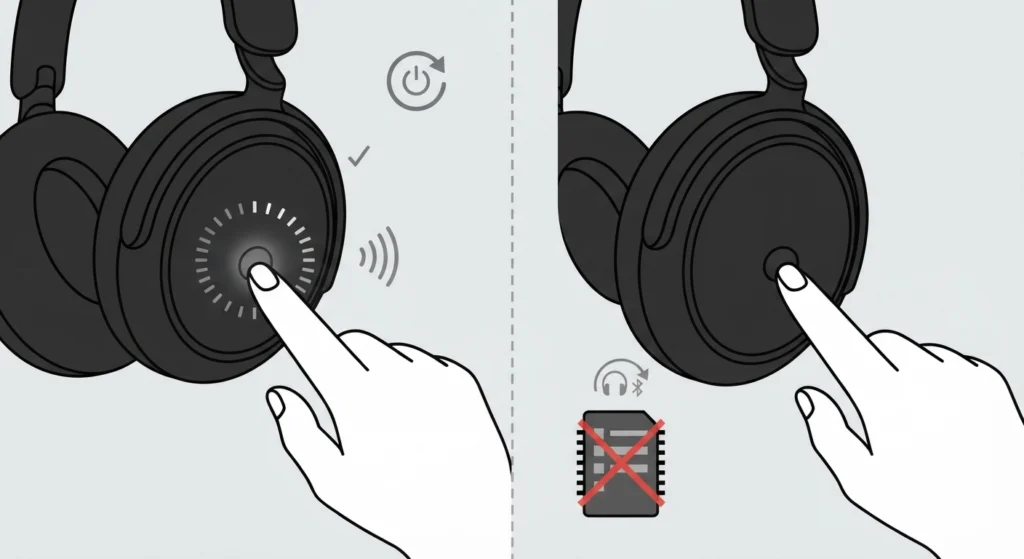
These two terms get mixed up often, but they solve different problems. A hardware reset is simply a restart, achieved by holding the multi-function button for around 15 seconds until a small tick sound confirms the headphones are rebooting. It does not erase any saved settings or pairings. A factory reset, on the other hand, wipes everything back to the state the headphones were in when they left the box, including the entire pairing list. Most people find that a quick hardware reset solves minor glitches like unresponsive buttons, while a full factory reset is reserved for deeper issues such as persistent connection failures or distorted audio.
Tips for a Smooth Reset
- Keep the headphones charged above 20 percent before starting, since a reset that gets interrupted by a dead battery can leave the device in an inconsistent state.
- Close the Smart Control app on the phone before attempting the manual button method, so the two reset processes do not conflict with each other.
- After the reset, check for a firmware update through the app, since a fresh factory state pairs well with the latest software.
- If the headphones will not be used for a while after resetting, store them with a partial charge rather than fully drained or fully topped up.
Pro-Tip: Right after a factory reset, sound sometimes plays through the wrong device on a Windows 11 laptop. Taking a moment to check and adjust the audio output settings saves a lot of confusion the first time the headphones reconnect.
Common Problems After Resetting
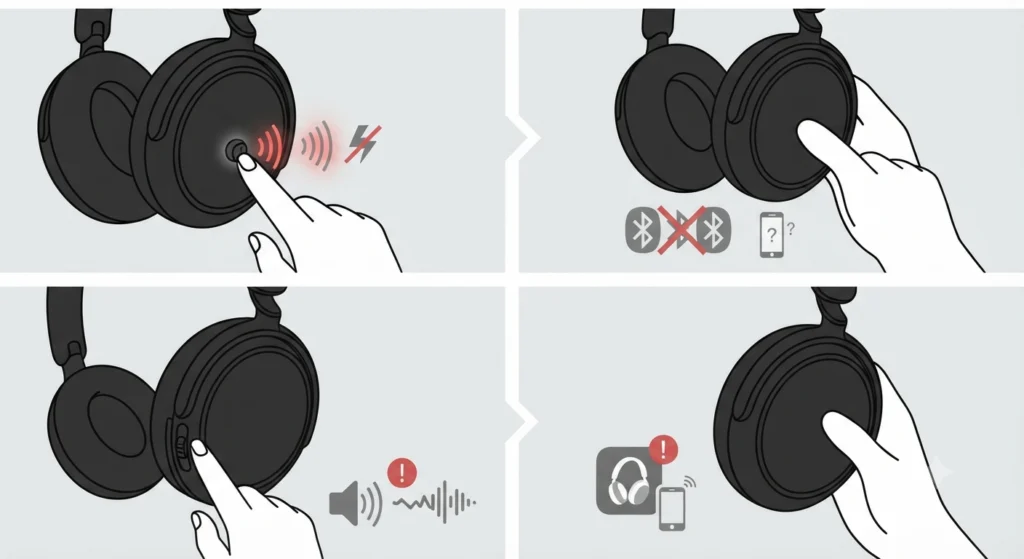
A factory reset is generally reliable, but a few situations come up often enough to be worth covering directly.
Headphones Will Not Enter Pairing Mode
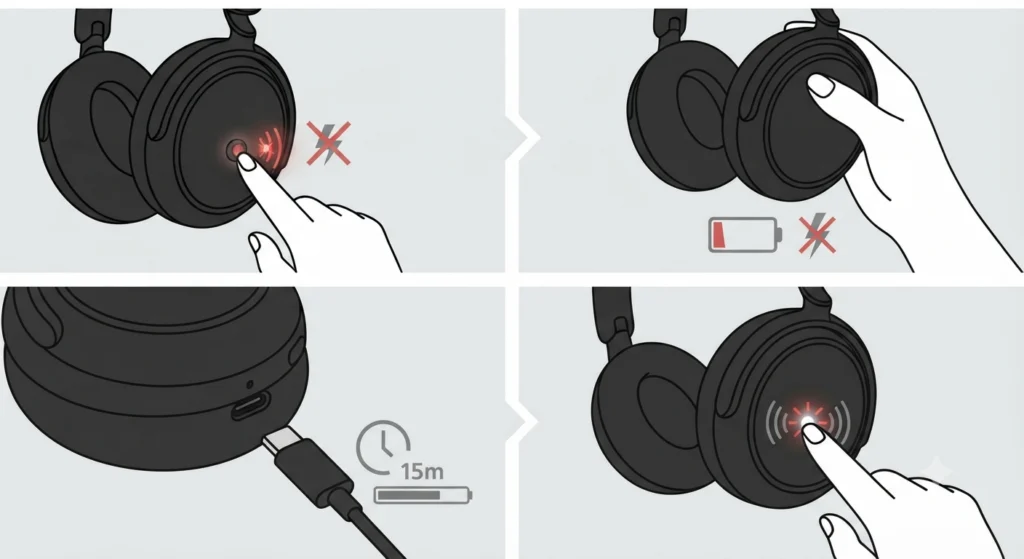
If the LED does not flash after the reset, the battery may be too low to complete the process. Charge the headphones for at least 15 minutes and try the button sequence again.
Computer Does Not Detect the Headphones
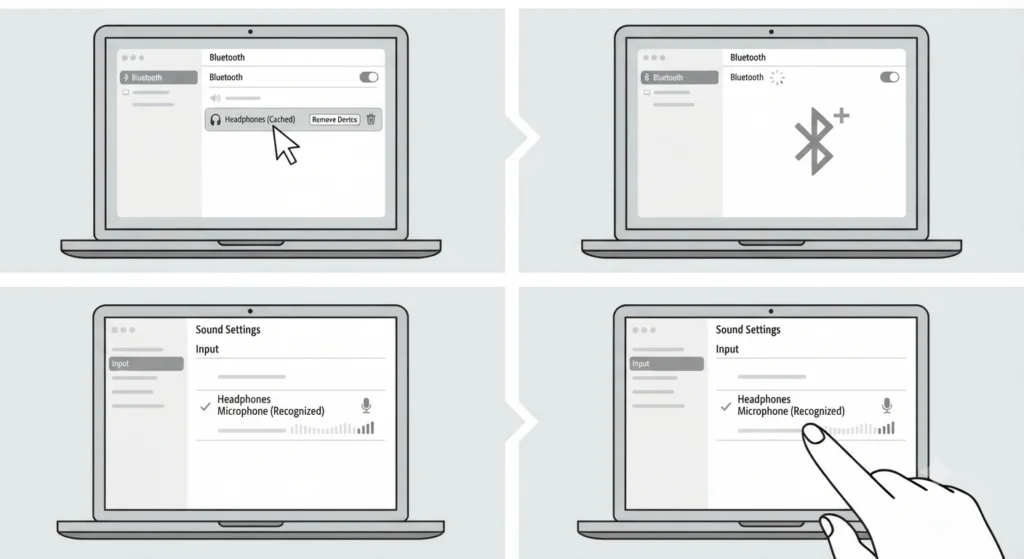
This usually means the old Bluetooth entry is still cached on the computer. Removing the device from the Bluetooth menu and searching again as a new device typically clears this up. On Windows 11, checking the list of audio input devices also confirms the microphone is recognized correctly after the reset.
No Sound After Reconnecting
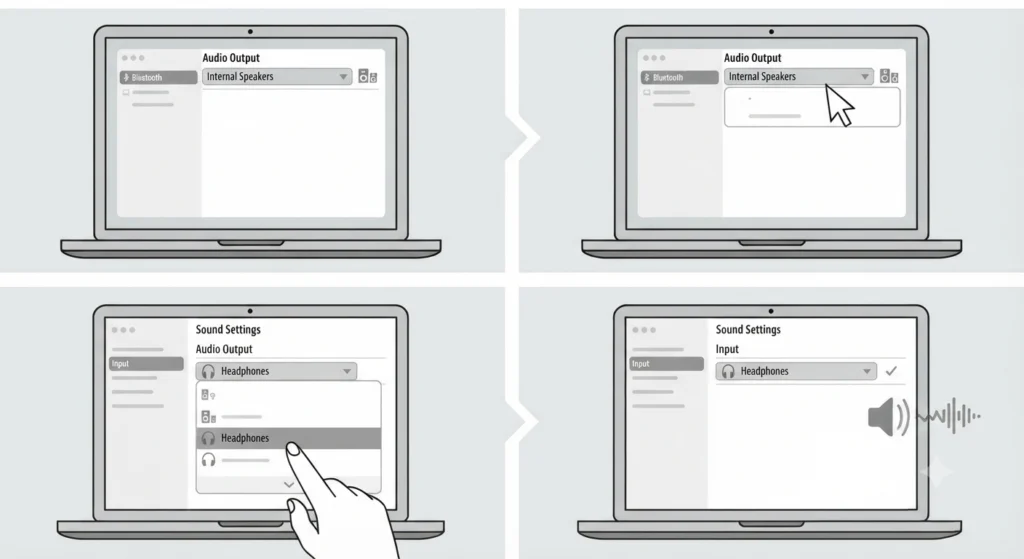
Sound profiles occasionally default to the wrong output after a reset. Resetting the audio settings on the connected device usually brings playback back to normal within a few seconds.
Microphone Not Working During Calls
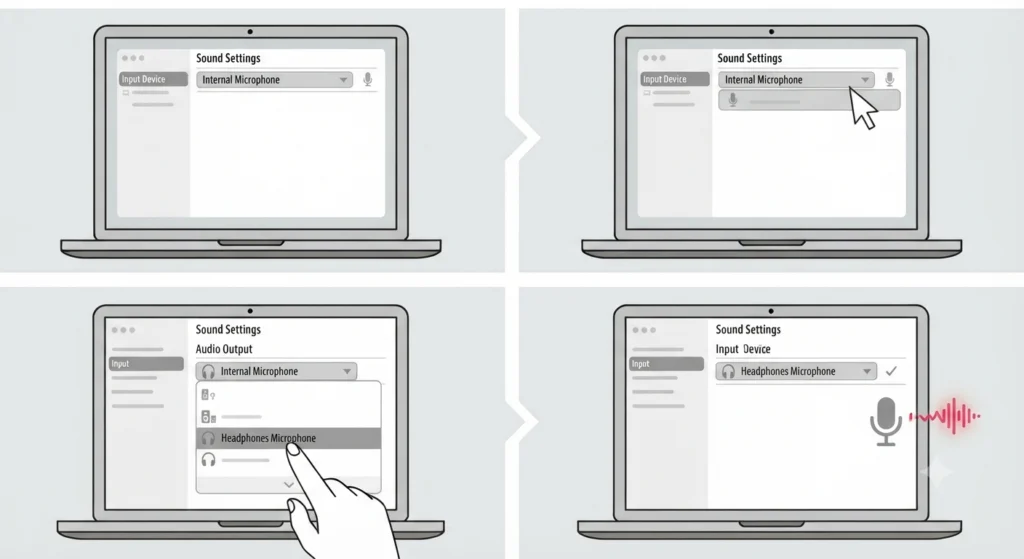
This is rarely related to the headphones themselves after a fresh reset. It is worth reviewing steps for resolving microphone detection problems on the operating system before assuming the hardware is faulty.
Frequently Asked Questions
Does a factory reset delete music or app data stored on the headphones?
No. The Momentum 4 does not store media files. A factory reset only clears Bluetooth pairings, sound personalization profiles, and custom button settings.
How long does it take for the Momentum 4 to reset?
The entire process, from holding the button to seeing the LED confirmation, takes about 20 to 30 seconds.
Can the Momentum 4 be reset without the Smart Control app?
Yes. The multi-function button method works independently of any app and only requires physical access to the headphones.
What is the difference between resetting and restarting the Momentum 4?
A restart, done by holding the button for about 15 seconds, simply reboots the headphones without erasing settings. A factory reset, done by holding the button for 20 seconds, erases all saved data.
Will a factory reset fix Bluetooth connection drops?
In many cases, yes, since a corrupted pairing entry is a common cause of dropped connections. Clearing the pairing list through a factory reset often resolves the issue.
Do the Momentum 4 headphones need to be charged before resetting?
A moderate charge is recommended so the reset process does not get interrupted by the battery dying mid-way through.
Is it necessary to update the firmware after a factory reset?
It is not strictly necessary, but checking for a firmware update right after resetting ensures the headphones run on the most stable and current software version.
Can a factory reset damage the headphones?
No. A factory reset is a standard supported function built into the headphones and does not cause any hardware damage.
How many times can the Momentum 4 be factory reset?
There is no limit. The headphones can be reset as many times as needed without any negative effect on performance or battery life.
What should be done immediately after a factory reset?
Power the headphones on, put them into pairing mode, and connect them to the desired device as if setting them up for the very first time.