
Learning how to connect Bluetooth headphones to an in-flight entertainment system takes about a minute once the right menu is found. Whether the seat screen has built-in Bluetooth or only a headphone jack, there is a simple way to go wireless at 35,000 feet.
Key Takeaways
- Method 1 works on seat screens that have a built-in Bluetooth menu, and no extra gear is needed.
- Method 2 uses a small Bluetooth transmitter plugged into the headphone jack for seats without Bluetooth.
- Headphones must be in pairing mode before the seat screen can find them.
- Pairing is done seat by seat, so it usually has to be repeated on every flight.
- Fully charged headphones and a charged transmitter make the whole process smoother.
Method 1: Pair Through the Seat Screen Bluetooth Menu
Many newer aircraft have Bluetooth built right into the seatback screen. This is the fastest route, and it works much like pairing headphones with a smart TV.
- Step 1: Turn off Bluetooth on the phone or tablet the headphones were last connected to. This stops the headphones from jumping back to that device during pairing.
- Step 2: Open the seat screen and look for the settings or audio options. The Bluetooth option is usually found there, and the exact label depends on the airline.
- Step 3: Put the headphones into pairing mode. On most models, this means holding the power or Bluetooth button until a light flashes or a voice prompt says the headphones are ready to pair.
- Step 4: Select the Bluetooth option on the seat screen so it starts scanning for nearby devices.
- Step 5: Choose the headphones from the list of available devices. The name usually matches the brand and model.
- Step 6: Wait for the headphones to confirm the connection with a tone or a steady light, then start a movie or song.
- Step 7: Adjust the volume on the seat screen or remote and on the headphones until it sounds comfortable.
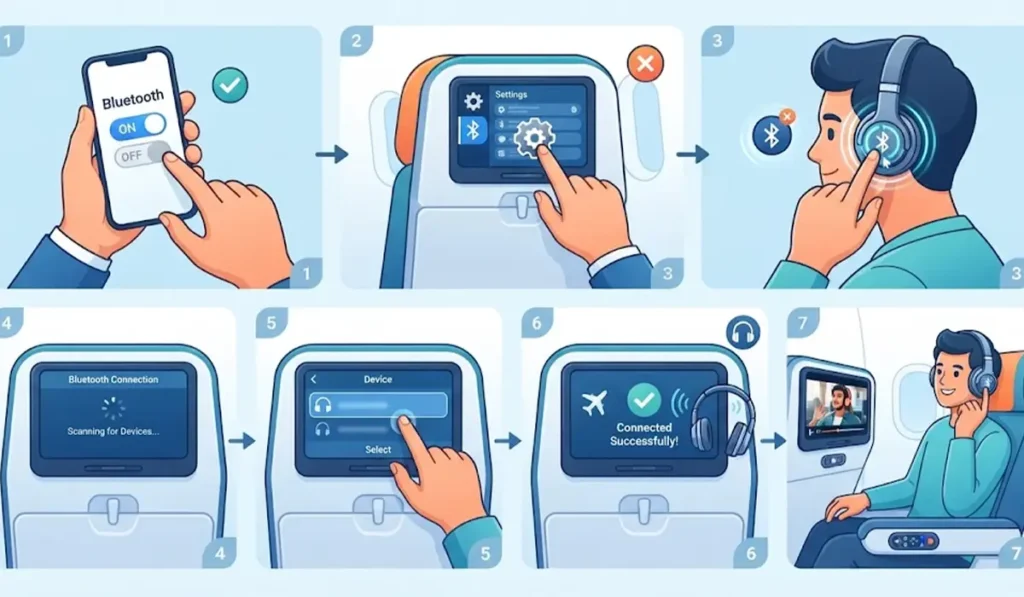
Pro-Tip: Keep the headphones close to the screen during pairing. Sitting in the seat with the headphones in hand is ideal, since a long distance or a crowd of other flashing devices can make the right name harder to spot.
Method 2: Use a Bluetooth Transmitter in the Headphone Jack
Some seats have no Bluetooth at all, and that is where a small Bluetooth transmitter saves the day. Think of it as a tiny translator that turns the wired audio from the seat into a wireless signal the headphones can read.
- Step 1: Charge the transmitter fully before the flight and keep it in the carry-on bag.
- Step 2: Put the transmitter in transmit mode if it also works as a receiver. Many models have a switch for this.
- Step 3: Put the headphones into pairing mode and hold them next to the transmitter.
- Step 4: Wait for the transmitter and the headphones to find each other. Most transmitters show this with a solid light.
- Step 5: Plug the transmitter into the seat’s headphone jack. Some older aircraft use a two-prong jack, so a small adapter may be needed if the transmitter did not come with one.
- Step 6: Start the movie or music on the seat screen and check that sound is coming through the headphones.
- Step 7: Raise or lower the volume on the seat controls and the headphones until it feels right.
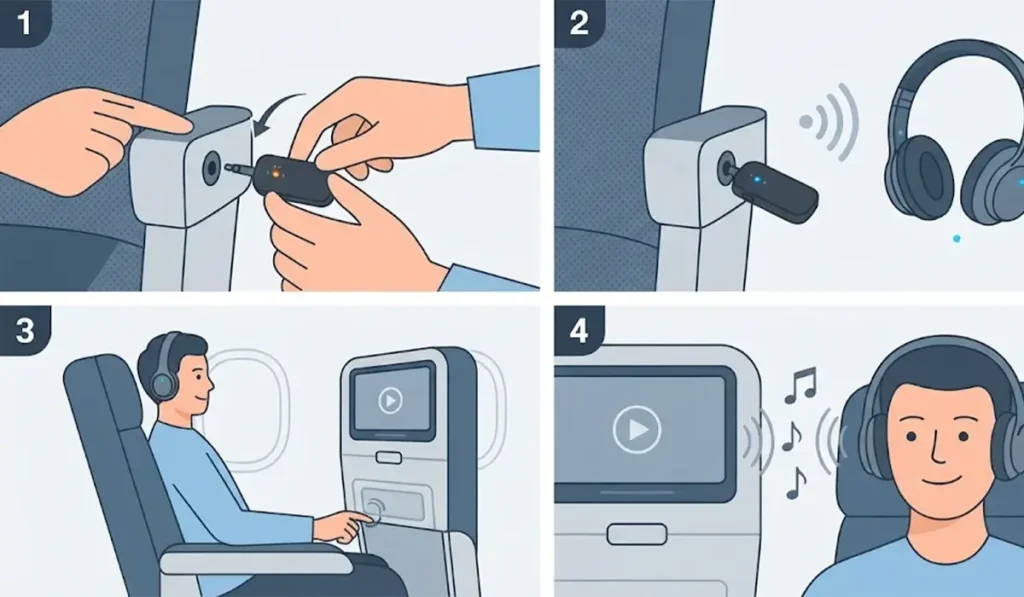
Pro-Tip: Pair the transmitter and the headphones at home before the trip. That way, the connection is ready within seconds after plugging into the seat, which is a real relief when the cabin is boarding and space is tight.
Tips for a Smoother Connection
- Charge the headphones and the transmitter the night before. Pairing takes very little power, but a low battery can cause drops mid-flight.
- Noise-cancelling headphones are a great match for the engine hum on a long flight, and they work the same way once connected.
- Headphones that were last used with a Windows PC sometimes hold on to the old connection, and a quick re-pair of Bluetooth earbuds on Windows clears that out before boarding.
- If the headphones are not showing up on a Windows laptop before the trip, troubleshooting headphone detection on Windows is a good first stop.
- Passengers who also watch downloaded shows on a Windows 11 laptop can switch between devices by adjusting audio output settings.
- Some transmitters advertise low-latency support, such as aptX Low Latency. Both the transmitter and the headphones need to support it for voices to line up better with lips on screen.
Common Problems and Fixes
Fix 1: The Headphones Do Not Appear in the List
Turn the headphones off, then hold the pairing button again until the light flashes. Make sure they are not already connected to a phone, since a connected device usually stops appearing as available.
Fix 2: The Connection Drops During the Flight
Keep the headphones within a short distance of the screen or transmitter and check the battery level. Re-pairing from the seat menu usually restores the connection.
Fix 3: Sound Is Too Quiet
Volume is controlled in two places. Raise it on the seat screen or remote first, then fine-tune it on the headphones.
Fix 4: No Bluetooth Option Appears on the Seat Screen
That seat likely has no built-in Bluetooth. Switch to Method 2 and use a Bluetooth transmitter in the headphone jack.
Frequently Asked Questions
Do all airplanes support Bluetooth headphones on the seat screen?
No. Support depends on the airline and the aircraft. Checking the settings menu on the seat screen or the airline website before the flight shows whether Bluetooth is available.
Can AirPods connect to an in-flight entertainment system?
Yes, as long as the seat screen has Bluetooth. Open the charging case lid and hold the setup button on the back until the status light flashes white, then pick the AirPods from the seat screen list. Without Bluetooth on the seat, a transmitter is the alternative.
Do I need to keep my phone connected to the headphones?
No. The headphones connect directly to the seat screen or transmitter, so the phone is not needed for this connection.
Is a Bluetooth transmitter allowed on a plane?
Rules can differ between airlines. Asking the cabin crew before plugging one in is the simplest way to confirm.
Will the seat screen remember the headphones on the next flight?
Usually not. Each seat is its own system, so pairing generally needs to be repeated on each flight and at each new seat.
Can two people share one Bluetooth transmitter?
Some transmitters support two headphones at once, while others do not. The product description or manual will say whether dual pairing is available.
Should Bluetooth be turned off on the phone before pairing?
It helps. Turning Bluetooth off on the phone stops the headphones from reconnecting to it automatically while pairing with the seat screen.
How close should the headphones be during pairing?
Within arm’s reach of the seat screen or transmitter works best. Bluetooth is designed for short distances, so staying close keeps the connection steady.