
Learning how to connect headphones to a digital piano or keyboard takes about a minute, and it opens the door to quiet practice at any hour. Whether the goal is late-night playing, a shared apartment, or a busy house, the setup is simple once the right jack and plug are matched.
Key Takeaways
- Most digital pianos and keyboards have a headphone jack, usually on the underside, front panel, or back panel.
- The jack is typically a 6.35 mm (quarter-inch) or 3.5 mm stereo socket, so check which size the instrument uses.
- A stereo adapter bridges the gap when the plug and jack sizes do not match.
- Wireless headphones need a Bluetooth transmitter plugged into the headphone jack.
- Turn the volume down before plugging in, then raise it slowly.
Method 1: Connect Wired Headphones With a Matching Plug
This is the quickest route, and it works for most players. The key is to confirm that the headphone plug and the piano jack are the same size before anything gets pushed in.
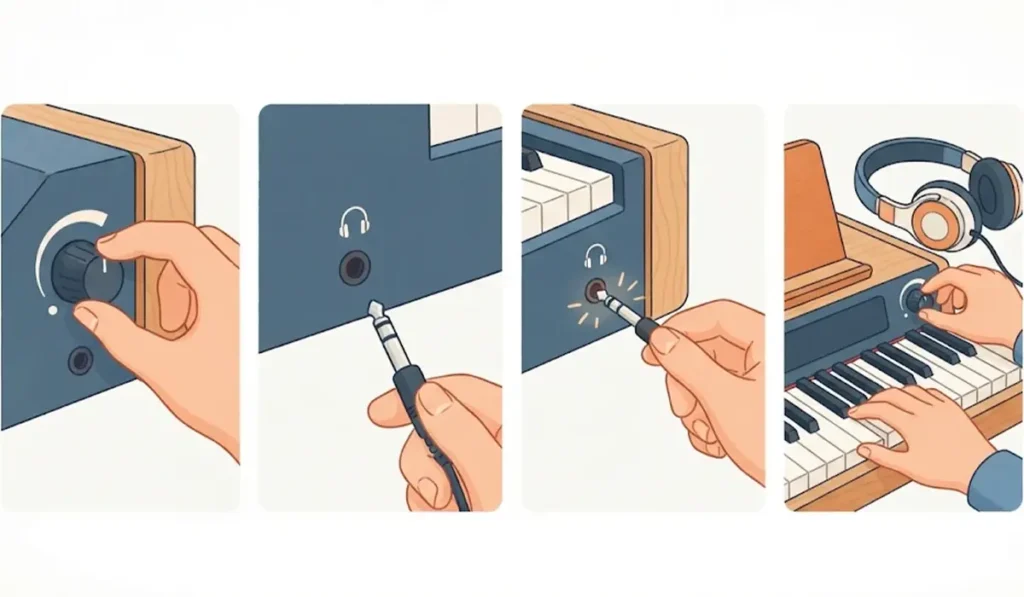
- Step 1: Lower the master volume on the piano to its minimum or a low setting.
- Step 2: Find the headphone jack. On many models it sits on the underside of the keyboard near the left edge, while others place it on the front panel or the back panel.
- Step 3: Check the size of the jack. It is usually marked with a small headphone symbol, and the size is often listed in the owner’s manual.
- Step 4: Push the headphone plug in gently until it sits fully inside the jack.
- Step 5: Play a few notes and raise the master volume slowly until the level feels comfortable.
Pro-Tip: Headphones place the sound directly at the ears, so the same volume that feels normal through speakers can feel much louder. Starting low and raising the level a little at a time protects both hearing and headphone drivers.
Method 2: Use an Adapter When the Plug Does Not Match
Many consumer headphones come with a 3.5 mm plug, while a lot of digital pianos use a 6.35 mm jack. Think of it like a travel plug adapter: the connection is the same, only the shape changes.
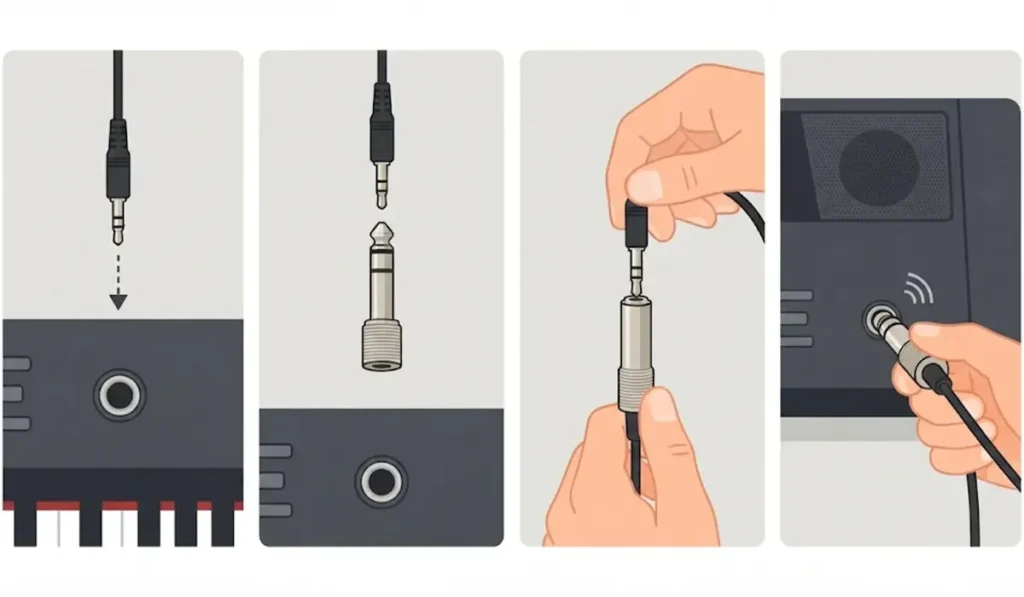
- Step 1: Identify the jack size on the piano and the plug size on the headphones.
- Step 2: Pick a stereo adapter that converts one size to the other, such as 3.5 mm to 6.35 mm.
- Step 3: Attach the adapter to the headphone plug first, so it sits firmly in place.
- Step 4: Insert the adapter and plug into the piano’s headphone jack until fully seated.
- Step 5: Play a few notes and confirm that sound comes through both ears.
Pro-Tip: Choose a stereo adapter, which shows two dark rings on the metal plug, rather than a mono one with a single ring. A mono adapter often sends sound to only one ear or removes parts of the stereo image.
Method 3: Connect Wireless Headphones With a Bluetooth Transmitter
Most digital pianos do not send audio to Bluetooth headphones on their own. A small Bluetooth transmitter that plugs into the headphone jack fills that gap.
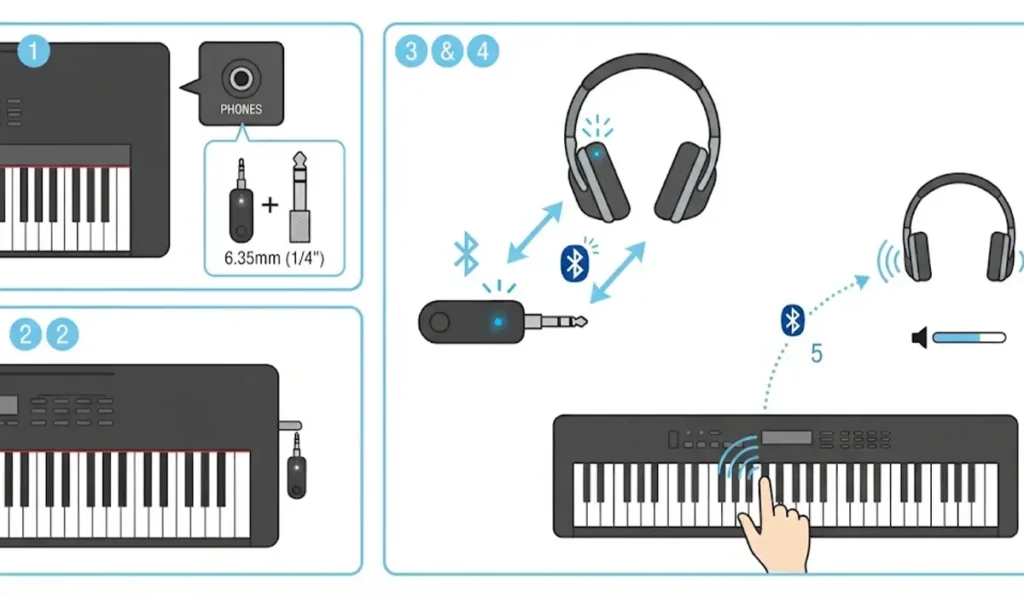
- Step 1: Choose a Bluetooth transmitter with a 3.5 mm output, or add a 6.35 mm adapter if the piano uses the larger jack.
- Step 2: Plug the transmitter into the headphone jack and turn it on.
- Step 3: Put the transmitter into pairing mode by following the instructions that came with it.
- Step 4: Put the headphones into pairing mode as well, and wait until the two devices connect.
- Step 5: Play a few notes and raise the volume slowly. If the earbuds sound thin or play in only one ear, the guide to re-pairing Bluetooth earbuds for stereo sound explains how to restore proper stereo output.
Tips for Comfortable Practice With Headphones
- Keep the volume at a moderate level and take short breaks during long sessions.
- Closed-back headphones keep the sound inside the ears, which suits shared spaces, while open-back models feel more natural but let sound leak out.
- Wired headphones give the most accurate timing, since sound reaches the ears at the same moment the key is pressed.
- Many pianos with two headphone jacks allow a teacher and student to listen together.
- Players who also link the keyboard to a Windows 11 computer for recording can review the audio output settings to make sure sound goes where expected.
Common Problems and Quick Fixes
Fix 1: No Sound in the Headphones
Raise the master volume and push the plug in fully. A plug that is only halfway in is one of the most common reasons for silence.
Fix 2: Sound in Only One Ear
Check that the adapter is a stereo type and that the plug is seated all the way. A mono adapter or a loose plug usually causes this.
Fix 3: Speakers Still Playing
On most digital pianos the built-in speakers switch off when headphones are connected. Some models include a speaker setting in the menu, so check the owner’s manual if the speakers stay on.
Fix 4: Delay With Wireless Headphones
Bluetooth adds a small delay between pressing a key and hearing the note. A low-latency transmitter helps, though wired headphones remain the best choice for precise timing.
Fix 5: Headphones Not Detected on a Computer
When the keyboard is connected to a Windows computer and the headphones are not recognized there, the guide to troubleshooting headphone detection walks through the fix.
Frequently Asked Questions
Can any headphones be used with a digital piano?
Yes. Any stereo headphones work as long as the plug fits the jack or a suitable adapter is used.
What size is the headphone jack on a digital piano?
Most models use either a 6.35 mm (quarter-inch) or a 3.5 mm stereo jack. The owner’s manual or the label near the jack confirms which one applies.
Where is the headphone jack on a digital piano or keyboard?
The location varies by model. Common spots include the underside of the keyboard near the left edge, the front panel, and the back panel.
Do the built-in speakers turn off when headphones are plugged in?
On most digital pianos, yes. The speakers mute automatically once a plug enters the headphone jack, although a few models let the speaker behavior be changed in the settings.
Can Bluetooth earbuds be used with a digital piano?
Yes, but usually through a Bluetooth transmitter plugged into the headphone jack, since most pianos do not send audio to Bluetooth headphones directly.
Do wireless headphones cause a delay when playing?
They can. Bluetooth adds a small amount of latency, which is why wired headphones are preferred when timing matters most.
Can two people use headphones on one digital piano at the same time?
Many models have two headphone jacks for exactly this purpose. When only one jack is available, a stereo headphone splitter allows two pairs to share it.
Do headphones change how the piano sounds?
The notes stay the same, but the sound feels closer and more detailed because it reaches the ears directly. Some models also apply special processing for headphones to make the sound feel more natural.
Is it safe to practice with headphones for long periods?
It is fine when the volume stays moderate and short breaks are taken. Loud levels over long sessions can strain hearing, so starting low is always the safer approach.