
A headphone sensor that pauses music randomly is one of the most frustrating problems earbud and headphone users run into, especially when it happens mid-song, mid-call, or in the middle of a workout. Most of the time, this issue comes down to a dirty sensor, a loose fit, or an in-ear detection setting that misreads whether the earbuds are actually being worn. The steps below walk through the exact fixes that resolve this problem for most wireless earbuds and headphones on the market today.
Key Takeaways
- Dirty or blocked sensors are the leading cause of random music pauses.
- In-ear detection settings often misread fit, especially with smaller or looser tips.
- Cleaning the sensor and updating firmware solve the majority of cases within minutes.
- Bluetooth connection issues on the connected device can also trigger unwanted pauses.
- A full factory reset should only be used after the simpler fixes have been tried.
Step-by-Step Guide to Fix a Headphone Sensor Pausing Music Randomly
Fix 1: Clean the In-Ear Sensor
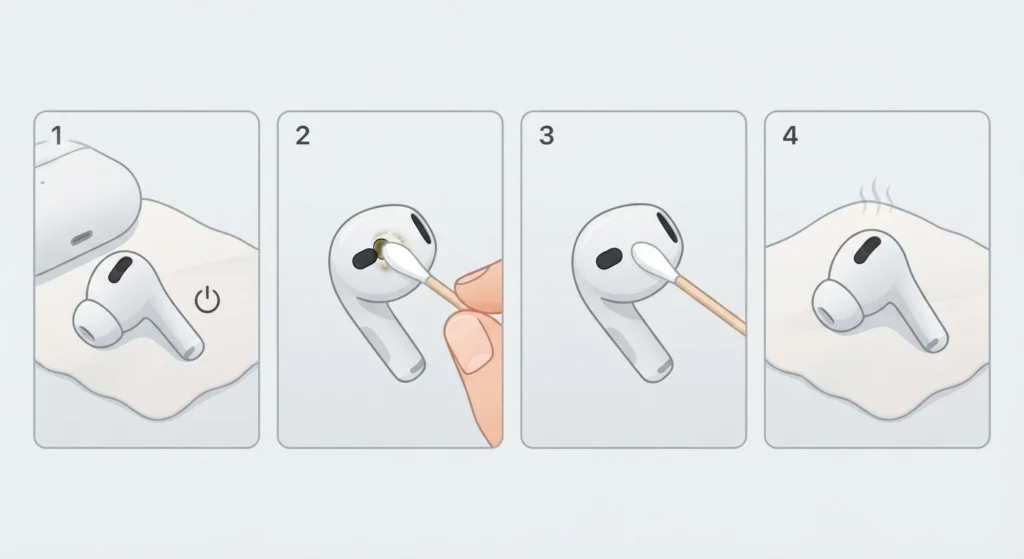
The proximity sensor sits on the inner side of each earbud, right where it touches the ear canal or the outer ear. Ear wax, sweat, and skin oil build up on this sensor over time, and that residue is often enough to confuse the sensor into thinking the earbud has been removed, even while it is still in place.
- Step 1: Power off the earbuds or headphones completely before cleaning them.
- Step 2: Use a dry, soft-bristled brush or a clean cotton swab to gently wipe the sensor area on each earbud.
- Step 3: Skip alcohol-based wipes directly on the sensor, since leftover moisture is a common trigger for random pausing.
- Step 4: Let the earbuds air dry fully for a few minutes before putting them back on.
Pro-Tip: Ear wax and sweat build up faster during workouts or humid weather, so wiping the sensors after every intense session prevents this issue before it starts, even if playback seems fine right now.
Fix 2: Check and Adjust the In-Ear Detection Setting
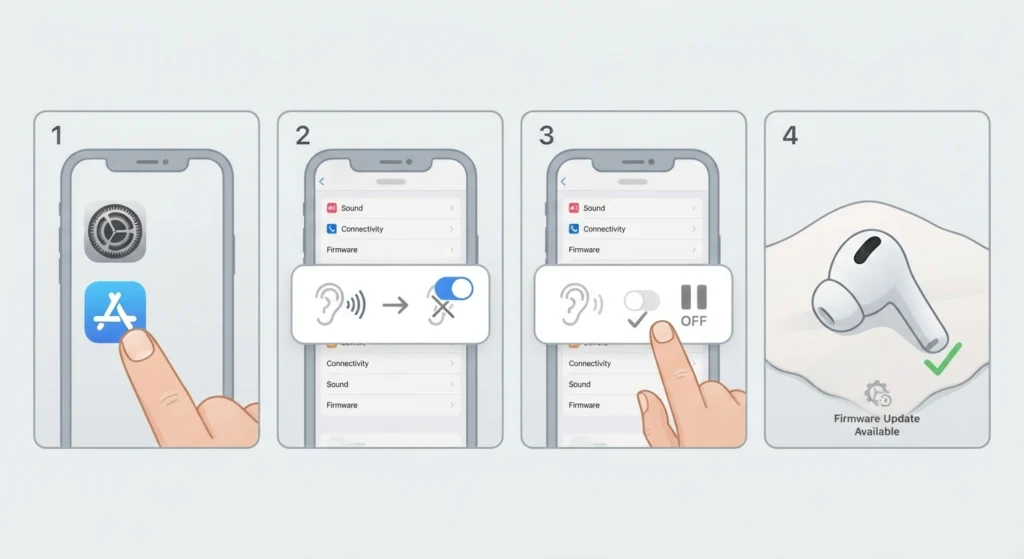
Most modern earbuds rely on in-ear detection to automatically pause music when they sense the earbud has left the ear. This feature is convenient, but it is also the most common source of false pauses when the sensor is oversensitive or the fit is slightly off.
- Step 1: Open the manufacturer’s companion app, such as the settings app that came with the earbuds or headphones.
- Step 2: Look for a setting labeled in-ear detection, wear detection, or automatic play and pause.
- Step 3: Turn the feature off temporarily to see if the random pausing stops.
- Step 4: If the pausing stops, the sensor itself is the source of the problem, and cleaning or a firmware update should be the next move.
Fix 3: Update Firmware and Audio Drivers
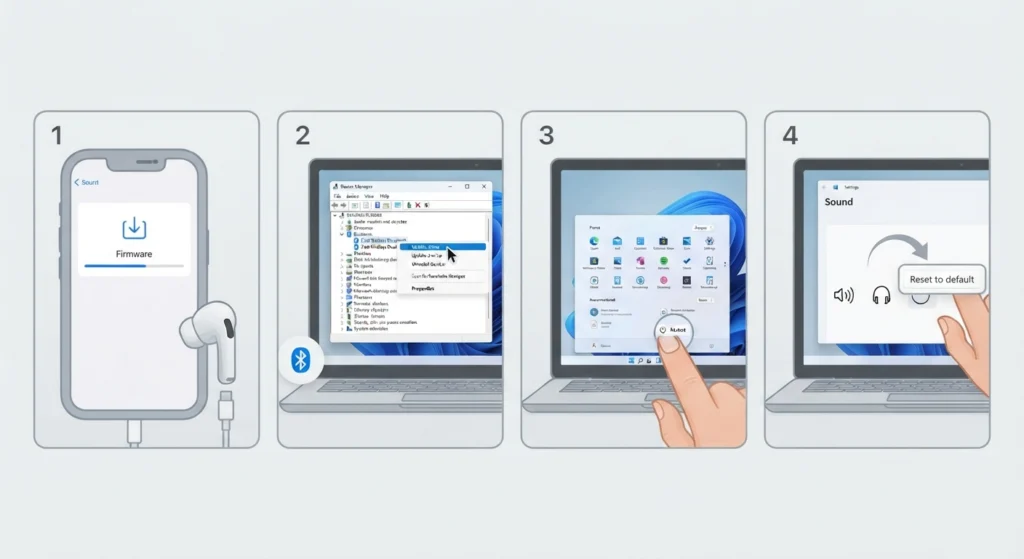
Outdated firmware on the earbuds, or outdated Bluetooth and audio drivers on the connected laptop or phone, can cause the sensor to send inconsistent signals to the device. Manufacturers release updates fairly often specifically to correct sensor calibration bugs.
- Step 1: Open the companion app and check for a firmware update option, then install any update that is available.
- Step 2: On a Windows computer, open Device Manager and update the Bluetooth driver if an update is listed.
- Step 3: Restart the computer after any driver update to make sure the change takes full effect.
- Step 4: If audio still behaves oddly after updating, resetting the audio settings back to default on Windows 11 often clears out any leftover configuration conflicts.
Fix 4: Re-Pair the Bluetooth Connection
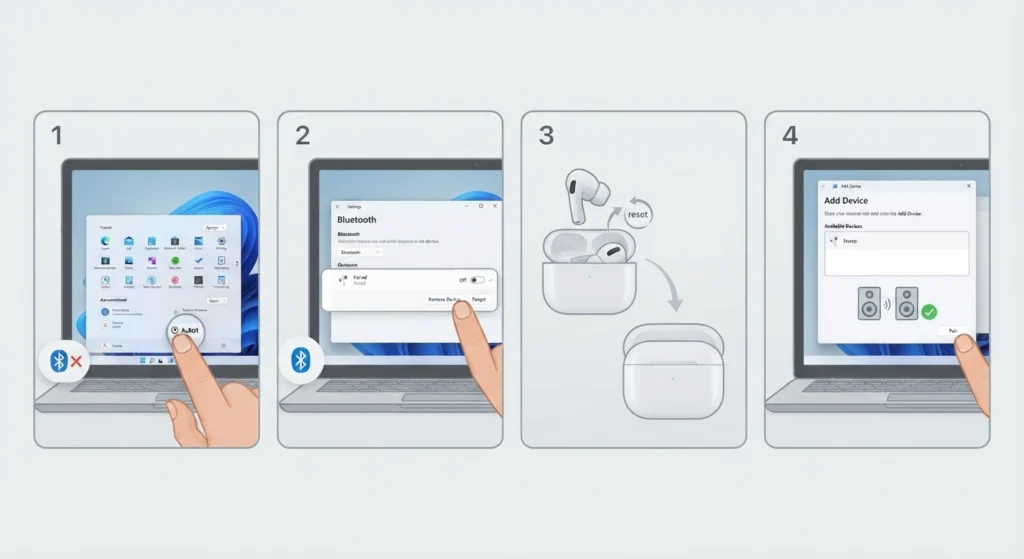
A weak or corrupted Bluetooth pairing profile can make it look like the sensor is misbehaving when the real issue is the connection itself. This is easy to rule out, and it only takes a couple of minutes.
- Step 1: Turn off Bluetooth on the connected device.
- Step 2: Forget or remove the earbuds from the list of paired devices.
- Step 3: Place the earbuds back in their case, then take them out again to reset the pairing mode.
- Step 4: Follow the process for re-pairing the Bluetooth earbuds for proper stereo sound on Windows, then test playback again.
Fix 5: Adjust the Fit of the Earbuds
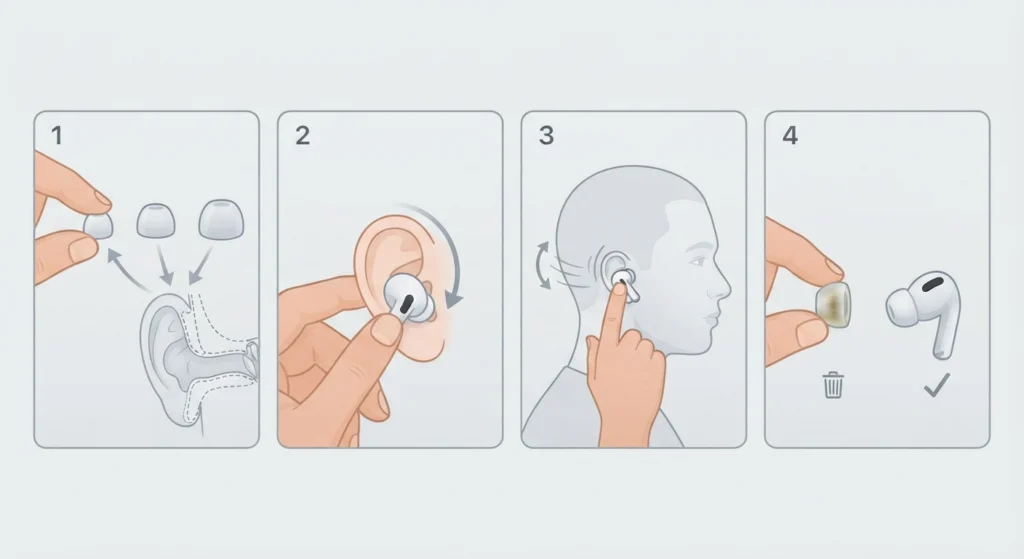
This works best when the ear tips actually match the size of the ear canal. A loose seal shifts the earbud slightly during movement, and that small shift is often enough to trigger a false pause reading from the sensor.
- Step 1: Try each of the included ear tip sizes to find the one that creates a snug seal without discomfort.
- Step 2: Gently twist the earbud into place rather than pushing it straight in.
- Step 3: Perform a light shake test by moving the head side to side to confirm the earbud stays seated.
- Step 4: Replace worn-out or hardened ear tips, since silicone loses its grip over time.
Fix 6: Review Audio Output Settings on the Connected Device
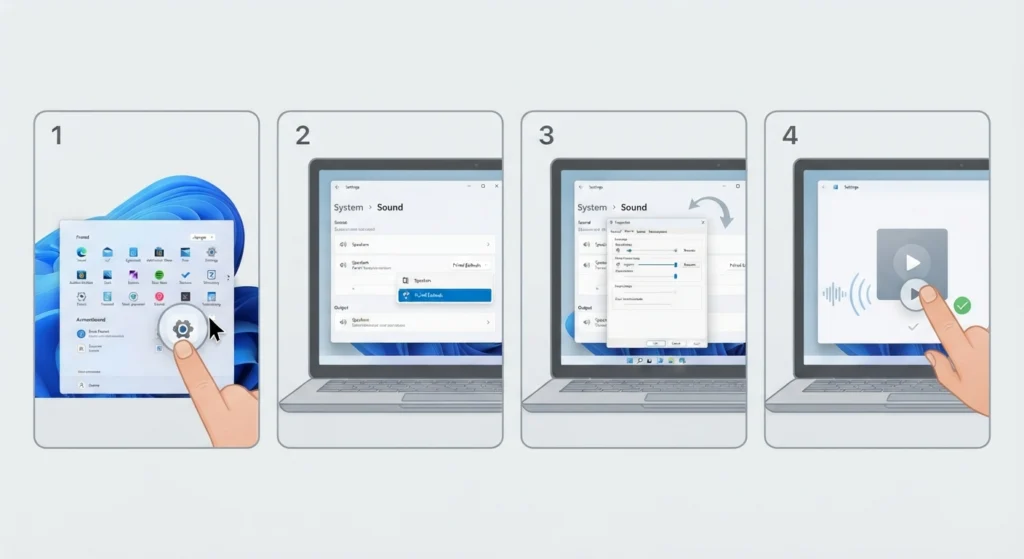
Sometimes the pausing has less to do with the earbud sensor and more to do with how the connected device is managing the audio output. This is common on Windows 11 after a system update.
- Step 1: Open the Sound settings on the connected device.
- Step 2: Confirm the earbuds are selected as the default output device.
- Step 3: Review and, if needed, adjust the audio output settings on Windows 11 to rule out a system-level conflict.
- Step 4: Test playback with a different media app to confirm the fix applies across all apps, not just one.
Pro-Tip: When the pausing only happens in one specific app, the sensor is not the problem. That points to an app-level media control conflict rather than a hardware issue.
Tips to Prevent the Sensor From Pausing Music Again
- Clean the sensors on a regular schedule, not just when a problem shows up.
- Store earbuds in their case when not in use, since dust and lint collect quickly in a pocket or bag.
- Keep firmware updated as soon as new versions are released.
- Avoid wearing earbuds during activities that cause heavy sweating without wiping them down afterward.
- Replace ear tips every few months, since the material naturally wears down with daily use.
Common Problems and Troubleshooting
Only One Earbud Keeps Pausing
This usually points to a sensor issue isolated to that single earbud rather than a system-wide problem. Clean that earbud’s sensor first, and if the issue continues, check for a firmware mismatch between the left and right earbud in the companion app.
Pausing Happens Only During Phone or Video Calls
When the pausing is limited to calls, the microphone pickup is often the actual source rather than the playback sensor. Resolving microphone detection problems on Windows 11 usually clears this up, since the system may be switching input devices mid-call.
Music Pauses Only When Connected to a Laptop
This points toward a device-side setting rather than the earbuds themselves. Checking how the laptop is managing audio input devices on Windows 11 can reveal a conflict between multiple connected audio sources.
The Issue Started Right After a Software Update
Software updates occasionally reset Bluetooth or audio preferences to default. Re-checking the in-ear detection setting and the default output device after any major update prevents this from becoming a recurring issue.
Frequently Asked Questions
Why does the headphone sensor pause music randomly?
The most common cause is a dirty or moisture-covered sensor that misreads whether the earbud is in the ear. Loose fit, outdated firmware, and Bluetooth connection issues are the next most likely causes.
Is it safe to clean the earbud sensor with water?
Direct water contact is not recommended unless the earbuds are officially rated for water resistance. A dry brush or a lightly damp cotton swab, followed by full air drying, is the safer approach.
Should in-ear detection be turned off permanently?
Turning it off permanently removes the false pausing issue, but it also removes the convenience of automatic pause and play. Many people leave it off only until the sensor has been cleaned and tested.
How often should earbud sensors be cleaned?
A light cleaning every one to two weeks works well for regular use, with more frequent cleaning during workout seasons or humid weather.
Does a firmware update actually fix sensor problems?
Yes, in many cases. Manufacturers frequently release firmware updates specifically to recalibrate sensor sensitivity and correct known pausing bugs.
Why does only one earbud pause and not the other?
This typically means the issue is isolated to that earbud’s individual sensor, often due to a buildup of debris or a firmware mismatch between the two earbuds.
Can a Bluetooth connection issue cause the pausing instead of the sensor?
Yes. A weak or corrupted pairing profile can produce symptoms that look identical to a sensor malfunction, which is why re-pairing the connection is a standard troubleshooting step.
Does the fit of the ear tip really make a difference?
It makes a significant difference. A loose seal allows the earbud to shift slightly during movement, and that shift is frequently enough to trigger a false in-ear detection reading.
What should be tried first when music keeps pausing randomly?
Cleaning the sensor is the fastest and most effective first step, since it resolves the issue in the majority of reported cases without needing any settings changes.
When does a factory reset become necessary?
A factory reset is worth trying only after cleaning, firmware updates, and re-pairing have all failed to resolve the issue. It should be treated as a last resort rather than a first step.