
Learning how to connect Bluetooth headphones to a car stereo comes down to knowing what kind of stereo is in the vehicle. Some systems, especially rear-seat entertainment units, can pair with headphones directly. Others need a small Bluetooth transmitter to do the job. This guide walks through both routes in plain, simple steps.
Key Takeaways
- Most factory car stereos are built to receive audio from a phone, so direct headphone pairing only works on stereos that offer a headphone or Bluetooth audio output option.
- Method 1 pairs the headphones straight to the stereo through its Bluetooth menu.
- Method 2 uses a Bluetooth transmitter plugged into the stereo’s audio output.
- Headphones are best used by passengers, since many places restrict headphone use while driving.
Method 1: Pair the Headphones Directly With the Car Stereo
This works best when the stereo or rear-seat entertainment system has a headphone or Bluetooth audio output option in its settings. The owner’s manual usually confirms this in the Bluetooth section.
- Step 1: Park the car, switch the ignition to accessory or on mode, and turn on the stereo.
- Step 2: Put the headphones in pairing mode. On most models, this means holding the power button until the light flashes or a voice prompt says pairing.
- Step 3: On the stereo, open Settings, then Bluetooth (some menus call it Connections or Devices), and choose the option to add or search for a new device.
- Step 4: Wait for the stereo to scan, then select the headphone name from the list.
- Step 5: Confirm the pairing request on the screen. If a PIN is asked for, check the headphone manual, since 0000 is a common default.
- Step 6: Play audio on the stereo and adjust the volume until the sound comes through the headphones clearly.
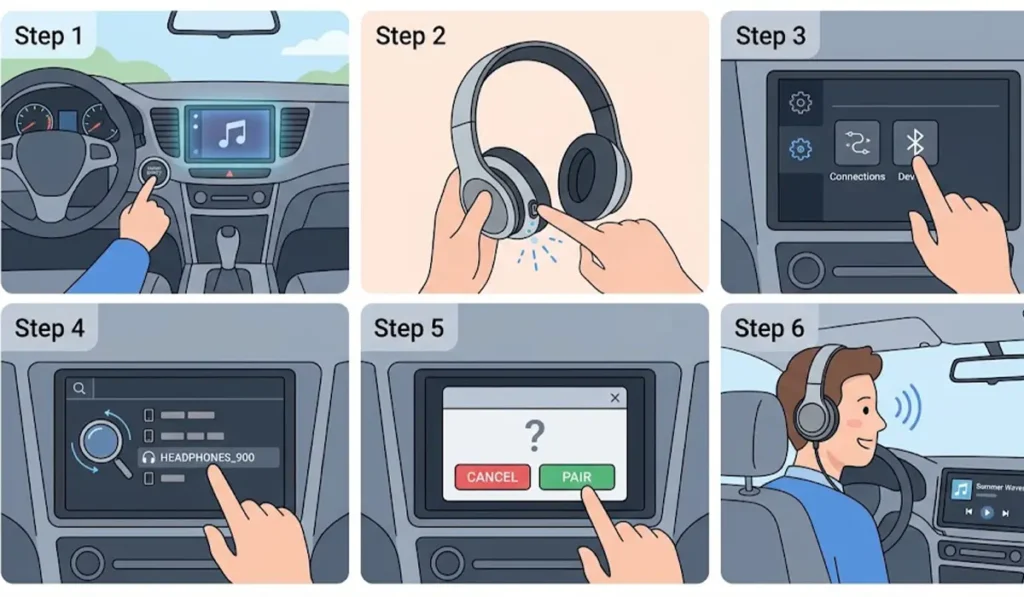
Pro-Tip: If the stereo only offers to pair a phone and shows no headphone option, it most likely works as a receiver only. Headphones are receivers too, and two receivers generally cannot stream audio to each other, so Method 2 is the better route in that case.
Method 2: Connect the Headphones Through a Bluetooth Transmitter
This method suits stereos that have a physical audio output, such as a 3.5 mm headphone jack or RCA outputs on an aftermarket or rear-seat system. The transmitter acts as a go-between, taking the wired signal and sending it to the headphones wirelessly.
- Step 1: Find the audio output on the stereo or rear-seat system. A 3.5 mm headphone jack or RCA output are the most common.
- Step 2: Plug the Bluetooth transmitter into that output, using a matching cable or adapter, and power it through USB or its built-in battery as the model requires.
- Step 3: Put the headphones in pairing mode.
- Step 4: Put the transmitter in pairing mode, which is usually done by holding its button until the indicator light flashes.
- Step 5: Wait for the transmitter indicator to change, which signals that the headphones are connected.
- Step 6: Play audio on the stereo source that feeds the output, then set the volume to a comfortable level.
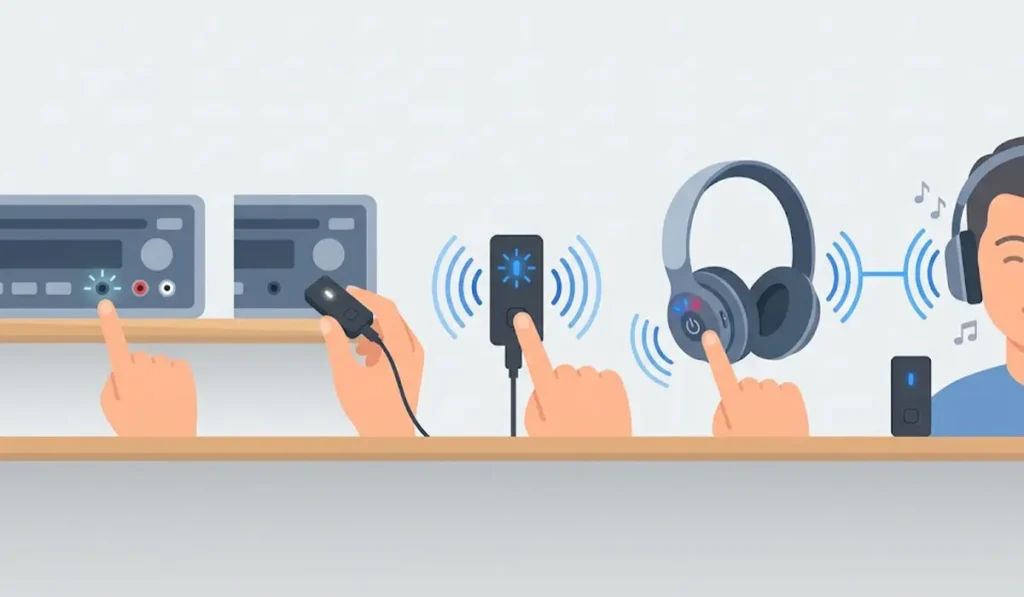
Pro-Tip: For the least audio delay, choose a transmitter and headphones that both support the same low-latency codec, such as aptX Low Latency. When the two do not match, the connection falls back to the standard SBC codec.
Helpful Tips for Using Headphones With a Car Stereo
- Headphones are meant for passengers. Wearing them over both ears while driving is restricted in many places, so check local rules before using them in the driver’s seat.
- Charge the headphones fully before a long trip, since the connection drains the battery steadily.
- Keep the headphones within roughly 10 meters of the stereo or transmitter, and expect a shorter range inside a car full of people and bags.
- Delete old pairings from the headphones if the list is crowded. Cleaning it out helps the headphones connect to the right device.
- Keep the owner’s manual of the car and the headphones nearby, since button combinations and menu names differ between brands.
Common Problems and Quick Fixes
Fix 1: Headphones Do Not Appear in the Stereo List
Make sure the headphones are in pairing mode and not already connected to a phone or computer. Headphones recently used with a PC may reconnect to it automatically. Turning off Bluetooth on the PC first prevents that, and this guide on how to re-pair Bluetooth earbuds on Windows covers the computer side.
Fix 2: Connected but No Sound
Check that the stereo is playing from the source that feeds the headphone output, and raise the volume on both the stereo and the headphones. If the headphones were last used with a Windows PC and still seem undetected there, this walkthrough on troubleshooting headphone detection can help clear that up before trying the car again.
Fix 3: Audio Delay or Lag
A small delay is normal with standard Bluetooth. Moving the headphones closer to the stereo or transmitter helps, and a transmitter with low-latency codec support reduces it further.
Fix 4: Connection Keeps Dropping
Remove obstacles between the headphones and the stereo, charge the headphones, and pair them again from scratch.
Frequently Asked Questions
Can any car stereo connect to Bluetooth headphones?
No. Many car stereos only pair with phones for calls and music. Stereos and rear-seat systems with a headphone or Bluetooth audio output option can pair with headphones directly.
Why does the car stereo not find my headphones?
Most stereos are built to receive audio, just like headphones. Two receivers cannot stream to each other, so the stereo may not list headphones at all.
Do I need a Bluetooth transmitter?
A transmitter is needed when the stereo has a wired audio output but no way to pair with headphones. It plugs into that output and sends the sound to the headphones wirelessly.
Can AirPods or other earbuds connect to a car stereo?
Earbuds follow the same rules as headphones. They pair directly only if the stereo supports headphone output, and they work through a transmitter otherwise.
Is it safe to wear headphones while driving?
Headphones that cover both ears reduce awareness of sirens, horns, and traffic. Many places restrict their use while driving, so they are best kept for passengers.
How do I put headphones in pairing mode?
On most models, holding the power button for several seconds until the light flashes or a voice prompt plays does it. The manual lists the exact steps for each model.
Can two pairs of headphones connect at once?
Some transmitters support two headphones at the same time, while others connect to one. The product specifications state which applies.
How far can headphones be from the stereo?
Bluetooth range is typically around 10 meters in open space. Inside a car, range is usually shorter because of seats, bags, and passengers.
How do I reconnect headphones after the first pairing?
Turn the headphones on near the stereo or transmitter. Many reconnect automatically, and if not, select the headphones from the list of paired devices.