
Learning how to use adaptive ANC on Soundcore Liberty 4 NC earbuds takes only a minute, and the setup happens inside the Soundcore app. ANC stands for active noise cancellation, the feature that quiets engines, chatter, and background hum.
Adaptive ANC works like a thermostat for sound. Instead of holding one fixed level, it adjusts noise cancellation to fit the ears and the surroundings. The key is knowing where to pick it and how to switch modes quickly once it is set.
Key Takeaways
- Adaptive ANC optimizes noise cancellation based on the wearer’s ears and environment.
- The mode is chosen in the Soundcore app, which is available for iOS and Android.
- Pressing and holding the touch pad on either earbud for 2 seconds switches ambient sound modes by default.
- A manual noise cancellation option with five levels is also available.
Step-by-Step Guide to Turn On Adaptive ANC
Method 1: Use the Soundcore App
This is the main way to select Adaptive ANC, since the app is where noise cancellation, normal, and transparency modes are chosen.
- Step 1: Place the Liberty 4 NC earbuds in the ears and connect them to the phone through Bluetooth.
- Step 2: Open the Soundcore app and select the Liberty 4 NC from the device screen.
- Step 3: Open the ambient sound controls.
- Step 4: Select the noise cancellation mode.
- Step 5: Choose Adaptive instead of the manual levels.
- Step 6: Walk from a quiet room into a noisier space to hear the cancellation adjust on its own.
Pro-Tip: Adaptive ANC works best when surroundings keep changing, such as a commute that moves from street noise to a quiet waiting area. For a steady environment, the manual option with five intensity levels keeps cancellation at one chosen strength.

Method 2: Use the Touch Controls on the Earbuds
Once the noise cancellation mode is set in the app, the touch pads make daily switching quick, with no phone needed.
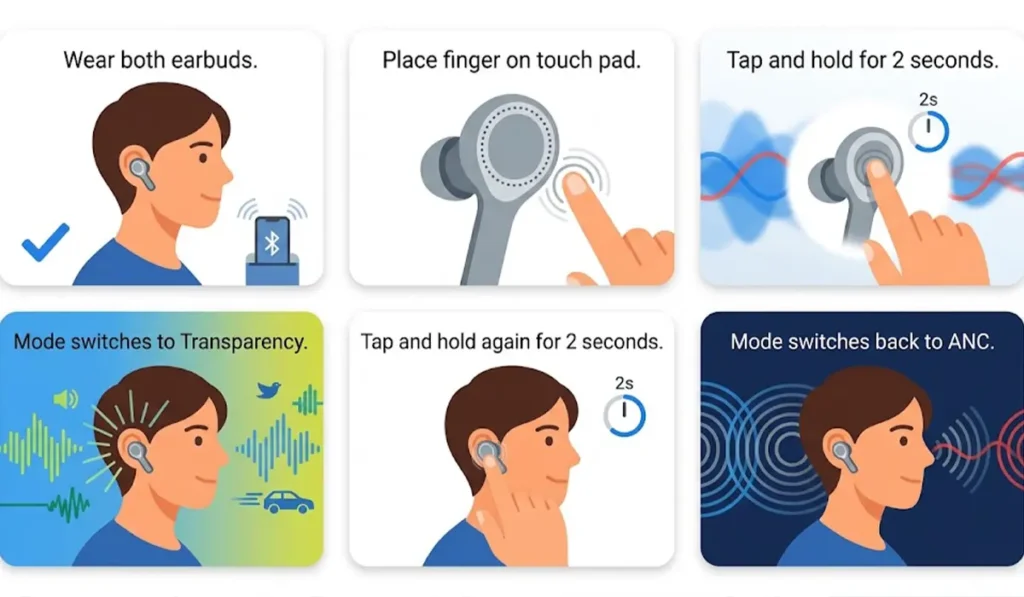
- Step 1: Wear both earbuds with the Bluetooth connection active.
- Step 2: Tap and hold the touch pad on either earbud for 2 seconds to switch the ambient sound mode between ANC and transparency.
- Step 3: Tap and hold for 2 seconds again to switch back.
Tips for Better Results
- Keep the earbuds seated snugly in the ears. Adaptive ANC adjusts to the ears, so a stable fit gives it the best starting point.
- Customize the touch controls in the Soundcore app if a different gesture feels more natural for switching modes.
- Check the app for firmware updates from time to time, since firmware updates are handled there.
- When the earbuds are used with a Windows 11 computer, confirm the headphones are selected in the audio output settings so sound plays through them.
Pro-Tip: The app only needs to be opened once to select Adaptive ANC. After that, the 2-second press on the touch pad covers most daily switching. Most people find that this removes any need to reach for the phone during a commute.
Common Problems and Quick Fixes
Fix 1: The Earbuds Do Not Connect to the App
Reinstall the Soundcore app or update it to the latest version from the mobile app store, then try connecting the earbuds again.
Fix 2: Tap and Hold Does Not Switch the Mode
The touch controls can be customized in the Soundcore app. Open the controls settings and confirm that the tap and hold gesture is still assigned to ambient sound modes.
Fix 3: Settings Behave Unexpectedly
Check the app for a firmware update, install it if one is offered, then reconnect the earbuds and select Adaptive again.
Fix 4: The Earbuds Are Not Detected on a Windows PC
When the earbuds are connected to a computer instead of a phone, a quick headphone detection check usually shows what is blocking the connection. If the sound only plays from one side, re-pairing the Bluetooth earbuds for stereo sound is the next step.
Frequently Asked Questions
What is adaptive ANC on the Soundcore Liberty 4 NC?
It is a noise cancellation setting that optimizes cancellation based on the wearer’s ears and environment, instead of holding one fixed level.
Is the Soundcore app required to turn on adaptive ANC?
Yes, the app is where Adaptive ANC is selected, along with the choice between noise cancellation, normal, and transparency modes.
How can ANC and transparency mode be switched from the earbuds?
Tap and hold the touch pad on either earbud for 2 seconds. This is the default gesture for switching ambient sound modes.
Can the touch controls be changed?
Yes. The controls can be customized in the Soundcore app.
Does the Liberty 4 NC have a manual noise cancellation option?
Yes. A manual mode with five intensity levels is available alongside Adaptive ANC.
What does transparency mode do?
Transparency mode lets outside sound in, which helps with staying aware of the surroundings while music keeps playing.
Which devices support the Soundcore app?
The Soundcore app is available for iOS and Android.
Can firmware be updated from the Soundcore app?
Yes. Firmware updates for the Liberty 4 NC are handled through the Soundcore app.