
Learning how to use advanced noise cancellation on Jabra Elite 10 earbuds takes only a minute, and the payoff is immediate: a quieter commute, a calmer office, and music that stays clear. This guide covers the two ways to control it, plus the fit and settings that make it work best.
Key Takeaways
- Press the left earbud button when not on a call to switch between HearThrough and ANC.
- The Jabra Sound+ app lets ANC be turned off and adds an Off option to the button cycle.
- Jabra Advanced ANC adapts automatically to ear shape, earbud placement, and loud, quiet, or windy surroundings.
- A good EarGel seal gives the strongest noise cancellation.
- ANC on means up to 6 hours of playback per charge, or up to 27 hours with the charging case.
Method 1: Use Advanced ANC With the Earbud Button
This is the fastest route. No phone is needed once the earbuds are connected.
- Step 1: Put both earbuds in with the microphones pointing toward the mouth.
- Step 2: Make sure the earbuds are connected to the phone or computer and no call is active.
- Step 3: Press the left earbud button once to switch between HearThrough and ANC.
- Step 4: Press the left button again whenever a switch back is needed.
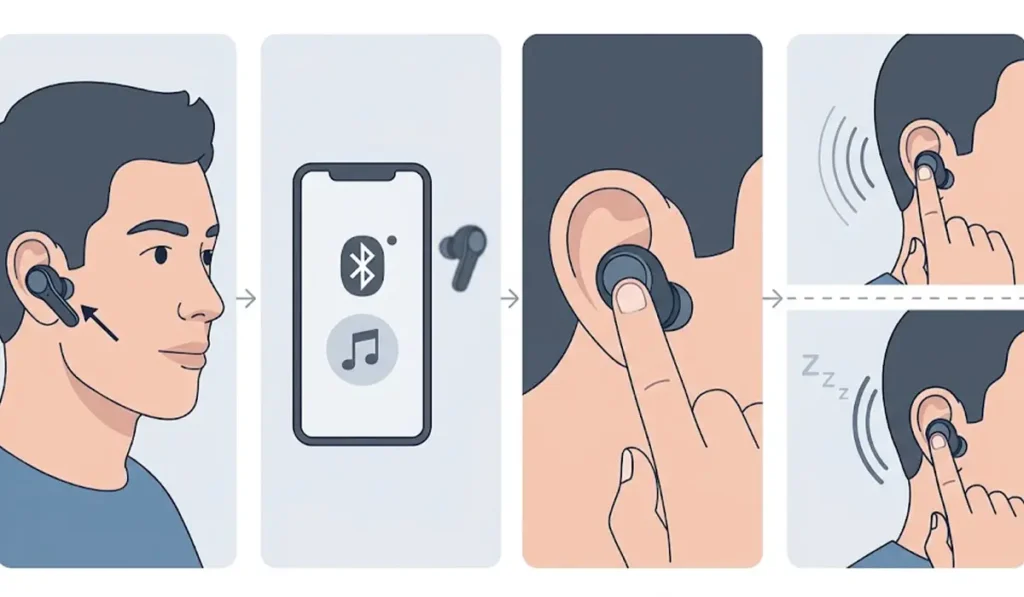
Jabra Advanced ANC does the rest on its own. It adjusts to the shape of the ear, the position of the earbuds, and whether the surroundings are quiet, loud, or windy, so there is nothing to tune by hand.
Method 2: Control ANC in the Jabra Sound+ App
The app gives a little more control, including a true Off mode.
- Step 1: Download Jabra Sound+ from the App Store or Google Play.
- Step 2: Open the app with the Jabra Elite 10 connected.
- Step 3: Open the sound mode controls and choose Active Noise Cancellation.
- Step 4: To add Off to the button cycle, go to Headset settings, then General, and select the HearThrough, ANC and Off option.
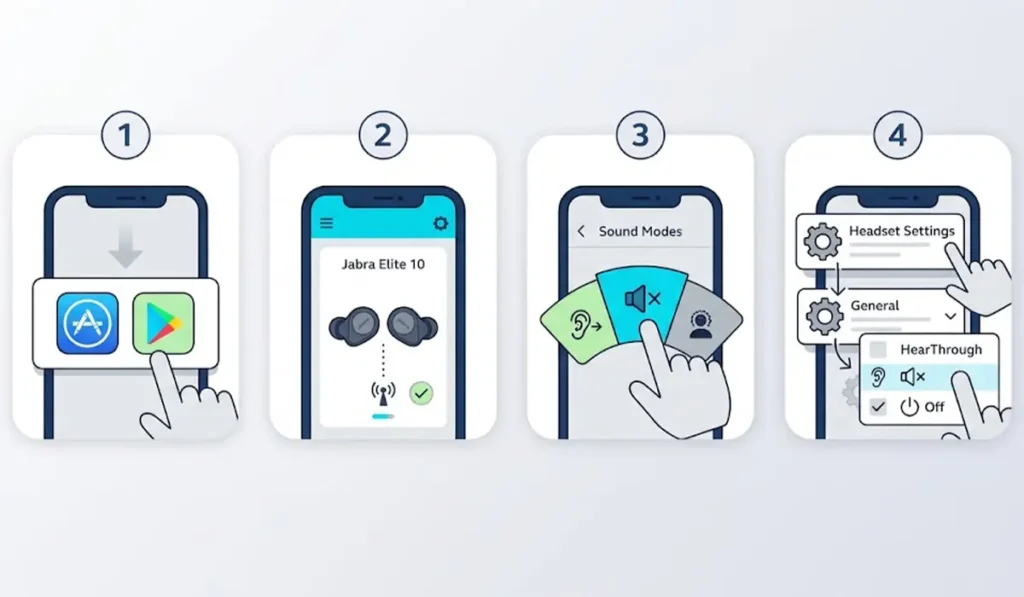
After that, each press of the left button moves through all three modes.
Method 3: Get the Right EarGel Fit for Stronger ANC
Noise cancellation works best when the earbud seals the ear canal. Think of it like closing a window before turning on the air conditioner. If air leaks in, the system works harder and the result is weaker.
- Step 1: Start with the medium EarGels, which come pre-mounted on the earbuds.
- Step 2: Play music with ANC switched on.
- Step 3: Try the other EarGel sizes included in the box and compare how much outside noise gets through.
- Step 4: Keep the size that feels comfortable and seals the ear canal best.
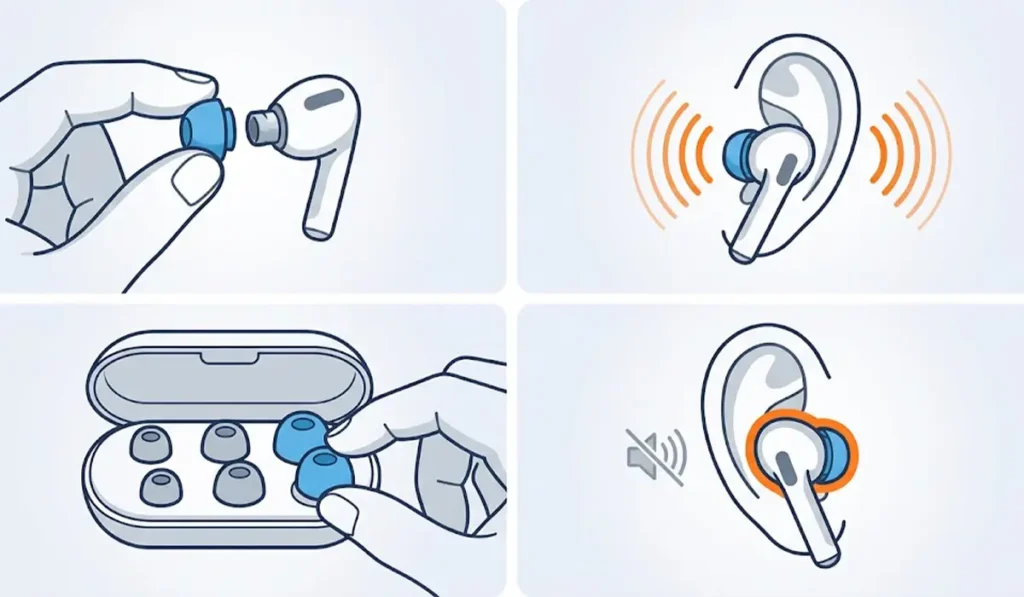
Pro-Tip: Test EarGel sizes with ANC already on. The difference between a loose and a sealed fit is easy to hear, and it often matters more than any other setting.
Tips for Better Noise Cancellation
- Update the earbud firmware through the Jabra Sound+ app. A notification appears when an update is available and notifications are enabled.
- Use ANC on a single earbud when needed. Place the unused earbud in the charging case, and the worn earbud switches to HearThrough, then press the left button to switch to ANC.
- Switch ANC off when battery life matters more. Without ANC and HearThrough, playback reaches up to 8 hours, or up to 36 hours with the charging case.
- When using a laptop, set the earbuds as the output device through the audio output settings in Windows 11 so sound plays through them.
- If sound feels uneven after connecting to a PC, re-pairing the earbuds for stereo sound usually clears it up.
Common Problems and Fixes
Fix 1: ANC Sounds Weak or Noise Leaks In
Check the EarGel size and reseat the earbuds so the microphones point toward the mouth. Try another EarGel size until the earbud seals the ear canal comfortably.
Fix 2: The Left Button Does Not Switch Modes
Mode switching works only when no call is active. Also check MyControls in the Jabra Sound+ app, since most button functions can be reassigned there.
Fix 3: Off Is Missing From the Button Cycle
Open Headset settings, then General, in the Jabra Sound+ app and select the HearThrough, ANC and Off option.
Fix 4: Earbuds Stop Responding Properly
Update the firmware in the Jabra Sound+ app first. If the problem remains, reset the earbuds: place both in the charging case, press and hold both buttons for 10 seconds until the LED inside the case flashes pink, then close the lid for 5 seconds. Delete the old pairing from the Bluetooth menu on the connected device before pairing again.
Fix 5: Windows Does Not Detect the Earbuds
Follow this guide on troubleshooting headphone detection in Windows to get the earbuds showing again.
Frequently Asked Questions
What is Jabra Advanced ANC on the Elite 10?
Jabra Advanced ANC automatically reduces surrounding noise and adapts to the shape of the ear, the placement of the earbuds, and quiet, loud, or windy environments. Jabra states it offers up to 2x more noise cancellation than the Jabra Elite 4.
How can noise cancellation be turned on?
Press the left earbud button when not on a call to switch between HearThrough and ANC. The Jabra Sound+ app can also be used to choose ANC.
Is the Jabra Sound+ app required to use ANC?
No. The left button switches between HearThrough and ANC without the app. The app is useful for turning ANC off, adding Off to the button cycle, and updating firmware.
How can Off be added to the sound mode options?
Open the Jabra Sound+ app, go to Headset settings, then General, and select the HearThrough, ANC and Off option.
Can ANC be used with only one earbud?
Yes. Place the unused earbud in the charging case, and the worn earbud switches to HearThrough by default. Press the left button to switch to ANC when using the left earbud alone.
Can the left button change sound modes during a call?
No. Switching between HearThrough and ANC with the left button works when not on a call.
Does ANC reduce battery life?
Yes. With ANC on, the earbuds last up to 6 hours per charge and up to 27 hours with the charging case. Without ANC and HearThrough, that rises to up to 8 hours and up to 36 hours with the case.
Which EarGel size gives the best noise cancellation?
The best size is the one that feels comfortable and seals the ear canal. The medium size comes pre-mounted, and trying every size with ANC on is recommended.
How can the Jabra Elite 10 firmware be updated?
Use the Jabra Sound+ app. If notifications are enabled, an alert appears when a firmware update is available.
Can the left and right button functions be changed?
Yes. MyControls in the Jabra Sound+ app lets most functions be reassigned to each earbud button.