
A firmware update that failed halfway can turn a pair of earbuds or headphones into a device that seems frozen, unresponsive, or stuck in pairing mode. This guide walks through the exact steps needed to recover the device safely, without guesswork or unnecessary extra reading.
Key Takeaways:
- A failed firmware update is usually recoverable and rarely means the device is permanently broken.
- Power interruption during the update is the most common cause of the problem.
- Resetting the earbuds or headphones before retrying solves most stuck updates.
- Using the official companion app instead of third-party tools gives the safest result.
- Patience during the retry process matters more than speed.
Step-by-Step Guide to Fix a Firmware Update That Failed Halfway
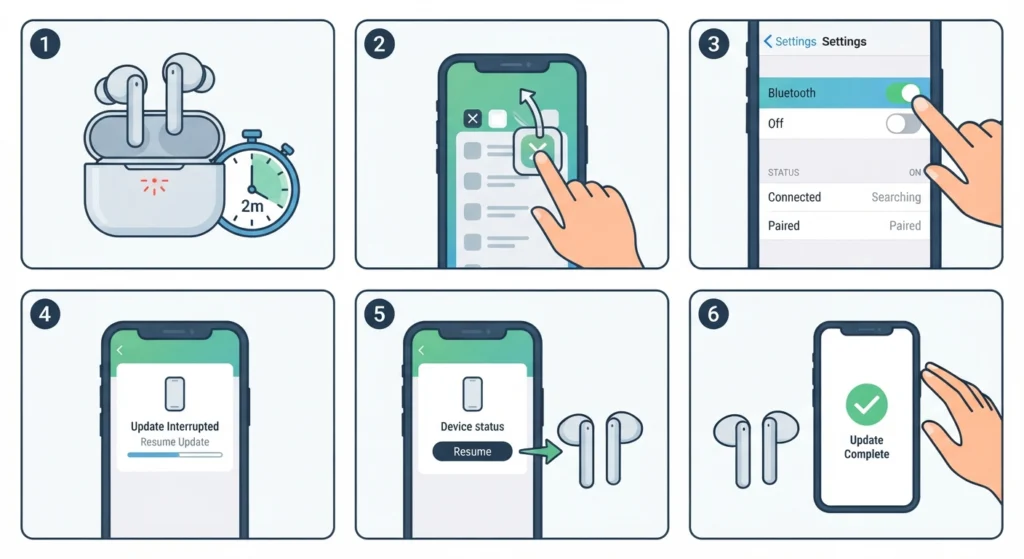
Follow these steps in order. Skipping ahead often causes the same failure to repeat.
- Step 1: Place the earbuds back in the charging case or connect the headphones to a power source, and let them sit for at least two full minutes before doing anything else.
- Step 2: Close the companion app completely, including background processes, then reopen it fresh.
- Step 3: Turn Bluetooth off and back on from the connected phone or computer, then let the device reconnect naturally.
- Step 4: Open the app again and check the device status screen. Most apps display a message such as ‘update incomplete’ or ‘resume update’ at this stage.
- Step 5: Tap resume or restart the update, and keep the earbuds or headphones within a short distance of the source device.
- Step 6: Avoid using the device, switching apps, or locking the screen until the app confirms the update finished successfully.
Pro Tip: Firmware updates rely on a stable connection more than a fast one. Standing still near the router or phone during the process prevents the exact interruption that caused the failure the first time.
Fix 1: Force a Full Reset Before Retrying
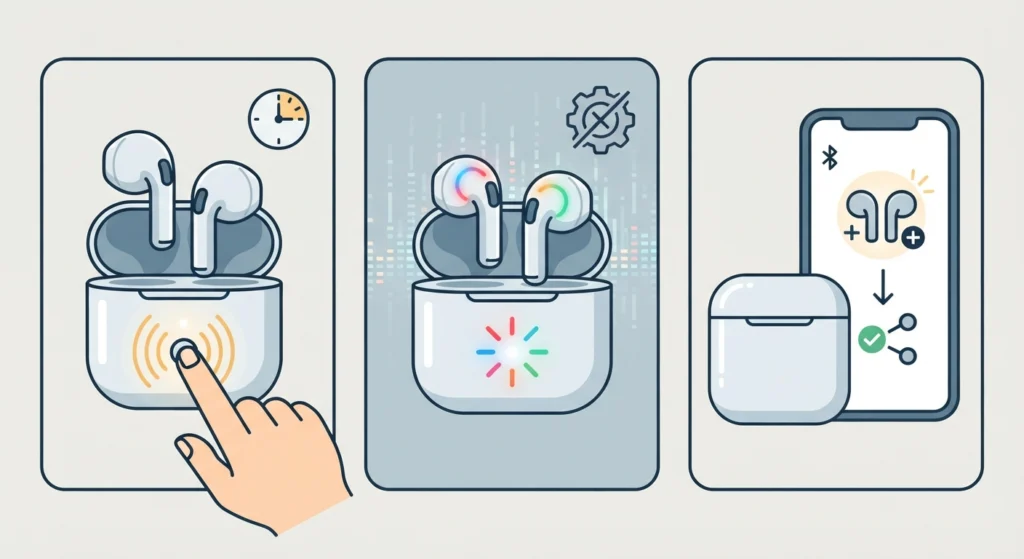
Most earbuds and headphones have a hidden reset combination, usually a button held for eight to ten seconds while the device sits in the case or is powered on. This clears the temporary memory that got stuck mid-update without deleting the firmware itself. Once reset, the device usually shows up in the app as a new pairing, and the update can be triggered again cleanly. If the earbuds also lost their Bluetooth pairing after the reset, re-pairing the earbuds for proper stereo sound resolves that separately before attempting the update again.
Fix 2: Update Through a Different Source Device
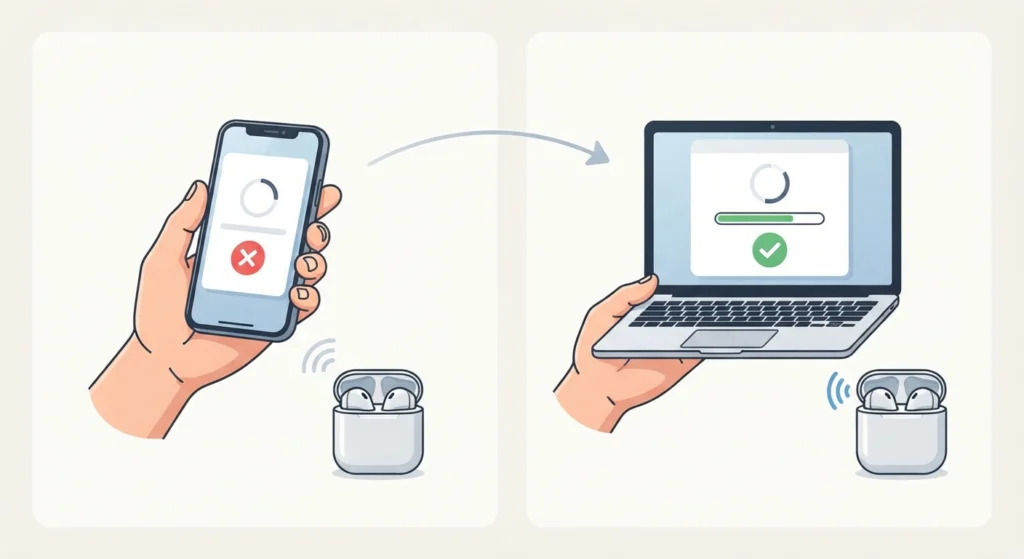
Sometimes the problem sits with the phone or computer rather than the earbuds. Switching to a different device, such as updating through a laptop instead of a phone, often finishes an update that kept failing before. This works best when the original device had a weak Bluetooth driver or an outdated companion app version installed.
Fix 3: Use a Wired Connection Instead of Bluetooth
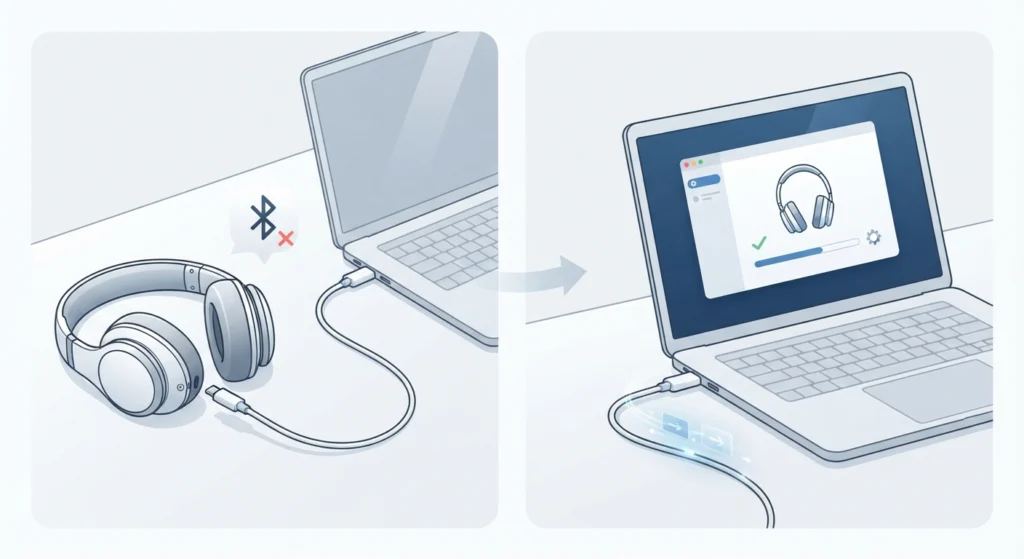
Many brands allow firmware updates over a USB-C or USB-A cable, and this method is far more stable than Bluetooth because it removes signal drops from the equation entirely. Plugging the earbuds or headphones directly into a computer and running the update through the desktop version of the companion app, when one exists, is one of the most reliable fixes available. A different cable or port is worth trying if the connection keeps disconnecting mid-transfer.
Tips to Avoid a Failed Firmware Update Next Time
- Charge the earbuds or headphones to at least 50 percent before starting any update.
- Keep the source device within arm’s reach for the entire update duration.
- Close unrelated Bluetooth-heavy apps, such as streaming services, while the update runs.
- Avoid updating firmware while connected to public or unstable Wi-Fi networks.
- Wait for official app notifications rather than manually forcing an update mid-process.
Common Problems After a Failed Firmware Update
A few side effects tend to show up after recovering from a failed update, and most trace back to the operating system rather than the earbuds themselves. If the microphone stops being picked up correctly, resolving microphone detection issues on Windows 11 usually clears it. When sound plays through the wrong device after reconnecting, adjusting the audio output settings puts things back in order. Audio that sounds distorted or too quiet right after an update is often fixed by resetting the audio settings back to default, and if the earbuds stop appearing as an input option at all, managing the audio input devices list brings it back into view.
Frequently Asked Questions
What causes a firmware update to fail halfway?
The most common cause is a Bluetooth disconnection or a device going out of range during the transfer. Low battery, closing the app too early, and system updates running in the background also interrupt the process.
Is it safe to keep using earbuds after a failed update?
Basic functions like playback usually still work, but advanced features tied to the new firmware may not activate until the update finishes successfully. It’s better to complete the update before relying on the device daily.
Can a failed firmware update permanently damage the earbuds?
Permanent damage is rare. Most earbuds and headphones store a backup of the previous firmware version specifically to prevent this kind of failure from becoming permanent.
How long does it typically take to recover from a failed update?
Recovery usually takes between five and fifteen minutes, depending on the reset process and how quickly the device reconnects to the app.
Should the earbuds be fully charged before retrying?
A charge of at least 50 percent is recommended. A full charge is not required, but running low during the retry increases the chance of the same failure happening again.
Does switching to a different phone or computer help?
Yes, in many cases. A different device sometimes has a more stable Bluetooth driver or a newer app version, both of which improve the odds of a clean update.
What if the companion app cannot find the earbuds after a failed update?
A manual reset usually solves this. Forgetting the device from the phone’s Bluetooth settings and re-adding it inside the companion app is the next step if the reset alone does not work.
How can it be confirmed that the update finished successfully?
The companion app typically displays a confirmation message along with the new firmware version number under the device settings screen. This is the most reliable way to confirm completion.
Can firmware updates be paused and resumed later?
Some brands support this, while others require the update to restart from the beginning if it gets interrupted. Checking the app’s device status page after reopening it usually clarifies which situation applies.
When is it necessary to contact a service center?
If the device does not power on at all after several reset attempts, or the app cannot detect it under any connection method, professional support becomes the safer option rather than repeated retries.