
Anker Soundcore Sport X20 noise cancelling not working can turn a quiet gym session into a frustrating one, especially when clanging weights and loud conversations suddenly cut through what should be a peaceful workout soundtrack. This happens more often than most people expect, and the good news is that the fix is usually quick and does not require a trip to a service center.
Quick Summary:
- Firmware updates through the Soundcore app resolve most ANC glitches on the Sport X20
- A loose or dirty ear tip seal is one of the most common hidden causes of weak noise cancelling
- Manual ANC and Adaptive ANC modes can be accidentally switched off using the physical buttons
- A full reset and re-pair clears out corrupted Bluetooth connection data
- Windows 11 audio settings sometimes interfere with how ANC performs during calls or media playback
Fix 1: Update the Firmware Through the Soundcore App
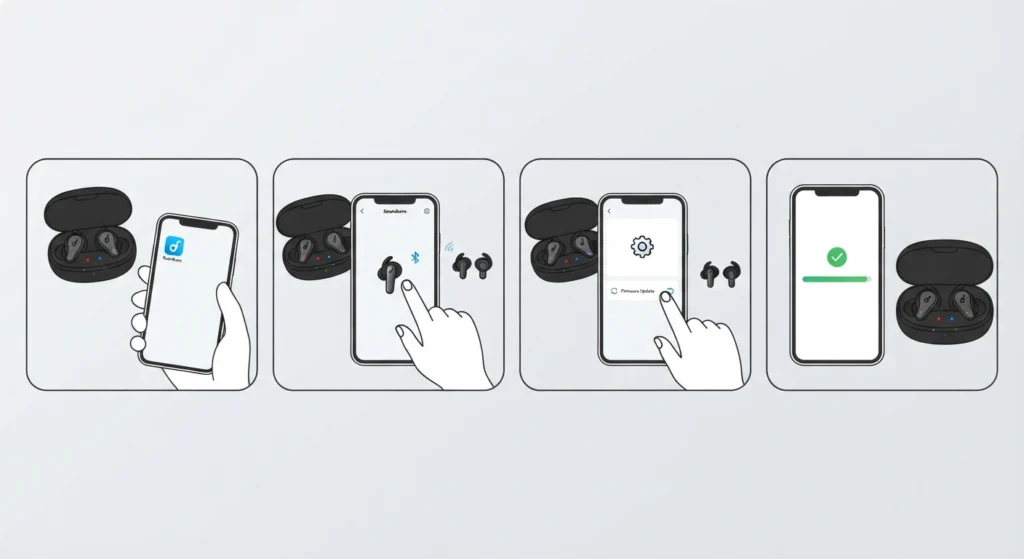
Most noise cancelling issues on the Sport X20 trace back to outdated firmware. Anker regularly rolls out updates that patch ANC calibration bugs, and skipping these updates is one of the most common reasons the feature stops behaving properly.
- Step 1: Open the Soundcore app on a phone or tablet and place both earbuds in the charging case.
- Step 2: Connect the earbuds to the app by tapping the device icon on the home screen.
- Step 3: Tap the settings gear, then select Firmware Update if a new version is available.
- Step 4: Keep the earbuds close to the phone and inside the case until the update finishes, since interrupting it can cause more problems than it solves.
Pro-Tip: Firmware updates can silently reset ANC preferences back to default. After updating, open the app and check whether Adaptive Noise Cancelling or Manual ANC is still selected, since this single step fixes the majority of reported cases.
Fix 2: Confirm the Noise Cancelling Mode Is Actually Active
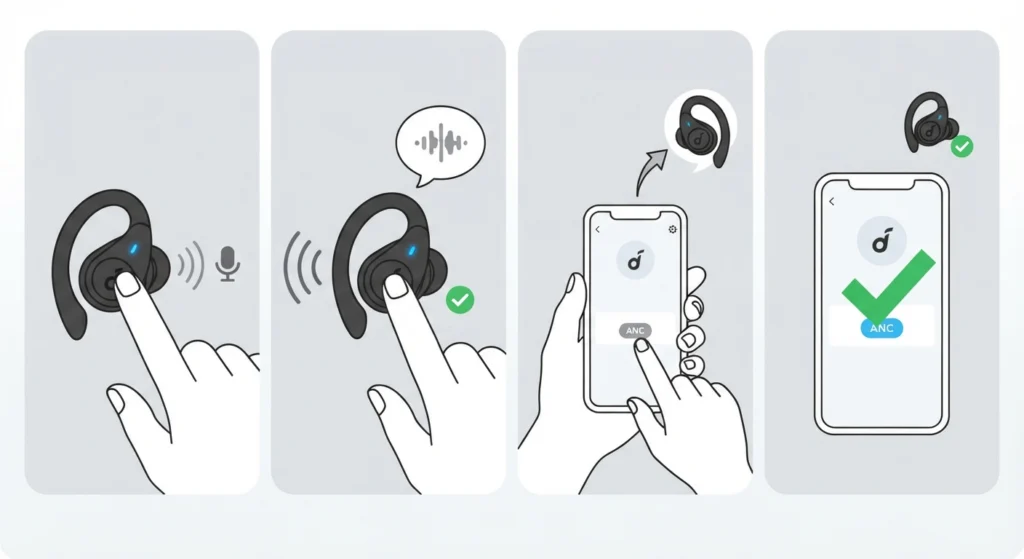
The Sport X20 uses physical buttons for control, which is convenient during workouts but also makes it easy to accidentally cycle through modes without noticing. A quick press-and-hold can switch from ANC to Transparency Mode or Normal Mode without any obvious signal.
- Step 1: Press and hold the multi-function button on either earbud for about two seconds.
- Step 2: Listen for the voice prompt that announces the current mode.
- Step 3: Cycle through the modes until Noise Cancelling or Adaptive ANC is confirmed as active.
- Step 4: Open the Soundcore app and double-check the ANC toggle matches what was heard through the voice prompt.
Fix 3: Reseat the Ear Tips for a Proper Seal
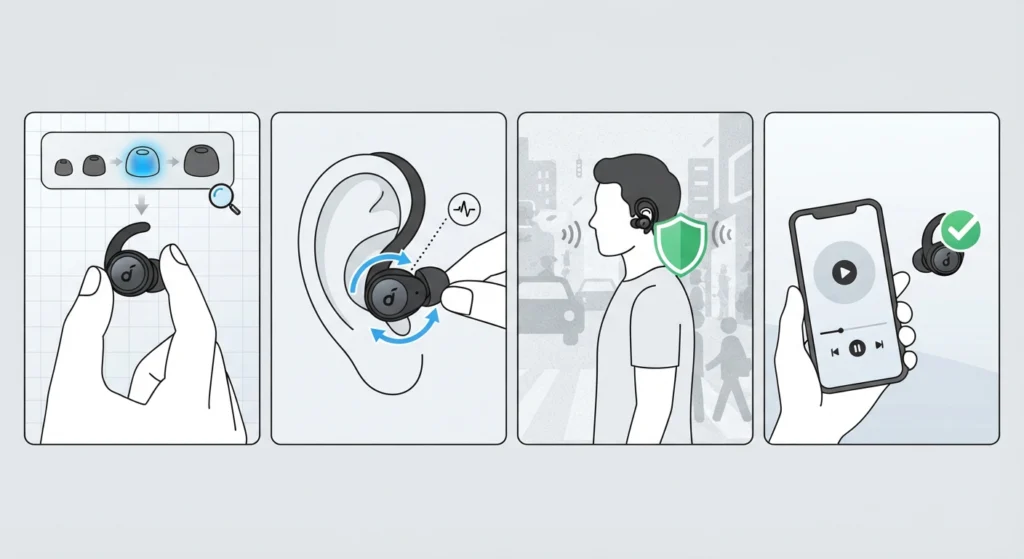
Noise cancelling relies heavily on a tight physical seal, not just software. If the ear tips are the wrong size or have shifted slightly out of place, ANC will sound noticeably weaker even when the setting is turned on correctly. This is the same principle used across nearly every ANC earbud on the market, and the Sport X20 is no exception.
- Step 1: Remove both earbuds and inspect the ear tips for wear, dirt, or misalignment.
- Step 2: Try a different ear tip size from the included set to find a snugger fit.
- Step 3: Insert the earbuds and gently rotate them until a noticeable pressure seal is felt in each ear.
- Step 4: Play audio and walk through a noisy area to test whether outside sound is now noticeably reduced.
Fix 4: Clean the Earbuds and Charging Case Contacts
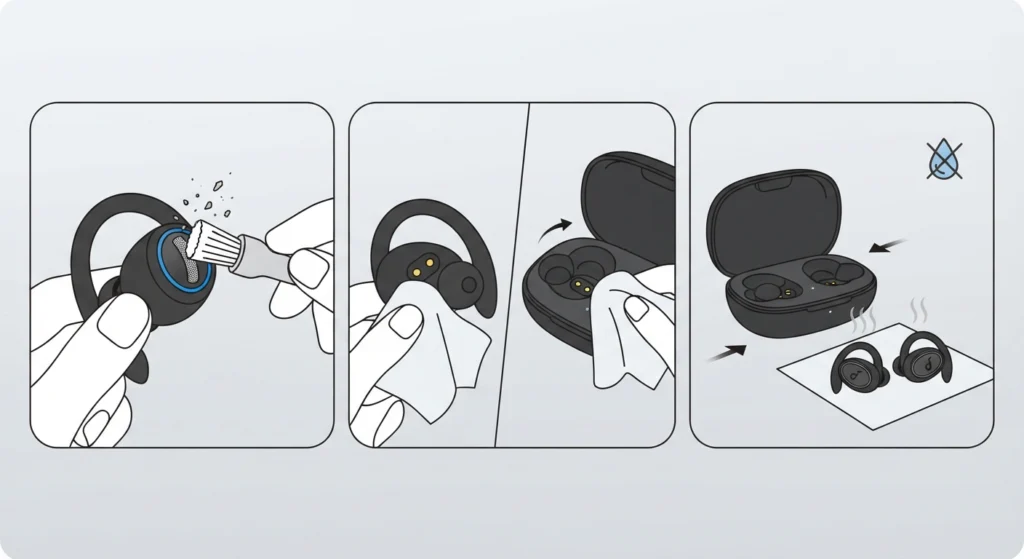
Sweat and dust are unavoidable with sport earbuds, and the Sport X20’s SweatGuard design helps protect internal components, but buildup around the microphone vents and charging contacts can still interfere with ANC performance and battery charging accuracy.
- Step 1: Use a soft, dry brush to clear debris from the mesh vents on each earbud.
- Step 2: Wipe the charging pins on both the earbuds and the case with a dry microfiber cloth.
- Step 3: Let the earbuds air dry fully if they were recently exposed to heavy sweat before placing them back in the case.
Fix 5: Restart and Re-Pair the Earbuds
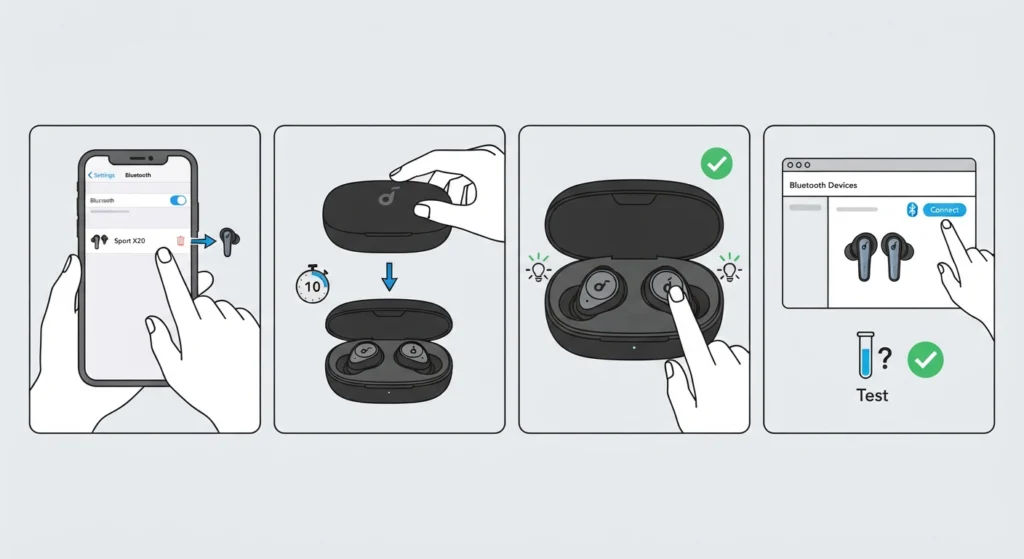
A corrupted Bluetooth connection can quietly disable features like ANC even while audio playback still works fine. Restarting the connection clears out that corrupted data and often restores full functionality.
- Step 1: Forget the Sport X20 from the connected device’s Bluetooth settings menu.
- Step 2: Place both earbuds in the case, close the lid, and wait ten seconds.
- Step 3: Open the case and hold the button on both earbuds simultaneously until the LED flashes to enter pairing mode.
- Step 4: Reconnect the earbuds following the same process used when pairing Bluetooth earbuds for proper stereo sound on Windows, then test ANC again.
Fix 6: Check Windows 11 Audio Settings
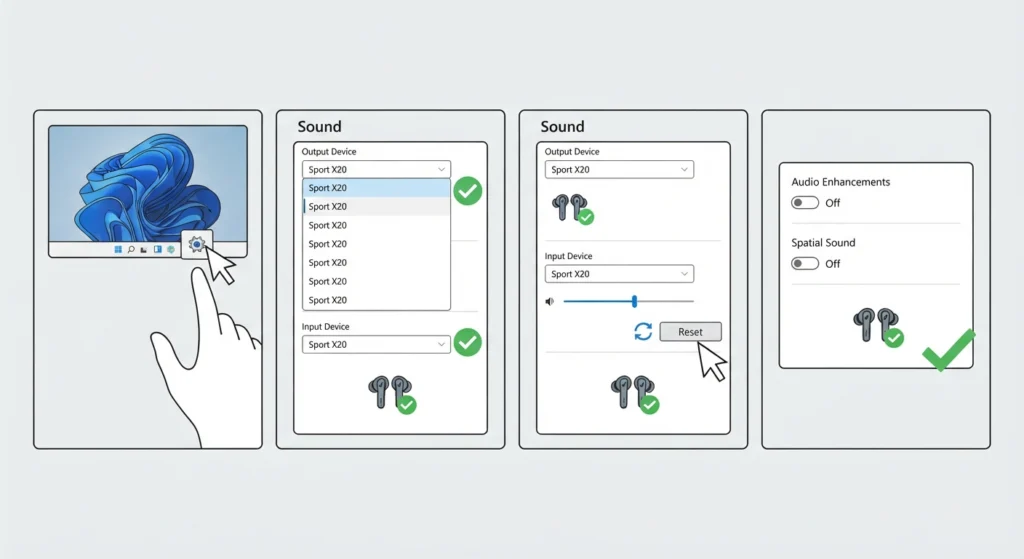
On laptops and desktops running Windows 11, ANC can appear to malfunction simply because the operating system is routing audio through the wrong profile or an outdated driver. This is especially common right after a Windows update.
- Step 1: Open Sound settings from the Windows 11 Control Panel.
- Step 2: Confirm the Sport X20 is selected as both the playback and communication device.
- Step 3: Follow the process for resetting audio settings on Windows 11 if the earbuds are misbehaving specifically on that device.
- Step 4: Review the steps for adjusting audio output settings on Windows 11 to make sure enhancements or spatial sound features are not conflicting with ANC processing.
Tips to Keep Noise Cancelling Working Reliably
- Charge the earbuds fully before intense workouts, since low battery can weaken ANC performance on many true wireless earbuds
- Store the earbuds in their case when not in use to avoid dust buildup around the microphone vents
- Update the Soundcore app itself, not just the earbud firmware, since older app versions sometimes fail to apply ANC settings correctly
- Use Adaptive ANC in changing environments like gyms and Manual ANC in consistently loud settings for more predictable results
Common Problems and Troubleshooting
A few specific scenarios come up often enough to deserve a direct answer.
- ANC works on one earbud but not the other: this is almost always an ear tip seal issue on the affected side rather than a hardware fault
- ANC seems weaker after a software update: check the app settings, since updates sometimes reset ANC intensity back to default
- Microphone stops working alongside ANC issues on a Windows 11 laptop: this is typically unrelated to the earbuds themselves, and resolving microphone detection problems on Windows 11 usually clears it up
- Audio and ANC both cut out randomly when multiple devices are connected: reviewing how to manage audio input devices on Windows 11 often resolves the conflict
Frequently Asked Questions
Why is noise cancelling not working on only one Soundcore Sport X20 earbud?
This is usually caused by an uneven ear tip seal or debris blocking the microphone vent on that specific earbud rather than a battery or firmware issue.
Does updating the firmware fix ANC problems on the Sport X20?
Yes, firmware updates are the most common fix for ANC bugs since Anker regularly improves noise cancelling calibration through software.
Can dirty ear tips really affect noise cancelling performance?
Yes, ANC depends on a tight physical seal in addition to the software processing, so dirty or worn ear tips can noticeably weaken the effect.
How long does Adaptive ANC take to adjust to a new environment?
Adaptive ANC typically adjusts within a few seconds of detecting a change in ambient noise levels, though it can take slightly longer in highly variable settings.
Should Adaptive ANC or Manual ANC be used at the gym?
Adaptive ANC works well in gyms with fluctuating noise levels, while Manual ANC set to a fixed high level suits gyms that are consistently loud.
Does low battery affect noise cancelling on the Sport X20?
Yes, ANC processing draws extra power, and earbuds running on low battery may reduce or disable ANC automatically to preserve remaining playtime.
Can Windows 11 settings interfere with noise cancelling?
Yes, incorrect audio output or communication device settings on Windows 11 can affect how ANC behaves during calls and media playback.
How to factory reset the Soundcore Sport X20 earbuds?
Place both earbuds in the case, hold both buttons simultaneously for about ten seconds until the LED flashes rapidly, then forget the device from Bluetooth settings and re-pair.
Is noise cancelling supposed to work while in Transparency Mode?
No, Transparency Mode is designed to let outside sound in intentionally, so ANC is not active during that mode by design.
Why does ANC sound weaker outdoors compared to indoors?
Wind and open-air acoustics reduce the effectiveness of active noise cancelling technology across nearly all earbuds, not just the Sport X20, since ANC performs best against consistent, steady background noise.