
Switching between Noise Cancelling and Aware Mode on Bose QC45 headphones takes one press of a single button, yet plenty of new owners spend their first week fumbling for the right control. This guide breaks down exactly where that button sits, how the two modes actually differ in daily use, and what to do when the switch does not respond the way it should.
Quick Summary Table
- The Action button on the left earcup controls mode switching – no app required
- A single press toggles between Quiet Mode and Aware Mode instantly
- Quiet Mode applies the highest level of noise cancellation available on the QC45
- Aware Mode lets outside sound through using the external microphones
- The Bose Music app offers a third option: adjustable noise cancelling levels
- Mode switching only works while the headphones are powered on
Method 1: Use the Action Button on the Left Earcup
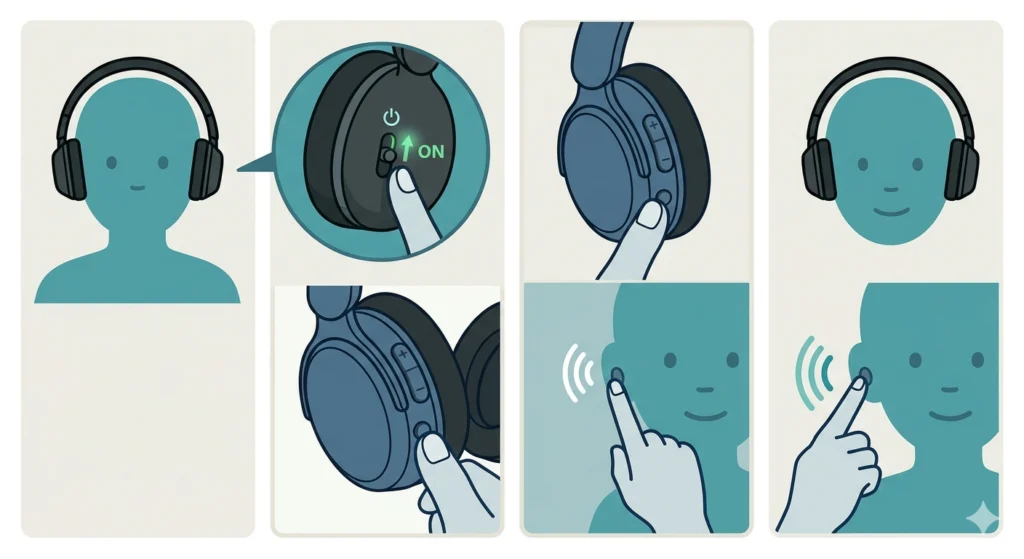
This is the fastest and most direct way to flip between the two listening modes, and most QC45 owners end up relying on it daily once the location becomes second nature.
- Step 1: Put the QC45 headphones on and power them on using the slider switch on the right earcup.
- Step 2: Locate the Action button – a small, flat button on the back of the left earcup, separate from the volume controls.
- Step 3: Press the Action button once. A voice prompt announces the mode that has just been activated.
- Step 4: Press it again to switch back. Each press alternates between Quiet Mode and Aware Mode, so there is no need to hold or double-tap anything.
The button has a slightly raised, ridged texture compared to the smooth volume rocker on the right side, which makes it easy to find by feel alone after a few tries. This works best when the headphones are already seated comfortably, since reaching for buttons mid-adjustment can sometimes shift the ear cushions.
Pro-Tip: The QC45 announces the active mode out loud every time the Action button is pressed. If that voice prompt is not heard, the headphones may be set to a low media volume rather than a separate prompt volume – check the volume level before assuming the button is broken.
Method 2: Switch Modes Through the Bose Music App
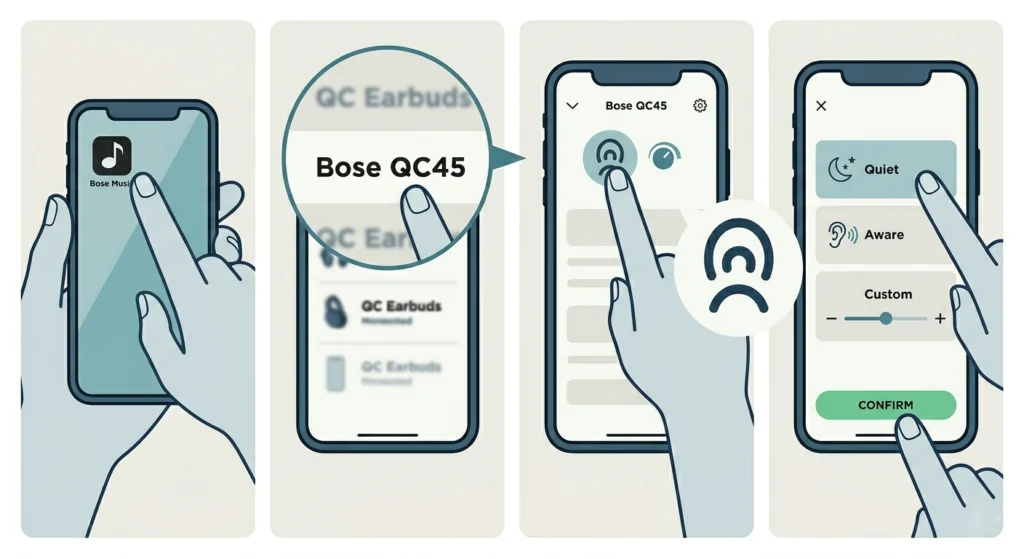
The app route is useful for anyone who wants more control than a simple toggle, including custom noise cancelling levels rather than just the two presets.
- Step 1: Open the Bose Music app on a paired phone or tablet.
- Step 2: Select the QC45 from the device list shown on the home screen.
- Step 3: Tap the noise cancelling icon, usually displayed as a wave or dial graphic near the top of the screen.
- Step 4: Choose between Quiet, Aware, or any custom level created in the app, then confirm the selection.
Most people find that the app method makes more sense at home or in an office, where pulling out a phone is not an inconvenience. On a crowded train or during a workout, the Action button remains the quicker option since it needs no screen interaction at all.
Understanding What Each Mode Actually Does
Knowing the technical difference between these two modes helps explain why one feels noticeably different from the other the moment the switch happens.
Quiet Mode
Quiet Mode applies the maximum noise cancellation the QC45 can produce. External microphones sample ambient sound and generate an inverse waveform that cancels it out before it reaches the ear. Engine hum, HVAC noise, and steady background chatter get reduced significantly, which is why this mode is the default choice for flights and open offices.
Aware Mode
Aware Mode does the opposite job. Instead of blocking outside sound, it uses the same external microphones to pipe ambient noise through the speakers alongside whatever audio is already playing. Footsteps, traffic, and nearby conversations stay audible, which matters for anyone walking through a busy street or waiting to hear an announcement at a gate.
The key is to treat these as situational tools rather than a “better and worse” pair. Quiet Mode is not an upgrade over Aware Mode; each one solves a different problem depending on the environment at that moment.
Setting Up Audio on Windows 11 Before Using the QC45
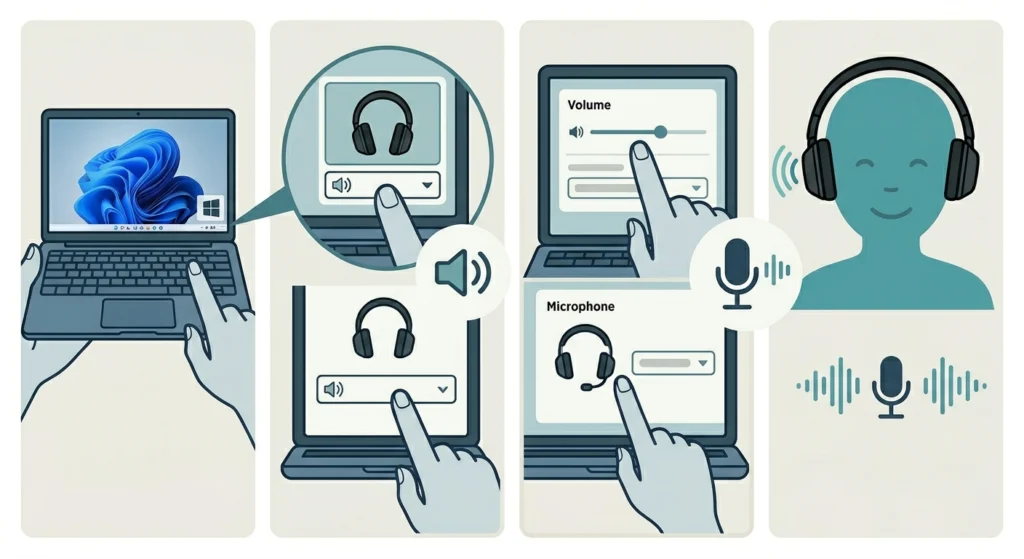
Mode switching itself happens entirely on the headphones, but getting clean audio output on a Windows 11 machine first makes the whole listening experience more reliable. Anyone who has just paired the QC45 with a laptop should confirm the playback device is selected correctly, and a full walkthrough on adjusting audio output settings covers that process in detail.
If the microphone side of the headset is not being picked up correctly during calls, a separate guide on resolving microphone detection problems walks through the fixes specific to Windows 11.
Tips for Getting the Most Out of Both Modes
- Switch to Aware Mode automatically when speaking to someone nearby, rather than removing the headphones entirely.
- Use Quiet Mode during takeoff and landing on flights, since cabin noise peaks during those phases.
- Check the Bose Music app occasionally for firmware updates, since Bose has added refinements to ANC performance through past updates.
- Keep the headphones charged above 20 percent, since some functions can behave inconsistently at very low battery.
- Memorize the Action button’s position by touch so mode switching does not require looking at the headphones.
Common Problems When Switching Modes
The Action Button Does Not Respond
This usually points to either a firmware glitch or a battery that has dropped too low to run secondary functions smoothly. Charging the headphones fully and restarting them resolves this in most cases.
No Voice Prompt Plays When Switching
Voice prompts can be muted through a setting in the Bose Music app. Checking the app’s prompt or notification volume setting usually brings the announcement back.
Mode Switches But Sound Quality Drops
If music suddenly sounds thin or distorted after a mode switch, the issue is often related to audio settings on the connected device rather than the headphones themselves. A guide on resetting audio settings for Windows 11 can rule out a system-level cause.
Headphones Default to the Wrong Mode After Reconnecting
The QC45 remembers the last mode used before powering off, so if a different mode is expected on reconnect, it likely was not saved before the previous shutdown. Pressing the Action button once after reconnecting resets it to the preferred setting.
Frequently Asked Questions
How many noise cancelling modes does the Bose QC45 have?
The QC45 has two primary modes accessible directly from the headphones: Quiet Mode and Aware Mode. The Bose Music app adds the ability to create custom levels in between, depending on the firmware version installed.
Can noise cancellation be turned off completely on the QC45?
Not entirely. The QC45 always runs some level of active noise cancellation while powered on, including in Aware Mode, since the same microphones are used to let ambient sound through.
Which button controls the mode switch, left or right earcup?
The Action button on the left earcup controls mode switching. The right earcup houses the Multi-function button, which handles playback and call controls instead.
Does switching modes affect battery life?
Battery impact between the two modes is minimal. Both modes keep the noise cancelling processor active, so the difference in power draw is not significant enough to notice in daily use.
Is an app required to switch between Quiet and Aware Mode?
No app is required. The Action button on the headphones switches between the two modes instantly without needing a paired phone nearby.
Why does the QC45 announce the mode out loud after switching?
The voice prompt confirms which mode is now active, since there is no visual display on the headphones themselves to show the current setting.
Can the QC45 be set to start in Aware Mode every time it powers on?
The headphones generally retain whichever mode was active before shutdown, so the easiest way to ensure a consistent starting mode is to switch to it manually right before powering down.
Does Aware Mode work well for outdoor activities like running?
Aware Mode is commonly used during outdoor activity since it keeps traffic and surrounding sound audible, which adds a layer of safety compared to fully blocking outside noise.
What should be checked if audio sounds off after a mode switch on a Windows 11 laptop?
Confirming the correct playback and input devices are selected in Windows 11 settings is a good first step, and managing those devices is covered in a guide on managing audio input devices.
Do firmware updates change how the modes function?
Bose has released firmware updates in the past that refine ANC performance and add custom mode options through the app, so keeping firmware current is worth doing periodically.