
Bose Ultra Open Earbuds not charging in the case is one of the most common complaints among owners of this open-ear design, and most of the time the cause is simple to spot once the real culprit is identified. Before assuming the battery is dead for good, a few quick checks usually bring the charging light right back to life.
Key Takeaways
- Most charging failures come from dirty pins, a drained case, or an underpowered charger, not a broken battery.
- The charging case status light is the fastest way to confirm which earbud, if any, is making contact.
- A soft reset resolves the issue in a large share of cases without needing a replacement.
- Physical pin damage or a case fault may require Bose service if none of the fixes below work.
Step-by-Step Guide to Fix Bose Ultra Open Earbuds Not Charging
Fix 1: Clean the Charging Pins and Contacts
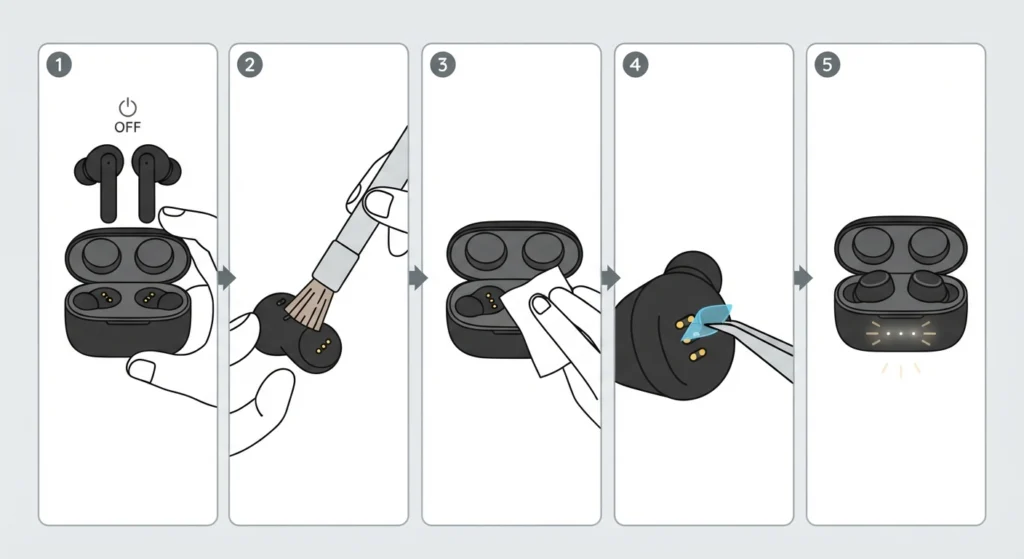
Dust, earwax, and pocket lint build up faster than most people expect, especially with an open-ear design that sits loosely against the ear rather than sealing inside the canal. A layer of grime on the charging pins is often the entire problem.
- Step 1: Power off the earbuds and remove them from the case.
- Step 2: Use a dry, soft-bristled brush or a clean, dry cotton swab to gently clear debris from the three charging pins on each earbud.
- Step 3: Wipe the matching pins inside the case with a dry microfiber cloth. Avoid liquid cleaners near the contacts.
- Step 4: Check for any leftover blue protective film that sometimes remains stuck over the pins from the factory. This is a surprisingly common cause of a charging failure right out of the box.
- Step 5: Place the earbuds back in the case and watch the status light for each side.
Fix 2: Charge the Case With the Correct Power Source
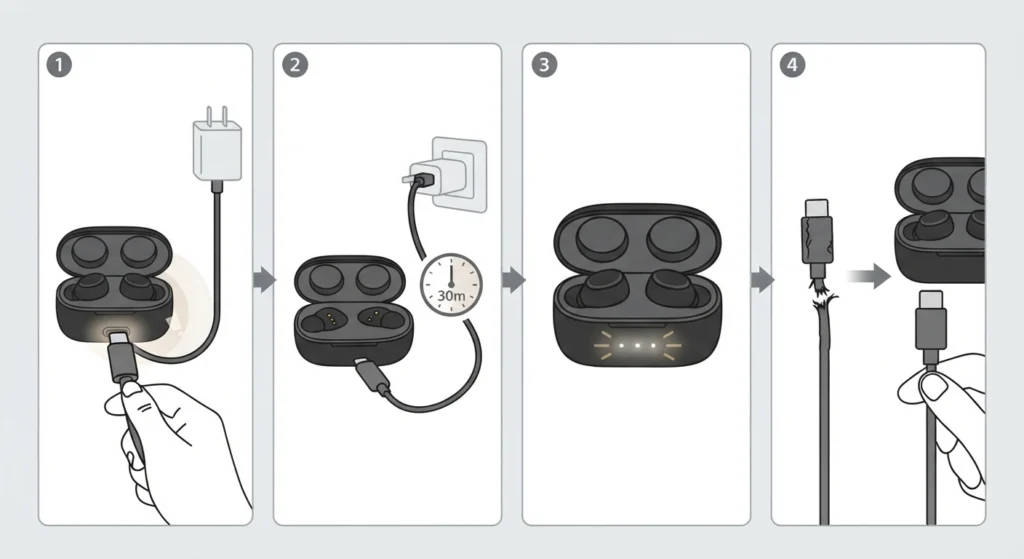
The case itself needs a healthy charge before it can pass power to the earbuds. A weak charger or a low-output USB port is one of the most overlooked reasons charging seems to fail.
- Step 1: Connect the case to its USB-C cable and plug it into a wall adapter rated at least 1 amp. Computer USB ports often supply only 0.5 amps, which is not enough for a reliable charge.
- Step 2: Let the case charge alone, without the earbuds inside, for about 30 minutes.
- Step 3: Check for the case’s own status light on the front to confirm it is receiving power.
- Step 4: Try a different cable if the case shows no response at all, since a damaged cable is easy to mistake for a dead case.
Pro-Tip: A charger that came with a phone or tablet usually has a higher amp rating than a basic USB hub or laptop port. Swapping to that charger alone fixes the issue for a large number of users before any other step is needed.
Fix 3: Seat the Earbuds Correctly and Close the Lid Fully
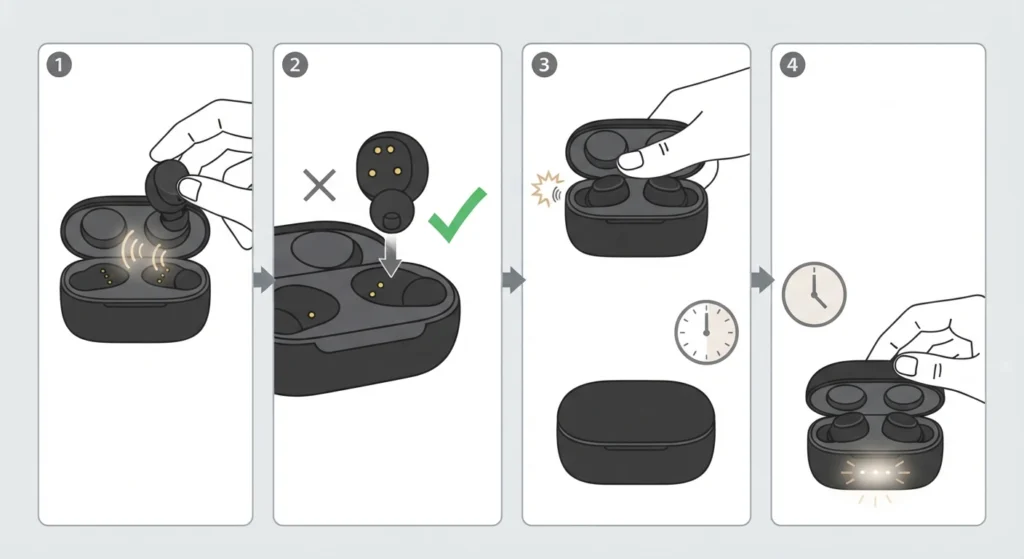
The magnets inside the case are strong enough to hold the earbuds in place, but they still need to land in the correct orientation to make contact.
- Step 1: Place one earbud at a time into its slot, feeling for the slight magnetic pull that lines it up.
- Step 2: Confirm the charging points on the earbud are facing down toward the pins in the case, not turned to the side.
- Step 3: Close the lid firmly until it clicks. Leaving the lid open, even slightly, keeps the earbuds active and can drain them instead of charging them.
- Step 4: Reopen the case after a minute and check whether the status light for that earbud has turned on.
Fix 4: Let the Case and Earbuds Return to Room Temperature
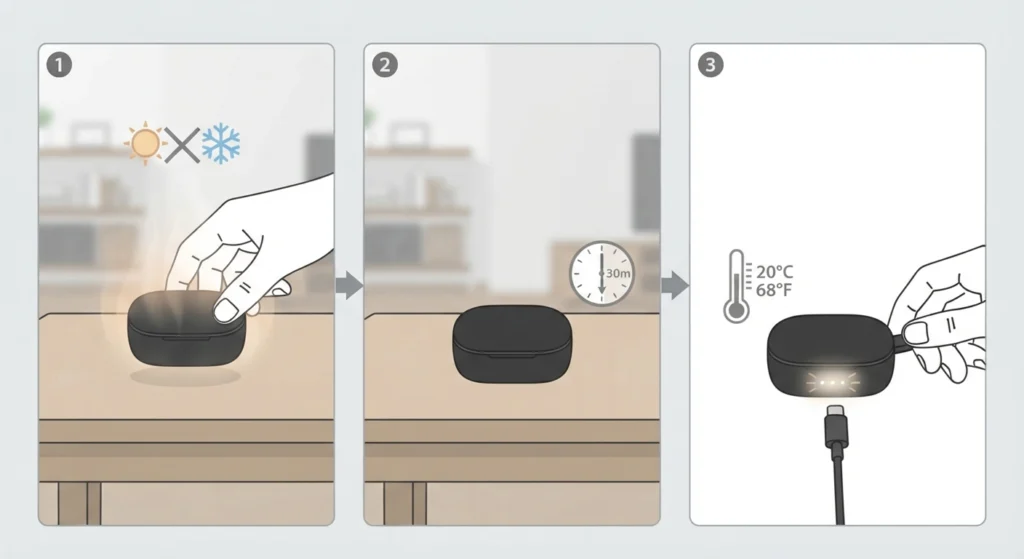
Lithium batteries are sensitive to heat and cold. A case left in a hot car, a gym bag, or near a window in winter can temporarily refuse to charge as a safety measure, even though nothing is actually broken.
- Step 1: Move the case indoors to a stable, moderate temperature.
- Step 2: Wait at least 20 to 30 minutes before attempting to charge again.
- Step 3: Reconnect the charging cable and check the status light once the case feels close to room temperature.
Fix 5: Reset the Earbuds
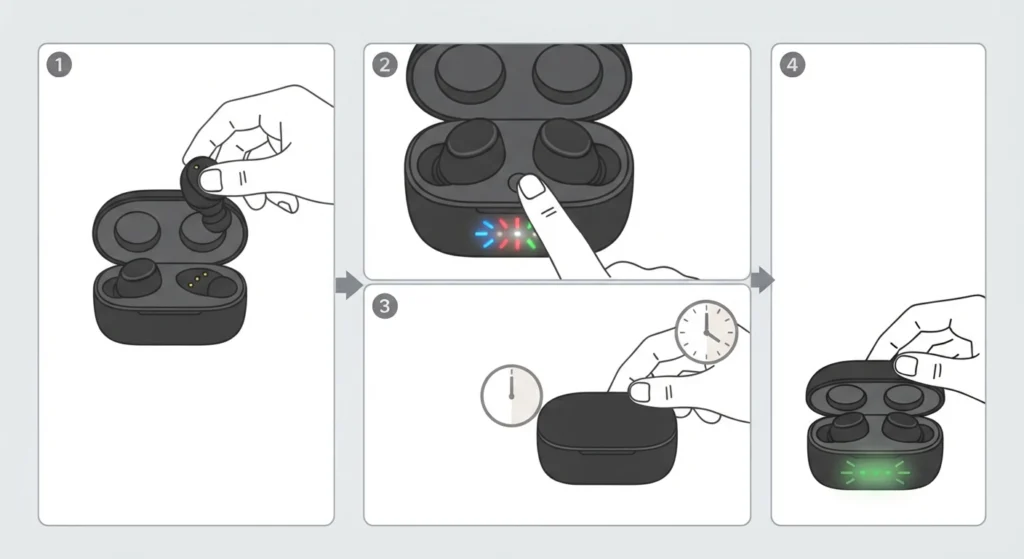
Much like a phone that occasionally needs a restart, the earbuds sometimes get stuck in a minor software glitch that blocks charging communication with the case.
- Step 1: Place both earbuds in the case but leave the lid open.
- Step 2: Press and hold the button inside the case for about 10 seconds, until the status lights flash.
- Step 3: Close the lid and wait 30 seconds before opening it again.
- Step 4: Check the status lights to confirm both earbuds are now registering a charge.
Fix 6: Rule Out Pin Damage or a Faulty Case
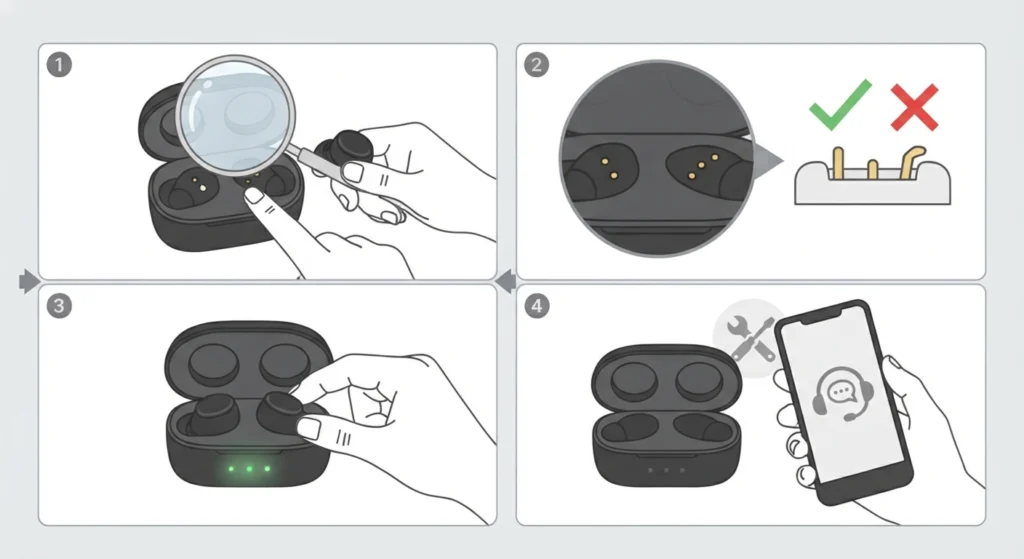
If cleaning, a fresh charger, correct seating, and a reset all fail to bring the charging light on, the charging pins themselves may be bent, recessed, or physically damaged.
- Step 1: Examine each of the three pins on both earbuds and inside the case under good lighting.
- Step 2: Confirm the pins protrude slightly rather than sitting flush or pushed in.
- Step 3: Test with a single earbud at a time to isolate whether the fault is with one earbud, the case, or both.
- Step 4: Contact Bose support for a repair or replacement if a pin is visibly bent or the case shows no life on any side.
Tips to Keep the Charging Case Working Reliably
A little routine care goes a long way with any true wireless charging case. Wiping the pins weekly, storing the case away from direct sunlight, and avoiding overly tight pockets where lint collects all help prevent the same issue from returning.
Once the earbuds power back on and reconnect to a paired device, audio settings sometimes need a quick check as well. Windows 11 users who notice sound only playing from one earbud after a reset may find it useful to review a guide on re-pairing Bluetooth earbuds for stereo sound, since a reset on the earbud side can sometimes affect how the connected device handles the pairing.
If the earbuds charge normally but audio still sounds off balance or muted on a Windows 11 laptop afterward, it can help to walk through the steps for adjusting audio output settings to confirm the correct device is selected as the default output.
Pro-Tip: Keeping the case lid closed whenever the earbuds are not in use is one small habit that prevents a large share of charging complaints, since an open lid keeps the earbuds powered on and slowly draining instead of topping up.
Common Problems and Troubleshooting
A few related issues tend to show up alongside a charging failure, and knowing the difference saves time.
- Only one earbud charges: usually a pin contact or seating issue on the side that is not charging, addressed in Fix 1 and Fix 3.
- The case charges but the earbuds never fill up: often a sign of pin damage on the earbuds themselves, covered in Fix 6.
- The status light flashes but never turns solid: typically resolved with the reset process in Fix 5.
- Charging works but the earbuds will not connect to a computer afterward: this is usually unrelated to the battery and points to a Bluetooth or driver issue instead, such as a microphone detection problem on Windows 11 rather than a charging fault.
Frequently Asked Questions
Why are the Bose Ultra Open Earbuds not charging in the case at all?
The most common causes are dirty charging pins, a case that has fully drained, an underpowered charger, or earbuds that are not seated correctly. Working through the fixes in order usually identifies the cause quickly.
How long does it take to fully charge the Bose Ultra Open Earbuds case?
A fully depleted case typically takes a couple of hours to reach a full charge when connected to a 1 amp or higher USB-C charger.
Why does only one earbud charge while the other does not?
This points to a contact issue on the affected side. Cleaning the pins on that specific earbud and case slot, then confirming it is seated correctly, resolves this in most cases.
Can a low-power USB port stop the case from charging?
Yes. Many computer USB ports only supply around 0.5 amps, which may not be enough for a reliable charge. A wall adapter rated at 1 amp or higher is the safer choice.
Does leaving the case lid open drain the earbuds?
Yes. An open lid keeps the earbuds active rather than allowing them to enter a charging state, which can slowly drain the battery instead of topping it up.
How does resetting the earbuds help with charging problems?
A reset clears minor software glitches that sometimes interrupt the communication between the earbuds and the case, similar to restarting a phone that has become unresponsive.
Is it normal for the case to feel warm while charging?
A slight warmth during charging is normal. Excessive heat, however, may trigger a temporary charging pause as a safety measure until the temperature drops.
What does the status light on the case actually indicate?
The status light reflects whether an earbud is making proper contact with the charging pins. No light on one side generally means that earbud is either depleted or not contacting the pins correctly.
When should the earbuds be sent in for repair instead of troubleshooting further?
If the pins appear bent, recessed, or damaged, or if none of the fixes bring the status light back after cleaning, a fresh charger, and a reset, contacting Bose support for a repair or replacement is the next step.
Can extreme cold or heat affect charging performance?
Yes. Lithium batteries generally charge best at room temperature. Letting the case warm up or cool down before charging often resolves a temporary charging failure.