
Resetting the Anker Soundcore Liberty 4 to factory settings is the fastest fix when the earbuds refuse to pair, one side goes silent, or the touch controls stop responding the way they should. This guide walks through the exact process, step by step, using the method Anker itself recommends.
Key Takeaways
- Factory reset clears saved Bluetooth pairings and restores default settings on the Liberty 4.
- The reset is done through the charging case button, not through a phone menu.
- Both earbuds must sit inside the open case while the button is held for 10 seconds.
- A successful reset shows the LED indicators flashing white rapidly three times.
- Re-pairing with a phone or laptop is required immediately after the reset.
Step-by-Step Guide to Reset Anker Soundcore Liberty 4
The process below applies directly to the Liberty 4 earbuds and takes less than a minute to complete. No app installation is required, though having the soundcore app on hand makes the re-pairing step smoother afterward.
Method 1: Reset Using the Charging Case Button
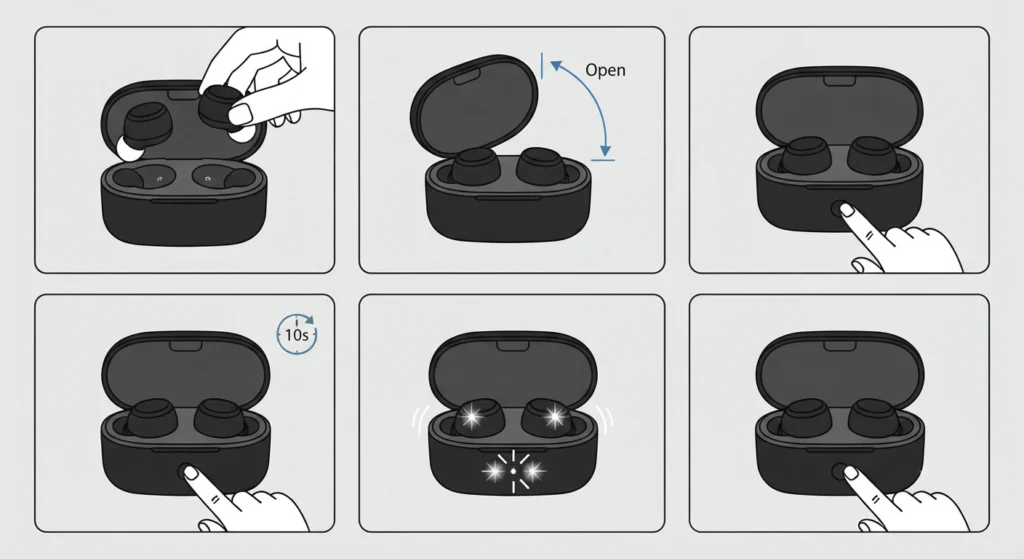
This is the official reset method for the Liberty 4, and it works whether the earbuds are stuck in a pairing loop or simply need a clean slate.
- Step 1: Place both earbuds into the charging case.
- Step 2: Leave the case lid open. Closing it during the process will interrupt the reset.
- Step 3: Locate the small button on the front of the charging case.
- Step 4: Press and hold that button continuously for 10 seconds.
- Step 5: Watch for the LED indicators inside the case to flash white rapidly three times. This confirms the reset has completed successfully.
- Step 6: Release the button once the flashing stops.
Once this sequence finishes, the earbuds return to their out-of-the-box state. Every saved device pairing, custom EQ setting, and touch control assignment gets wiped clean.
Method 2: Clear Bluetooth Pairing Before Resetting
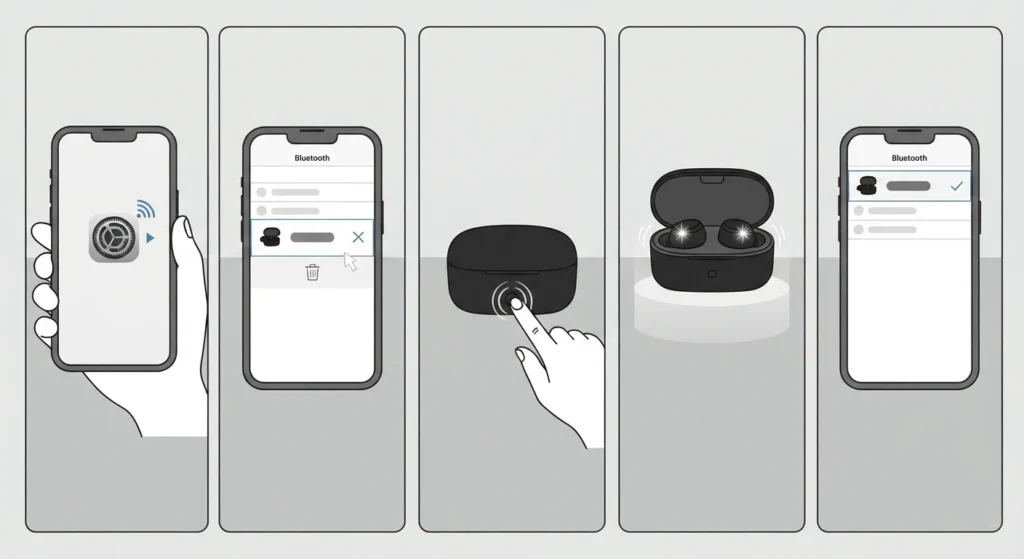
Most people find that clearing the old Bluetooth entry from a phone or computer first prevents connection confusion after the reset finishes.
- Step 1: Open the Bluetooth settings menu on the connected phone, tablet, or laptop.
- Step 2: Find the listing for soundcore Liberty 4 and select forget or remove device.
- Step 3: Proceed with the charging case reset described in Method 1.
- Step 4: Reopen the case once reset is confirmed, since the earbuds will automatically enter pairing mode.
- Step 5: Select soundcore Liberty 4 from the available Bluetooth devices list to complete the connection.
On a Windows laptop, this stage sometimes needs a little extra attention, especially when the old pairing lingers in the system. A closer look at how to re-pair Bluetooth earbuds for stereo sound on Windows can help if the audio comes through in mono or only one channel after reconnecting.
Pro-Tip: Keep the earbuds inside the case and the lid open for the entire 10-second hold. Removing an earbud mid-process, even briefly, cancels the reset and the LED sequence has to be restarted from scratch.
Tips for a Smooth Reset
- Charge the case to at least 30 percent before starting. A low battery can interrupt the LED sequence partway through.
- Clean the charging pins with a dry, lint-free cloth beforehand. Dirty contacts sometimes prevent the case from registering the earbuds properly during reset.
- Update the soundcore app before reconnecting. An outdated app version occasionally fails to recognize a freshly reset earbud.
- Reset both earbuds together rather than one at a time. A mismatched reset state between the left and right bud is a common cause of audio dropouts afterward.
Common Problems After Resetting
A factory reset solves most connectivity issues, but a few hiccups tend to show up right after. These are the ones worth knowing about before assuming something is broken.
LED Lights Do Not Flash
This usually points to insufficient charge in the case or earbuds. Connect the case to power for 15 minutes, then repeat the 10-second button hold.
Earbuds Will Not Reconnect to a Phone
Turn Bluetooth off and back on the phone, then forget any old soundcore Liberty 4 entry before scanning again. A stubborn old entry is one of the more frequent culprits behind failed reconnections.
Only One Earbud Plays Sound
Place both earbuds back in the case for about 10 seconds, then take them out together. This resyncs the left and right channels. If sound still comes through unevenly on a Windows machine, checking the steps for adjusting audio output settings on Windows 11 often clears up the imbalance.
App Does Not Detect the Earbuds Post-Reset
Force close the soundcore app, restart the phone’s Bluetooth, and reopen the app with the earbuds seated in the open case. Detection typically resolves within a few seconds once the app refreshes its device scan.
Frequently Asked Questions
How long does it take to factory reset the Anker Soundcore Liberty 4?
The entire process takes about 10 to 15 seconds once the button is pressed, plus a few extra seconds for the LED confirmation flash.
Does resetting the Liberty 4 delete the custom EQ settings?
Yes. A factory reset clears any custom EQ profile, HearID sound settings, and touch control customizations saved through the soundcore app.
Can the Liberty 4 be reset without the charging case?
No. The charging case button is the only supported method for resetting the Liberty 4 to factory settings.
Why is one earbud not resetting along with the other?
Both earbuds need to sit fully seated in the case with the lid open during the entire 10-second hold. An earbud that is not making proper contact with the charging pins will not receive the reset signal.
Is it necessary to forget the Bluetooth pairing before resetting?
It is not strictly required, but doing so prevents the phone from trying to reconnect to outdated pairing information, which can cause a temporary connection failure right after the reset.
What do the LED flashes mean during the reset process?
Three rapid white flashes confirm the reset completed successfully. If the LEDs do not flash at all, the case likely needs more charge or the button was not held long enough.
Will a factory reset fix a microphone that stopped working?
In many cases, yes, since a reset clears any corrupted connection data that can interfere with the microphone. On a Windows 11 setup, it also helps to check guidance on resolving microphone detection problems if the issue continues after reconnecting.
How many devices can the Liberty 4 remember after a reset?
After a reset, the earbuds start with no saved devices. From there, they can be paired with multiple devices again, and dual connection can be set up through the soundcore app as before.
Does a factory reset update the firmware?
No. Resetting only clears settings and pairing data. Firmware updates are handled separately through the soundcore app once the earbuds reconnect.
What should be done if audio still sounds off after reconnecting?
Reconnecting sometimes leaves outdated audio settings in place on a computer. Running through a guide on resetting audio settings on Windows 11 usually clears up any leftover playback issues.