
Bose QuietComfort Ultra headphones are known for premium sound, but a static or hissing noise can ruin that experience fast. This issue usually comes from firmware glitches, Bluetooth interference, or a driver conflict on the connected device, and most cases can be resolved without a trip to a repair shop.
Key Takeaways
- Static or hissing noise is often caused by outdated firmware, weak Bluetooth signal, or driver conflicts.
- Updating the Bose Music App firmware fixes the majority of reported cases.
- Re-pairing the headphones and adjusting Windows audio settings solves connection-related static.
- Dirty charging contacts or ear cushion debris can also trigger crackling sounds.
- Persistent noise after all fixes may point to a hardware issue that needs Bose support.
Fix 1: Update the Firmware Through the Bose Music App
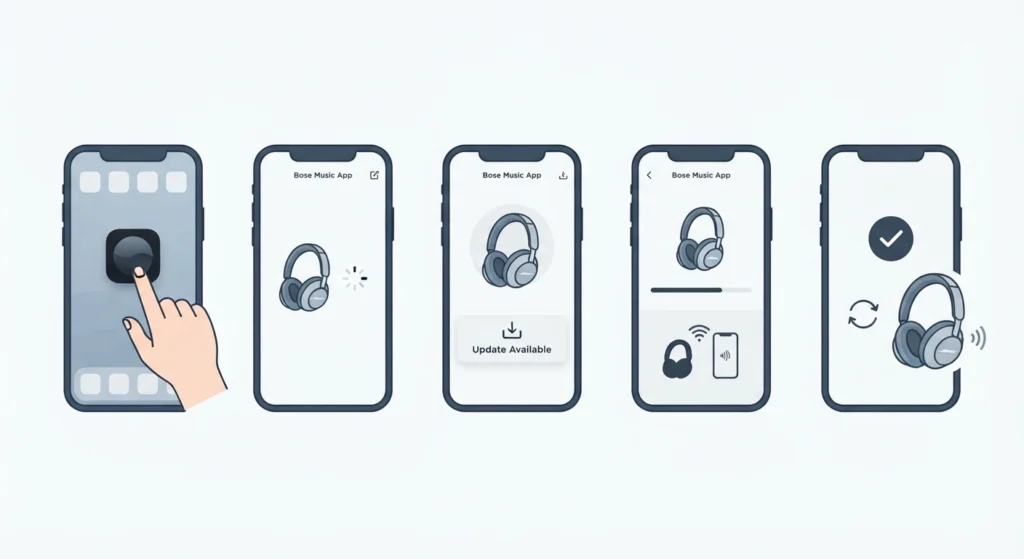
Firmware bugs are the most common reason behind static or hissing sounds on the QuietComfort Ultra. Bose regularly rolls out updates that patch audio processing glitches, and skipping these updates often leaves the noise issue unresolved.
- Step 1: Open the Bose Music App on a smartphone or tablet.
- Step 2: Connect the headphones and wait for the app to detect the device.
- Step 3: Tap on the headphone icon, then check for available firmware updates.
- Step 4: Keep the headphones close to the phone and let the update finish without interruption.
- Step 5: Restart the headphones once the update completes and test the audio.
Pro-Tip: Never turn off the headphones mid-update. An interrupted firmware update is one of the leading causes of ongoing static, and in some cases it can only be fixed with a full factory reset.
Fix 2: Re-Pair the Headphones With the Connected Device
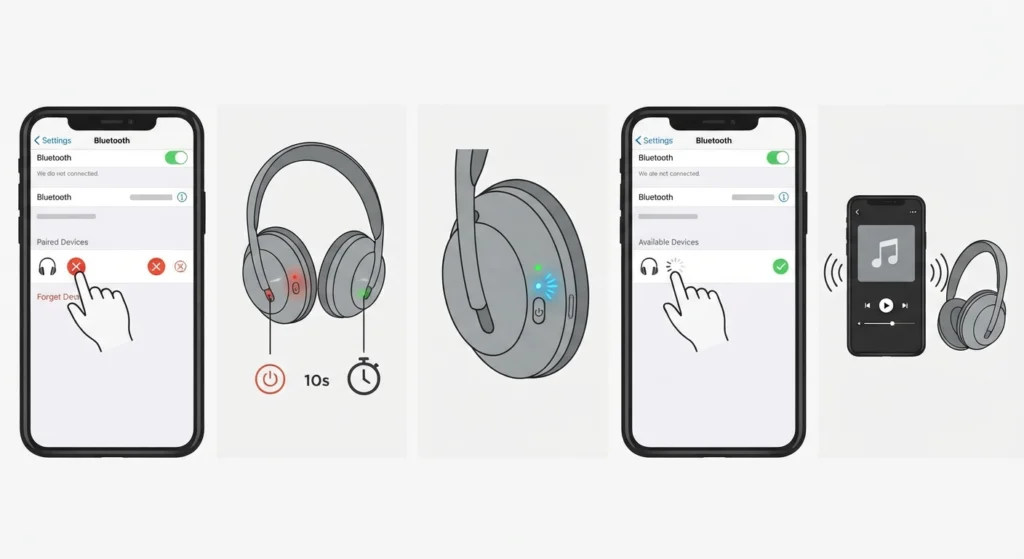
A weak or corrupted Bluetooth pairing profile can create a constant hissing sound, especially after switching between multiple devices. Clearing the old pairing and starting fresh usually clears this up within minutes.
- Step 1: Go to Bluetooth settings on the connected device and remove the Bose QuietComfort Ultra from the paired list.
- Step 2: Turn off the headphones, wait ten seconds, then turn them back on.
- Step 3: Hold the power button until the pairing light flashes blue.
- Step 4: Search for the headphones on the device and connect again.
- Step 5: Play audio for a few minutes to confirm the static is gone.
Anyone who regularly switches between a laptop and phone should also look into re-pairing Bluetooth earbuds for proper stereo sound, since a mismatched stereo profile can sound very similar to static interference.
Fix 3: Adjust Audio Output Settings on Windows 11
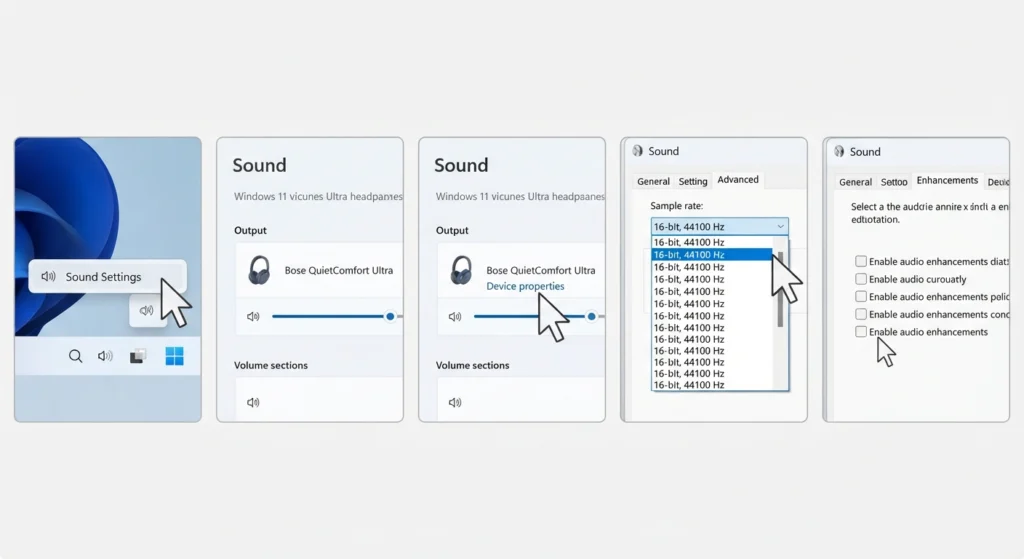
On a Windows laptop, static noise is sometimes caused by the wrong audio format being applied to the headphones rather than the headphones themselves. Lowering the sample rate or switching the audio enhancement settings often removes the crackling sound entirely.
- Step 1: Right-click the sound icon in the taskbar and open Sound Settings.
- Step 2: Select the Bose QuietComfort Ultra as the output device.
- Step 3: Open the device properties and go to the Advanced tab.
- Step 4: Change the default format to a lower bit depth, such as 16-bit, 44100 Hz.
- Step 5: Disable any audio enhancements listed under the Enhancements tab.
A full breakdown of this process is covered in the guide on adjusting audio output settings on Windows 11, which is worth reviewing if the static only happens during calls or streaming on a PC.
Fix 4: Clean the Ear Cushions and Charging Contacts
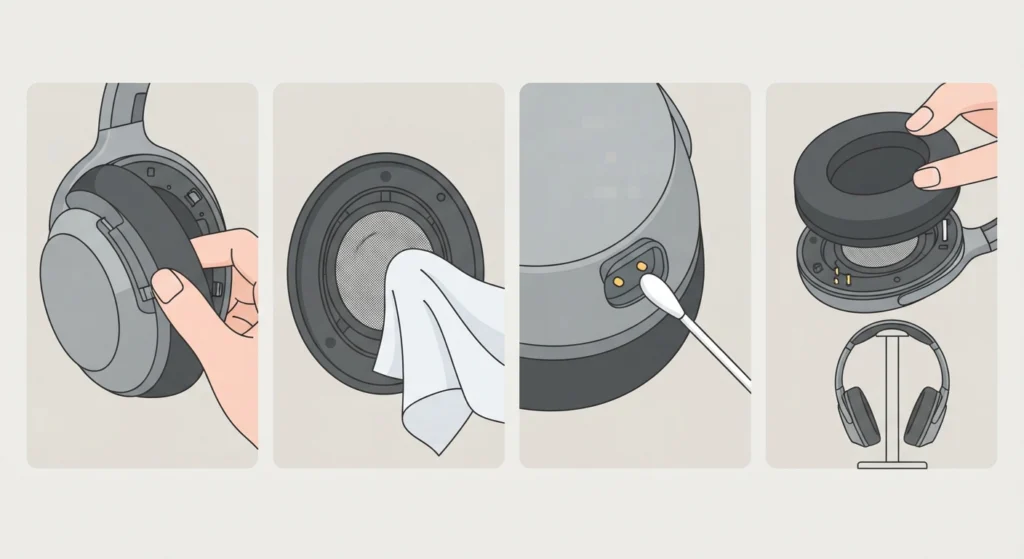
Dust, sweat, or lint buildup around the driver mesh and charging pins can cause a faint but constant hissing sound. This is a physical issue rather than a software one, and it gets overlooked often because the fix feels too simple to be the actual cause.
- Step 1: Remove the ear cushions gently by pulling them away from the frame.
- Step 2: Use a soft, dry microfiber cloth to wipe the driver mesh.
- Step 3: Clean the charging contacts on the headphones with a dry cotton swab.
- Step 4: Reattach the ear cushions and let the headphones sit for a few minutes before testing.
Pro-Tip: Moisture is the biggest hidden cause of crackling sounds in premium headphones. Letting the headphones air dry for at least thirty minutes after a workout or humid environment prevents this from becoming a recurring problem.
Fix 5: Reset the Audio Settings on the Connected Device
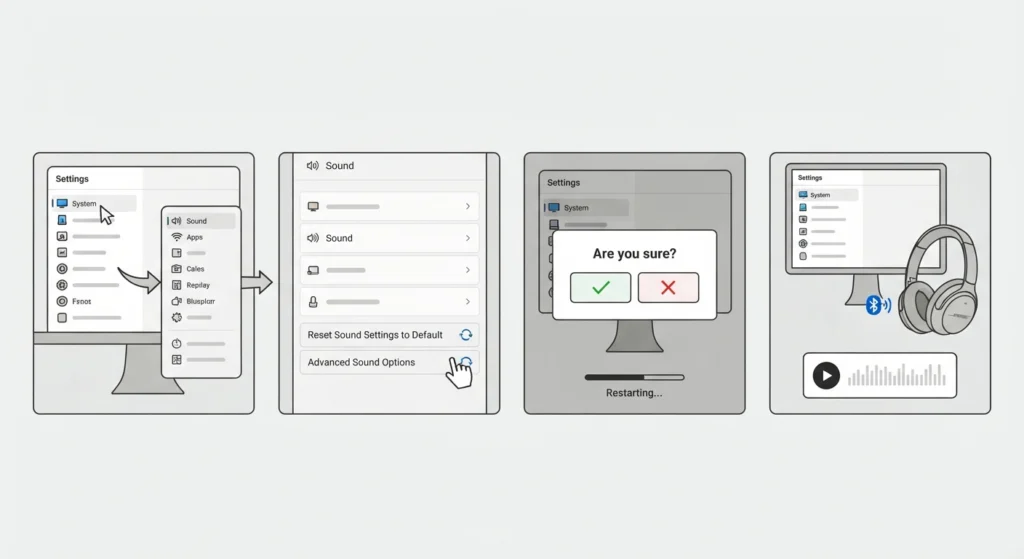
Sometimes the static comes from a corrupted audio driver profile rather than the headphones or the Bluetooth connection. Resetting the audio settings back to default clears out any conflicting configurations that built up over time.
- Step 1: Open Settings, then go to System, followed by Sound.
- Step 2: Scroll down and select the option to reset all sound settings.
- Step 3: Confirm the reset and restart the computer.
- Step 4: Reconnect the Bose QuietComfort Ultra and test playback again.
Step-by-step details for this process are available in the guide on resetting audio settings on Windows 11, which helps when the static appears across multiple apps rather than just one.
Fix 6: Check for Signal Interference From Other Devices
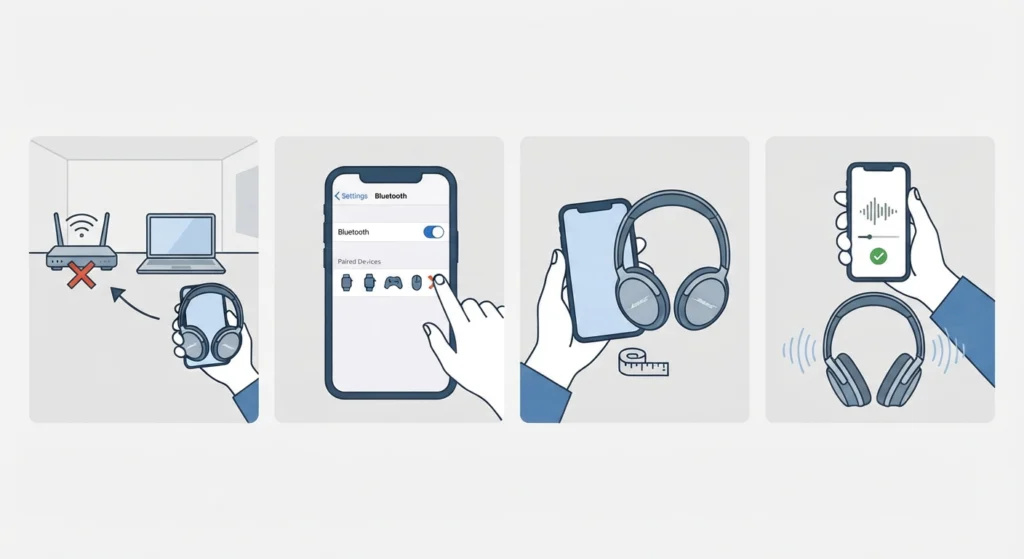
Bluetooth operates on the 2.4GHz frequency, which is shared with Wi-Fi routers, microwaves, and other wireless accessories. A crowded frequency band is a common but often ignored reason behind intermittent hissing sounds.
- Step 1: Move away from routers, USB 3.0 hubs, and other Bluetooth devices.
- Step 2: Disconnect any unused Bluetooth accessories connected to the same phone or laptop.
- Step 3: Keep the connected device within three feet during testing.
- Step 4: Play audio for several minutes to confirm the interference was the cause.
Tips to Prevent Static or Hissing in the Future
- Keep firmware updated by checking the Bose Music App every few weeks.
- Avoid connecting the headphones to more than two devices at once through multipoint pairing.
- Store the headphones in the case when not in use to protect the drivers from dust.
- Charge the headphones fully before long listening sessions, since low battery can cause audio distortion.
- Disable unnecessary Bluetooth accessories nearby to reduce signal congestion.
Common Problems and Troubleshooting
A few recurring issues tend to show up alongside static or hissing noise on the QuietComfort Ultra, and knowing what triggers them saves time.
- Noise that only happens during calls usually points to a microphone driver conflict rather than the speaker itself.
- Crackling that appears only with Active Noise Cancelling turned on may mean the ANC processor needs a firmware refresh.
- Static during video calls on a laptop is frequently linked to input device conflicts, which is covered in the guide on managing audio input devices on Windows 11.
- If the sound cuts out entirely instead of hissing, a full factory reset from the Bose Music App is the next step before contacting support.
Frequently Asked Questions
Why do Bose QuietComfort Ultra headphones make a static noise out of nowhere?
Static usually appears after a firmware update goes incomplete, a Bluetooth connection weakens, or dust builds up near the driver. Updating the firmware and re-pairing the device resolves most sudden cases.
Does Active Noise Cancelling cause hissing sounds?
ANC can produce a faint hiss at very high volume levels, which is a known characteristic of noise cancelling technology in general. If the hiss is loud or constant, it is more likely a firmware issue than normal ANC behavior.
Can low battery cause static in the QuietComfort Ultra?
Yes. When battery levels drop below ten percent, some Bluetooth headphones reduce power to the audio processor, which can create crackling or static sounds. Charging the headphones fully often fixes this immediately.
How often should the firmware be updated to avoid audio issues?
Checking for updates once every two to three weeks through the Bose Music App is enough to stay ahead of most audio bugs, including static and connectivity problems.
Is the static noise a sign of a hardware failure?
Not always. Most static issues come from software or connection problems. Hardware failure is more likely if the noise continues after a factory reset and firmware update, or if it only comes from one ear cup.
Why does the static only happen on a Windows laptop and not on a phone?
This usually points to a driver or audio format mismatch on Windows rather than an issue with the headphones. Adjusting the output format and disabling audio enhancements typically solves it.
Can multipoint connection cause hissing between two paired devices?
Yes, having two devices connected at once through multipoint pairing can occasionally cause interference-like static, especially if both devices are actively sending audio signals. Disconnecting one device while troubleshooting helps isolate the cause.
What should be done if the static noise continues after trying every fix?
If the noise persists after firmware updates, re-pairing, cleaning, and driver resets, contacting Bose support for a warranty check is the safest next step, since it may indicate a defective driver.
Does cleaning the ear cushions really affect sound quality?
Yes. Dust and moisture trapped near the driver mesh can muffle sound or create a faint crackling noise. Regular cleaning keeps the audio output clear and extends the lifespan of the ear cushions.
How long does a firmware update usually take on the QuietComfort Ultra?
Most firmware updates complete within five to ten minutes, depending on the size of the update and the strength of the Bluetooth connection to the paired device.