
Quick Summary: Key Takeaways
- Sensory Bass on Skullcandy Crusher ANC 2 is controlled by the Crusher Wheel located on the left earcup.
- Scrolling the wheel adjusts bass intensity in real time, from minimum to maximum.
- Pressing the wheel like a button cycles through three presets: 20 percent, 50 percent, and 80 percent.
- Pressing and holding the wheel for 1 second turns Sensory Bass fully on or off.
- The Skullcandy App offers a bass slider for those who prefer adjusting the feature from a phone.
- Hands-Free Voice Control also supports bass adjustments without touching the headphones.
The Sensory Bass feature on Skullcandy Crusher ANC 2 is what sets this headphone apart from most others on the market, letting listeners physically feel bass through built-in haptic drivers rather than just hearing it. This guide walks through every method available for adjusting that bass, from the wheel on the earcup to the companion app.
Method 1: Adjust Sensory Bass Using the Crusher Wheel
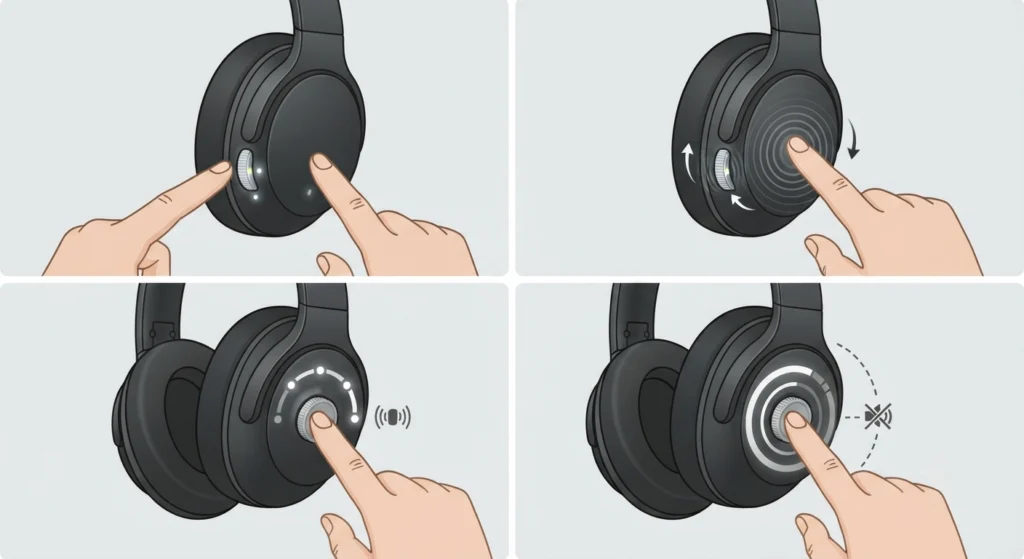
The Crusher Wheel sits on the left earcup and is the fastest way to fine-tune bass while listening. This works best when quick, on-the-fly changes are needed without pulling out a phone.
- Step 1: Locate the Crusher Wheel on the outside of the left earcup.
- Step 2: Scroll the wheel upward to increase bass intensity, or downward to decrease it. A low tone plays at the minimum level and a higher tone plays at the maximum level, so the ears can confirm the setting without checking a screen.
- Step 3: Press the wheel inward like a button to cycle through the three built-in presets: 20 percent, 50 percent, and 80 percent of the total Crusher Bass experience.
- Step 4: Press and hold the wheel for 1 second to switch Sensory Bass off entirely, or hold it again to turn it back on.
Pro-Tip: The audio tones during scrolling are there for a reason. Most people find that relying on those tones, rather than trying to guess the level, makes it much easier to land on a comfortable setting without needing to look at the headphones at all.
Method 2: Adjust Sensory Bass Using the Skullcandy App
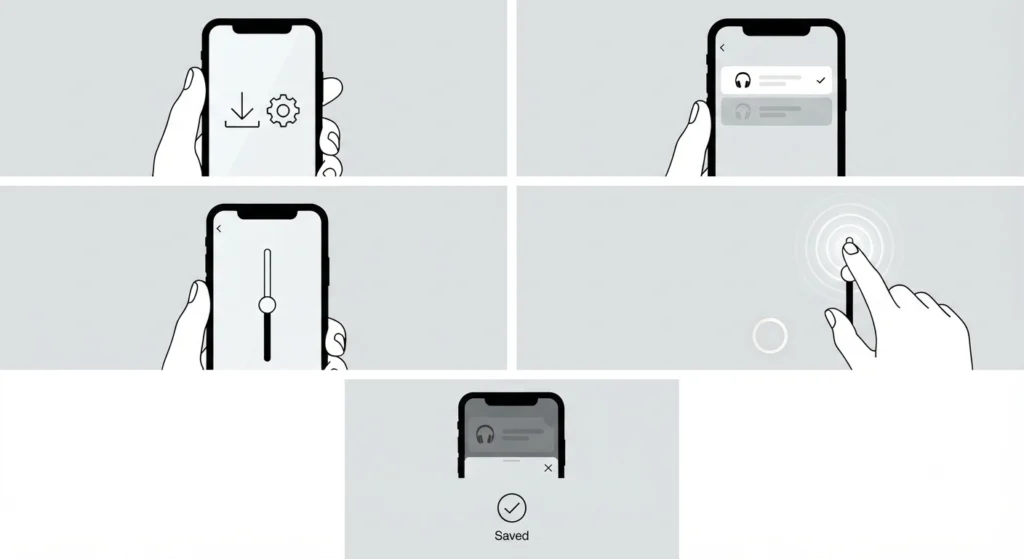
For anyone who prefers precise, visual control, the Skullcandy App includes a dedicated bass slider that mirrors what the wheel does on the headphones.
- Step 1: Download and open the Skullcandy App on a paired smartphone.
- Step 2: Select Crusher ANC 2 from the list of connected devices.
- Step 3: Locate the Sensory Bass slider on the device control screen.
- Step 4: Drag the slider left or right to lower or raise bass intensity, watching the on-screen percentage update in real time.
- Step 5: Close the app once satisfied. The chosen level stays saved, even after powering the headphones off and back on.
Pro-Tip: Any change made in the app updates the physical wheel position instantly, and the reverse is also true. There is no need to pick one method over the other. Switching between the wheel and the app depending on the situation, wheel while out walking, app while relaxing at a desk, is a common habit among regular users.
Method 3: Adjust Sensory Bass Using Voice Control
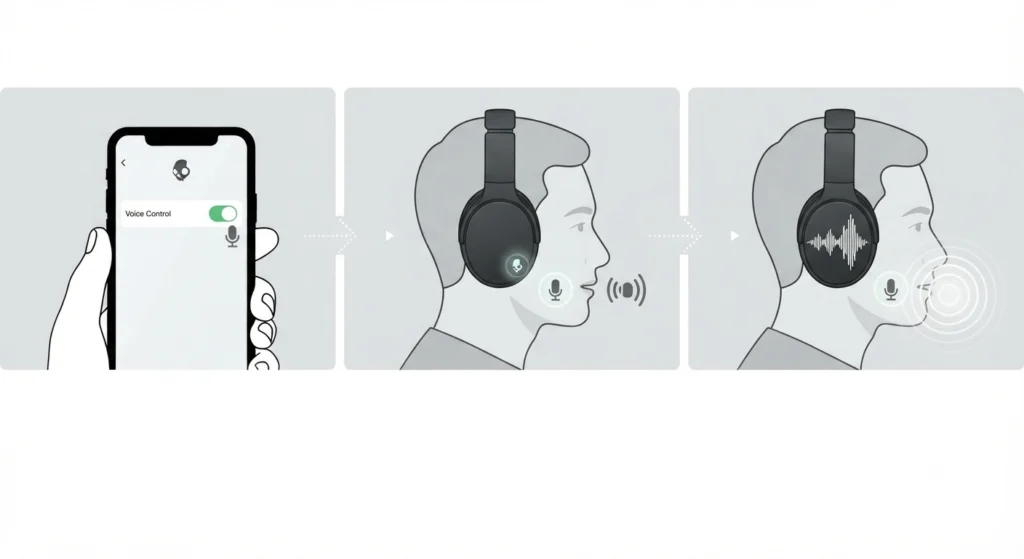
Crusher ANC 2 also supports Hands-Free Voice Control, which can be useful when hands are busy or the headphones are already on and settled in place.
- Step 1: Make sure Hands-Free Voice Control is enabled through the Skullcandy App settings.
- Step 2: Use the designated voice wake command to activate the assistant built into the headphones.
- Step 3: Follow the voice prompts to adjust bass settings without touching the earcup or a phone.
The wheel remains the quickest option for fine adjustments, but voice control is a solid backup when manual access is not convenient.
Tips for Getting the Best Sensory Bass Experience
- Start at the 50 percent preset for most music genres, then adjust up or down based on the track being played.
- Bass-heavy genres like hip-hop or EDM usually sound best around the 80 percent preset, while podcasts and audiobooks are often clearer at 20 percent or with the feature off.
- A snug, proper fit around the ears makes a noticeable difference in how strong the haptic vibration feels, since a loose fit lets some of that sensation escape.
- Keeping the headphones firmware updated through the Skullcandy App helps the Sensory Bass feature perform consistently over time.
Common Problems and Troubleshooting
Most Sensory Bass issues trace back to connection settings or a wheel that was accidentally set too low. Here are practical fixes for the most common situations.
- Wheel scrolling does nothing: Confirm Sensory Bass is turned on by pressing and holding the wheel for 1 second. If it was already off, this step turns it back on.
- App slider will not sync with the headphones: Disconnect and reconnect the headphones inside the Skullcandy App, and make sure the app has the latest update installed.
- Bass vibration feels weak on a Windows 11 laptop: Sometimes the issue sits with the audio driver rather than the headphones. Checking and adjusting audio output settings on Windows 11 can restore full audio performance alongside the haptic bass.
- Sound cuts out or bass feels inconsistent after switching devices: Try resetting audio settings on Windows 11 to clear any conflicting configuration between the headphones and the operating system.
- Stereo balance feels off after a fresh pairing: Re-pairing the Bluetooth earbuds for stereo sound on Windows usually resolves this, since a partial pairing can sometimes affect how audio, including bass, comes through.
Frequently Asked Questions
What is the Sensory Bass feature on Skullcandy Crusher ANC 2?
Sensory Bass is a haptic bass technology built into the earcups that lets listeners physically feel bass vibrations while listening, in addition to hearing them.
Where is the Sensory Bass control located on Crusher ANC 2?
The control is the Crusher Wheel, positioned on the outside of the left earcup.
How many bass presets does Crusher ANC 2 offer?
There are three presets built into the wheel: 20 percent, 50 percent, and 80 percent of the total Crusher Bass intensity.
Can Sensory Bass be adjusted through the Skullcandy App?
Yes. The app includes a bass slider that adjusts the same setting as the physical wheel, and changes sync between both.
How to turn Sensory Bass completely off?
Press and hold the Crusher Wheel for 1 second to switch Sensory Bass off. Holding it again turns the feature back on.
Does Sensory Bass work with Active Noise Cancelling turned on?
Yes, Sensory Bass and Active Noise Cancelling operate independently, so both can run at the same time without conflict.
Can Sensory Bass be controlled with voice commands?
Yes, through Hands-Free Voice Control, which can be enabled in the Skullcandy App settings.
Why does the sensory bass vibration feel weak?
A loose earcup fit is the most common cause. Adjusting the headband and making sure the earcups sit snugly against the ears usually restores the full effect.
Does adjusting Sensory Bass affect battery life?
Running Sensory Bass at higher intensity can draw slightly more power from the battery than lower settings, though the difference is generally minor for regular daily listening.
Is Sensory Bass available on both wired and wireless connections?
Sensory Bass works over Bluetooth and through the included audio cable, as long as the headphones are powered on and have battery charge available.