
The Sennheiser Momentum True Wireless 3 is one of the best premium earbuds on the market – so when one side suddenly goes silent, it is genuinely frustrating. This is actually one of the most common complaints from MTW3 users, and the good news is that most cases can be fixed in just a few minutes without any tools or technical know-how. This guide covers every proven fix, straight to the point, so both earbuds can be back in action as fast as possible.
Quick Summary Table
| Fix | What It Solves | Time Needed |
|---|---|---|
| Clean the earbuds and contacts | Dirty charging pins causing sync issues | 2-5 mins |
| Reset the earbuds | Firmware glitches, pairing errors | 2-3 mins |
| Re-pair to your device | Broken Bluetooth mono/stereo connection | 3-5 mins |
| Check audio balance settings | Device-side audio panned to one side | 1-2 mins |
| Update firmware via Smart Control app | Software bugs causing one-sided audio | 5-10 mins |
| Reseat the earbuds in the case | Charging imbalance causing one earbud to shut off | 1 min |
Step-by-Step Fixes for Sennheiser Momentum True Wireless 3 One Side Not Working
Fix 1: Reseat the Earbuds in the Charging Case
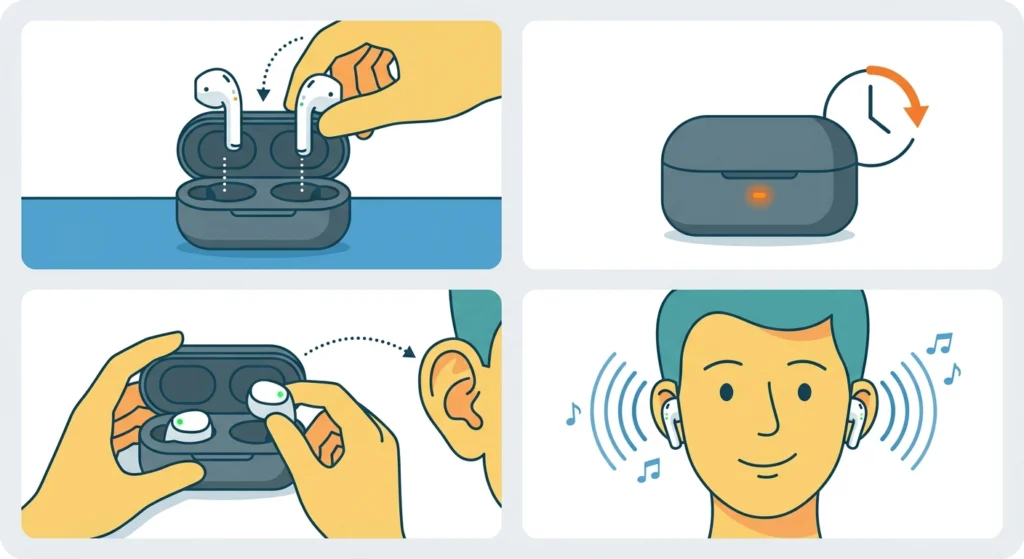
This sounds almost too simple, but it fixes the problem more often than people expect. If one earbud has a slightly lower charge than the other, it can drop out or fail to activate properly. The key is making sure both earbuds are making solid contact with the charging pins inside the case.
- Step 1: Place both earbuds back into the charging case and close the lid.
- Step 2: Wait at least 30 seconds, then open the lid.
- Step 3: Remove both earbuds and put them in your ears.
- Step 4: Check if both sides are now producing sound.
If the LED on the case does not light up correctly for one side when seated, the contacts may be dirty – move on to Fix 2.
Fix 2: Clean the Charging Contacts and Earbuds
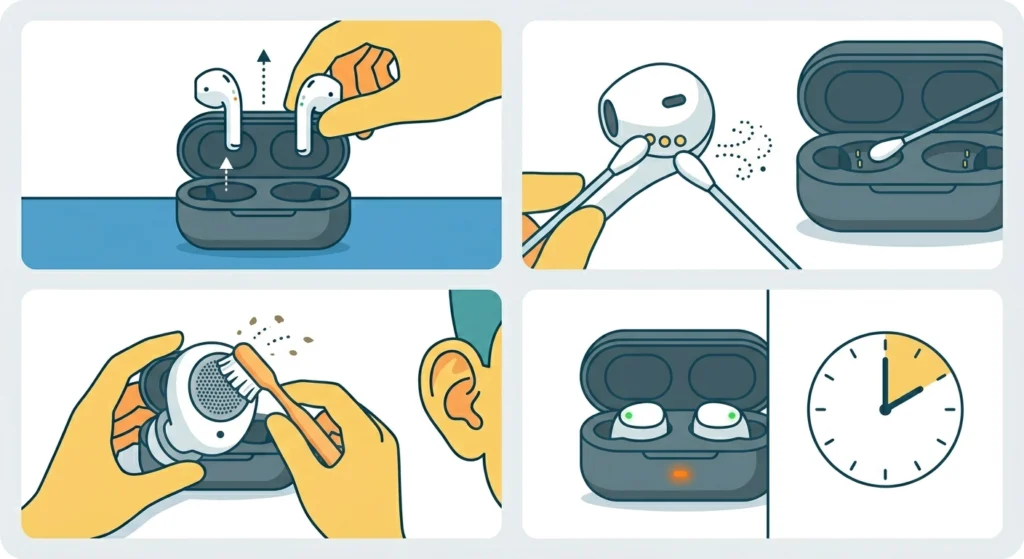
Earwax, dust, and moisture can build up on the metal charging contacts at the bottom of the earbuds and inside the case. When contacts are dirty, one earbud may not charge fully – and a low battery earbud will often stop working before the other. This is a surprisingly common root cause.
- Step 1: Take both earbuds out of the case.
- Step 2: Using a dry cotton swab or soft, lint-free cloth, gently wipe the gold charging contacts on each earbud and inside the case.
- Step 3: If there is visible debris around the speaker mesh, use a dry soft-bristled toothbrush to carefully brush it away.
- Step 4: Let everything dry completely, then reseat the earbuds in the case for at least 2 minutes before testing.
Pro-Tip: Never use water or alcohol directly on the charging contacts. Even a small amount of moisture left on the pins can cause intermittent connection problems that are difficult to diagnose. A dry swab is all that is needed.
Fix 3: Reset the Sennheiser Momentum True Wireless 3
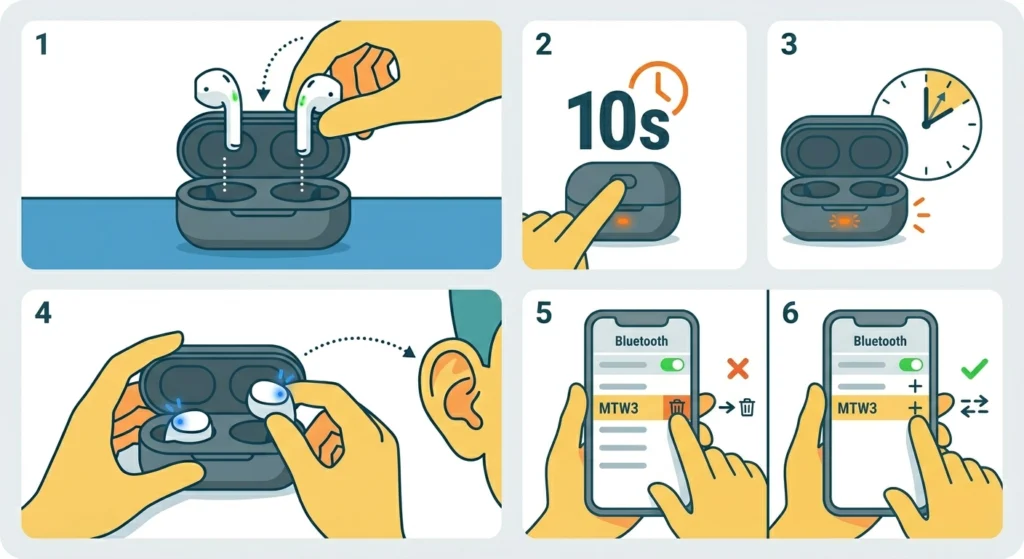
A factory reset clears firmware glitches, corrupted pairing data, and sync errors between the two earbuds. This is the most effective fix for cases where one side worked fine and then randomly stopped. After a reset, the earbuds re-establish their internal connection from scratch.
- Step 1: Place both earbuds in the charging case and leave the lid open.
- Step 2: Press and hold the button on the back of the case for about 10 seconds until the LED flashes. This initiates the reset.
- Step 3: Wait for the LED to stop flashing and return to a steady state.
- Step 4: Remove both earbuds. They should enter pairing mode automatically.
- Step 5: Go to the Bluetooth settings on the connected device, remove or forget the MTW3 from the paired devices list.
- Step 6: Re-pair the earbuds fresh by selecting them from the Bluetooth scan list.
Most users who experience one-earbud audio find that this step alone resolves the issue permanently.
Fix 4: Re-Pair the Earbuds to Your Device
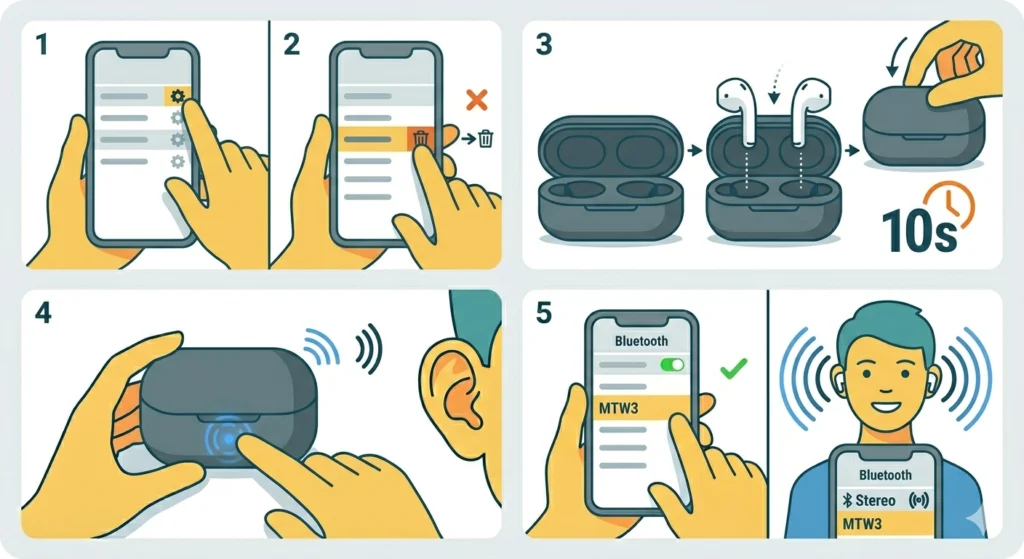
Sometimes the Bluetooth connection between the device and earbuds gets stuck in a mono state, where only one earbud registers as the active audio output. This is more common after software updates on phones or after switching between multiple connected devices. Re-pairing Bluetooth earbuds for stereo sound is a well-established fix for this exact kind of issue.
- Step 1: Open Bluetooth settings on the connected device (phone, tablet, or PC).
- Step 2: Find the Sennheiser MTW3 in the paired devices list and select ‘Forget’ or ‘Remove’.
- Step 3: Put both earbuds back in the case, close the lid, wait 10 seconds, then open the lid.
- Step 4: The earbuds should automatically enter pairing mode. If not, press and hold the case button briefly.
- Step 5: Scan for Bluetooth devices and pair the MTW3 as a fresh connection.
Fix 5: Check the Audio Balance Setting on Your Device
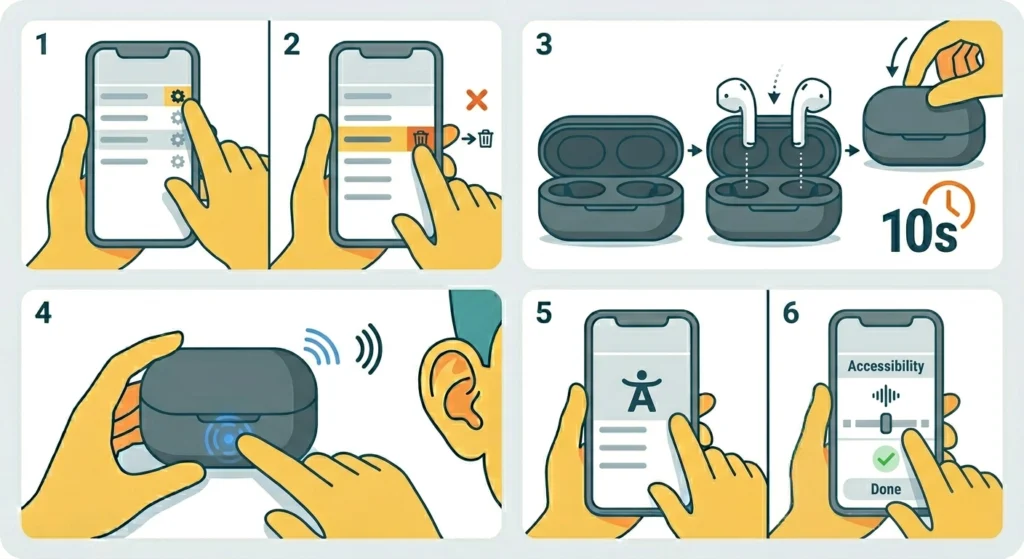
This one catches a lot of people off guard. If the audio balance on a phone or computer is accidentally set all the way to the left or right, it will appear as though one earbud has stopped working – but the earbuds themselves are fine. Always rule this out before assuming a hardware issue.
On Android, go to Settings, then Accessibility, then Audio and On-screen Text, and check the balance slider is centered. On iPhone, go to Settings, then Accessibility, then Audio and Visual, and make sure the balance slider is in the middle. On Windows 11, adjusting the audio output settings takes only a minute and can reveal if the stereo balance is the culprit.
Fix 6: Update Firmware via the Sennheiser Smart Control App
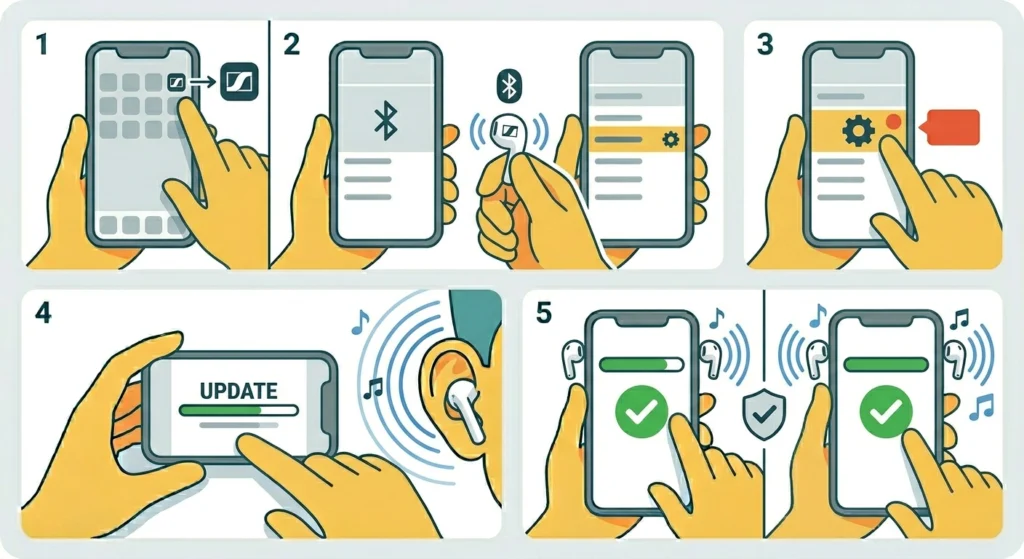
Sennheiser regularly releases firmware updates for the Momentum True Wireless 3 that address known audio bugs, including one-sided audio dropouts. Running outdated firmware is a common and overlooked reason why one earbud stops responding correctly.
- Step 1: Download and open the Sennheiser Smart Control app on a smartphone (available on iOS and Android).
- Step 2: Connect the MTW3 to the phone via Bluetooth.
- Step 3: In the app, navigate to Settings or the device info section and check for a firmware update notification.
- Step 4: If an update is available, keep both earbuds in the ears and follow the on-screen instructions to install.
- Step 5: Do not remove earbuds or close the app during the update. The process typically takes 3 to 5 minutes.
Pro-Tip: After any firmware update, it is a good idea to reset the earbuds (Fix 3) and re-pair them. Updates occasionally overwrite pairing data in a way that creates connection inconsistencies between the left and right earbuds.
Fix 7: Check Earbud Fit and Ear Tip Seal
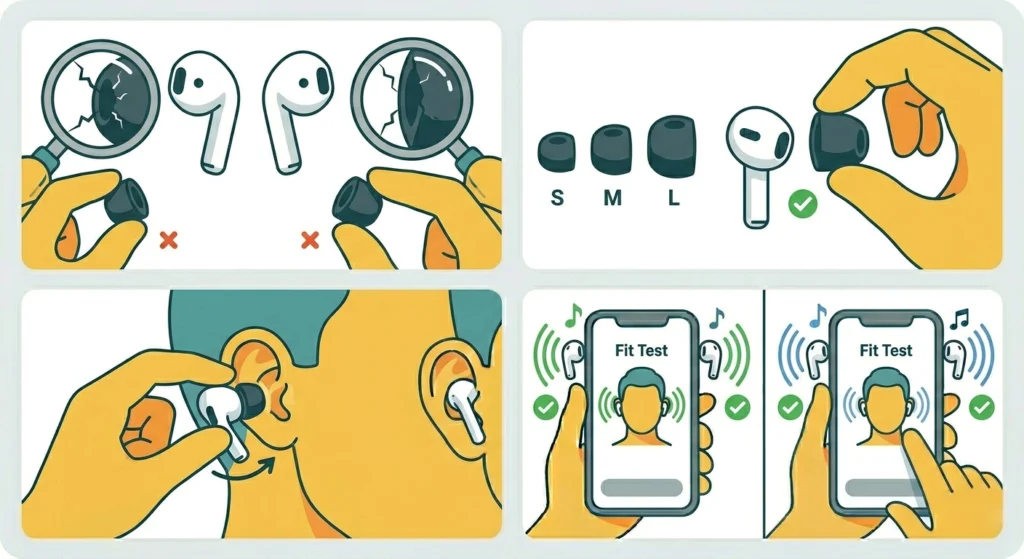
The MTW3 uses adaptive ANC and sound processing that can sometimes behave differently based on how well the ear tips seal inside the ear canal. A poor seal on one side can make that earbud sound much quieter or even appear to be silent in a noisy environment. This is worth checking, especially if the ‘not working’ side sounds faint rather than completely dead.
- Step 1: Remove the ear tips from both earbuds and inspect for cracks or stretching.
- Step 2: Try a different ear tip size on the affected earbud for a firmer seal.
- Step 3: Reinsert the earbud with a slight twist to lock it into position.
- Step 4: Run the Fit Test in the Smart Control app if available in the current firmware version.
Tips to Keep Both Earbuds Working Reliably
- Always store the earbuds in the case with the lid closed when not in use – this keeps both earbuds at matched charge levels.
- Clean the charging contacts every 2 to 4 weeks with a dry swab, especially if earbuds are used during workouts.
- Keep the Smart Control app updated alongside the firmware so compatibility issues are minimized.
- If switching between multiple Bluetooth devices (phone and laptop, for example), disconnect properly from one device before connecting to another – abrupt switches can trigger mono mode.
- Avoid letting the battery on either earbud drop to 0% regularly, as deep discharge cycles can cause one earbud to become less responsive over time.
Common Problems and Troubleshooting
Only the Right or Left Earbud Plays Audio After Reset
This usually means the two earbuds did not re-sync with each other properly after the reset. Place both back in the case, close the lid for 30 seconds, then open and remove together. They should pair as a stereo pair automatically. If the issue persists on a Windows PC, checking how audio input devices are managed can help rule out a software-side conflict.
One Earbud Keeps Disconnecting While the Other Stays Connected
This is often a battery or charging contact issue. One earbud is running out of charge faster. Clean the contacts thoroughly (Fix 2), let both charge to 100%, and test again. If one still drains faster, the battery in that earbud may be degraded and a warranty or service claim may be appropriate.
One Side Has Very Low Volume but Is Not Silent
Check the audio balance on the connected device first. Also check if Transparency Mode or ANC settings in the Smart Control app are applying different levels to each side – a bug in some older firmware versions caused exactly this behavior. Updating the firmware (Fix 6) typically resolves it.
Earbuds Work Fine Individually but Not Together in Stereo
This is a classic pairing sync issue. Do a full reset (Fix 3) followed by a fresh re-pair (Fix 4). Make sure both earbuds are removed from the case at the same time during pairing – removing them one at a time can cause one to register as the primary and the other to fail to sync.
Frequently Asked Questions
Why is only one side of my Sennheiser Momentum True Wireless 3 working?
The most common reasons are a firmware glitch, a Bluetooth pairing error that puts the earbuds in mono mode, dirty charging contacts causing unequal battery levels, or an audio balance setting on the connected device panned to one side. Most of these are fixable in under 5 minutes with the steps above.
How do I reset the Sennheiser Momentum True Wireless 3?
Place both earbuds in the open charging case and press and hold the button on the back of the case for approximately 10 seconds until the LED flashes. Wait for it to settle, then remove the earbuds and re-pair them to the connected device from scratch.
Can a firmware update cause one earbud to stop working?
Yes, in rare cases a firmware update can disrupt the internal sync between the left and right earbud. The fix is to reset the earbuds after updating and re-pair them fresh. This clears any corrupted state left over from the update process.
My left earbud is not working – is it a hardware defect?
Not necessarily. Software and connectivity issues are far more likely than hardware failure. Work through all the software-based fixes first – reset, re-pair, firmware update, and contact cleaning. If none of these work after thorough testing, then a hardware issue or battery defect is possible and a Sennheiser warranty claim is worth pursuing.
How do I check if the audio balance is the problem?
On Android, check under Settings, Accessibility, Audio and On-screen Text. On iPhone, look in Settings, Accessibility, Audio and Visual. On Windows, go to Sound settings and check the stereo balance under the output device properties. The slider should be centered for equal audio on both sides.
Do I need the Smart Control app to fix one-sided audio?
Not always. Many fixes like resetting, re-pairing, and cleaning can be done without the app. However, the app is necessary for firmware updates, which can fix bugs causing one-sided audio that no other method resolves. It is recommended to have the app installed for ongoing maintenance.
Will resetting the earbuds delete my settings?
Yes. A factory reset will clear all custom EQ settings, ANC preferences, and paired device history stored in the earbuds. These will need to be reconfigured in the Smart Control app after the reset and re-pairing process.
How long should I charge the earbuds before testing after a reset?
Ideally, place both earbuds in the case for at least 15 to 20 minutes before testing post-reset. This ensures both have enough charge to stay active during the pairing sequence. Low battery on one earbud during pairing is a common reason for incomplete stereo connection.
Can I use only one earbud while the other is being fixed?
Yes. The Sennheiser Momentum True Wireless 3 supports single-earbud use. Either the left or right can be used independently. Simply take one out of the case and connect as normal – the device will pair with whichever is available.
What if none of the fixes work?
If all software-based solutions have been tried and one earbud still does not work, the issue is likely hardware-related – usually a failed speaker driver or a degraded battery cell. In that case, contact Sennheiser Support directly. The MTW3 typically comes with a 2-year warranty, so a replacement or repair may be covered at no cost.