
Nothing Ear (a) noise cancelling not working is a common issue that usually comes down to a setting, a firmware version, or a loose ear tip seal, and most people can fix it in under ten minutes without any tools.
Key Takeaways
- ANC issues on Nothing Ear (a) are most often caused by outdated firmware, a disabled Noise Control mode, or a poor ear tip seal.
- The Nothing X app controls all ANC settings, so it needs to be installed and updated before troubleshooting anything else.
- A proper ear tip fit matters more than most people realize, since even a small air gap can cancel out the ANC effect.
- Resetting the earbuds and re-pairing the Bluetooth connection solves the problem in most stubborn cases.
- Windows 11 users sometimes need to adjust audio output settings separately for ANC to register correctly on calls and media.
Fix 1: Update the Nothing X App and Firmware
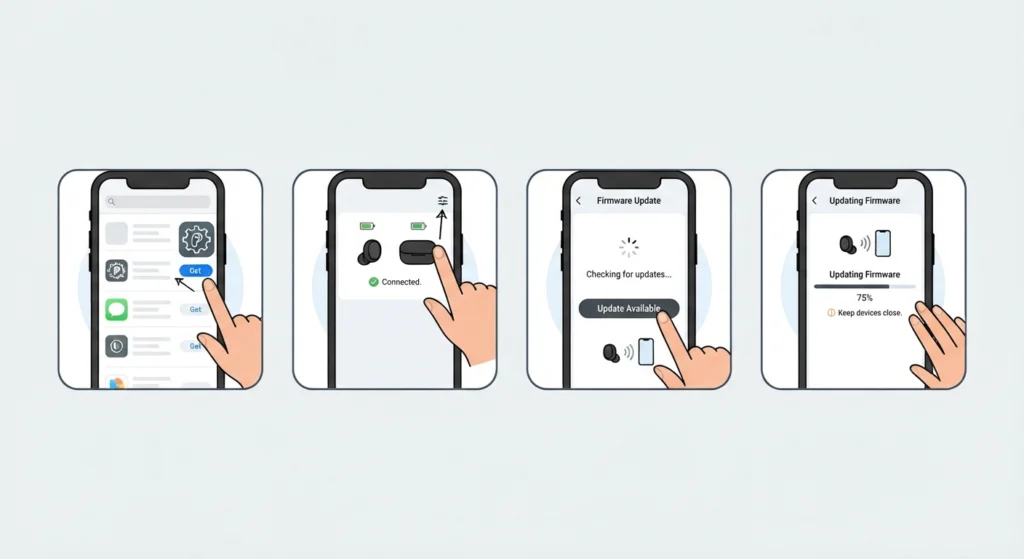
An outdated version of the Nothing X app is one of the most frequent reasons ANC stops responding. Nothing regularly ships firmware updates that patch noise cancellation performance, so skipping an update often means missing the exact fix needed.
- Step 1: Open the Google Play Store or Apple App Store and search for the Nothing X app.
- Step 2: Update the app if a new version is available, then open it.
- Step 3: Place the Nothing Ear (a) buds in the case, keep the lid open, and hold them near the phone.
- Step 4: Tap the firmware update banner if one appears and let the update finish without disconnecting the buds.
- Step 5: Restart the earbuds by placing them back in the case for ten seconds, then taking them out again.
Pro-Tip: Firmware updates can take a few minutes and should never be interrupted. Keep the case lid open and the phone nearby, since a dropped connection mid-update can force the whole process to restart.
Fix 2: Turn On ANC in Noise Control Settings
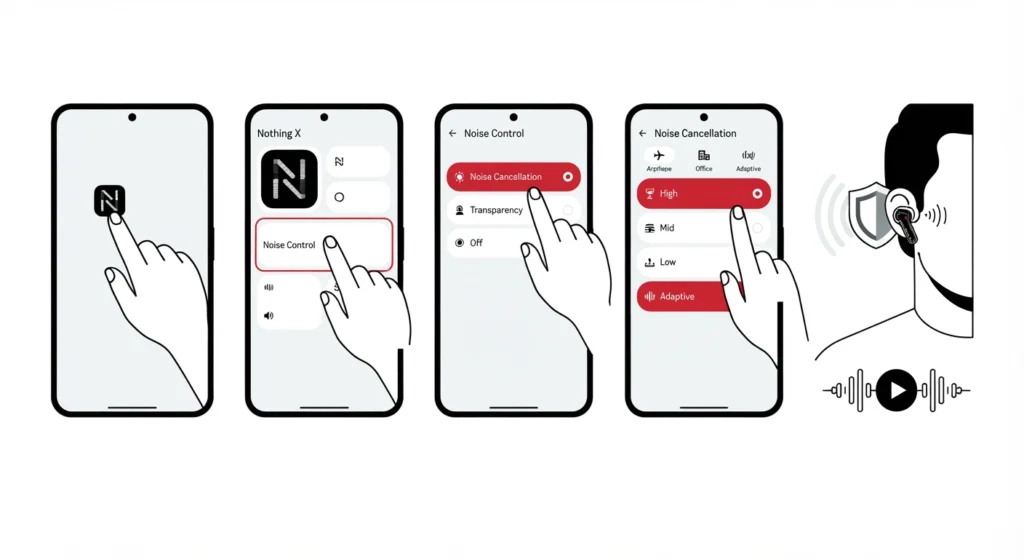
Sometimes ANC simply is not switched on, especially after a factory reset or a fresh pairing. The Nothing X app has a dedicated Noise Control section that handles this.
- Step 1: Open the Nothing X app with the earbuds connected.
- Step 2: Tap on Noise Control from the main screen.
- Step 3: Select Noise Cancellation, then choose High, Mid, Low, or Adaptive depending on the environment.
- Step 4: Confirm the mode is highlighted as active and not set to Off or Transparency by mistake.
- Step 5: Play audio for a few seconds and listen for the pressure change in the ears, which confirms ANC has engaged.
Fix 3: Check the Ear Tip Fit and Seal
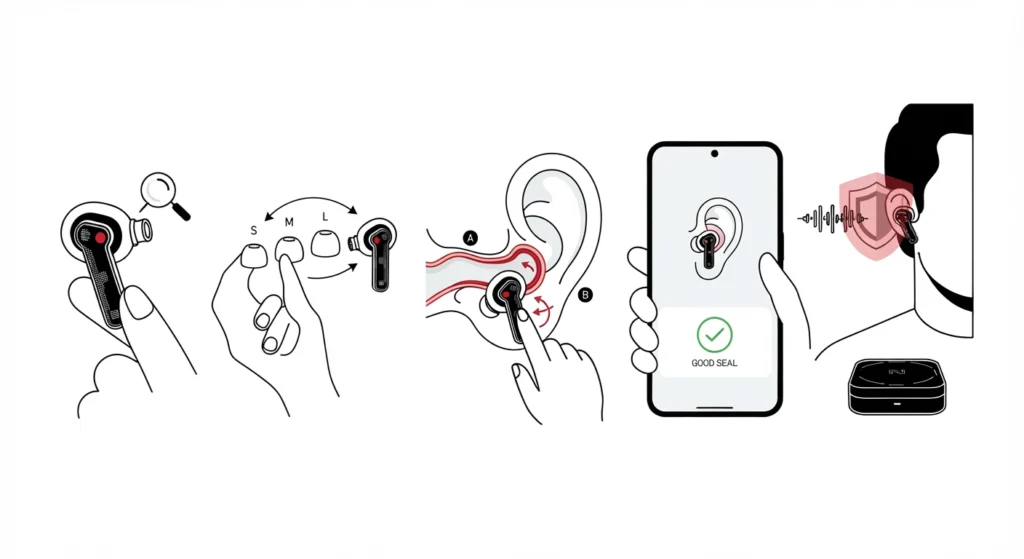
Noise cancellation relies on a sealed environment inside the ear canal. Even a small gap between the ear tip and the ear lets outside noise leak in, which makes ANC feel weak or completely inactive.
- Step 1: Remove the current ear tips and check for wax buildup or damage.
- Step 2: Try the medium size first, then test small and large sizes for a snug fit.
- Step 3: Insert the bud gently and twist slightly until a seal is felt, not just placed loosely in the ear.
- Step 4: Run the in-app fit test if the Nothing X app offers one, since it measures seal quality directly.
- Step 5: Repeat the ANC check from Fix 2 after switching tip sizes.
Pro-Tip: A fit test inside the app is more reliable than judging by feel alone. Most people assume their ear tips fit correctly, but a slightly loose seal is the single biggest reason ANC underperforms on true wireless earbuds.
Fix 4: Reset In-Ear Detection
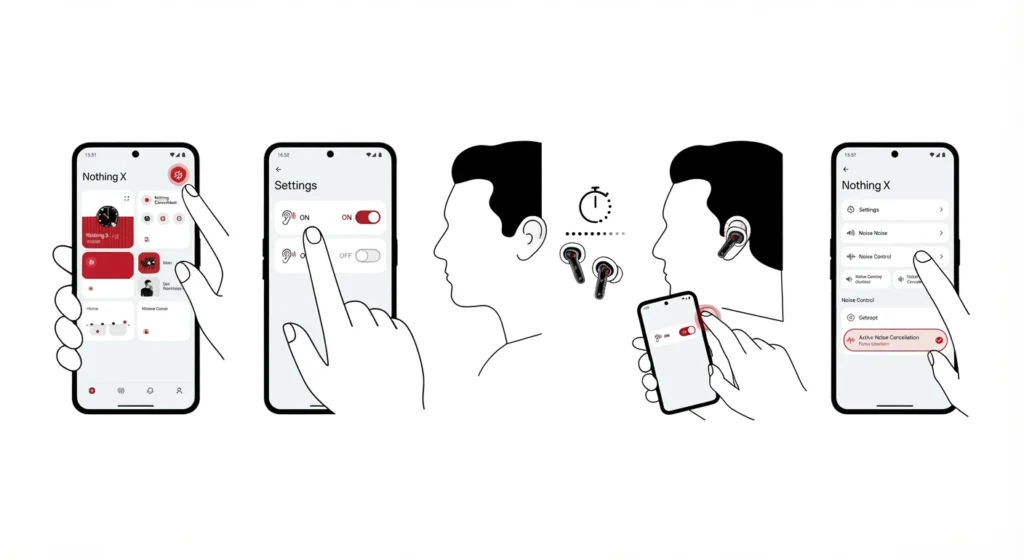
In-ear detection tells the earbuds when they are actually being worn, and a glitch here can quietly disable ANC even though the app shows it as on.
- Step 1: Open the Nothing X app and go to the settings icon.
- Step 2: Find In-Ear Detection and toggle it off.
- Step 3: Remove both earbuds from the ears for ten seconds.
- Step 4: Put the earbuds back in and toggle In-Ear Detection back on.
- Step 5: Check the Noise Control menu again to confirm ANC is active.
Fix 5: Reset the Earbuds and Re-Pair the Bluetooth Connection
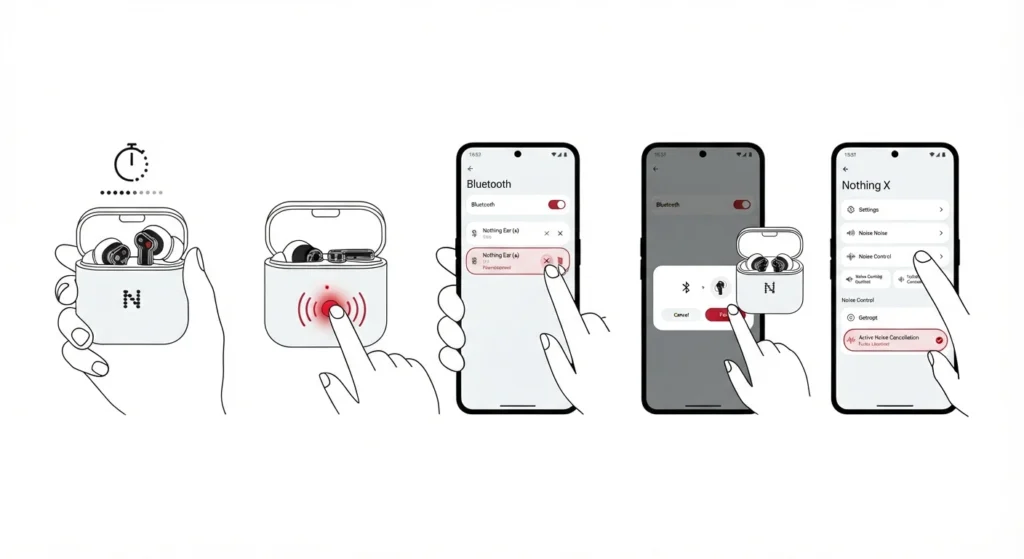
When none of the settings changes help, a full reset clears any corrupted connection data that could be blocking ANC from functioning properly. This is also the point where a clean audio settings reset on the connected device can rule out a system-level conflict.
- Step 1: Place both earbuds in the case and close the lid for fifteen seconds.
- Step 2: Open the lid, then press and hold the button on the case for around ten seconds until the LED flashes.
- Step 3: Forget the Nothing Ear (a) device from the phone’s Bluetooth settings menu.
- Step 4: Reopen the case near the phone and follow the on-screen pairing prompt to re-pair the earbuds for proper stereo sound.
- Step 5: Open the Nothing X app, confirm the connection, and re-enable ANC from Noise Control.
Fix 6: Adjust Audio Output Settings on Windows 11
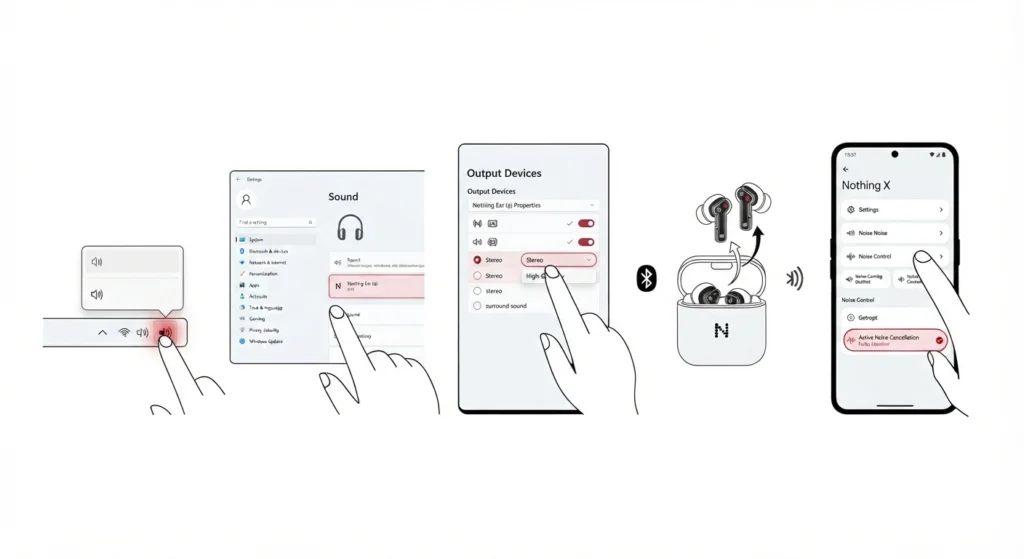
Windows 11 sometimes routes audio through a generic Bluetooth profile that does not fully support ANC controls from the Nothing X app. Checking the output configuration on the PC side often resolves this without touching the earbuds at all.
- Step 1: Right-click the sound icon in the Windows 11 taskbar.
- Step 2: Select Sound Settings and confirm Nothing Ear (a) is set as the default output device.
- Step 3: Follow the steps for adjusting audio output settings on Windows 11 to make sure the correct audio format is selected.
- Step 4: Reconnect the earbuds and reopen the Nothing X app to check ANC status.
Tips to Keep Noise Cancellation Working Properly
- Keep the earbuds charged above twenty percent, since low battery can silently disable ANC to save power.
- Clean the mesh vents on the earbuds regularly, since dust and lint can interfere with the microphones ANC relies on.
- Update the Nothing X app whenever a new version is released, even if nothing seems broken.
- Replace ear tips every few months, since worn silicone loses its ability to form a tight seal.
- Avoid using third-party cases or tips not designed for the Nothing Ear (a), since they can affect the fit and airflow needed for ANC.
Common Problems and Troubleshooting
ANC Works on One Earbud But Not the Other
This usually points to a seal issue or a firmware mismatch between the two buds. Reseating the ear tip and running the firmware update from Fix 1 resolves this in most cases.
ANC Turns Off By Itself After a Few Minutes
This is often linked to in-ear detection misreading the fit. Following the reset steps in Fix 4 typically stops the ANC from disengaging unexpectedly.
Crackling or Static Sound With ANC Enabled
Static during ANC usually signals a Bluetooth interference issue rather than a hardware fault. Moving away from other wireless devices and re-pairing the connection, as shown in Fix 5, generally clears this up.
Nothing X App Shows ANC as On But No Effect Is Heard
This mismatch is commonly caused by an app that needs updating or a connection that has partially dropped. Restarting both the app and the earbuds, then rechecking Noise Control, usually corrects the display.
Frequently Asked Questions
Why is Nothing Ear (a) ANC not working after a firmware update?
An interrupted update can leave the firmware in an incomplete state. Placing the buds back in the case for a minute and letting the update finish fully usually fixes this.
Does Nothing Ear (a) need the Nothing X app for ANC to work?
Yes, the Nothing X app is required to enable, adjust, or troubleshoot ANC settings, since there is no way to control Noise Cancellation modes from the earbuds alone.
How much noise cancellation does Nothing Ear (a) actually support?
Nothing Ear (a) supports Active Noise Cancellation with High, Mid, Low, and Adaptive modes, and performance depends heavily on ear tip fit and seal quality.
Why does ANC feel weaker on Nothing Ear (a) compared to before?
A weaker ANC effect is often caused by worn-out ear tips, earwax buildup on the mesh, or a firmware setting that reverted after a reset. Checking the fit and updating the app usually restores the original strength.
Can a factory reset fix Nothing Ear (a) noise cancelling issues?
A factory reset clears corrupted pairing data and often resolves ANC problems that persist after basic troubleshooting, though it should be treated as a later step rather than the first one.
Is it normal for Nothing Ear (a) ANC to sound different indoors versus outdoors?
Yes, ANC performance naturally varies with the type of surrounding noise, and low, steady sounds like fans or engines are cancelled more effectively than sudden or high-pitched sounds.
Why does one Nothing Ear (a) earbud have stronger ANC than the other?
This is typically caused by an uneven ear tip seal between the two ears rather than a hardware defect, so testing different tip sizes on each side usually balances the effect.
Does using Nothing Ear (a) on Windows 11 affect ANC performance?
ANC itself runs on the earbuds and is not controlled by Windows, but incorrect audio output settings on the PC can make it seem like ANC is not engaging during calls or playback.
How often should Nothing Ear (a) firmware be updated for ANC to work well?
Checking for updates once a month through the Nothing X app is enough to keep ANC performance and bug fixes current.
What should be done if none of the fixes restore ANC on Nothing Ear (a)?
If ANC still does not work after updating firmware, checking the fit, and resetting the connection, the earbuds may have a hardware fault and should be reviewed through official Nothing support channels.