
JBL Tune Flex earbuds not charging is a common issue that usually comes down to a dirty contact point, a faulty cable, or a case that needs a reset. This guide walks through the exact fixes that work, in the order that solves the problem fastest for most users.
Key Takeaways
- Dirty charging contacts are the most common cause of charging failure
- A worn or low-quality USB cable often blocks proper power flow
- Resetting the charging case clears most software-related charging glitches
- Testing with a different power source rules out adapter or port issues
- Most fixes take less than five minutes and require no tools
Step-by-Step Guide to Fix JBL Tune Flex Earbuds Not Charging
Method 1: Clean the Charging Contacts
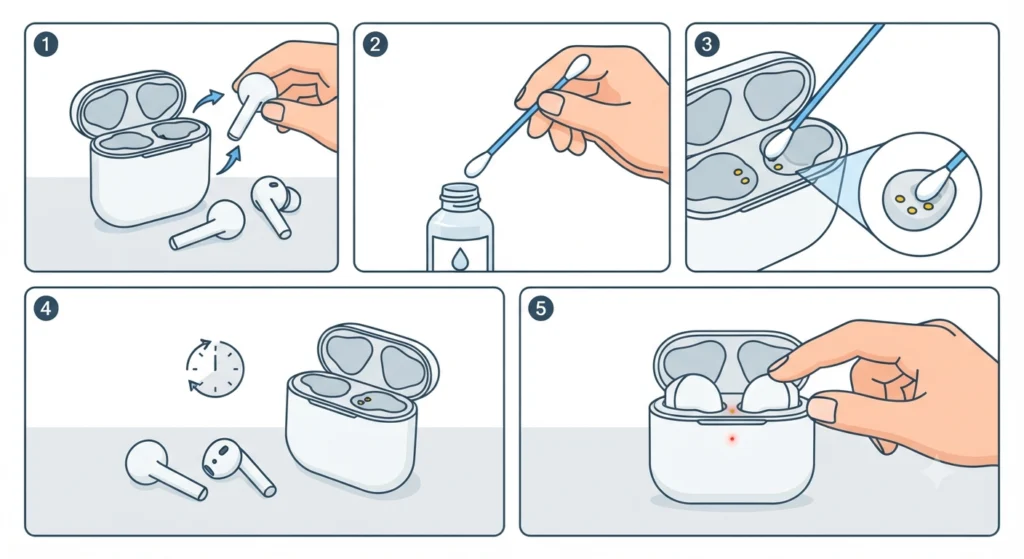
Dust, earwax, or pocket lint sitting on the metal contact points inside the case is the number one reason earbuds stop charging. This works best when checked before trying anything else, since it takes almost no time.
- Step 1: Open the charging case and remove the earbuds
- Step 2: Dip a cotton swab lightly in isopropyl alcohol
- Step 3: Gently wipe the gold contact pins on both the earbuds and the case
- Step 4: Let the contacts air dry for two to three minutes
- Step 5: Place the earbuds back in the case and check for the charging light
Pro-Tip: Never use water or wet wipes on the contact points. Moisture left inside the case can cause corrosion, which turns a simple fix into a permanent charging failure.
Method 2: Check the Charging Cable and Adapter
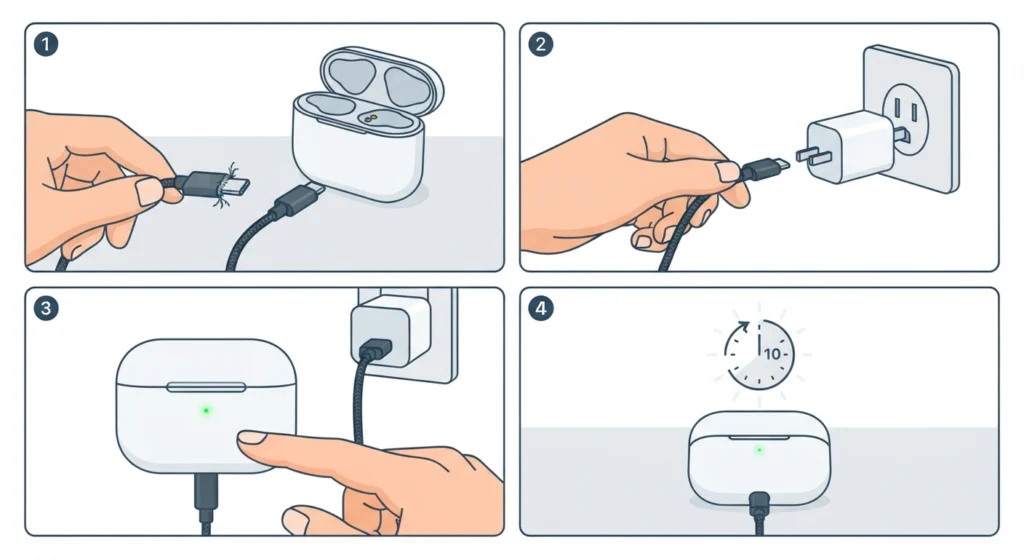
A damaged or low-power cable is the second most common culprit. Most people find that a cable used for years of daily charging eventually frays internally, even if it looks fine on the outside.
- Step 1: Swap the current USB cable for a known working one
- Step 2: Connect the case to a wall adapter instead of a laptop or power bank
- Step 3: Watch for the LED indicator on the case to confirm a connection
- Step 4: Leave the case charging for ten minutes before checking again
Method 3: Reset the Charging Case
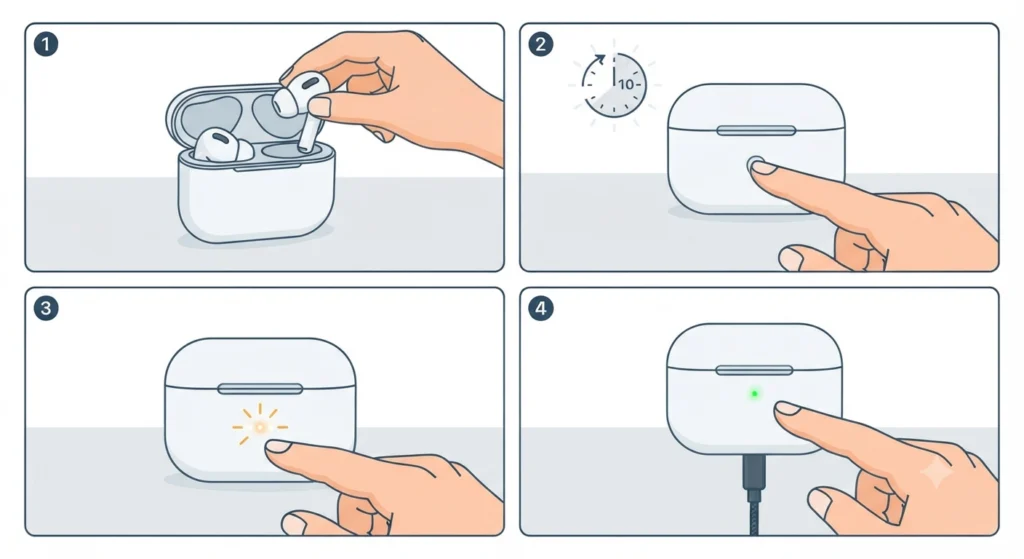
A reset clears any internal glitch that blocks the case from recognizing a power source. This step solves the issue in a large number of cases where cleaning and cable swaps do not help.
- Step 1: Place both earbuds inside the case and close the lid
- Step 2: Press and hold the button on the case for ten seconds
- Step 3: Release the button once the LED flashes three times
- Step 4: Reconnect the case to power and check the charging status
Once the earbuds power back on correctly, pairing them again is straightforward by following this guide on re-pairing Bluetooth earbuds for stereo sound.
Method 4: Try a Different USB Port or Power Source
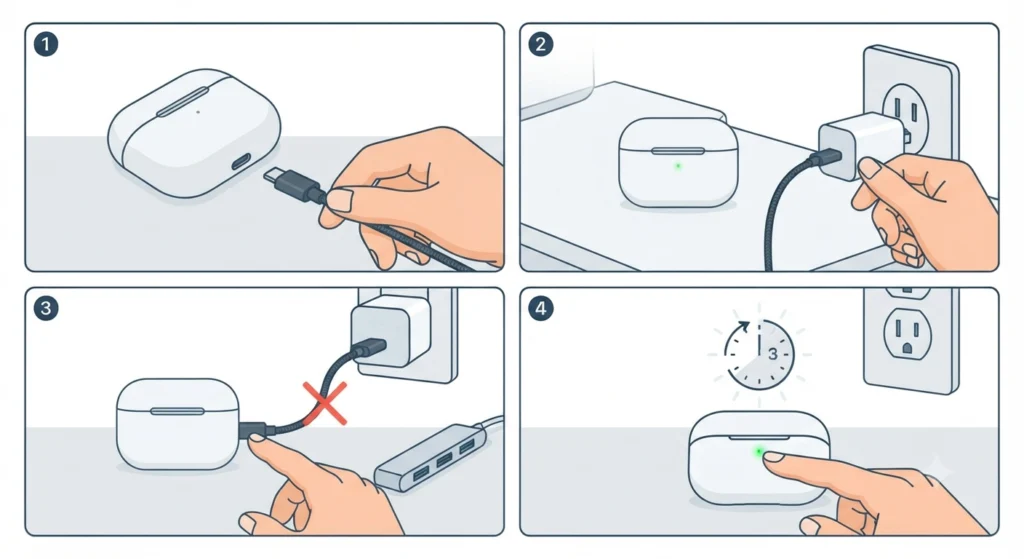
Some ports simply do not supply enough current to charge the case, especially older USB 2.0 ports on desktop towers or budget power strips.
- Step 1: Unplug the case from the current power source
- Step 2: Plug it into a different wall outlet or USB port
- Step 3: Avoid USB hubs, since these often reduce power output
- Step 4: Check the LED indicator after two to three minutes
Pro-Tip: A wall adapter rated at 5V/1A or higher charges the case far more reliably than a laptop USB port, which often limits power to save battery.
Tips to Keep JBL Tune Flex Earbuds Charging Properly
- Store the case in a dry area away from direct sunlight and heat
- Wipe the contact points once a week if used daily
- Avoid overcharging the case overnight on a regular basis
- Use the original cable when possible, since third-party cables vary in quality
- Keep the case closed when not charging to reduce dust buildup
Common Charging Problems and Quick Fixes
- Case shows no light at all – test with a different cable and outlet first
- One earbud charges but the other does not – clean that specific earbud’s contact pins
- Case charges but earbuds do not – reseat the earbuds firmly until a click is felt
- LED blinks red constantly – this usually points to a battery that needs replacement
- Charging works only at certain angles – contact pins are likely misaligned or dirty
If the earbuds start charging again but sound or connection issues appear afterward, checking the device’s audio output settings or audio input device settings on Windows 11 often resolves the remaining problem.
Frequently Asked Questions
Why are the JBL Tune Flex earbuds not charging at all?
The most common reasons are dirty charging contacts, a faulty cable, or a case that needs a manual reset. Working through these three checks resolves the issue in the majority of cases.
How long does it take to fully charge the JBL Tune Flex case?
The charging case typically takes around two hours for a full charge when connected to a standard 5V/1A wall adapter.
Can a damaged cable stop the earbuds from charging?
Yes. Internal wire damage is not always visible from the outside, so testing with a different cable is one of the fastest ways to confirm this as the cause.
Is it safe to clean the charging contacts with alcohol?
Isopropyl alcohol on a dry cotton swab is safe and is the recommended method, since it removes buildup without leaving moisture behind.
Why does only one earbud charge in the case?
This usually happens when the contact pins on one earbud or one side of the case are dirty or slightly bent out of alignment.
Does resetting the case delete any saved settings?
No. Resetting the case only clears the internal charging glitch and does not remove Bluetooth pairing history or sound settings.
Why does the LED light blink red instead of turning solid?
A blinking red light generally indicates low battery health inside the case, which may require professional battery service if the issue persists after a reset.
Can a power bank charge the JBL Tune Flex case properly?
Most power banks work fine as long as they output at least 5V/1A. Low-output power banks may charge the case slowly or not at all.
What should be checked first before assuming the earbuds are broken?
Cleaning the contact points and testing with a different cable and power source should always be checked first, since these two steps solve most charging problems.
How often should the charging contacts be cleaned?
Once a week is enough for daily users. Cleaning more frequently is unnecessary unless the earbuds are used in dusty or humid environments.