
Key Takeaways
- JBL Live 770NC not connecting to Bluetooth usually comes from a stuck pairing list, outdated firmware, or too many linked devices.
- Restarting Bluetooth on both the headphones and the source device solves most connection failures within minutes.
- A factory reset clears corrupted pairing data and is often the fastest permanent fix.
- Keeping the JBL Headphones app updated prevents repeat Bluetooth issues over time.
- Windows 11 users may need to adjust audio settings separately after reconnecting.
JBL Live 770NC not connecting to Bluetooth is one of the most common complaints among owners of this headphone model, and it usually shows up right when the headphones are needed the most. This problem tends to happen after a software update, a battery drain, or simply after pairing with too many devices over time. The good news is that this issue is almost always fixable at home, without needing a repair shop or replacement unit. Below is a direct, no-fluff guide that walks through the exact fixes that work, starting with the simplest one first.
Method 1: Restart Bluetooth on the Headphones and the Connected Device
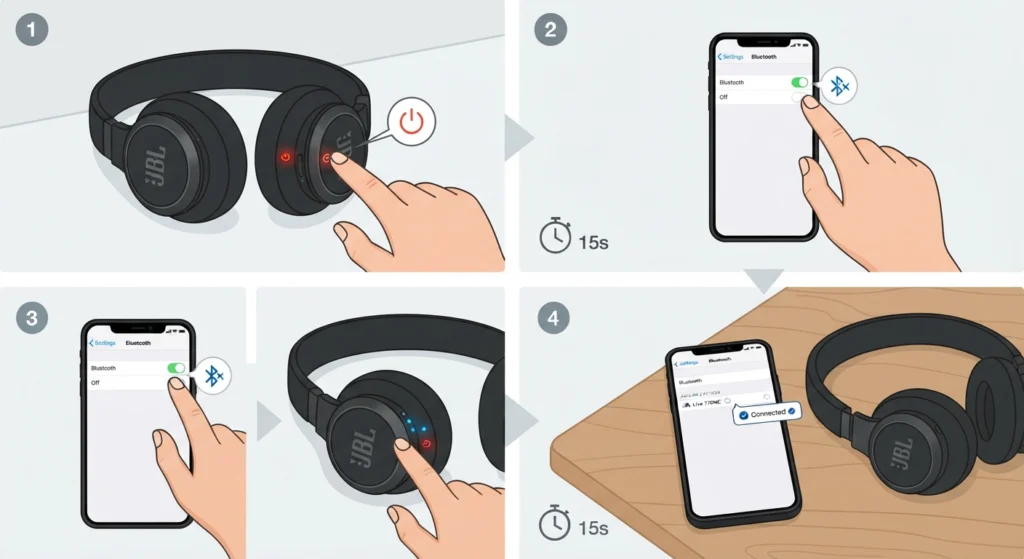
This works best when the connection issue is temporary rather than a deeper software conflict. A quick restart clears short-term glitches that build up after hours of continuous use.
- Step 1: Power off the JBL Live 770NC completely using the power button, not just placing it on standby.
- Step 2: Turn off Bluetooth on the phone, laptop, or PC being used, then wait about fifteen seconds.
- Step 3: Turn Bluetooth back on the source device first, then power the headphones back on.
- Step 4: Allow ten to fifteen seconds for the devices to detect each other before attempting to connect manually.
Method 2: Forget the Device and Re-Pair From Scratch
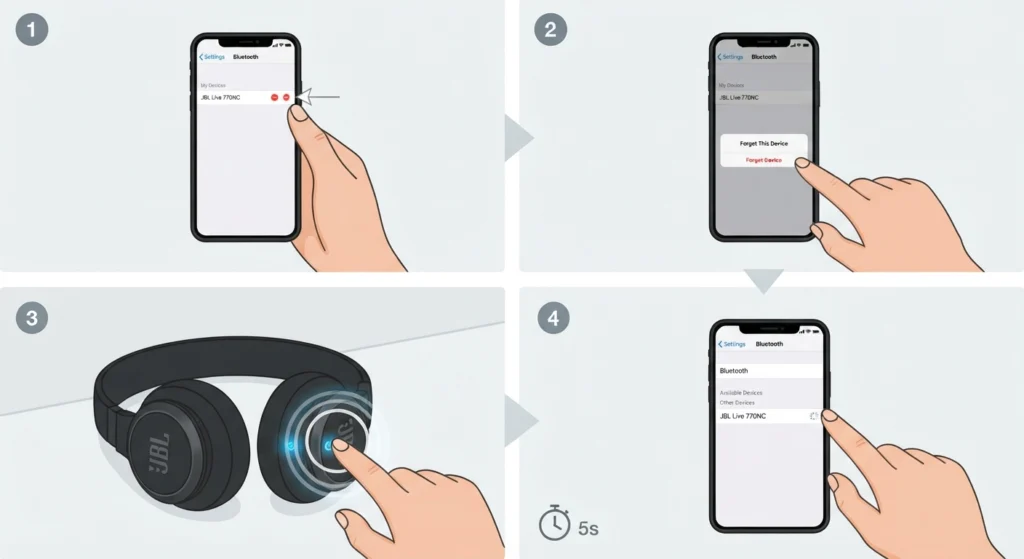
Most people find that a stale pairing profile is the actual culprit, especially if the headphones connected fine before and suddenly stopped. Removing the old profile forces both devices to build a fresh connection.
- Step 1: Open Bluetooth settings on the connected device and locate JBL Live 770NC in the paired devices list.
- Step 2: Select the option to forget or remove the device completely, not just disconnect it.
- Step 3: Press and hold the power button on the headphones for about five seconds until the LED flashes blue and white, which signals pairing mode.
- Step 4: Search for new Bluetooth devices on the source device and select JBL Live 770NC once it appears.
Windows 11 users dealing with repeated dropouts after re-pairing may also benefit from checking how to re-pair Bluetooth earbuds for stable stereo sound, since stereo mode sometimes reverts to mono after a fresh pairing attempt.
Method 3: Factory Reset the JBL Live 770NC
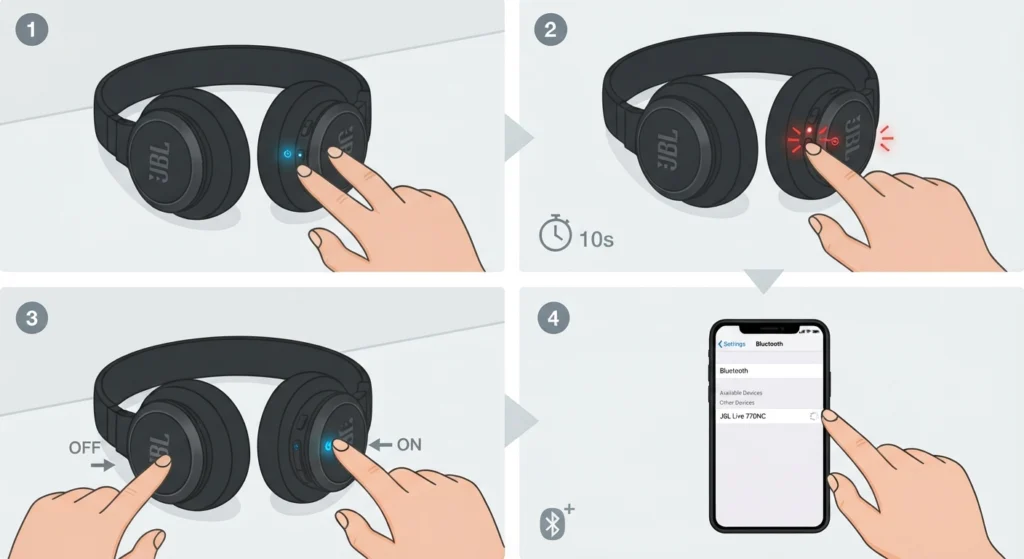
A factory reset is the fix that resolves this issue permanently in most cases, since it clears every stored connection and any corrupted Bluetooth data sitting in the headphone memory.
- Step 1: With the headphones powered on, press and hold both the volume down button and the power button together.
- Step 2: Continue holding for about ten seconds until the LED indicator flashes red three times.
- Step 3: Release both buttons and power the headphones off, then back on again.
- Step 4: Re-pair the headphones as a brand-new device following the steps in Method 2.
Pro-Tip: A factory reset also clears the multipoint device list, so any phone or laptop connected previously will need to be paired again. This step alone resolves a large share of stubborn Bluetooth connection failures on this model.
Method 4: Update Firmware Through the JBL Headphones App
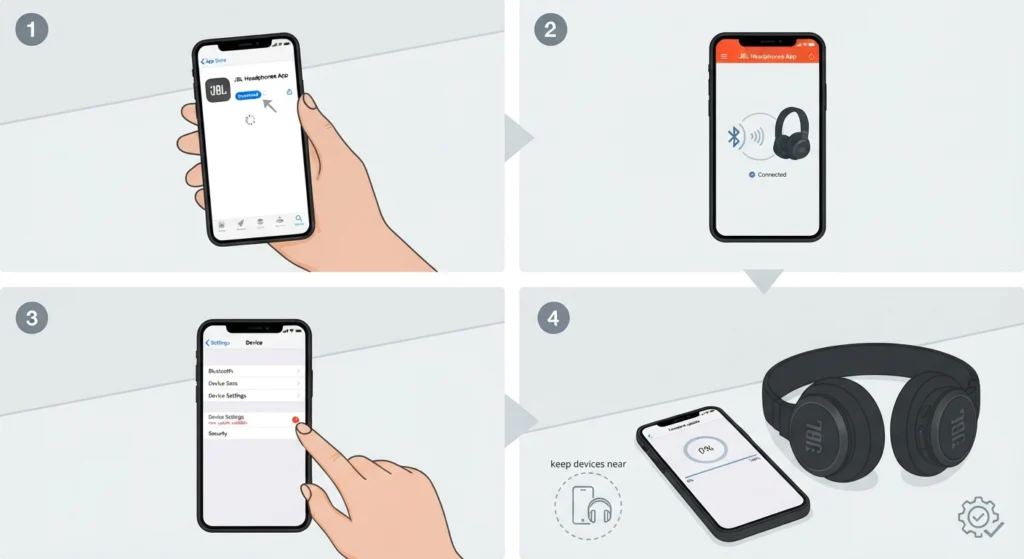
Outdated firmware is a quiet cause of Bluetooth issues that many owners overlook. JBL regularly ships updates that patch connection bugs, so skipping this step often means repeating the same problem weeks later.
- Step 1: Download and open the JBL Headphones app on a smartphone.
- Step 2: Connect the JBL Live 770NC to the app using Bluetooth.
- Step 3: Navigate to the device settings section and check for available firmware updates.
- Step 4: Install any pending update and keep the headphones near the phone until the process finishes completely.
Method 5: Remove Excess Paired Devices
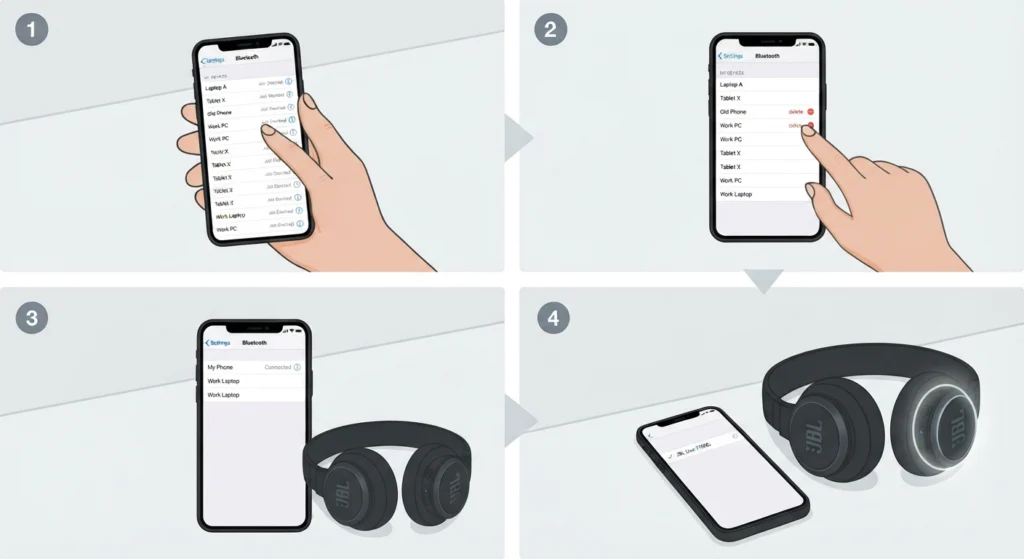
The JBL Live 770NC stores a limited number of paired devices, and once that list fills up, new connections can fail silently. This is common for people who switch between a work laptop, personal phone, and tablet regularly.
- Step 1: Access Bluetooth settings on any device currently linked to the headphones.
- Step 2: Remove devices that are no longer in regular use, keeping only two or three active connections.
- Step 3: Reconnect the headphones to the priority device first.
On Windows 11 machines, cleaning up the paired list is easier through managing audio input devices, which also helps when the microphone stops registering after reconnecting.
Tips to Keep JBL Live 770NC Connected Without Issues
- Keep the headphones within three meters of the source device, especially in rooms with thick walls or multiple electronics running at once.
- Avoid placing the headphones near routers or microwaves while connecting, since Bluetooth and Wi-Fi signals sometimes overlap and cause interference.
- Charge the headphones fully before attempting a factory reset, since low battery can interrupt the reset sequence midway.
- Turn off multipoint connection when only one device is being used, which reduces the chance of accidental disconnects.
Common Problems When Fixing Bluetooth Connection Issues
Headphones Show Up But Fail to Connect
This usually points to a corrupted pairing profile rather than a hardware fault. Forgetting the device and re-pairing, as covered in Method 2, resolves this in nearly every case.
Connection Drops a Few Seconds After Pairing
This pattern often relates to too many active Bluetooth connections nearby or outdated firmware. Running Method 4 and Method 5 together usually clears it.
Audio Plays on the Wrong Output Device on Windows 11
Sometimes the headphones connect successfully, but the computer keeps routing sound elsewhere. This is a settings issue rather than a Bluetooth failure, and it gets resolved by adjusting audio output settings directly in Windows 11.
Frequently Asked Questions
Why is JBL Live 770NC not connecting to Bluetooth?
This typically happens due to a corrupted pairing profile, outdated firmware, low battery, or too many devices stored in the headphone memory. Working through the methods above in order resolves the issue for most users.
How long should the reset button be held on JBL Live 770NC?
The volume down and power buttons should be held together for about ten seconds until the LED flashes red three times, confirming a successful reset.
How to put JBL Live 770NC into pairing mode?
Press and hold the power button for about five seconds until the LED flashes blue and white. This signals that the headphones are discoverable and ready to pair.
Does a factory reset delete all paired devices?
Yes, a factory reset clears every stored Bluetooth connection, including multipoint pairings. Each device needs to be paired again afterward.
How many devices can JBL Live 770NC connect to at once?
The headphones support multipoint connection with up to two active devices simultaneously, though the internal memory can store several more paired profiles.
Why do JBL Live 770NC headphones keep disconnecting after pairing?
Frequent disconnects usually point to interference from other wireless devices, an outdated firmware version, or a low battery level affecting Bluetooth stability.
Is updating firmware necessary to fix Bluetooth issues?
Firmware updates often include patches specifically for Bluetooth stability, so skipping updates can cause the same connection problem to return repeatedly.
Can too many paired devices cause connection failures?
Yes, once the stored device list fills up, new pairing attempts can fail or behave inconsistently. Removing unused devices usually fixes this.
Why does the microphone stop working after reconnecting on Windows 11?
This is a separate issue from Bluetooth pairing and relates to how Windows 11 detects audio input devices after a new connection is established.
Is it safe to reset JBL Live 770NC frequently?
Yes, resetting the headphones does not damage the hardware. It only clears stored software data, making it a safe first step whenever Bluetooth issues appear.