
Jabra Elite 4 noise cancelling not working can turn a peaceful commute into a noisy headache. Most of the time, the fix takes only a few minutes once the right cause is found. This guide walks through the exact steps that get Active Noise Cancellation (ANC) back to normal on the Jabra Elite 4.
Quick Summary Table
- Common cause: ANC mode accidentally switched off or set to HearThrough
- Common cause: Loose ear tip seal blocking proper noise detection
- Common cause: Outdated firmware or a glitch in the Jabra Sound+ app
- Common cause: ANC automatically disabled during an active phone call
- Fastest fix: Cycle the ANC button and check settings inside Jabra Sound+
- Time needed: Usually 5 to 15 minutes
- Tools needed: Jabra Sound+ app, a charged earbud case, a smartphone or PC
Method 1: Check and Cycle the ANC Mode
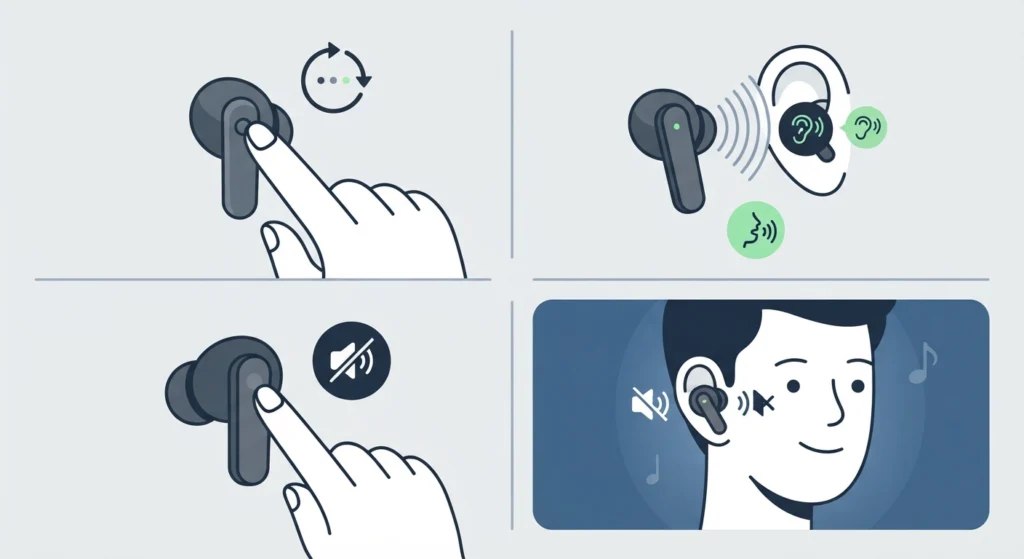
Before assuming something is broken, confirm the earbuds are actually set to ANC mode. The Elite 4 cycles between three modes – ANC, HearThrough, and Off – and it is easy to bump the button into the wrong setting without noticing.
- Step 1: Press and hold the left earbud button briefly to cycle through the sound modes.
- Step 2: Listen for the voice prompt confirming which mode is active.
- Step 3: Stop cycling once the prompt says ‘Active Noise Cancellation on’.
- Step 4: Play music or a podcast for 30 seconds to confirm outside noise is noticeably reduced.
This works best when both earbuds are seated correctly in the ears, since the left earbud usually controls the ANC toggle on the Elite 4.
Method 2: Fix the Ear Tip Seal
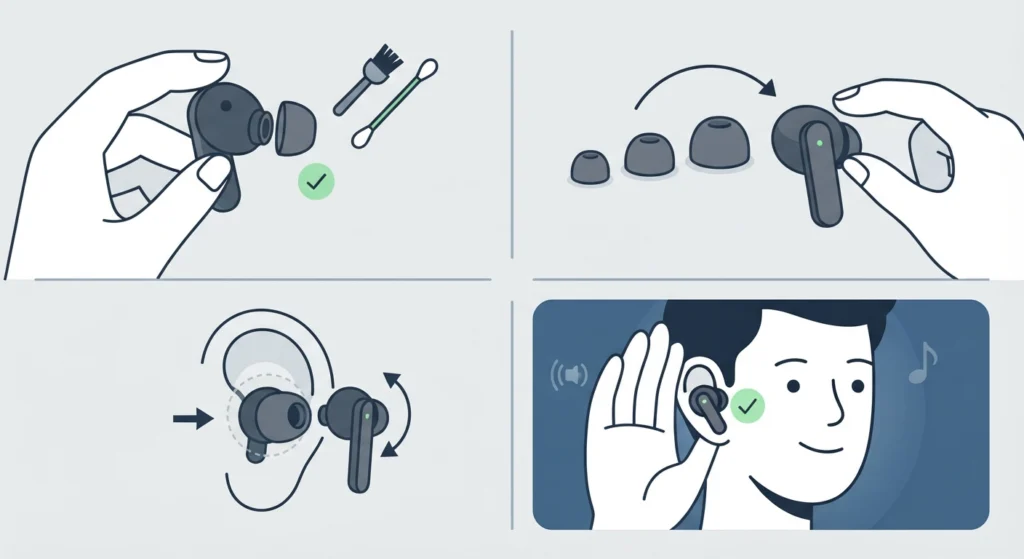
ANC on the Elite 4 relies on a tight physical seal between the ear tip and the ear canal. If air is leaking in from the sides, the earbuds cannot cancel outside sound properly, even with ANC switched on.
- Step 1: Remove the ear tips and check them for wax buildup or debris.
- Step 2: Try a different ear tip size from the pack that came in the box.
- Step 3: Insert the earbud, then gently twist it until a snug seal is felt.
- Step 4: Cup a hand over the ear briefly – if outside noise drops further, the seal was the issue.
Most people find that the medium tip fits well out of the box, but ears vary, and a size that feels fine can still leak sound around the edges.
Method 3: Update Firmware Through Jabra Sound+
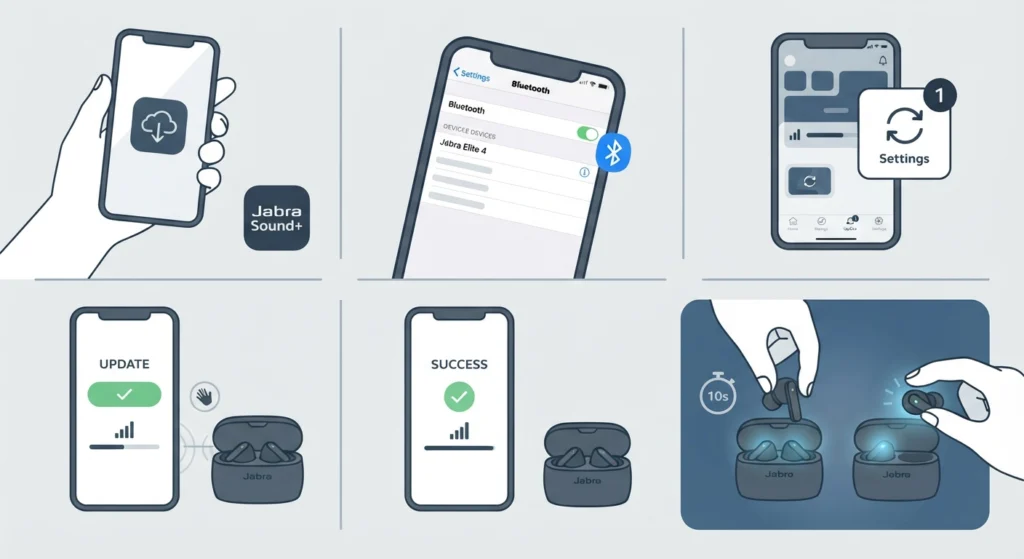
Firmware bugs are a known cause of ANC acting inconsistently on true wireless earbuds, and Jabra regularly ships updates that address exactly this kind of issue.
- Step 1: Download the Jabra Sound+ app on a phone or tablet.
- Step 2: Pair the Elite 4 earbuds with the device running the app.
- Step 3: Open the app and check the home screen for a firmware update notification.
- Step 4: Tap update and keep the earbuds close to the phone until the process finishes.
- Step 5: Restart the earbuds by placing them back in the case for 10 seconds, then taking them out again.
Method 4: Adjust ANC Personalization Settings
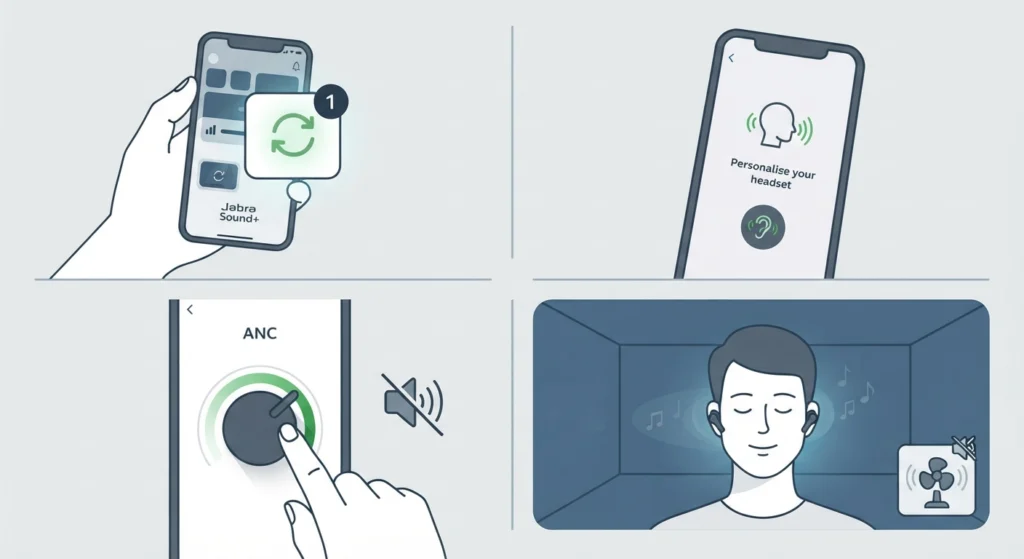
The Elite 4 allows ANC intensity to be personalized inside the app. If a previous adjustment set the level too low, ANC can feel like it is barely working even though it is technically switched on.
- Step 1: Open Jabra Sound+ and go to the Settings icon.
- Step 2: Select ‘Personalize your headset’ followed by ‘Active Noise Cancellation’.
- Step 3: Move the slider toward a stronger ANC setting.
- Step 4: Save the setting and test in a noisy room, such as near a fan or open window.
Pro-Tip: ANC automatically turns off during phone calls on the Elite 4 and resumes once the call ends. This is normal behavior, not a fault, so there is no need to troubleshoot ANC during an active call.
Method 5: Reset the Earbuds
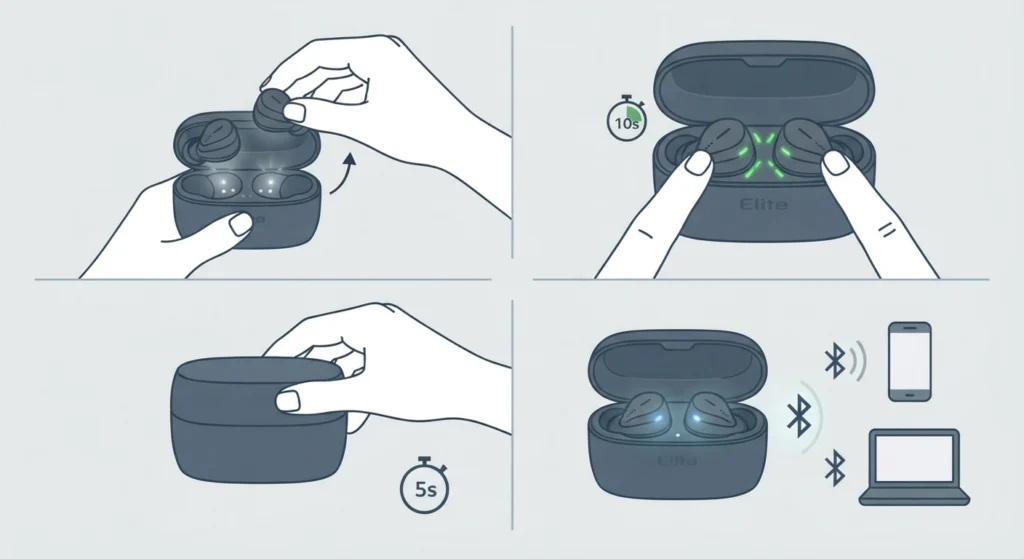
When ANC still feels off after checking modes, seal, firmware, and settings, a factory reset clears out any stuck configuration without affecting the physical hardware.
- Step 1: Place both earbuds in the charging case with the lid open.
- Step 2: Press and hold the buttons on both earbuds for about 10 seconds until the LED flashes.
- Step 3: Close the case, wait 5 seconds, then reopen it.
- Step 4: Re-pair the earbuds with the phone or PC as if setting them up for the first time.
Anyone reconnecting to a Windows PC after a reset can follow this guide on re-pairing Bluetooth earbuds for stereo sound to make sure audio comes through both earbuds correctly.
Tips for Keeping ANC Working Properly
- Clean the earbud mesh vents weekly with a soft dry brush, since dust buildup can interfere with the ANC microphones.
- Keep the Jabra Sound+ app updated so firmware notifications arrive as soon as they are released.
- Store earbuds in the case when not in use to avoid accidental button presses that switch ANC off.
- Charge the case fully at least once a week, since low battery can sometimes affect ANC performance.
Common Problems and Troubleshooting
- ANC sounds weaker on one side: Usually points to an uneven ear tip seal rather than a hardware fault. Swapping tip sizes on the affected side often solves it.
- ANC works on one device but not another: This points to a Bluetooth connection issue on the second device rather than the earbuds themselves. Adjusting the audio output settings on Windows 11 can resolve playback inconsistencies tied to this.
- ANC seems to cut in and out: Often caused by a Bluetooth connection drop rather than the ANC feature itself failing.
- Microphone and ANC both acting strange after an update: Worth checking the microphone detection troubleshooting steps for Windows 11 to rule out a system-level audio conflict.
Frequently Asked Questions
Why is ANC not working on Jabra Elite 4 earbuds?
The most common reasons are the ANC mode being switched off by accident, a poor ear tip seal, outdated firmware, or ANC being personalized to a low intensity setting in the app.
How to turn on noise cancelling on Jabra Elite 4?
Press and hold the left earbud button to cycle through Off, HearThrough, and ANC. A voice prompt confirms which mode is active.
Does Jabra Elite 4 have adjustable ANC strength?
Yes. ANC intensity can be adjusted in the Jabra Sound+ app under Personalize your headset, then Active Noise Cancellation.
Why does ANC turn off during phone calls?
ANC and HearThrough automatically switch off during calls on the Elite 4 so the external microphones can pick up the caller’s voice clearly, then resume once the call ends.
Can a bad ear tip seal affect noise cancelling?
Yes. ANC depends on a tight physical seal in the ear canal. A loose or wrong-sized tip lets outside noise leak in regardless of the ANC setting.
How to update Jabra Elite 4 firmware?
Open the Jabra Sound+ app while the earbuds are paired and connected. Any available firmware update appears on the home screen with an update prompt.
How to factory reset Jabra Elite 4 earbuds?
With both earbuds in the open charging case, press and hold both buttons for about 10 seconds until the LED flashes, then close and reopen the case before re-pairing.
Why does one earbud have weaker noise cancelling than the other?
This is usually caused by an uneven ear tip fit rather than a hardware defect. Trying a different tip size on the weaker side often fixes it.
Does low battery affect ANC performance on Jabra Elite 4?
Yes, ANC can behave inconsistently when the battery runs low, since noise cancelling uses extra power compared to standard playback.
Is it normal for Jabra Elite 4 ANC to sound different indoors versus outdoors?
Yes. ANC is tuned mainly for steady, low-frequency noise such as engine hum or airflow, so it reduces sound differently depending on the environment.