
Knowing how to connect headphones to an electric drum kit means practice sessions can happen at any hour without disturbing anyone. The whole process takes about a minute, and the only things needed are a pair of headphones and the drum module.
Key Takeaways
- The headphone jack is on the drum module, usually labeled Phones.
- Most modules use a quarter-inch jack, while some use a 3.5 mm jack, so check the size before plugging in.
- A small adapter solves any plug size mismatch.
- Lower the volume before connecting, then raise it slowly.
- Wired headphones give the most natural playing feel. Wireless works only through a Bluetooth transmitter.
Method 1: Connect Wired Headphones to the Drum Module
This is the standard way to hear an electric drum kit privately. It works with nearly every brand and model, and no extra settings are needed.
- Step 1: Turn the drum kit on and turn the module volume down to a low level. This prevents a sudden loud burst in the ears.
- Step 2: Find the headphone jack on the drum module. It is usually on the front, side, or back panel and is marked Phones or shown with a small headphone icon.
- Step 3: Check the jack size. Many modules use a quarter-inch (6.35 mm) jack, and some entry-level modules use a 3.5 mm jack.
- Step 4: If the headphone plug does not match the jack, screw or slide on the correct adapter. Many studio-style headphones include a screw-on quarter-inch adapter in the box.
- Step 5: Push the plug in firmly until it is fully seated. A half-inserted plug is the most common reason for sound in only one ear.
- Step 6: Put the headphones on, strike a pad, and slowly raise the volume or headphone level control until the sound is comfortable.
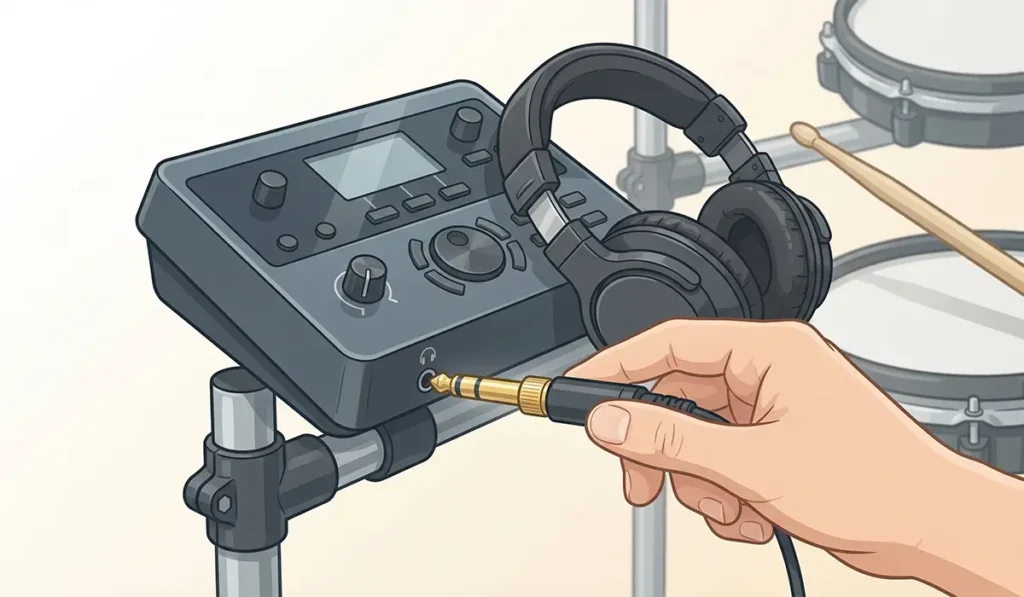
Pro-Tip: Closed-back headphones are the usual choice for drumming. They keep the module sound inside the ears and block much of the tapping noise from the pads, which makes quiet practice far more enjoyable.
Method 2: Use a Bluetooth Transmitter for Wireless Headphones
Drum modules are generally built for wired headphones, so wireless listening needs a small Bluetooth transmitter that plugs into the Phones jack. This works best when freedom from cables matters more than split-second timing.
- Step 1: Plug the Bluetooth transmitter into the Phones jack on the module, using an adapter if the plug size does not match.
- Step 2: Power the transmitter on, since most models run on a built-in battery or USB power.
- Step 3: Put the transmitter into pairing mode, then put the headphones into pairing mode.
- Step 4: Wait until both devices confirm the connection, usually with a steady light or a short tone.
- Step 5: Strike a pad and adjust the module volume until the sound is comfortable.
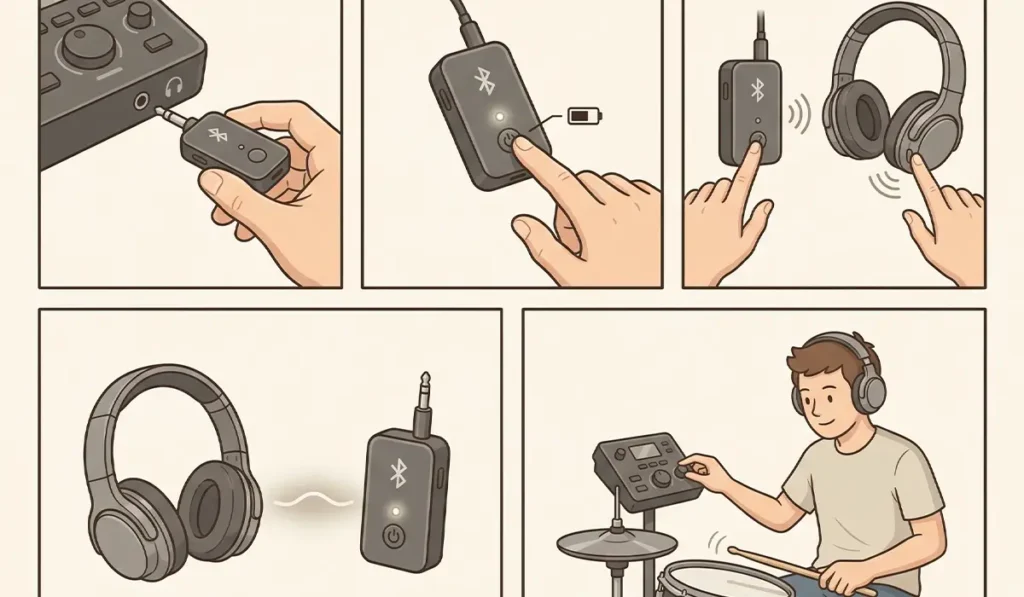
Bluetooth adds a small delay between hitting a pad and hearing the sound, and drummers tend to notice it more than other musicians. A transmitter and headphones that both support aptX Low Latency keep that delay as small as possible. Headphones that were previously paired with a Windows computer may also need to be paired again, and this guide on how to re-pair Bluetooth earbuds for stereo sound on Windows covers that process.
Tips for a Better Headphone Setup on an Electric Drum Kit
- Choose a headphone cable length that reaches the module without pulling tight when the arms move.
- Clip the cable to the drum rack so it stays clear of the hi-hat and kick pedal.
- A right-angle plug or adapter keeps the cable from sticking out and getting bumped.
- Mesh pads are generally quieter than rubber pads, which helps in shared spaces.
- Take short breaks, since long sessions at high volume tire the ears.
Pro-Tip: Set the volume before the first note of a session, then leave it alone. Changing it constantly makes it harder to judge how hard each pad is being struck.
Some modules also offer a USB connection to a computer for recording. On Windows 11, the sound output can be chosen in the sound settings, and this guide on adjusting audio output settings shows where to find it.
Common Problems and Fixes
Fix 1: No Sound in the Headphones
Confirm the module is powered on and the volume or headphone level is turned up. Then check that the plug is pushed all the way in and that the correct adapter is firmly attached.
Fix 2: Sound in Only One Ear
This usually means the plug is not fully seated. Push it in firmly, or try a different adapter or cable to rule out a worn connector.
Fix 3: Crackling or Cutting Out
A loose adapter or a damaged cable is the usual cause. Reseat the plug, wiggle it gently to test, and replace the cable or adapter if the noise continues.
Fix 4: Delay With Wireless Headphones
The small delay is a limit of Bluetooth itself. Switching to wired headphones removes it completely. If the module is connected to a Windows computer by USB and the headphones are not recognized there, this guide on troubleshooting headphone detection can help.
Frequently Asked Questions
Can any headphones connect to an electric drum kit?
Yes, any wired headphones with a matching plug will work. A small adapter handles any difference in plug size.
What size is the headphone jack on an electric drum kit?
Most modules use a quarter-inch (6.35 mm) jack, while some use a 3.5 mm jack. The label near the jack or the product manual confirms the size.
Is an adapter needed to connect headphones to an electric drum kit?
An adapter is needed only when the headphone plug and the module jack are different sizes. Matching sizes plug straight in.
Can wireless headphones connect to an electric drum kit?
Yes, but only through a Bluetooth transmitter that plugs into the headphone jack. Wired headphones remain the better choice for timing.
Are closed-back or open-back headphones better for drumming?
Closed-back headphones are the usual choice because they block pad noise and keep the sound focused. Open-back models let outside sound in, which can distract during practice.
Can earbuds be used with an electric drum kit?
Wired earbuds with the right plug work fine. They isolate less than closed-back headphones, so the pad tapping can be more noticeable.
Will headphones make an electric drum kit completely silent?
Headphones keep the module sound private, but the pads still make a soft tapping noise when struck. The kick pedal also produces some thump.
Is it safe to plug in headphones while the drum kit is on?
Yes. Turn the volume down first, plug in the headphones, and then raise the level slowly.