
Headphones that turn on by themselves are one of the most annoying quirks a wireless pair can develop, especially when it drains the battery overnight or triggers random connections in a bag or pocket. This guide walks through the exact fixes that solve the problem, without wasting time on unrelated topics.
Key Takeaways
- Moisture, dirty contacts, and stuck power buttons are the most common triggers.
- Cleaning the charging case and pins solves the issue in most cases.
- A factory reset clears software glitches that cause random power-ons.
- Disabling auto-connect features stops phantom Bluetooth wake-ups.
- Persistent issues after these fixes usually point to a worn-out battery or case.
Step-by-Step Guide to Stop Headphones From Turning On by Themselves
Fix 1: Clean the Charging Case and Contact Pins
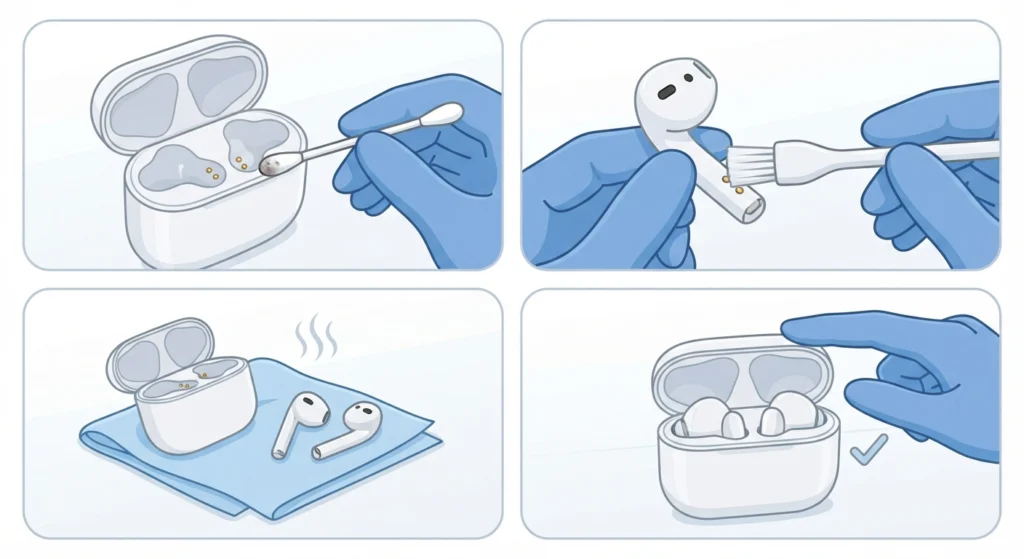
Dirt, lint, and skin oils build up on the metal contact pins over time. This buildup can create a weak electrical connection that the earbuds interpret as being placed in and out of the case, which triggers random power cycles.
- Step 1: Take a dry cotton swab or a soft-bristled brush and gently wipe the metal contacts inside the charging case.
- Step 2: Wipe the matching contact points on the earbuds themselves.
- Step 3: Let everything air dry for a few minutes before placing the earbuds back in the case.
- Step 4: Close the lid and check if the random power-on behavior stops.
Pro-Tip: A dry toothbrush works just as well as a cotton swab for reaching tight corners around the pins, and it removes debris that a cloth alone tends to push around instead of lifting out.
Fix 2: Dry Out Moisture From the Case or Earbuds
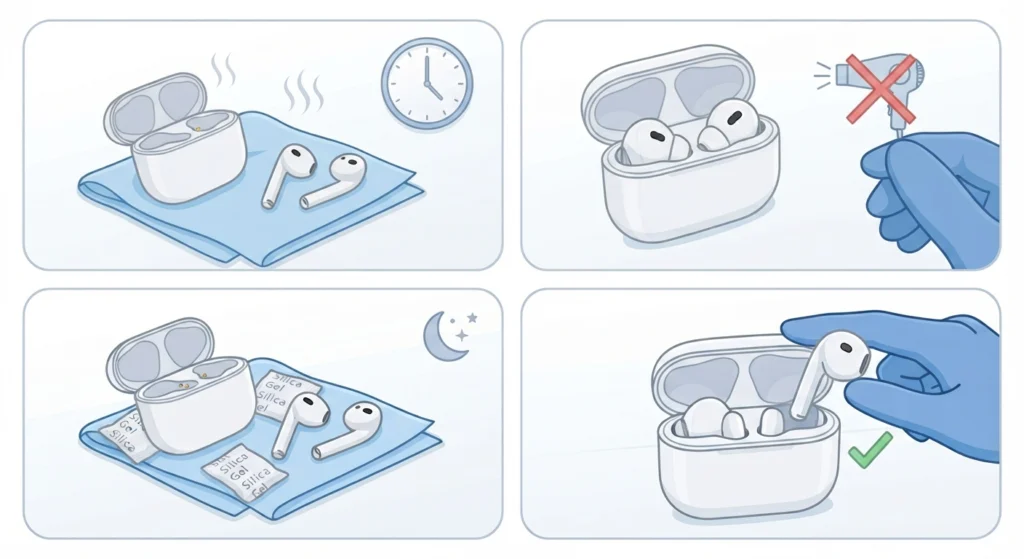
Sweat, humidity, or a light splash of water can seep into the charging case and cause the internal sensors to misread contact status. This is one of the most common reasons headphones seem to power on for no reason.
- Step 1: Open the charging case and leave it open in a dry, room-temperature area for at least two hours.
- Step 2: Avoid using a hair dryer or direct heat, since this can damage the internal battery and sensors.
- Step 3: Place a few silica gel packets near the case overnight if moisture is suspected.
- Step 4: Test the earbuds the next day to confirm the random power-ons have stopped.
Fix 3: Reset the Headphones to Factory Settings
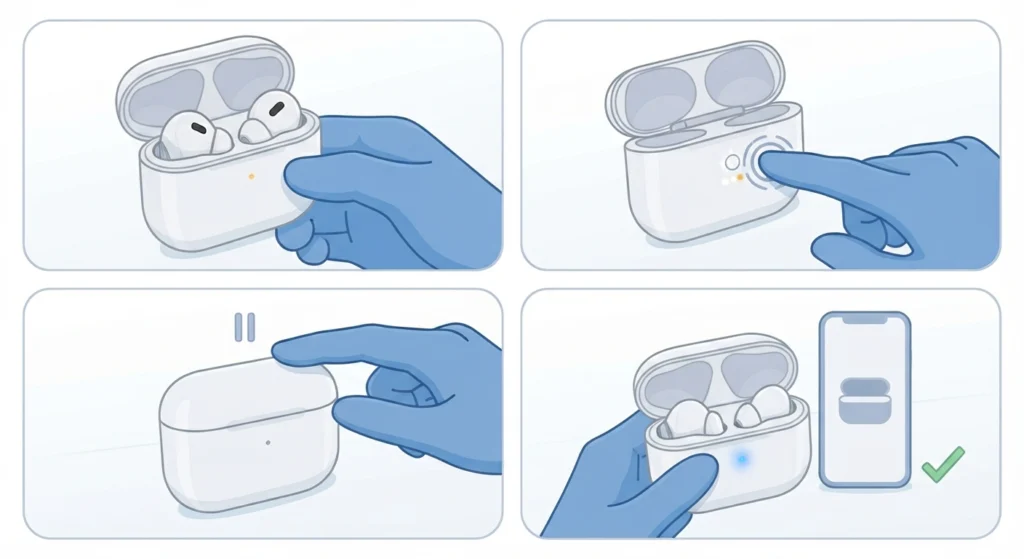
A software glitch inside the earbuds’ firmware can cause them to misfire the power-on signal even when nothing is touching them. A factory reset clears this out completely.
- Step 1: Place both earbuds in the charging case but leave the lid open.
- Step 2: Press and hold the button on the back or bottom of the case for about 10 to 15 seconds, until the LED flashes a different color pattern.
- Step 3: Release the button and close the case for a few seconds.
- Step 4: Reopen the case and pair the earbuds again as if setting them up for the first time.
Reset steps vary slightly by brand, so checking the manufacturer’s manual for the exact button combination is worth the extra minute.
Fix 4: Update the Firmware
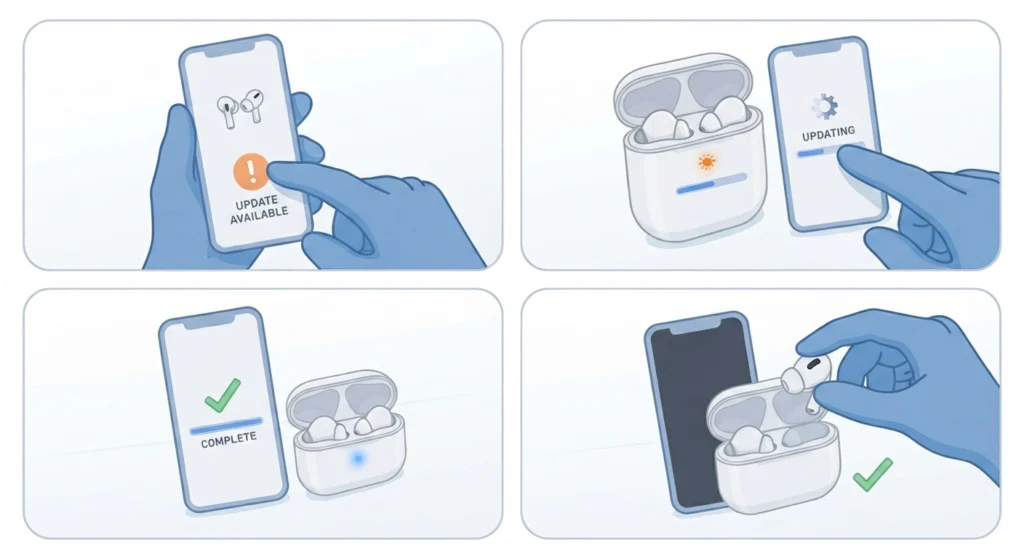
Manufacturers regularly push firmware updates that patch exactly this kind of bug. Outdated firmware is a frequent cause of erratic power behavior on wireless earbuds.
- Step 1: Open the companion app for the headphone brand on a paired phone or computer.
- Step 2: Navigate to the device settings or firmware section.
- Step 3: Install any available update and keep the earbuds close to the device until it finishes.
- Step 4: Restart the earbuds once the update completes.
Fix 5: Turn Off Bluetooth Auto-Connect Features
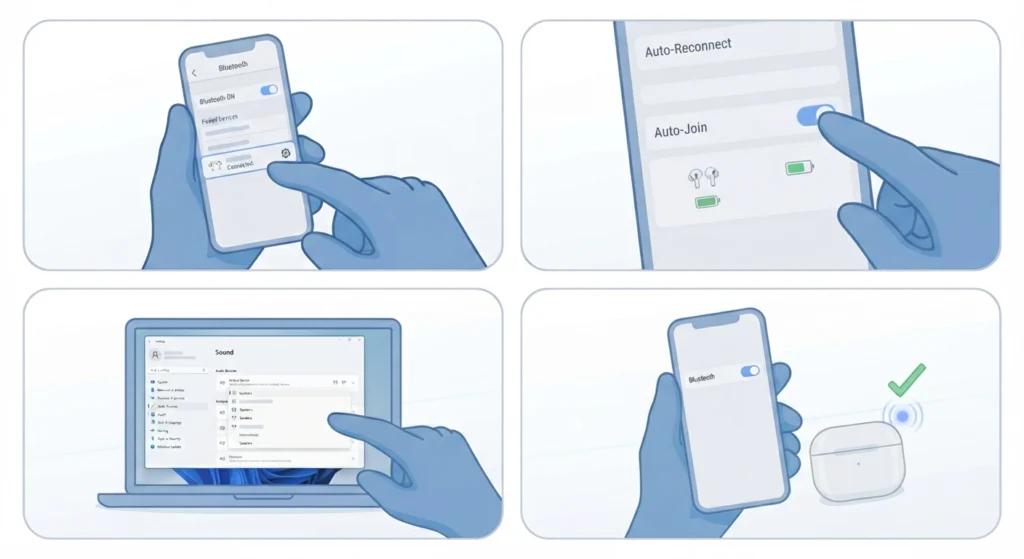
Some headphones are designed to power on automatically whenever a previously paired device is nearby with Bluetooth enabled. This is convenient in theory, but it often feels like the headphones are turning on randomly in a bag or on a desk.
- Step 1: Open the Bluetooth settings on the paired phone, tablet, or computer.
- Step 2: Find the paired headphones in the device list and disable any ‘auto-reconnect’ or ‘auto-join’ option.
- Step 3: On Windows 11, this often overlaps with broader connection settings, so it helps to adjust the audio output settings to confirm the headphones are not set as the default auto-switch device.
- Step 4: Turn Bluetooth back on and check whether the earbuds still wake up without being touched.
Fix 6: Check the Physical Power Button for Stuck Debris
On headphones with a physical power switch rather than touch controls, dust or a bent switch cover can cause the button to feel like it’s constantly being pressed.
- Step 1: Inspect the power button closely under good lighting for dust, lint, or a stuck position.
- Step 2: Use a dry toothpick or soft brush to clear any debris around the edges of the button.
- Step 3: Press the button a few times to confirm it clicks back smoothly instead of staying depressed.
- Step 4: If the switch feels loose or doesn’t spring back, this usually means physical repair or replacement is needed.
Fix 7: Rule Out a Worn-Out Battery or Case
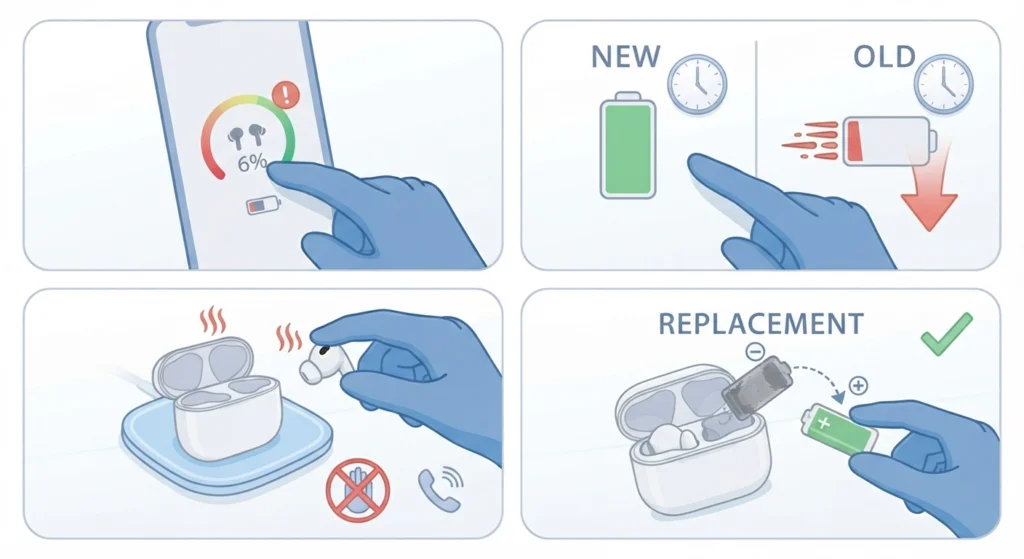
Old lithium-ion batteries can swell slightly or lose the ability to hold a stable charge, which confuses the internal circuit and causes random restarts. This is more common in earbuds that are two years old or more.
- Step 1: Check the battery health percentage in the companion app if one is available.
- Step 2: Compare how quickly the battery drains now versus when the earbuds were new.
- Step 3: If the case or earbuds feel warm, swollen, or the battery drains unusually fast, stop using them and contact the manufacturer’s support team.
- Step 4: Consider a case or battery replacement if the product is still within the service window.
Tips to Prevent Headphones From Turning On by Themselves Again
- Wipe the charging pins with a dry cloth once a week, especially in humid climates.
- Store the earbuds in the case with the lid fully closed rather than leaving them loose in a bag.
- Keep the earbuds away from direct sunlight and hot car interiors, since heat accelerates battery wear.
- Check for firmware updates once a month through the companion app.
- Avoid stacking magnetic accessories near the case, since strong magnets can interfere with the lid sensor.
Common Problems Related to This Issue
Earbuds Keep Reconnecting to the Wrong Device
This usually happens after several devices have been paired over time. Forgetting the device from the phone or laptop’s Bluetooth list and re-pairing the earbuds for stereo sound resolves most cases of unwanted auto-reconnection.
Case LED Flickers Even When Closed
A flickering LED with the lid closed almost always points back to a faulty lid sensor or moisture inside the case, which is covered in Fix 2 above.
Only One Earbud Turns On by Itself
This is typically a contact or battery issue isolated to one side rather than the whole set. Cleaning that earbud’s specific charging pin, as shown in Fix 1, usually clears it up.
Pro-Tip: If the earbuds still act up after every fix above, resetting the audio settings at the system level can rule out a software conflict rather than a hardware fault, and this step is often skipped even though it takes under a minute through the resetting audio settings option on Windows 11.
Frequently Asked Questions
Why do headphones turn on by themselves in a bag or pocket?
This is usually caused by pressure or movement against the case lid, dirty contact pins, or a proximity sensor that misreads motion as the case opening.
Is it normal for wireless earbuds to power on randomly?
No, this is not normal behavior. It typically signals a cleaning issue, a software glitch, or an aging battery that needs attention.
Can a factory reset damage the headphones?
No, a factory reset simply clears the paired device list and internal settings. It does not affect the hardware or void the warranty.
How often should the charging case be cleaned?
Once a week is a reasonable routine for most users, though anyone in a humid or dusty environment may benefit from cleaning every few days.
Does moisture really cause headphones to turn on unexpectedly?
Yes, moisture inside the case can interfere with the sensors that detect whether the earbuds are seated properly, which triggers false power signals.
Will updating the firmware fix random power-on issues?
In many cases, yes. Manufacturers frequently release firmware updates specifically to correct bugs related to power management.
How long do earbud batteries typically last before needing a replacement?
Most earbud batteries hold a reliable charge for around two years with regular use before performance starts to noticeably decline.
Should Bluetooth be turned off completely to stop random connections?
Turning off auto-reconnect for that specific device is usually enough. Disabling Bluetooth entirely is not necessary unless the issue persists after trying the other fixes.
What if none of these fixes solve the problem?
If the earbuds still turn on by themselves after cleaning, resetting, and updating firmware, the issue is most likely a hardware fault that requires contacting the manufacturer’s support team.
Can a swollen battery be dangerous?
Yes, a swollen battery should be treated as a safety concern. The earbuds should be stopped from use immediately and handled according to the manufacturer’s disposal or replacement guidance.