
Having the EarFun Air Pro 3 one side not working is one of the most frustrating issues any earbud owner can run into – especially when everything seemed fine just hours ago. The good news is that this is almost always fixable without sending anything in for repair. Whether the left or right earbud has gone silent, the steps below cover every proven fix, from the simplest to the most thorough.
Quick Summary Table
| Fix | Best For | Time Needed |
|---|---|---|
| Clean the earbuds and charging contacts | Debris or wax buildup blocking sound | 2-5 minutes |
| Factory reset both earbuds | Firmware glitch or pairing mismatch | 2-3 minutes |
| Re-pair the Bluetooth connection | Device connected to wrong earbud only | 3-5 minutes |
| Check and adjust audio balance settings | Audio shifted to one side on device | 1-2 minutes |
| Charge both earbuds fully | Low battery causing one side to cut out | 1-2 hours |
| Re-sync earbuds to each other | Left and right lost connection to each other | 3-5 minutes |
Fix 1: Clean the Earbuds and Charging Contacts
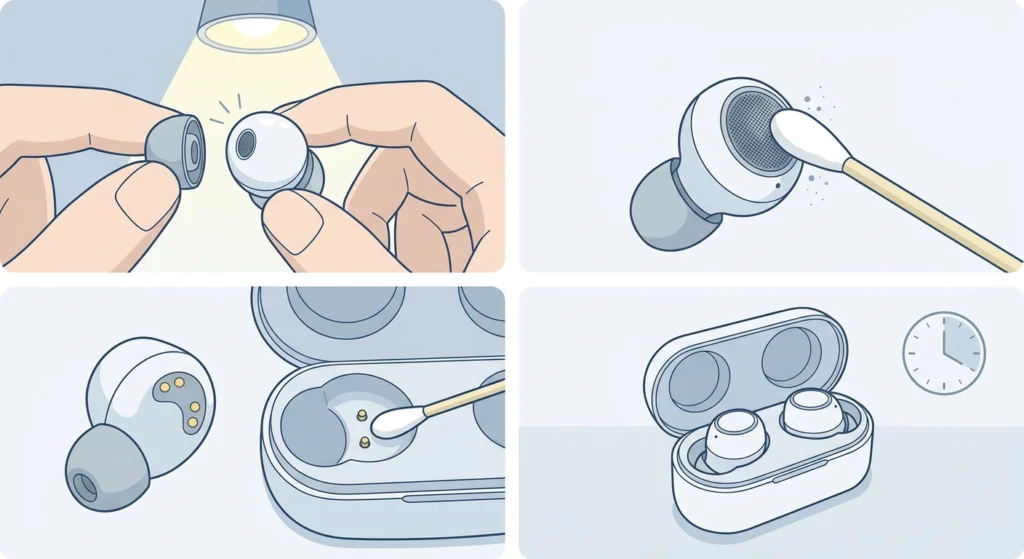
Before anything else, check if the silent earbud has wax, dust, or debris blocking the speaker mesh or the charging pins. This is the most overlooked cause – and it is surprisingly common. The key is to clean gently without pushing debris further in.
- Step 1: Remove the ear tip from the affected earbud and inspect the speaker mesh under good lighting.
- Step 2: Use a dry cotton swab or a soft-bristled toothbrush to gently brush away any debris from the mesh.
- Step 3: Check the gold charging contacts on the earbud and inside the case. Wipe them with a dry or lightly alcohol-dampened cotton swab.
- Step 4: Let everything dry completely, then place the earbuds back in the case for a full minute before testing.
This works best when the issue appeared gradually or after heavy use. Most people find that simply cleaning the contacts and mesh resolves intermittent audio dropouts on one side.
Fix 2: Charge Both Earbuds Fully
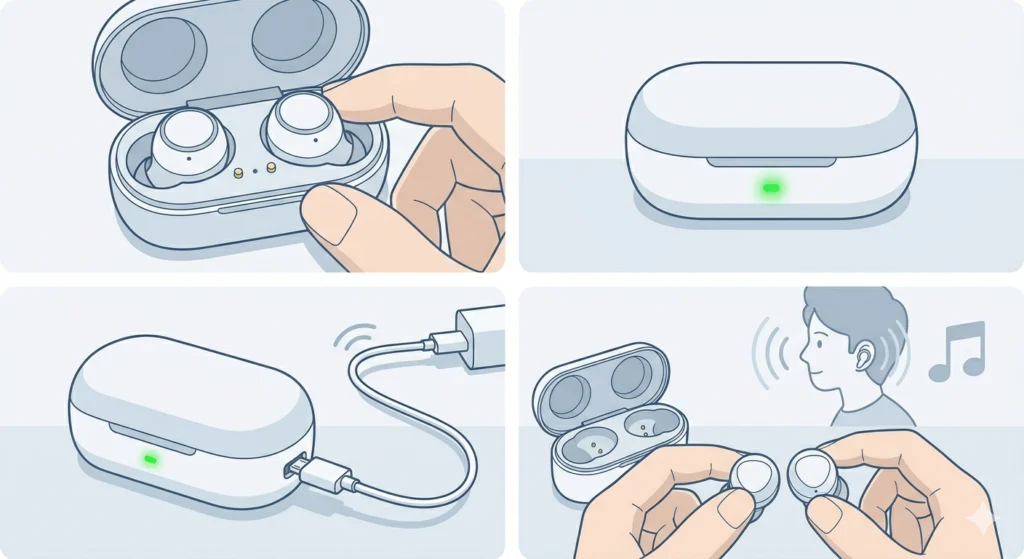
A low battery on one earbud can cause it to shut off or reduce output, making it seem like the hardware is broken. Always rule this out first before spending time on more complex steps.
- Step 1: Place both earbuds in the charging case and close the lid.
- Step 2: Make sure the case itself has enough charge – plug it into a power source if the LED indicator is low or off.
- Step 3: Leave both earbuds charging for at least 30 minutes to 1 hour.
- Step 4: Remove both earbuds, put them in the ears, and test audio playback.
Fix 3: Check Audio Balance Settings on the Connected Device
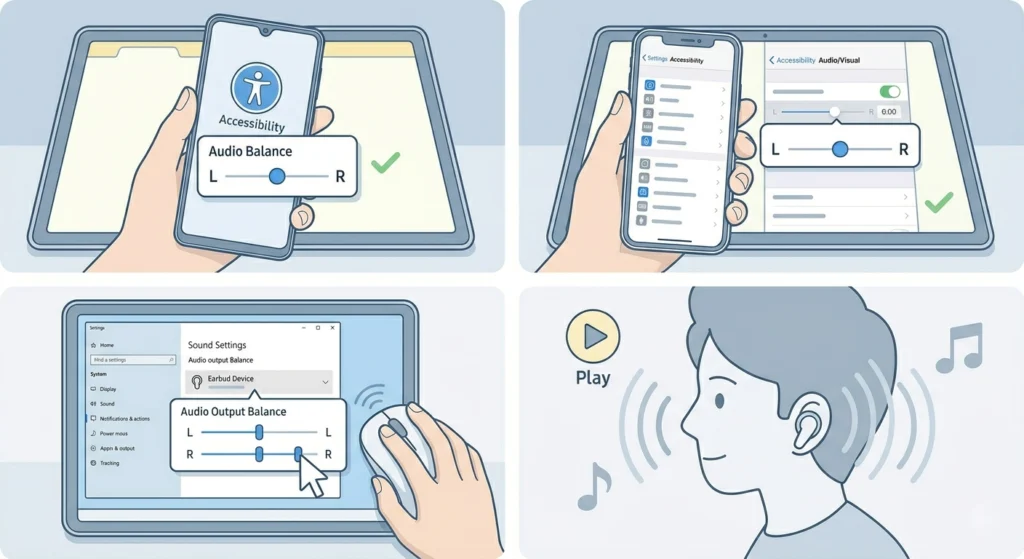
Sometimes the problem has nothing to do with the earbuds at all. If the audio balance on the phone, tablet, or computer is shifted to one side, one earbud will sound much quieter or completely silent.
- Step 1: On Android, go to Settings, then Accessibility, then Audio and Sound – look for ‘Audio Balance’ and center the slider.
- Step 2: On iPhone or iPad, go to Settings, then Accessibility, then Audio/Visual – find the Balance slider and make sure it is centered at 0.00.
- Step 3: On Windows 11, right-click the speaker icon, open Sound Settings, and check the audio output balance for the EarFun device. For more detail on this, the guide on adjusting audio output settings on Windows 11 walks through every step clearly.
- Step 4: Play audio and check if both sides are now working evenly.
Pro-Tip: This step is the most commonly skipped fix, but it resolves the issue for a surprising number of users. Always check balance settings before assuming a hardware problem.
Fix 4: Factory Reset the EarFun Air Pro 3
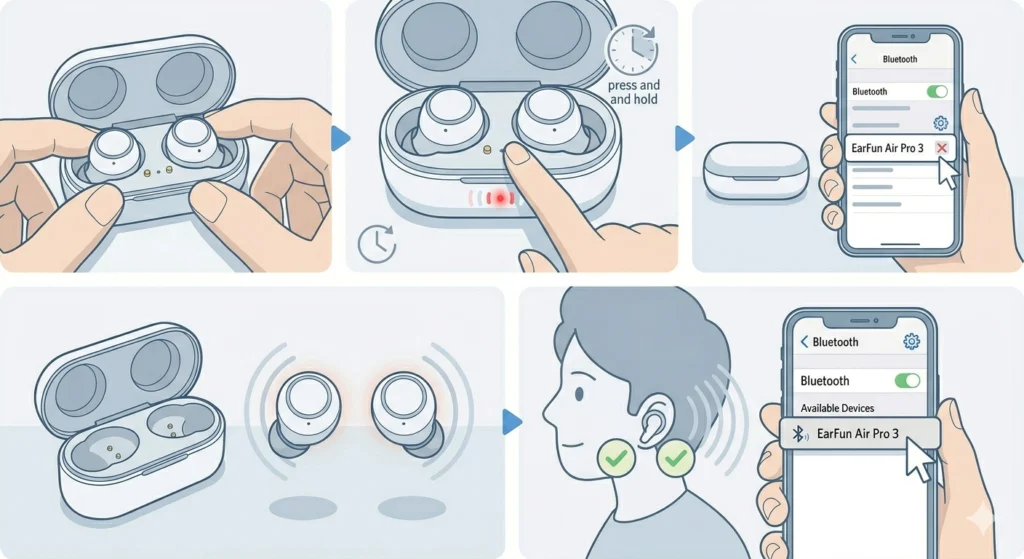
A factory reset clears any firmware glitches, pairing errors, or internal configuration problems that can cause one earbud to stop syncing properly. This is one of the most reliable fixes for the EarFun Air Pro 3 one side not working.
- Step 1: Place both earbuds in the charging case and keep the lid open.
- Step 2: Press and hold the button on the charging case for about 10 seconds until the LED flashes red and white alternately – this signals the reset has been triggered.
- Step 3: Close the case lid, wait 5 seconds, then open it again.
- Step 4: On the connected device, go to Bluetooth settings and forget or unpair the EarFun Air Pro 3.
- Step 5: Take the earbuds out of the case – they should enter pairing mode automatically. Reconnect from the device’s Bluetooth menu.
After the reset, both earbuds should re-sync with each other and pair as a stereo pair. Test audio on both sides before moving forward.
Fix 5: Re-Pair the Bluetooth Connection for Stereo Sound
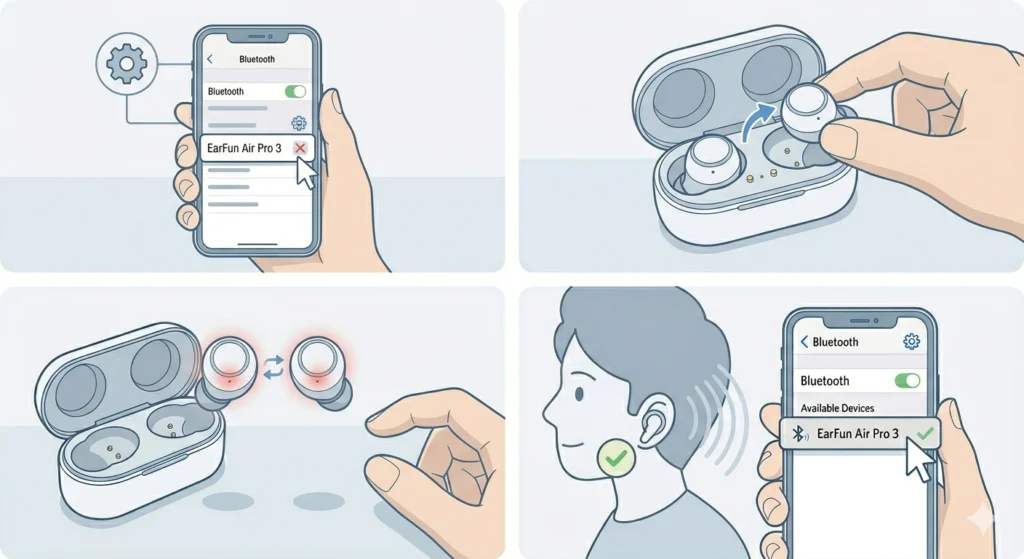
Sometimes the device is connected to only one earbud instead of the stereo pair, which means only one side produces sound. This often happens after a software update or if the earbuds were accidentally paired separately.
- Step 1: Go to the Bluetooth settings on the connected device and remove or forget the EarFun Air Pro 3 entry.
- Step 2: Place both earbuds back in the case, wait 10 seconds, then take them out together.
- Step 3: The earbuds will automatically sync with each other first (the LEDs will flash briefly) and then enter pairing mode.
- Step 4: Select ‘EarFun Air Pro 3’ from the Bluetooth device list on the phone or computer and complete the pairing.
On Windows specifically, re-pairing Bluetooth earbuds for stereo sound can be tricky if the old device entry is cached. Removing all previous EarFun entries from Device Manager before re-pairing often solves the issue for good.
Fix 6: Re-Sync the Left and Right Earbuds
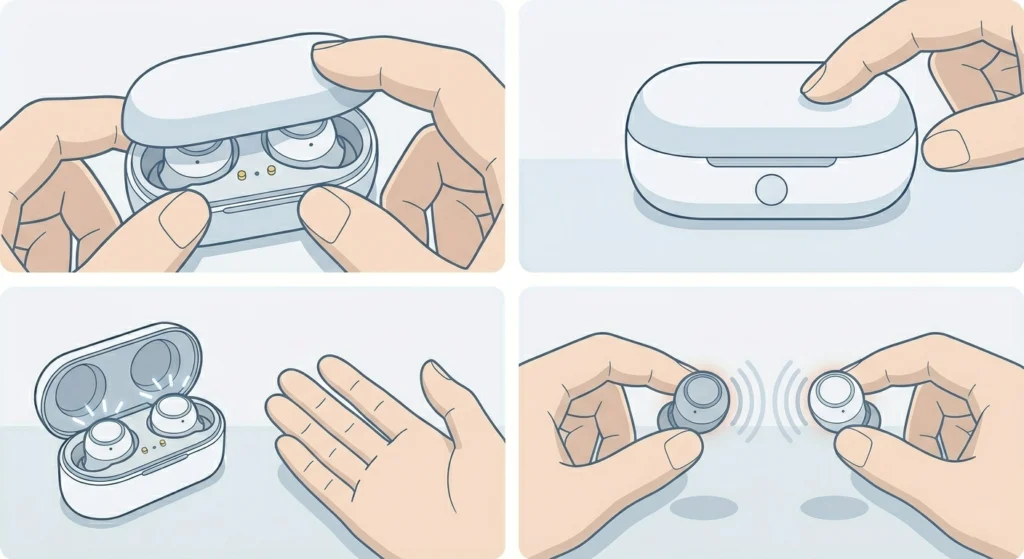
The EarFun Air Pro 3 uses a true wireless system where the two earbuds communicate with each other. If this inter-earbud connection drops, one side will appear to stop working even though it is technically functional.
- Step 1: Put both earbuds back in the charging case and close the lid for 15 seconds.
- Step 2: Open the lid – both earbuds should automatically attempt to reconnect to each other.
- Step 3: If the LED on one earbud blinks but the other stays dark or blinks a different pattern, take them both out and place them back in simultaneously.
- Step 4: Wait for both LEDs to show a matching blink pattern before removing them for use.
Pro-Tip: Always take both earbuds out of the case at the same time. Removing them one by one can sometimes cause the first one removed to connect directly to the phone before the second one has a chance to pair with it, resulting in a mono connection.
Tips for Preventing One Side from Stopping Again
- Always store both earbuds in the case together when not in use – this keeps them synced and charged.
- Clean the speaker mesh and charging contacts at least once every two weeks if using the earbuds daily.
- Avoid exposing the earbuds to heavy sweat without wiping them down afterward, even though they have an IPX5 rating.
- Keep the EarFun app updated if installed, as firmware updates often include fixes for connectivity bugs.
- Disconnect the earbuds properly from the Bluetooth device before putting them in the case rather than just placing them in mid-session.
Common Problems and Troubleshooting
One Earbud Has No Sound After Reset
If the affected earbud still produces no audio after a factory reset, try removing it from the case by itself and tapping the touch panel 3 times rapidly. This can sometimes force a manual re-sync with the other unit. If it still fails, charge both earbuds fully and try the reset process one more time.
Left Earbud Keeps Dropping Out
Left earbud dropout is often a sign that the left unit is not maintaining its connection to the right primary earbud. Make sure there are no large obstructions – like a phone in the left pocket – between the earbuds. Keeping the connected device closer to the right earbud (which is usually the primary) helps maintain a stable link.
Right Earbud Sounds Quieter Than Left
Check audio balance settings first (Fix 3 above). If balance is centered and the issue persists, the right speaker mesh may have debris partially blocking it. A gentle clean usually resolves this immediately.
Earbuds Reconnect But Still Only One Side Works
This usually means the device is still connected to a cached single-earbud Bluetooth profile. On Windows 11, go into the audio input device settings and confirm that the EarFun Air Pro 3 is listed as a stereo device, not a mono handsfree profile.
Frequently Asked Questions
Why is only one side of my EarFun Air Pro 3 working?
The most common reasons include a pairing mismatch between the two earbuds, a shifted audio balance on the connected device, debris blocking the speaker mesh, or one earbud running low on battery. Running through the fixes above in order will identify and resolve the cause quickly.
How do I reset the EarFun Air Pro 3?
Place both earbuds in the open charging case and hold the case button for about 10 seconds until the LED flashes red and white. Then close the case, wait 5 seconds, open it again, and re-pair from the Bluetooth settings on the connected device.
Can a software update cause one earbud to stop working?
Yes. Firmware updates occasionally reset pairing data or alter how the two earbuds sync with each other. Performing a factory reset and re-pairing after any update resolves this in most cases.
Is the EarFun Air Pro 3 one side not working a hardware defect?
In the vast majority of cases, no. The issue is almost always a pairing, settings, or charging problem. Hardware failure is rare and typically only occurs after physical damage or prolonged moisture exposure beyond the IPX5 rating.
Do I need the EarFun app to fix one side not working?
No. All the fixes covered here can be done without the app. However, keeping the app installed allows for firmware updates and EQ adjustments that can prevent connectivity issues from recurring.
Why does one earbud keep disconnecting randomly?
Intermittent disconnection on one side is often caused by low battery, weak inter-earbud communication due to obstructions, or a Bluetooth interference issue. Charging fully and staying within 10 meters of the source device usually eliminates random dropouts.
Can the audio balance setting on my phone cause one earbud to go silent?
Absolutely. If the balance slider is pushed fully to one side, the opposite earbud will produce no sound at all. This is frequently mistaken for a hardware or pairing problem. Always check the balance setting before anything else.
How long should the EarFun Air Pro 3 take to re-sync after a reset?
After placing them in the case and reopening it, the earbuds should sync with each other within 5 to 10 seconds. If one LED stays solid or off while the other blinks, return them to the case for another 15 seconds and try again.
What does it mean when one EarFun Air Pro 3 blinks red?
A red blinking LED on one earbud usually indicates a low battery on that unit. Place it in the case and charge it before attempting any other fixes. Trying to re-pair or reset earbuds with a very low battery often results in incomplete processes.
Should I contact EarFun support if none of the fixes work?
Yes. If all the steps above have been completed and one side is still silent, reach out to EarFun customer support with proof of purchase. The EarFun Air Pro 3 comes with a warranty, and confirmed hardware issues are typically covered for replacement or repair.