
Key Takeaways
- Constant beeping is almost always tied to battery level, a broken pairing signal, dirty sensors, or outdated firmware.
- Charging the earbuds fully and checking the case contacts solves the issue in most cases within a few minutes.
- Re-pairing the Bluetooth connection clears the majority of connection-related beep loops.
- A factory reset is the most reliable fix when the beeping continues after basic troubleshooting.
- Keeping firmware updated through the companion app prevents the problem from returning.
Earbuds that beep constantly can turn a quiet commute into a distraction-filled mess, and the good news is that fixing earbuds that beep constantly rarely requires a trip to the repair shop. In most cases, the beeping is the earbuds trying to communicate something simple, such as a low battery, a lost connection, or a sensor that needs cleaning. This guide walks through the exact fixes, in order of how often they solve the problem, so the beeping can be stopped for good.
Step-by-Step Guide to Stop Earbuds From Beeping Constantly
Fix 1: Charge the Earbuds Fully
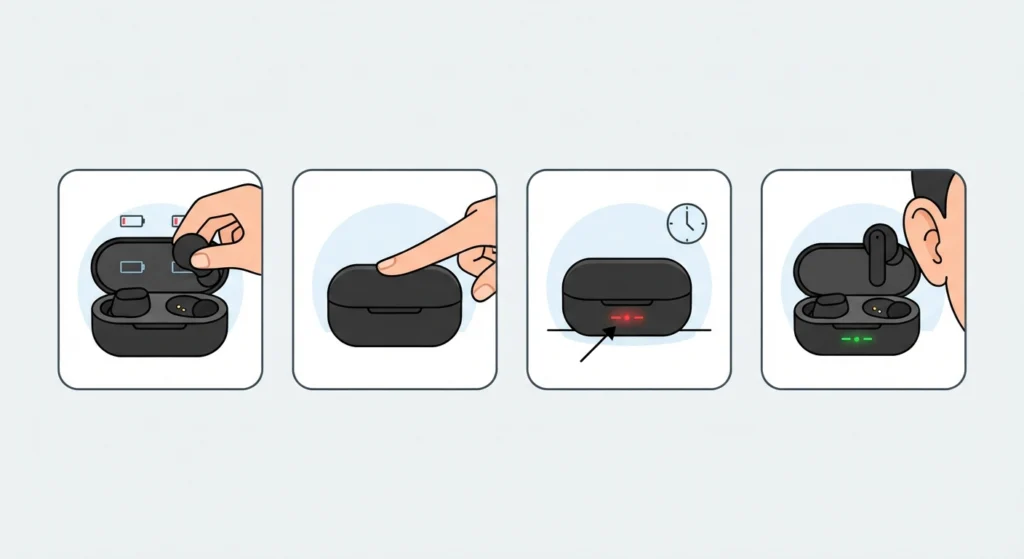
Low battery beeping is the single most common cause, and it happens because earbuds are designed to alert the user before they shut off completely. Most people find that a quick charge clears the beeping within minutes.
- Step 1: Place both earbuds in the charging case and close the lid completely.
- Step 2: Let the case charge for at least 15 to 20 minutes before removing the earbuds.
- Step 3: Check the LED indicator on the case or earbuds to confirm charging has started.
- Step 4: Take the earbuds out and test them once the light shows a full or near-full charge.
Fix 2: Re-pair the Bluetooth Connection
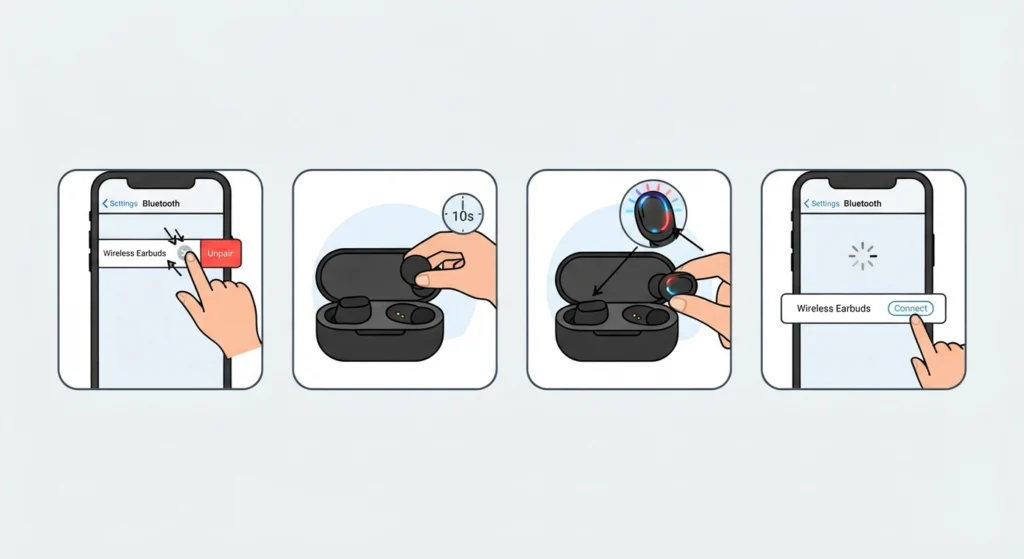
A weak or interrupted Bluetooth link often triggers repeated beeping as the earbuds try to reconnect over and over. This is common in crowded areas with a lot of wireless signals, like offices or public transport. Forgetting the device and pairing it fresh usually clears this up, and a full walkthrough on how to re-pair Bluetooth earbuds for stereo sound makes the process even smoother on a Windows setup.
- Step 1: Open Bluetooth settings on the connected device and forget or remove the earbuds from the paired list.
- Step 2: Turn the earbuds off, then place them back in the case for about 10 seconds.
- Step 3: Take the earbuds out and hold the pairing button until the LED flashes to indicate pairing mode.
- Step 4: Search for the earbuds again on the device and select them to complete a fresh pairing.
Pro-Tip: Always forget the earbuds on every previously connected device, not just the one currently in use. A phone and a laptop trying to claim the same earbuds at once is a frequent cause of beeping that never seems to stop.
Fix 3: Clean the Charging Contacts and Sensors
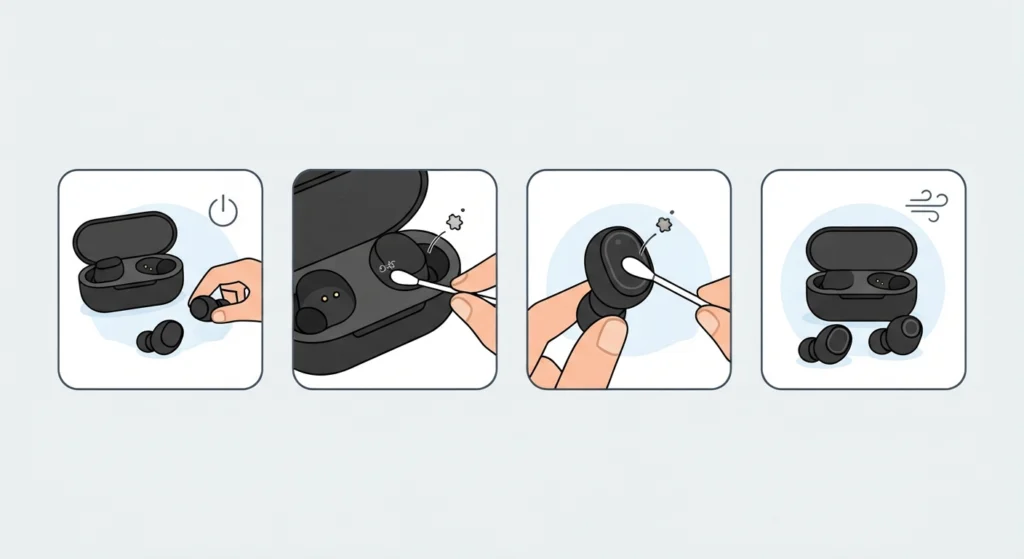
Dust, earwax, or moisture on the charging pins inside the case can create a poor connection, and the earbuds respond with a beep every time contact is lost or restored. This is especially common after workouts or humid weather.
- Step 1: Turn off the earbuds and remove them from the case.
- Step 2: Use a dry, soft cotton swab or a small brush to gently clean the metal charging contacts on both the earbuds and the case.
- Step 3: Wipe the sensor area on each earbud, since a blocked proximity sensor can also trigger unexpected beeps.
- Step 4: Let everything air dry for a minute before placing the earbuds back in the case.
Fix 4: Reset the Earbuds to Factory Settings
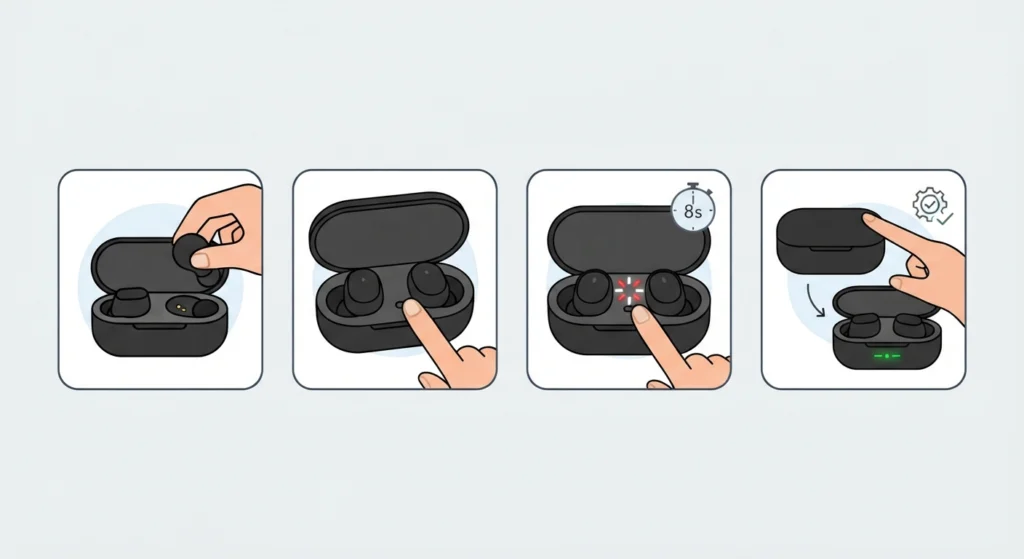
When the beeping continues after charging, re-pairing, and cleaning, a factory reset usually clears whatever internal glitch is causing it. This wipes stored pairing data and restarts the earbuds’ internal settings from scratch.
- Step 1: Place both earbuds in the case with the lid open.
- Step 2: Locate the reset button, which is often a small pinhole on the case or a touch-and-hold command on the earbuds, and check the manufacturer’s manual for the exact method.
- Step 3: Hold the reset button or touch command for 8 to 10 seconds until the LED flashes a specific pattern, usually red and white together.
- Step 4: Close the case for a few seconds, then reopen it and pair the earbuds again as if setting them up for the first time.
Pro-Tip: Skipping the reset step and going straight to firmware updates is a common mistake. A reset should always happen first, since an outdated firmware update installed on top of corrupted settings can make the beeping worse instead of better.
Fix 5: Update the Firmware Through the Companion App
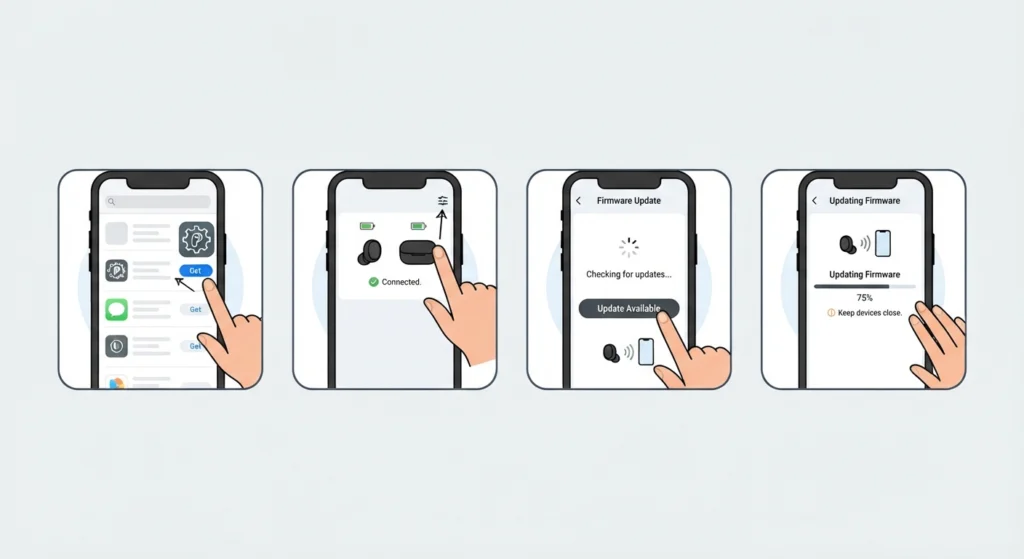
Manufacturers regularly release firmware updates that fix bugs, including ones that cause random or constant beeping. Many people skip this step simply because they never installed the companion app in the first place.
- Step 1: Download the official companion app for the earbuds brand from the app store.
- Step 2: Connect the earbuds to the device and open the app.
- Step 3: Check the firmware or software section for any available updates.
- Step 4: Install the update and keep the earbuds close to the device until the process finishes completely.
Tips to Prevent Earbuds From Beeping Again
- Charge the earbuds before the battery drops below 20 percent instead of waiting for a warning beep.
- Store the earbuds in a dry case and avoid leaving them in direct sunlight or a hot car.
- Clean the charging contacts once every couple of weeks, especially with regular use during workouts.
- Keep only one active Bluetooth connection at a time to avoid conflicting pairing requests.
- Check for firmware updates monthly through the companion app rather than waiting for a problem to appear.
Common Problems and Troubleshooting
Some beeping issues point to something more specific than a low battery or a bad pairing. The list below covers scenarios that come up often and what usually causes them.
- Beeping only in one earbud: This usually means that earbud has a weaker connection or a lower battery than its pair. Charging both fully and re-pairing them together as a set typically resolves it.
- Beeping right after closing the case: This is often a confirmation tone rather than a fault, though a rapid repeated beep can point to a charging contact issue covered in Fix 3.
- Beeping when connected to a Windows 11 laptop: This sometimes traces back to a conflict in audio settings rather than the earbuds themselves, and resetting the audio settings on the laptop often clears it.
- Beeping alongside no sound or muffled sound: This combination usually points to an outdated driver or output conflict, and adjusting the audio output settings on the connected device can fix both issues together.
- Beeping that starts after a firmware update: This can happen if the update installed incompletely. Restarting the update process from the companion app usually corrects it.
Frequently Asked Questions
Why do earbuds beep constantly even when fully charged?
This is usually a sign of a Bluetooth connection issue or a firmware glitch rather than a battery problem. Re-pairing the earbuds or resetting them to factory settings typically resolves it.
Is constant beeping a sign that the earbuds are broken?
Not usually. Beeping is a built-in alert system, and in the vast majority of cases it points to a fixable issue like low battery, dirty contacts, or a lost pairing signal rather than hardware failure.
How long should earbuds charge before the beeping stops?
Most earbuds need around 15 to 20 minutes of charging before the low battery beep clears. A full charge usually takes closer to an hour, depending on the model.
Why does one earbud beep more than the other?
This typically happens when the two earbuds are out of sync on battery level or connection status. Charging both together and re-pairing them as a matched set usually fixes the imbalance.
Can dirty charging contacts really cause beeping?
Yes. A layer of dust, sweat, or earwax on the charging pins can interrupt the connection between the case and the earbuds, and the earbuds often beep every time that connection drops or reconnects.
Does resetting the earbuds delete saved settings?
A factory reset clears stored pairing data and returns the earbuds to their original settings, so any custom equalizer settings or touch controls saved in a companion app will need to be set up again.
How often should firmware be updated to avoid beeping issues?
Checking for updates once a month through the companion app is a reasonable habit, since manufacturers release fixes for bugs like unexpected beeping fairly regularly.
Why do earbuds beep when connected to a laptop but not a phone?
This points to a device-side setting rather than the earbuds themselves. Audio driver conflicts or output settings on the laptop are common culprits, and managing the audio input and output devices on the laptop often resolves it.
What does a rapid, repeated beep usually mean compared to a single beep?
A single beep is typically a status confirmation, such as powering on or connecting. A rapid, repeated beep usually signals an ongoing issue, like a failed connection attempt or a battery that has dropped critically low.
Should earbuds be replaced if beeping continues after every fix?
If charging, cleaning, re-pairing, resetting, and updating firmware all fail to stop the beeping, a hardware fault becomes more likely, and contacting the manufacturer’s support team for a warranty check is the next reasonable step.