
Knowing how to connect Bluetooth headphones to a Kindle or e-reader turns a quiet reading device into a private audiobook player. It works well for commutes, late-night listening, or any moment when speakers would disturb someone nearby. The process takes about a minute, and the steps below cover Kindle, Kobo, and Android-based e-readers.
Key Takeaways
- Only e-readers with Bluetooth audio support can pair with wireless headphones. A Bluetooth option inside the settings menu confirms support.
- Headphones must be in pairing mode before the e-reader can find them.
- Kindle e-readers play Audible audiobooks and VoiceView screen reader audio through Bluetooth headphones, not a music library.
- Kobo and Android-based e-readers follow a similar flow: open Bluetooth settings, scan, and tap the headphones.
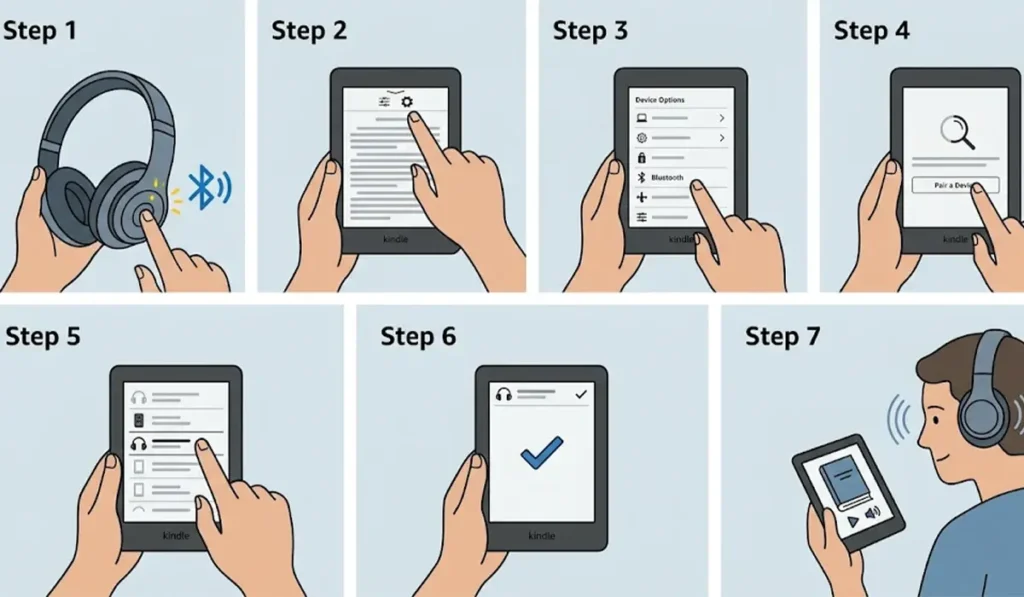
Method 1: Connect Bluetooth Headphones to a Kindle
Kindle e-readers with Bluetooth audio support pair with most wireless headphones and earbuds. Keep the headphones close and charged before starting.
- Step 1: Put the headphones in pairing mode. This usually means holding the power button or a dedicated Bluetooth button until a light starts flashing or a voice prompt says pairing.
- Step 2: On the Kindle, open the Quick Actions menu and tap All Settings. On some models, tap Settings from the Home screen instead.
- Step 3: Tap Bluetooth. On some models, this option sits under Device Options.
- Step 4: Tap Pair a Device and wait while the Kindle scans for nearby devices.
- Step 5: Select the headphones from the list of available devices.
- Step 6: Confirm the pairing prompt if one appears. The headphones then show as connected in the Bluetooth menu.
- Step 7: Open an Audible audiobook that has already been downloaded to the Kindle and press play. The audio now streams through the headphones.
Pro-Tip: Audiobooks need to be downloaded to the Kindle over Wi-Fi before listening. Starting the download first means pairing and playback happen back to back, with no waiting around.
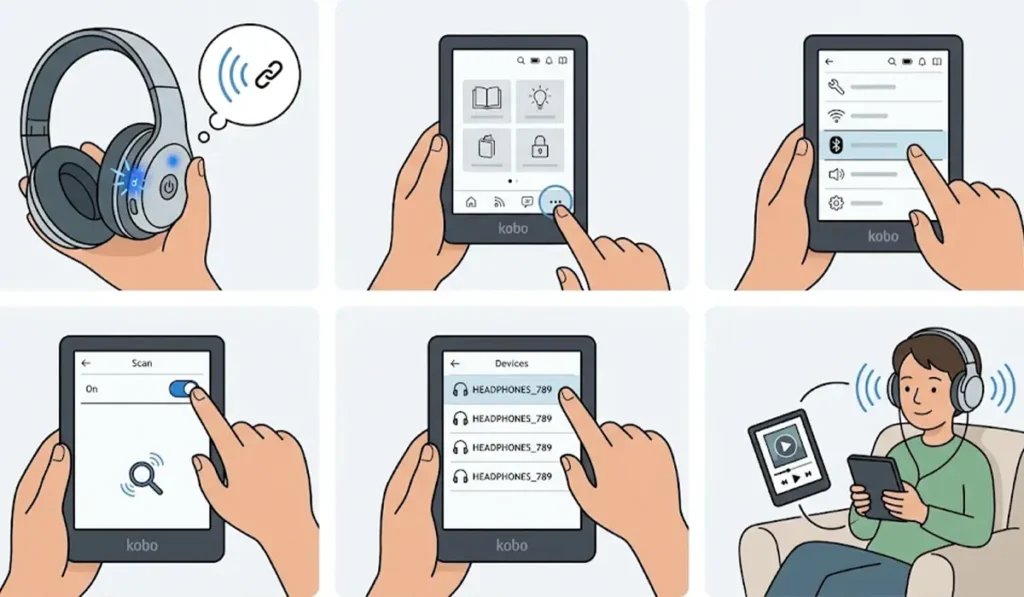
Method 2: Connect Bluetooth Headphones to a Kobo E-Reader
Newer Kobo models with Bluetooth, such as the Libra 2, Clara 2E, and Elipsa 2E, play Kobo audiobooks through wireless headphones.
- Step 1: Switch the headphones into pairing mode.
- Step 2: On the Kobo, tap More, then Settings, then Bluetooth.
- Step 3: Turn Bluetooth on and let the e-reader search for devices.
- Step 4: Tap the headphone name when it appears in the list.
- Step 5: Start an audiobook from the library. The sound plays through the headphones once the connection is active.
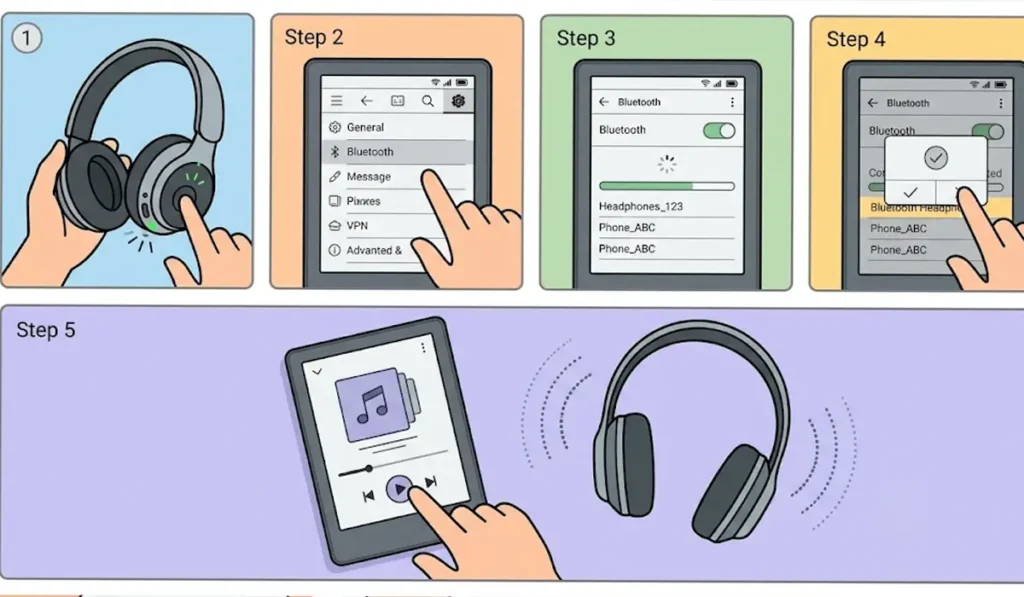
Method 3: Connect Bluetooth Headphones to an Android-Based E-Reader
E-readers that run Android, such as many Boox models, use the standard Android Bluetooth menu. The flow feels familiar to anyone who has paired headphones with a phone.
- Step 1: Place the headphones in pairing mode.
- Step 2: Open Settings on the e-reader and tap Bluetooth.
- Step 3: Turn Bluetooth on and wait for the list of available devices to load.
- Step 4: Tap the headphone name and accept the pairing request.
- Step 5: Open an audio or audiobook app and press play to hear the sound in the headphones.
Tips for a Smoother Listening Experience
Most people find that a few small habits make Bluetooth listening on an e-reader far more pleasant. Keep the headphones within a few feet of the e-reader for the steadiest signal. Turn Bluetooth off on the e-reader once listening ends, since constant use can shorten battery life between charges.
Headphones that are also used with a computer sometimes need a fresh pairing on that side, and a guide on how to re-pair Bluetooth earbuds for stereo sound on Windows covers that process. For headphones that jump between a PC and an e-reader, it also helps to check the audio output settings on Windows 11 so sound goes to the right place.
Pro-Tip: Headphones can only stay actively connected to one source at a time in many cases. Turning Bluetooth off on a phone or tablet before pairing with the e-reader prevents the headphones from reconnecting to the wrong device.
Common Problems When Pairing Headphones With an E-Reader
Fix 1: Headphones Do Not Appear in the List
Make sure the headphones are in pairing mode, not just powered on. A flashing light usually confirms this. Move them closer to the e-reader and run the scan again.
Fix 2: Headphones Pair but No Sound Plays
Confirm that an audiobook is actually playing and that the volume is turned up on both the e-reader and the headphones. Disconnecting and reconnecting the headphones from the Bluetooth menu usually restores the audio.
Fix 3: The Connection Keeps Dropping
Charge both the headphones and the e-reader, and keep them close together. If the headphones were last used with a computer, a guide on troubleshooting headphone detection on Windows can help clear up conflicts on that device.
Frequently Asked Questions
Can every Kindle connect to Bluetooth headphones?
No. Only Kindle e-readers with Bluetooth audio support can pair with wireless headphones. A Bluetooth option inside the settings menu confirms that the model supports it.
Can AirPods connect to a Kindle?
AirPods can pair with a Kindle as standard Bluetooth headphones. Open the charging case, hold the setup button until the light flashes, and then select them in the Kindle Bluetooth menu.
Can a Kindle play music through Bluetooth headphones?
Kindle e-readers are built for Audible audiobooks and the VoiceView screen reader, so they do not work as a music player.
Do wired headphones work with a Kindle?
Current Kindle e-readers do not include a headphone jack, which makes Bluetooth the standard way to listen.
Is an Audible account required to listen on a Kindle?
Audible audiobooks are the main audio content on a Kindle. An Audible account is needed to download and play them.
Do Kobo e-readers support Bluetooth headphones?
Newer Kobo models, including the Libra 2, Clara 2E, and Elipsa 2E, support Bluetooth and play Kobo audiobooks through wireless headphones.
How can headphones be disconnected from a Kindle?
Open the Bluetooth settings on the Kindle and tap the headphone name to disconnect or remove it. Turning the headphones off also ends the connection.
Does Bluetooth use more battery on an e-reader?
Audio playback with Bluetooth active uses more power than reading alone, so battery life can be shorter. Turning Bluetooth off after listening helps.
Does a Kindle have a built-in speaker?
Most Kindle e-readers do not have a built-in speaker, so audiobooks play only through paired Bluetooth headphones or speakers.
Why does the e-reader not show the headphones after pairing mode is on?
The headphones may still be connected to another device, such as a phone. Turning off Bluetooth on that device and starting pairing mode again usually fixes it.