
Want to enjoy a workout playlist without tangled cords? This guide shows how to connect Bluetooth headphones to a gym cardio machine in a few simple steps. Pairing takes about a minute, and it works on treadmills, bikes, and ellipticals alike.
Key Takeaways:
- The cardio machine needs built-in Bluetooth audio, usually marked with a Bluetooth symbol on the console.
- Headphones must be in pairing mode before the machine can find them.
- Machines with only a headphone jack can still work with a small Bluetooth transmitter.
- Menu names differ by brand, but the pairing flow is nearly the same everywhere.
Method 1: Connect Bluetooth Headphones to a Gym Cardio Machine With Built-In Bluetooth (Step-by-Step)
Start by looking at the console. A Bluetooth logo, or a menu option labeled Bluetooth or Audio, means the machine can pair with headphones directly. Charge the headphones first, since a low battery is a common reason pairing stalls halfway through.
- Step 1: Turn off Bluetooth on the phone, or disconnect the headphones from it, so the headphones are free to pair with something new.
- Step 2: Wake the console by pressing a button or starting to move, then find the Bluetooth or Audio option on the screen.
- Step 3: Turn on pairing or discovery mode on the machine if the menu offers it.
- Step 4: Put the headphones into pairing mode. This usually means holding the power button until a light flashes or a voice prompt says pairing.
- Step 5: Select the headphones from the list on the console. On many machines, the machine name shows up in the headphones’ Bluetooth list instead, so select it from there.
- Step 6: Wait for a confirmation message on the console or a tone in the headphones.
- Step 7: Start the built-in TV or an audio source on the machine and adjust the volume to a comfortable level.
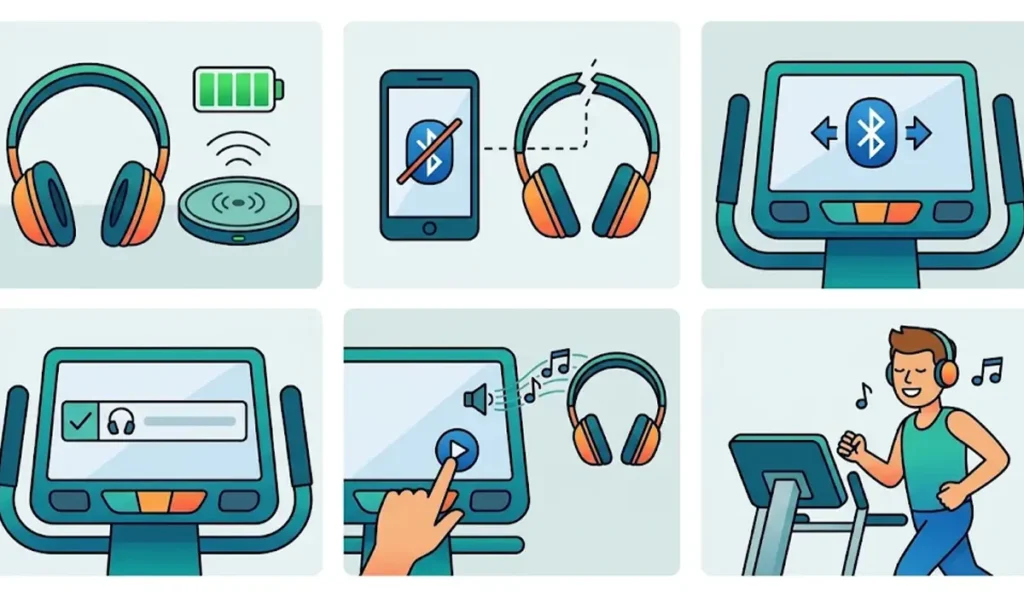
Pro-Tip: Pair the headphones before the workout begins, not halfway through it. Pairing while walking or pedaling makes it easy to mis-tap a menu option, and the console may time out before the connection finishes.
Method 2: Use a Bluetooth Transmitter for Machines With Only a Headphone Jack
Plenty of older cardio machines have a standard 3.5 mm headphone jack and no Bluetooth at all. A small Bluetooth transmitter bridges that gap. It works much like a tiny radio station that sends the machine’s audio to the headphones.
- Step 1: Charge the transmitter and turn it on.
- Step 2: Put the headphones into pairing mode and set the transmitter to pairing mode as well.
- Step 3: Wait until the transmitter and headphones link. A solid light or a short tone usually confirms it.
- Step 4: Plug the transmitter into the headphone jack on the cardio machine.
- Step 5: Start the machine’s audio and raise the volume on the machine if the sound is too quiet.
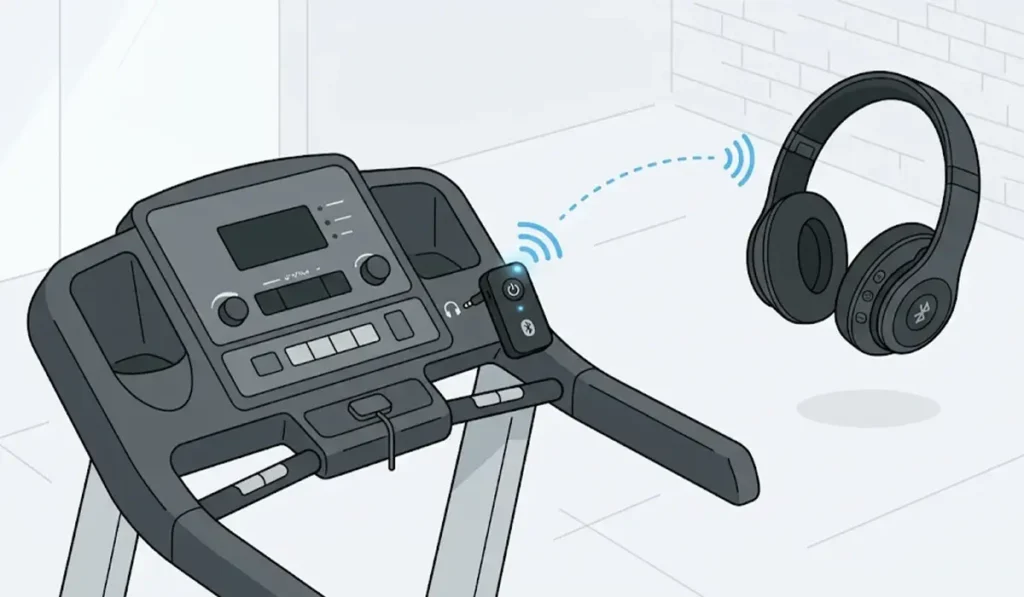
Pro-Tip: Choose a transmitter that supports low latency if the machine has a TV screen. Standard Bluetooth can make speech lag slightly behind the picture.
Helpful Tips for a Smoother Gym Connection
- Gym machines are shared, so pairing often needs to be repeated at each visit.
- Keep the headphones close to the console while pairing. Pairing from across the room often fails.
- Pair one device at a time. Many headphones connect to only one source at a time, so disconnect the phone first.
- Headphones that also get used with a Windows PC sometimes need a fresh start there. This guide to re-pairing Bluetooth earbuds on Windows covers the process.
- Look for a sticker or label near the console that mentions Bluetooth. It saves time compared to digging through menus.
Common Problems and Quick Fixes
Fix 1: Headphones Do Not Appear on the Console
Confirm the headphones are in pairing mode and not just powered on. A flashing light is the usual sign. Disconnect them from any nearby phone and search again.
Fix 2: Connected but No Sound
Check that audio is actually playing on the machine and that the machine volume and headphone volume are both turned up. Some machines only send sound from the built-in TV or a selected audio source.
Fix 3: The Connection Keeps Dropping
Move the headphones closer to the console and make sure the battery is charged. Pairing again from the beginning often clears a shaky link.
Fix 4: Headphones Are Hard to Find on a Computer Afterward
If the same headphones become hard to detect on a Windows PC after a gym session, this walkthrough on troubleshooting headphone detection can help.
Frequently Asked Questions
Can any Bluetooth headphones connect to a gym cardio machine?
Most standard Bluetooth headphones and earbuds work, as long as the machine supports Bluetooth audio. The pairing steps are the same for over-ear and in-ear models.
How can a cardio machine be checked for Bluetooth support?
Look for a Bluetooth symbol on the console or a Bluetooth option in the audio menu. Gym staff can also confirm which machines support it.
Can AirPods connect to a gym cardio machine?
Yes, if the machine supports Bluetooth audio. Open the AirPods case and hold the button on the back until the status light flashes white, then select them on the console.
Do headphones need to be paired again at every visit?
Often, yes. Gym machines are shared, so many do not keep a saved connection between users. Repeating the quick pairing steps usually takes less than a minute.
Can headphones stay connected to a phone and a cardio machine at the same time?
That depends on the headphones. Some models support two connections, but many do not. Disconnecting the phone before pairing avoids confusion.
What if the cardio machine has no Bluetooth?
A Bluetooth transmitter plugged into the machine’s headphone jack lets wireless headphones play the machine’s audio.
Does the same method work on treadmills, bikes, and ellipticals?
Yes. The pairing flow is nearly identical across machine types, although menu names and button positions vary by brand and model.
Why does the machine not show a list of devices?
Some machines wait for the headphones to find them instead. In that case, open the Bluetooth list on the headphones or the source device and select the machine name that appears.