
Learning how to connect Bluetooth headphones to a hotel TV takes just a few minutes, and it means late-night shows never disturb the room next door. Some hotel TVs have Bluetooth built in, while others need a small plug-in transmitter. Both options are covered below, from the quickest to the most reliable.
Key Takeaways:
- Many hotel TVs are locked-down models, so check the Sound menu for a Bluetooth option first.
- If there is no Bluetooth option, a Bluetooth transmitter in the TV headphone jack works on most hotel TVs.
- Put the headphones in pairing mode before searching for them.
- Remove the pairing before checkout so the TV does not keep the connection.
Method 1: Connect Through the TV’s Built-In Bluetooth
This is the fastest route, but it only works when the hotel TV supports Bluetooth audio. Menu names differ by brand and model, so the exact wording on screen may vary slightly.
- Step 1: Press the Settings or Menu button on the hotel TV remote.
- Step 2: Open the Sound or Audio menu.
- Step 3: Select Sound Output or Speaker Selection, then choose the Bluetooth option.
- Step 4: Put the headphones in pairing mode. This usually means holding the power or Bluetooth button until a light starts flashing.
- Step 5: Choose the option to search for or add a Bluetooth device on the TV.
- Step 6: Select the headphones from the list on screen and confirm the connection.
- Step 7: Play something on the TV and check that the sound comes through the headphones.
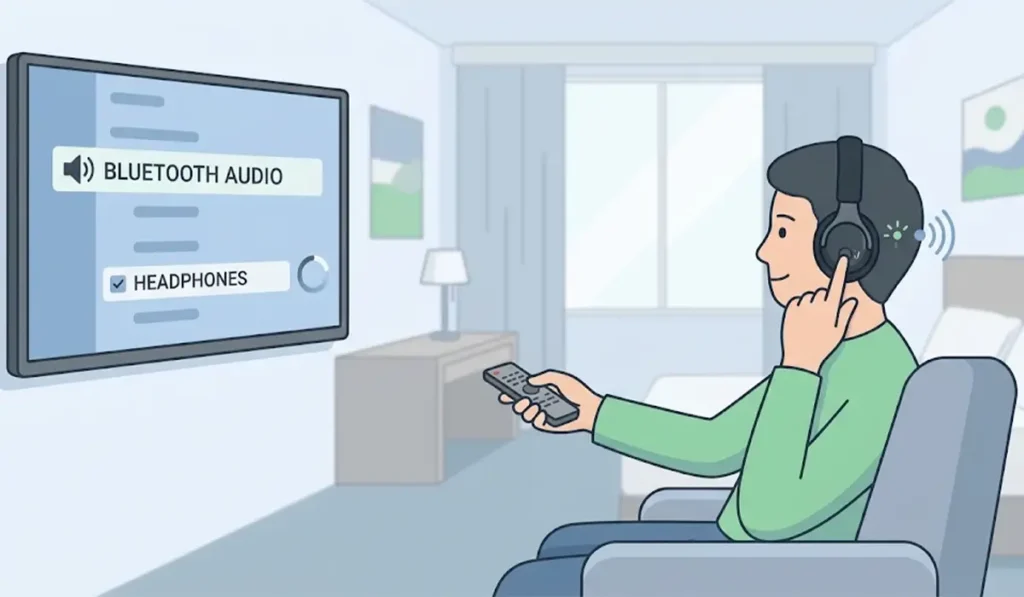
If the Bluetooth option is missing or the settings menu is hidden, the TV is probably set to a hotel mode. Method 2 solves that without touching any settings.
Method 2: Connect Using a Bluetooth Transmitter
A Bluetooth transmitter is a tiny gadget that sends the TV’s audio to any pair of Bluetooth headphones. Think of it as a translator between a TV that only speaks cable and headphones that only speak wireless. This works best when the hotel TV has a 3.5mm headphone jack, usually on the side or back panel.
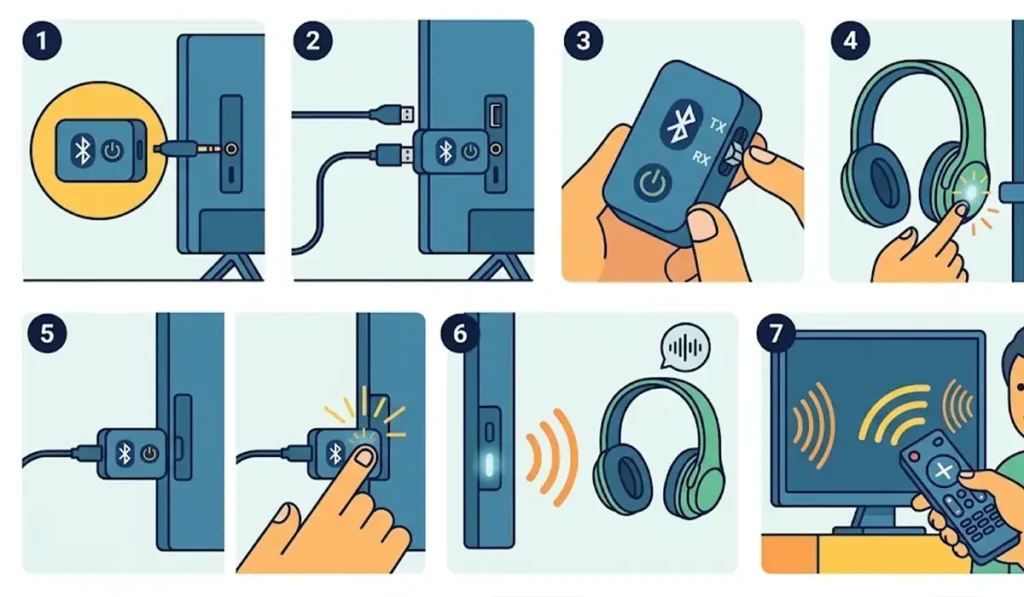
- Step 1: Plug the transmitter into the TV’s headphone jack, using a 3.5mm cable if the transmitter does not plug in directly.
- Step 2: Power the transmitter through a USB port on the TV or a USB wall adapter or power bank. Some models have their own battery.
- Step 3: If the transmitter has a TX and RX switch, set it to TX so it sends audio.
- Step 4: Put the headphones in pairing mode.
- Step 5: Hold the pairing button on the transmitter until its light flashes quickly.
- Step 6: Wait a few seconds until the light turns solid, which means the headphones are connected.
- Step 7: Raise the TV volume slowly until the sound is comfortable.
Pro-Tip: Pick a transmitter and a pair of headphones that support the same low-latency codec, such as aptX Low Latency. When both sides support it, the delay between picture and sound is usually much smaller than with standard Bluetooth.
Method 3: Connect Using a Fire TV Stick
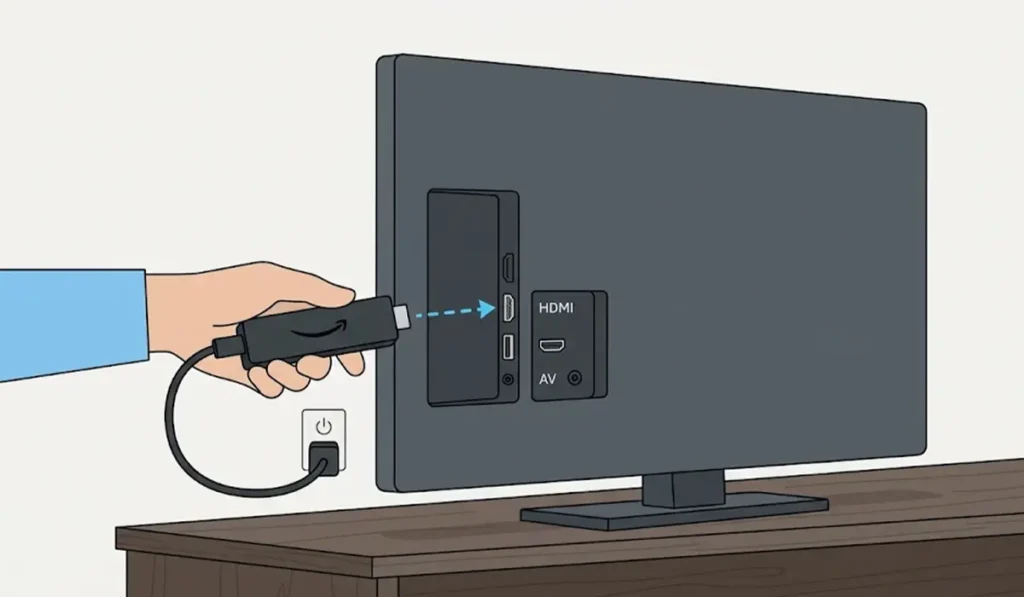
When the hotel TV has an accessible HDMI port and a Wi-Fi connection the stick can join, such as a phone hotspot, a streaming stick brings its own Bluetooth. A Fire TV Stick is a common example.
- Step 1: Plug the Fire TV Stick into a free HDMI port and switch the TV to that input.
- Step 2: Open Settings on the Fire TV home screen.
- Step 3: Select Controllers and Bluetooth Devices, then Other Bluetooth Devices.
- Step 4: Choose Add Bluetooth Devices and put the headphones in pairing mode.
- Step 5: Select the headphones when they appear and wait for the connected message.
Tips for Better Sound on a Hotel TV
- Charge the headphones the night before, since a flat battery is the most common reason a pairing attempt goes nowhere.
- Keep the headphones within a few meters of the TV or transmitter. Walls and bathroom doors weaken the signal.
- Keep a small transmitter and a short 3.5mm cable in the travel bag. Together they take up almost no space.
- Headphones that also pair with a Windows laptop sometimes need a fresh start there after travel, and this guide on re-pairing Bluetooth earbuds on Windows covers it.
Pro-Tip: Pair the headphones before getting into bed. Setting everything up in a calm moment is far easier than fiddling with a remote at midnight.
Common Problems and Quick Fixes
Fix 1: The Headphones Do Not Appear in the List
The headphones are probably not in pairing mode. Turn them off, then hold the power or Bluetooth button until the light flashes, and search again.
Fix 2: The Headphones Connect to Another Device Instead
Most headphones reconnect to the last device they used. Turn off Bluetooth on the phone or laptop nearby, then try pairing with the TV or transmitter again.
Fix 3: The Transmitter Stays in Pairing Mode
Unplug the transmitter, plug it back in, and repeat the pairing steps with the headphones already in pairing mode.
Fix 4: Sound Is Quiet or Missing
Raise the TV volume and the headphone volume together. Also confirm the transmitter is firmly seated in the headphone jack and set to TX if it has a switch. If the same headphones are not detected on a Windows laptop either, troubleshooting headphone detection on Windows can help narrow it down.
Frequently Asked Questions
Can every hotel TV connect to Bluetooth headphones?
No. Many hotel TVs do not have Bluetooth, or the feature is hidden by hotel settings. A Bluetooth transmitter is the dependable option in those cases.
Does a Bluetooth transmitter work on a hotel TV?
Yes, as long as the TV has a headphone jack or another audio output the transmitter can use. Transmitters are sold with 3.5mm, optical, and RCA inputs, so choose one that matches the output available.
Will the sound be out of sync with the picture?
A small delay can happen with standard Bluetooth. A transmitter and headphones that both support a low-latency codec usually reduce it.
Can two people listen at the same time?
Yes, with a dual-link transmitter that pairs with two pairs of headphones at once. Built-in TV Bluetooth usually supports only one pair.
Do AirPods work with a hotel TV?
Yes. AirPods use standard Bluetooth, so they pair with a transmitter or a TV that offers Bluetooth audio. Hold the button on the charging case until the light flashes white, then select them from the device list.
Is it safe to plug a transmitter into a hotel TV?
Plugging into the headphone jack is the same as using wired headphones, so it does not change anything on the TV. Avoid changing hotel TV settings or unplugging hotel equipment, and follow any hotel rules.
Does the transmitter need its own power?
Most do. They either run on a built-in rechargeable battery or draw power from a USB port, wall adapter, or power bank.
How can the connection be removed before checkout?
If the headphones were paired through the TV, open the Bluetooth device list and remove them. With a transmitter, simply unplug it and pack it away.