
A charging case that drains overnight is one of the most frustrating problems earbud owners run into, especially when the case is fully charged before bed and somehow empty by morning. This guide walks through the exact fixes that solve this issue, without wasting time on unrelated troubleshooting.
Key Takeaways
- Overnight battery drain is usually caused by a poor seal, dirty contacts, or a background Bluetooth connection.
- Cleaning the charging pins solves the problem in most cases within minutes.
- A firmware update or factory reset can resolve drain caused by software bugs.
- A case older than 18-24 months may simply have a degraded battery that needs replacing.
- Using the original cable and a wall adapter (not a laptop USB port) prevents inconsistent charging cycles.
Step-by-Step Guide to Fix a Charging Case That Drains Overnight
Method 1: Clean the Charging Contacts
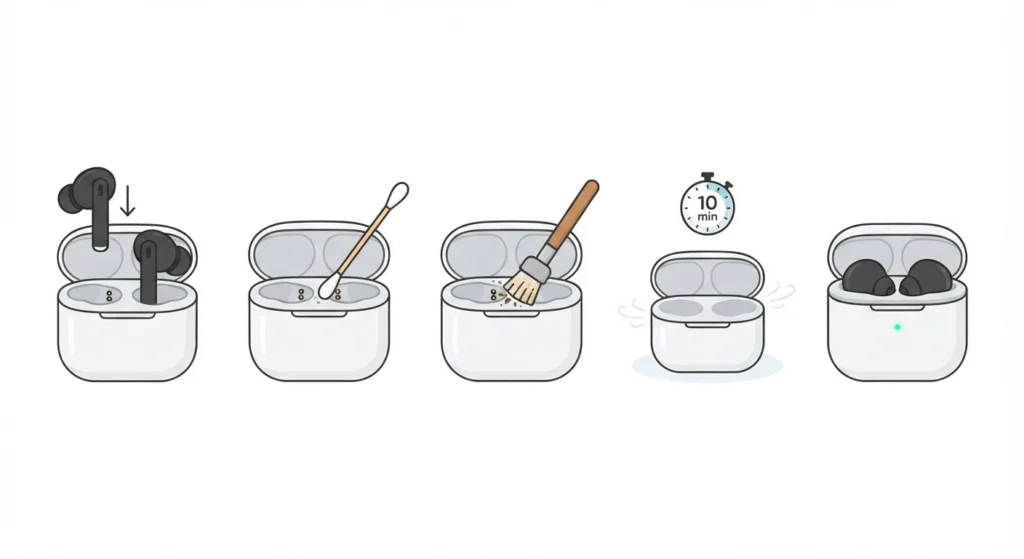
Dust, lint, and skin oil build up on the metal charging pins over time. This buildup creates a weak connection between the earbuds and the case, which forces the case to draw more power trying to maintain a steady charge. This is the first thing to check, since it accounts for the majority of overnight drain complaints.
- Step 1: Power off the earbuds and remove them from the case.
- Step 2: Dip a cotton swab in isopropyl alcohol (90% or higher) and gently wipe the metal contacts inside the case.
- Step 3: Use a dry, soft-bristle brush to remove any remaining debris from the charging slots.
- Step 4: Let the case air dry for at least 10 minutes before placing the earbuds back inside.
- Step 5: Close the lid fully and check that the LED indicator confirms a proper connection.
Pro-Tip: A weak magnetic seat is often mistaken for a battery issue. Push the earbuds down firmly until a slight click or snug resistance is felt, since even a millimeter of misalignment can keep the pins from making full contact.
Method 2: Disable Background Bluetooth Searching
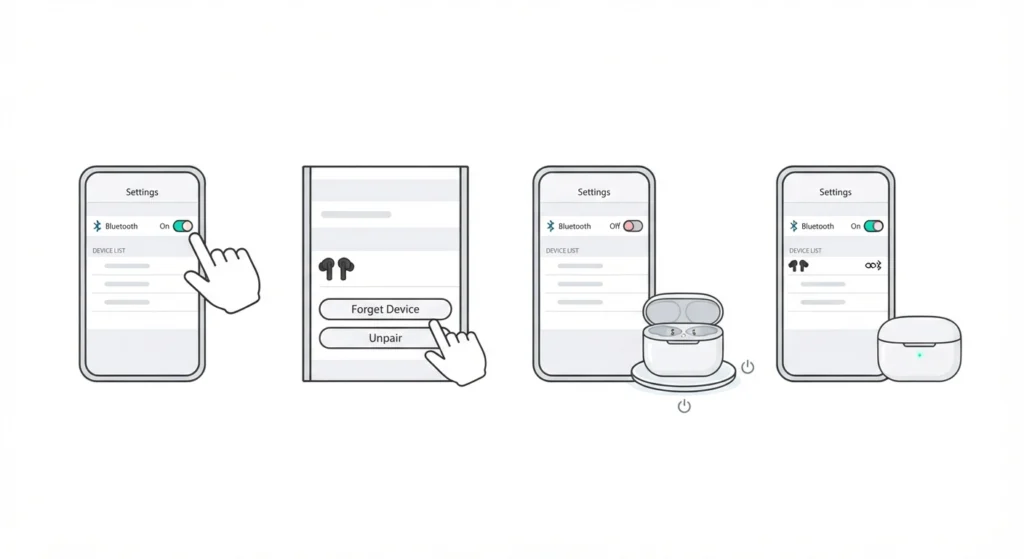
Some earbud cases keep a low-power Bluetooth signal active even while closed, especially models with ‘quick pair’ or ‘find my earbuds’ features. This constant signal search is a common reason a case slowly bleeds power overnight.
- Step 1: Open the Bluetooth settings on the connected device.
- Step 2: Forget or unpair the earbuds temporarily.
- Step 3: Turn off Bluetooth on the device completely before placing the case on the charger overnight.
- Step 4: In the morning, turn Bluetooth back on and re-pair the earbuds as usual.
For anyone who frequently drops connection or needs to reconnect earbuds for proper stereo sound, this guide on re-pairing Bluetooth earbuds for stereo sound walks through the process in detail.
Method 3: Perform a Factory Reset on the Case
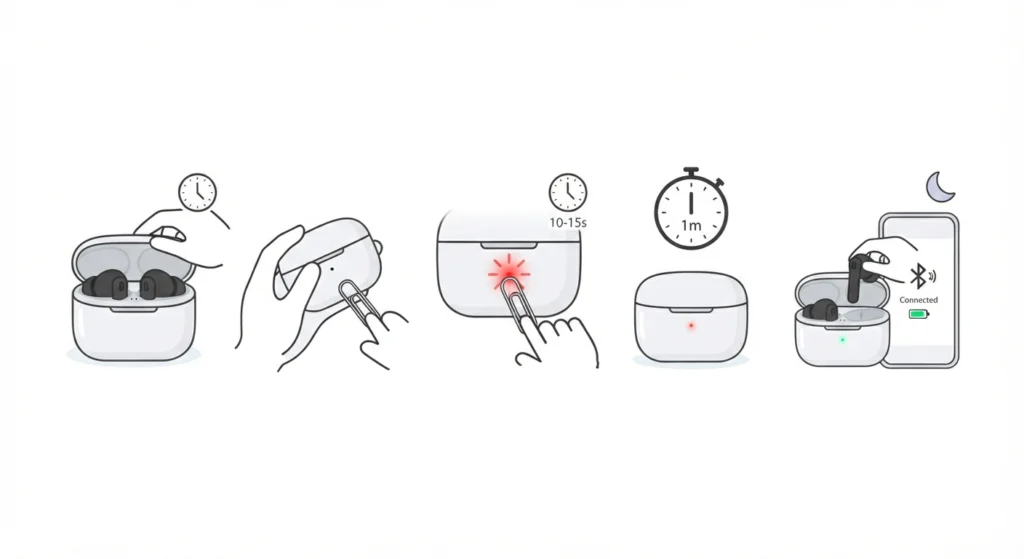
A software glitch inside the case’s charging chip can cause it to miscalculate battery levels or keep circuits active when they should be idle. Resetting clears this kind of bug without needing a repair.
- Step 1: Place both earbuds inside the case and close the lid for 15 seconds, then reopen it.
- Step 2: Locate the small reset button on the back or bottom of the case (a pinhole on most models).
- Step 3: Press and hold the reset button for 10-15 seconds until the LED flashes or changes color.
- Step 4: Release the button and wait one full minute before reconnecting the earbuds.
- Step 5: Re-pair the earbuds with the device and monitor the charge level overnight to confirm the fix.
Method 4: Replace the Charging Cable and Power Source
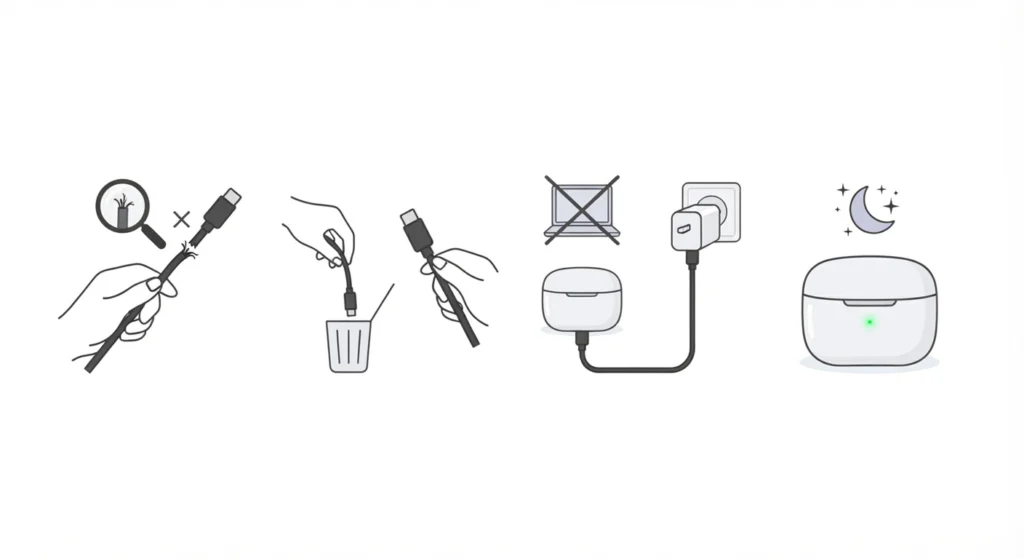
A damaged cable or an unstable power source can cause a case to charge inconsistently, which drains the battery faster than normal once unplugged. This is easy to overlook since the case still appears to charge during the day.
- Step 1: Inspect the charging cable for fraying, bent connectors, or loose ends.
- Step 2: Swap in a certified replacement cable from the original manufacturer.
- Step 3: Plug the case into a wall adapter instead of a laptop or power bank, since USB ports on computers often deliver inconsistent voltage.
- Step 4: Charge the case fully, unplug it, and leave it untouched overnight to test whether drain still occurs.
Method 5: Update the Case Firmware
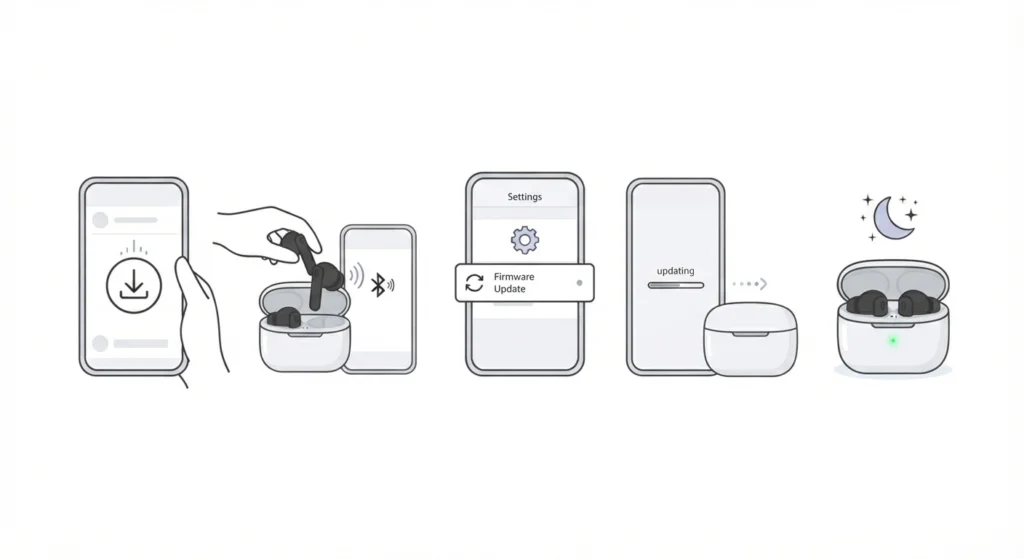
Many charging cases run on firmware that occasionally needs an update from the manufacturer’s companion app. Older firmware versions sometimes contain known battery management bugs that later updates specifically correct.
- Step 1: Download the manufacturer’s official app (such as the brand-specific companion app for the earbuds).
- Step 2: Connect the earbuds and case to the device via Bluetooth.
- Step 3: Open the app’s settings menu and check for an available firmware update.
- Step 4: Install the update and keep the case near the device until the process finishes completely.
- Step 5: Restart the case by closing and reopening the lid, then observe the battery level overnight.
Tips to Prevent Overnight Battery Drain
- Store the case at room temperature, since extreme cold or heat accelerates battery degradation.
- Avoid leaving the case connected to the charger for days at a time once it reaches 100%, as constant trickle charging wears down battery cells faster.
- Clean the charging contacts once every two to three weeks as routine maintenance, not just when a problem appears.
- Check that the earbuds themselves are fully seated and the lid clicks shut completely, since a lid that does not close all the way can keep the case in an active state.
Common Problems and Troubleshooting
The Case Drains Even When Empty (No Earbuds Inside)
This usually points to a parasitic drain from the case’s internal circuitry rather than the earbuds themselves. Try Method 3 (factory reset) first, since this often resolves drain that happens even with the case empty.
Only One Side Drains the Case Faster
This typically means one earbud has a weaker battery cell or a dirty contact point on that specific side. Clean that single contact carefully using Method 1 and test again before assuming a full replacement is needed.
Case Shows Full Charge But Dies Within Hours
This is a sign the internal battery has degraded and can no longer hold its rated capacity, which is common in cases older than 18 months. At this stage, contacting the manufacturer for a replacement case is the most reliable solution, since battery cells inside sealed cases generally cannot be swapped at home.
If the connected device is running Windows 11 and audio issues appear alongside the charging problem, checking audio output settings or resetting audio settings can rule out a software-side conflict that sometimes gets mistaken for a hardware battery fault.
Frequently Asked Questions
Why does a fully charged case still lose power overnight?
This is typically caused by a weak seal between the earbuds and the charging pins, a background Bluetooth signal, or a firmware bug that keeps the case’s circuitry partially active instead of entering low-power mode.
Is it normal for a charging case to lose a small amount of battery overnight?
A drop of 1-3% overnight is considered normal standby drain. Anything beyond 10-15% points to one of the issues covered in this guide, most commonly dirty contacts or a background connection.
Can leaving the case plugged in overnight damage the battery?
Most modern cases include overcharge protection that stops charging once the battery reaches 100%. However, leaving it plugged in for multiple days at a time can still shorten battery lifespan over the long run.
How often should the charging contacts be cleaned?
Cleaning every two to three weeks is a reasonable routine for most users, though anyone using earbuds daily in dusty or humid environments may need to clean more frequently.
Does cold weather affect how fast a charging case drains?
Yes. Lithium-ion batteries lose efficiency in cold temperatures, which can cause a case to appear to drain faster than usual. Storing the case at room temperature helps maintain a stable charge level.
Why does only one earbud show a low battery while the case looks fine?
This usually means that specific earbud has a dirty or misaligned contact point. Cleaning that single connection point and reseating the earbud firmly usually resolves it.
Should the case be reset every time it drains overnight?
Not necessarily. A reset should be used after cleaning the contacts and disabling background Bluetooth searching, since resetting first can mask a simpler mechanical fix like a dirty pin.
How long should a charging case battery normally last?
Most charging case batteries hold a reliable charge for 18 to 24 months with regular daily use. After this point, gradual capacity loss becomes noticeable and is considered normal wear rather than a defect.
Can a third-party charging cable cause this issue?
Yes. Uncertified cables can deliver inconsistent voltage, which affects how efficiently the case charges and how well it holds that charge afterward. Using the original or a certified replacement cable is recommended.
Is it worth repairing an old case instead of replacing it?
If the case is under warranty, requesting a replacement is the more practical option, since battery cells in sealed cases are not designed to be user-replaceable. Once out of warranty, replacing the entire case is usually more cost-effective than a professional repair.