
Bose Sport Earbuds with one earbud not working is a frustrating problem, especially mid-workout, but the fix is usually simple and takes only a few minutes. In most cases, a quick reset, a clean charging contact, or a fresh Bluetooth connection brings the silent earbud back to life.
Quick Summary:
- Most common cause: a minor connection glitch between the two earbuds and the phone
- Fastest fix: seat both earbuds in the charging case and reconnect Bluetooth
- Most effective fix: the 30-second Bluetooth button reset inside the case
- Red and white flashing light: reset first, then request a repair or replacement if it continues
- Time needed: about 5 to 10 minutes
Step-by-Step Guide to Fix Bose Sport Earbuds With One Earbud Not Working
Work through the fixes below in order. Each one is quick, and the earbuds often start working again after the first or second fix.
Fix 1: Recharge and Reseat Both Earbuds
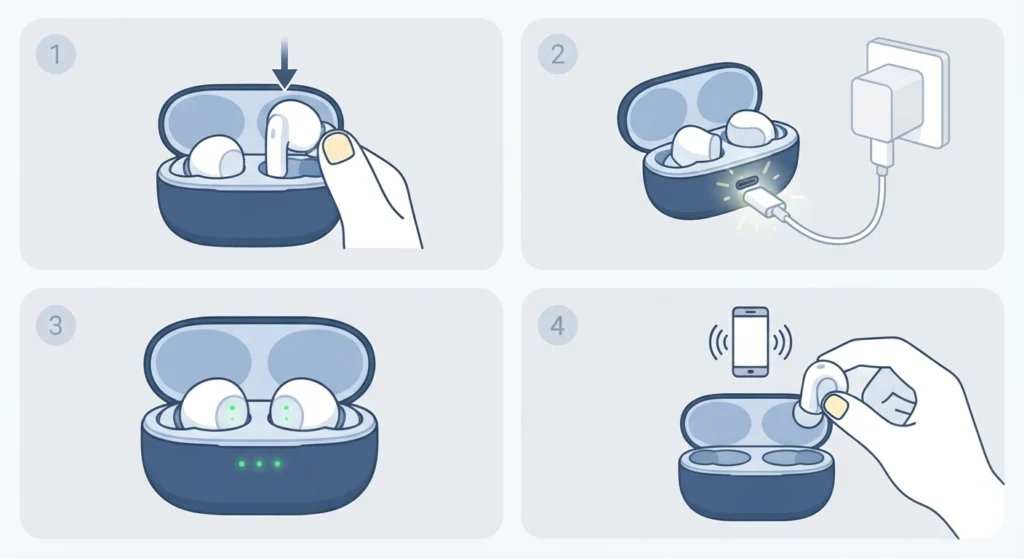
A drained or poorly seated earbud is one of the most common reasons for silence in one ear. Think of it like a car that looks fine but has a loose battery cable. Everything seems normal until it refuses to start.
- Step 1: Place both earbuds firmly into the charging case.
- Step 2: Connect the case to power and leave it for at least 15 minutes.
- Step 3: Check that the LEDs on the earbuds and the case light up as expected.
- Step 4: Remove both earbuds and try playing audio again.
Pro-Tip: If one earbud shows a red and white flashing LED, or the 1, 3 and 5 LEDs on the front of the case flash white, the earbuds are reporting an error. Skip ahead to Fix 5 and run the full reset.
Fix 2: Clean the Earbuds and Charging Contacts
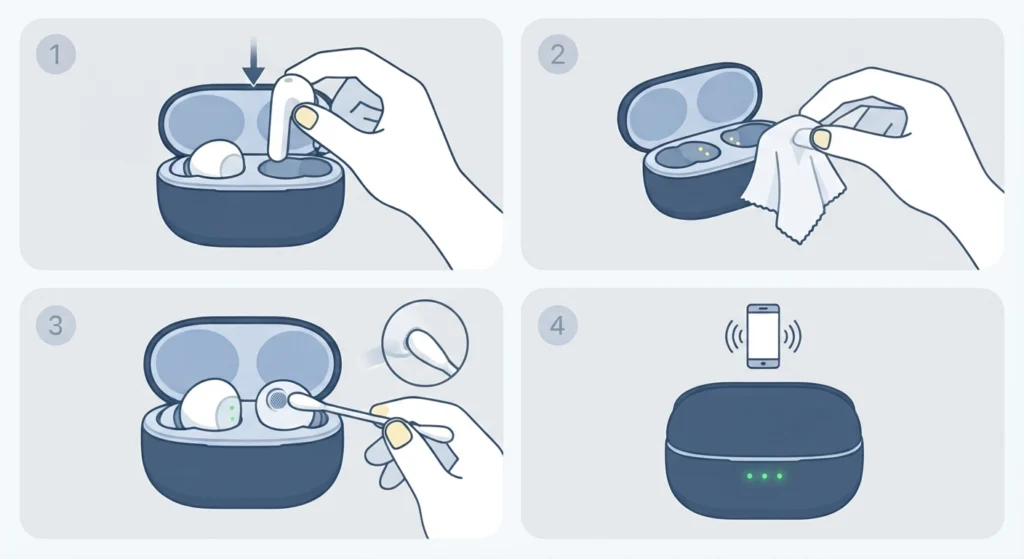
Sweat, earwax and gym dust build up faster than most people expect. A thin layer on the charging contacts can stop one earbud from charging or syncing properly.
- Step 1: Turn off the earbuds by placing them in the case.
- Step 2: Wipe the earbud contacts and the matching contacts inside the case with a dry, soft, lint-free cloth.
- Step 3: Gently clean the ear tips and the sound opening with a dry cotton swab.
- Step 4: Avoid liquids and sharp tools, then reseat the earbuds and test again.
Fix 3: Remove and Reconnect the Bluetooth Connection
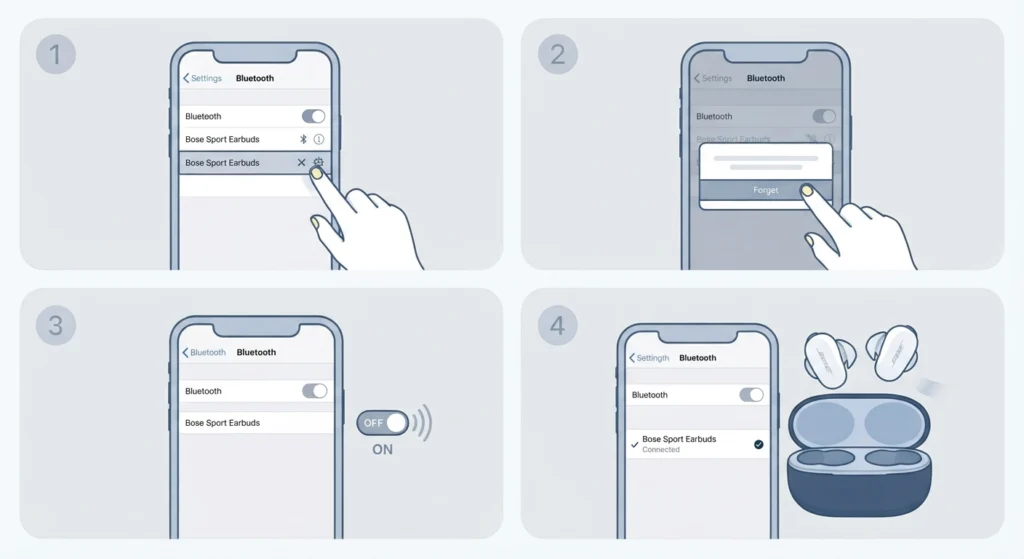
Bluetooth can hold on to an old or half-broken connection. Clearing it forces a clean start.
- Step 1: Open the Bluetooth menu on the phone, tablet or computer.
- Step 2: Select the Bose Sport Earbuds in the list of paired devices and choose to forget or remove them.
- Step 3: Turn Bluetooth off, wait a few seconds, then turn it back on.
- Step 4: Take both earbuds out of the case and pair them again.
Windows users who still get sound from only one side after pairing may find this guide on how to re-pair Bluetooth earbuds for stereo sound on Windows helpful.
Fix 4: Check the Audio Balance and Mono Settings on the Device
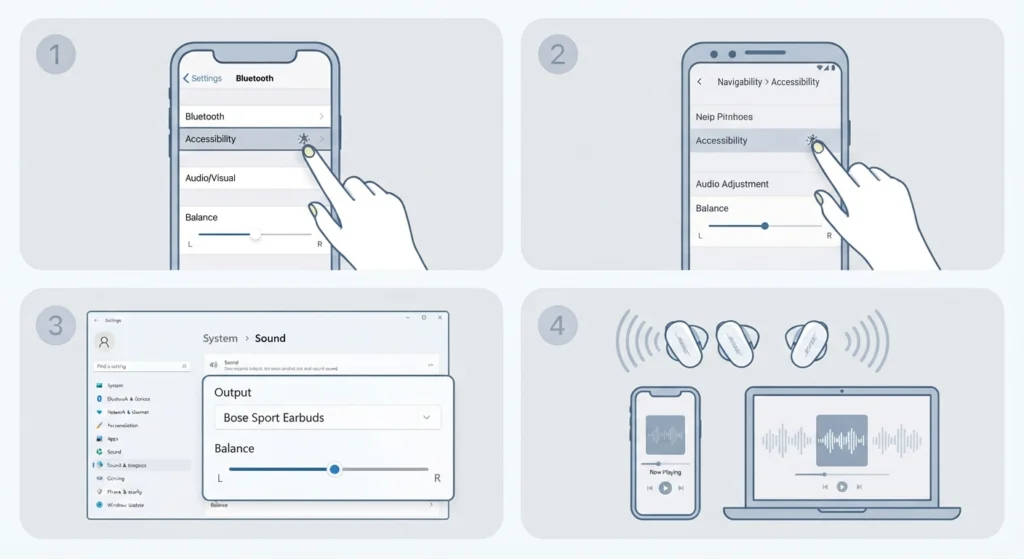
Sometimes the earbuds are perfectly fine and the phone or computer is sending sound to one side only. The balance slider is easy to nudge by accident.
- Step 1: On an iPhone, open Settings, then Accessibility, then Audio and Visual, and make sure the Balance slider sits in the center.
- Step 2: On an Android phone, open Settings, then Accessibility, then Audio adjustment, and center the balance slider.
- Step 3: On a Windows 11 computer, review the audio output settings to confirm the Bose earbuds are the selected output and the channels are balanced.
- Step 4: Play a song and check that both earbuds now produce sound.
Fix 5: Reset the Bose Sport Earbuds
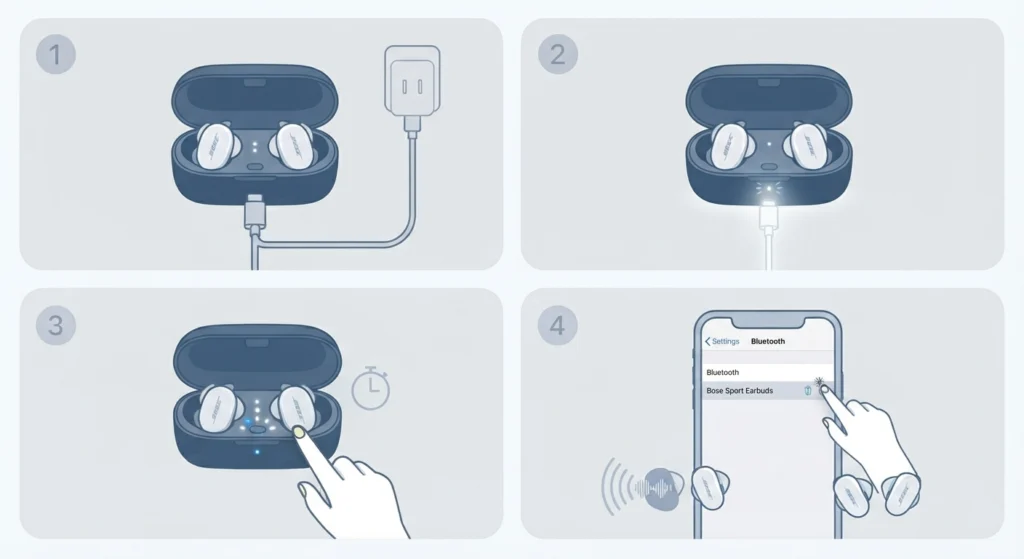
This is the most reliable fix, and it works much like restarting a frozen phone. The reset clears the earbuds’ memory of previously connected Bluetooth devices. It does not restore factory settings.
- Step 1: Connect the charging case to power.
- Step 2: Place both earbuds in the charging case.
- Step 3: Close the lid for 5 seconds, then open it again.
- Step 4: Press and hold the Bluetooth button inside the case for 30 seconds, then release it.
- Step 5: Watch the earbud LEDs. They blink, glow solid white, then blink blue.
- Step 6: On the phone or computer, remove the Bose earbuds from the list of saved Bluetooth connections.
- Step 7: Reconnect the earbuds and play audio to confirm both sides work.
Pro-Tip: Do not let go of the Bluetooth button early. The full 30 seconds matters, and stopping at 10 or 15 seconds is the most common reason a reset seems to do nothing.
Fix 6: Update the Earbuds With the Bose Music App
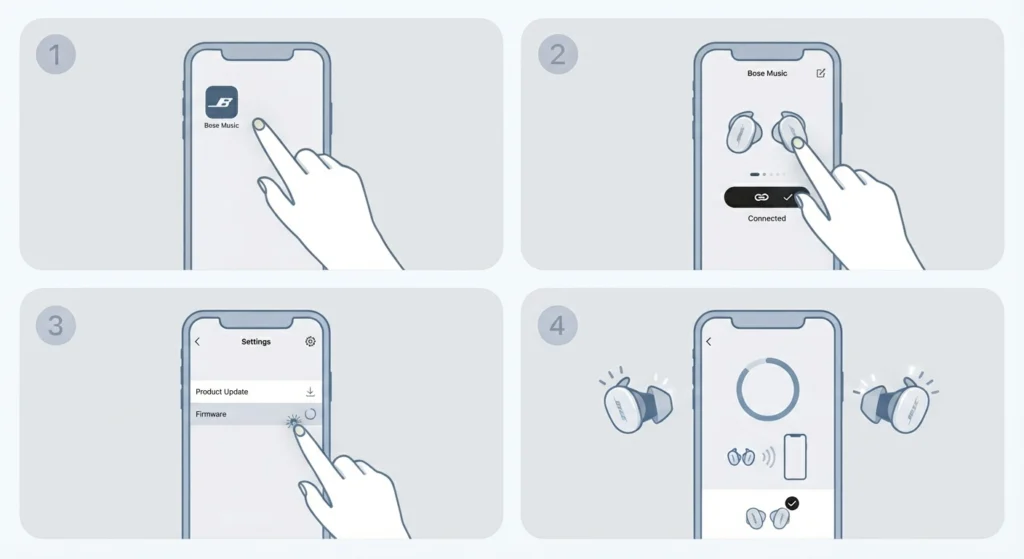
Firmware updates can correct connection bugs between the two earbuds. Once the earbuds are working again, keeping them current helps prevent a repeat.
- Step 1: Install or open the Bose Music app on the phone.
- Step 2: Connect the earbuds and select them in the app.
- Step 3: Open the product settings and check for a software update.
- Step 4: Install any available update and keep the earbuds close to the phone until it finishes.
Tips to Keep Both Earbuds Working
- Return the earbuds to the charging case after every session so both charge evenly.
- Wipe sweat off the earbuds and contacts after workouts before closing the lid.
- Keep the earbuds and case inside a bag pocket, away from loose keys and coins.
- Avoid leaving the case in a hot car or in direct sunlight.
- Pair the earbuds with one main device when possible to reduce connection confusion.
Common Problems and Quick Solutions
One Earbud Shows Red and White Flashing Lights
This points to an error state. Seat the earbuds in the case and run the reset from Fix 5. If the light keeps flashing after the reset, Bose states that the earbuds will need to be replaced, so start a repair or replacement request through Bose support.
The Earbud Works in the Case but Has No Sound Outside
Remove the earbuds from the Bluetooth list, run the reset in Fix 5, then pair again. This clears a mismatched connection between the earbuds and the device.
Sound Works on Phone but Not on a Windows 11 Computer
The computer may be using the wrong device profile or a saved setting. Try resetting the audio settings on the computer, then reconnect the earbuds.
Frequently Asked Questions
Why is only one of my Bose Sport Earbuds working?
The most common causes are a low battery in one earbud, dirty charging contacts, a glitchy Bluetooth connection, or an audio balance setting on the device. Working through the fixes above in order usually solves it.
How do I reset Bose Sport Earbuds?
Connect the charging case to power, place both earbuds inside, close the lid for 5 seconds, then open it. Press and hold the Bluetooth button in the case for 30 seconds and release it. The earbud LEDs blink, turn solid white, then blink blue.
Will resetting the earbuds erase my settings?
The reset clears the list of previously connected Bluetooth devices, but it does not restore the earbuds to factory settings. Pairing with the phone or tablet must be done again afterward.
What does a red and white flashing light on one earbud mean?
It signals an error on that earbud. Place both earbuds in the case and run the reset. If the flashing continues, Bose support states that the earbuds require replacement.
Can a dirty charging contact stop one earbud from working?
Yes. Sweat and earwax residue can block charging, which leaves one earbud with no power. Cleaning the contacts with a dry, soft cloth often restores normal charging.
How long should the earbuds charge before testing again?
Leaving them in the connected case for at least 15 minutes gives a clear sign of whether the earbud is taking a charge. Longer is fine if the battery was completely drained.
Can the phone cause sound to play in only one earbud?
Yes. A balance slider that is off center or a mono audio setting can send sound to one side. Checking the accessibility audio settings on the phone takes less than a minute.
Do the Bose Sport Earbuds need to be paired again after a reset?
Yes. After the reset, remove the earbuds from the saved Bluetooth list on the device, then connect them again as a new pairing.
Is the problem covered by warranty if nothing works?
Coverage depends on the purchase date and region. When the steps above do not solve the issue, Bose support offers an online repair or replacement request, which is the fastest way to check eligibility.
How can a lost sound issue be prevented in the future?
Charge both earbuds fully, clean them after sweaty workouts, store them in the case, and keep the Bose Music app updated. These habits prevent most one-sided sound problems.