
Bose QuietComfort headphones not turning on is one of the most common issues reported by owners, and in most cases, the cause is something simple that can be fixed in a few minutes without any tools or technical background.
Key Takeaways
- A dead or deeply drained battery is the most frequent reason the headphones will not power on
- A forced reset resolves the issue in the majority of cases within seconds
- Faulty cables or power sources are often mistaken for a hardware fault
- Firmware updates through the Bose Music app can restore power function on stuck units
- A factory reset should only be used after other fixes have been tried
Before assuming the headphones are broken, it helps to know that this problem is usually recoverable. The following steps are listed in the order that resolves the issue fastest for most users, starting with the simplest checks first.
Step-by-Step Guide to Fix Bose QuietComfort Headphones Not Turning On
Fix 1: Charge the Headphones Properly
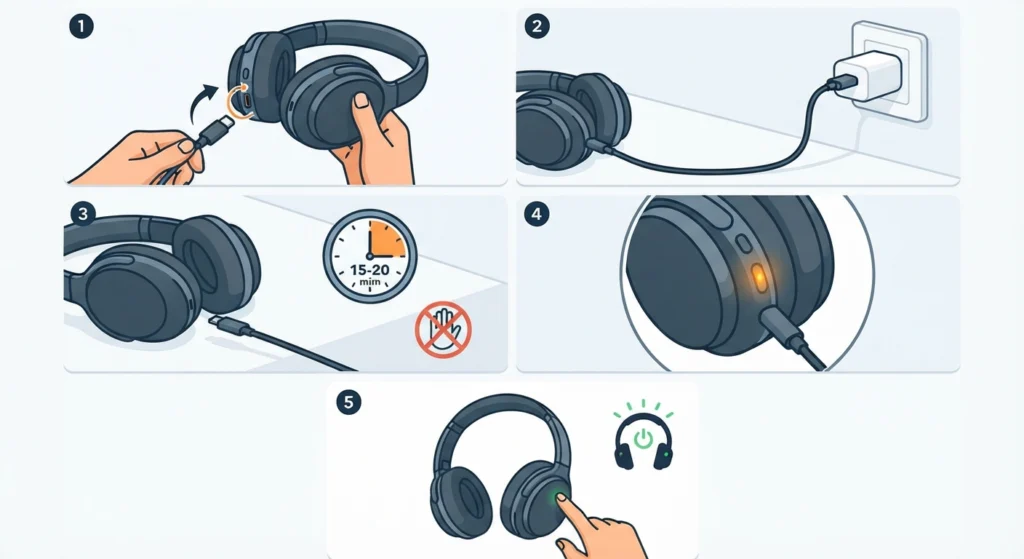
A battery that has been fully drained for an extended period sometimes needs a few minutes of charging before the power button responds at all. This is normal behavior, not a defect.
- Step 1: Connect the headphones to the included USB cable
- Step 2: Plug the other end into a wall adapter instead of a laptop or PC port, since wall adapters typically deliver more consistent power
- Step 3: Leave the headphones charging for at least 15 to 20 minutes without pressing any buttons
- Step 4: Check for the charging LED near the power switch, which should glow white or amber depending on the model
- Step 5: Attempt to power on the headphones after the charging period
Pro-Tip: If no LED lights up at all after 10 minutes of charging, the cable or power source is likely the actual problem, not the headphones themselves. Swapping the cable before assuming a hardware failure saves a lot of unnecessary troubleshooting.
Fix 2: Perform a Forced Reset
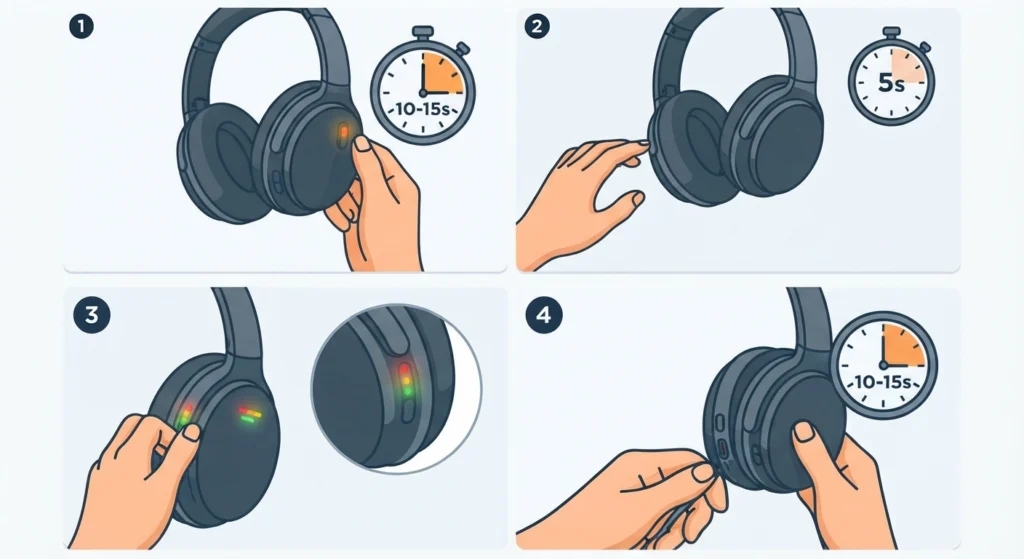
Most Bose QuietComfort models, including the QC35, QC45, and QC Ultra, have a hidden reset function that clears a frozen internal state without erasing any pairing data.
- Step 1: Slide the power switch to the On position and hold it there for 10 to 15 seconds
- Step 2: Slide it back to Off and wait 5 seconds
- Step 3: Slide it On again and check whether the status LED activates
- Step 4: If nothing happens, repeat the process one more time, since some units need a second attempt to fully clear
This method fixes the issue for a large share of users experiencing a completely unresponsive headset, especially after the headphones have been stored unused for weeks.
Fix 3: Try a Different Cable and Power Source
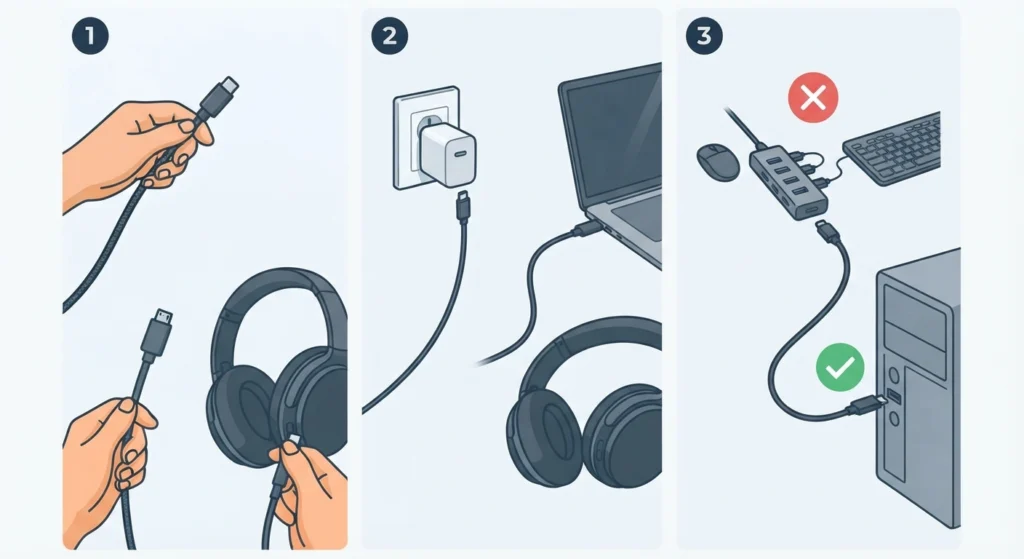
Third-party or damaged charging cables are a frequent hidden cause. A cable can look fine on the outside while the wiring inside has failed.
- Step 1: Use a different USB-C or micro-USB cable, depending on the model
- Step 2: Test with a different wall adapter or a verified working USB port
- Step 3: Avoid charging through a USB hub, since low-power hubs often fail to deliver enough current to revive a fully drained battery
Fix 4: Update the Firmware Through the Bose Music App
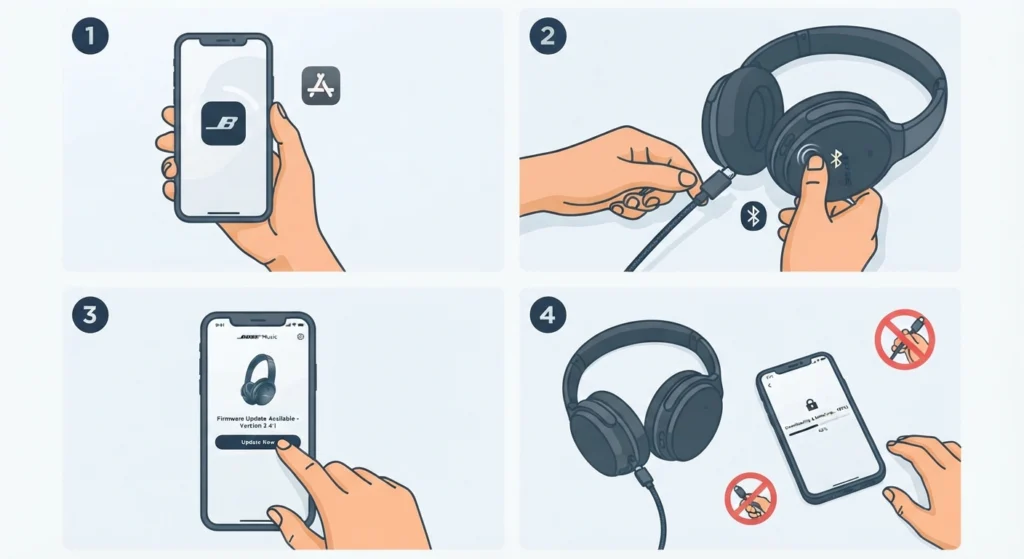
Occasionally, headphones that show some signs of life, such as a flickering LED, are stuck mid-update rather than fully dead. Completing the update through the official app resolves this.
- Step 1: Install the Bose Music app on a phone or tablet
- Step 2: Connect the headphones to a charger while attempting to pair
- Step 3: Open the app and check for a pending firmware update notification
- Step 4: Allow the update to finish fully without disconnecting the cable
Once paired again, users on a Windows 11 machine sometimes notice the sound still routes to the wrong device. This is usually fixed by adjusting the audio output settings so the correct headset becomes the default playback device.
Fix 5: Factory Reset the Headphones
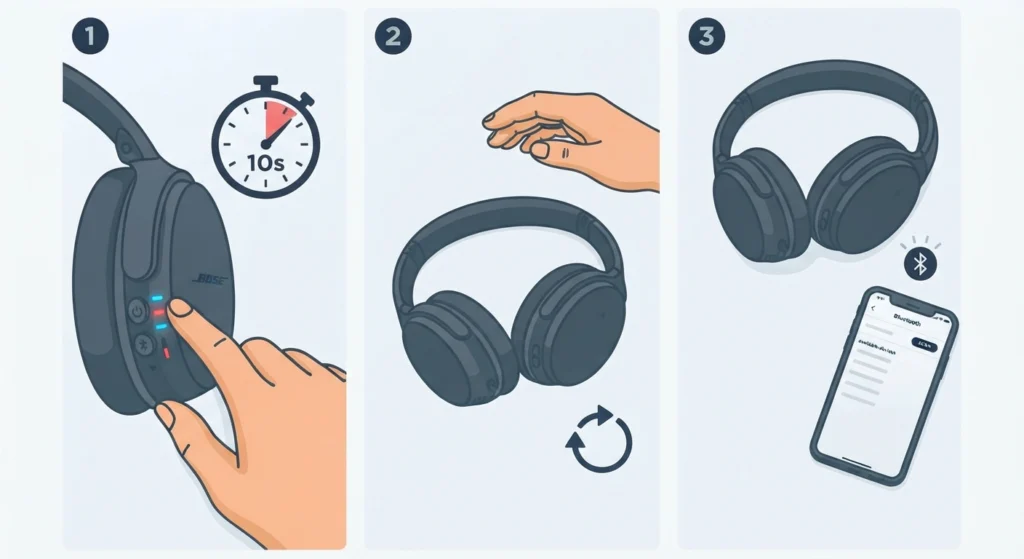
This step should be used only after the previous fixes have not worked, since it clears all saved Bluetooth pairings.
- Step 1: Hold the power and Bluetooth buttons together for about 10 seconds until the LED flashes blue and red alternately
- Step 2: Release the buttons and wait for the headphones to power cycle on their own
- Step 3: Once restored, the headphones will need to be paired again as a new device
After a factory reset, the original pairing has to be rebuilt from scratch. A clear walkthrough for re-pairing Bluetooth earbuds for proper stereo sound makes this part quick, especially on Windows machines where the device sometimes connects in mono mode by default.
Fix 6: Inspect the Charging Port
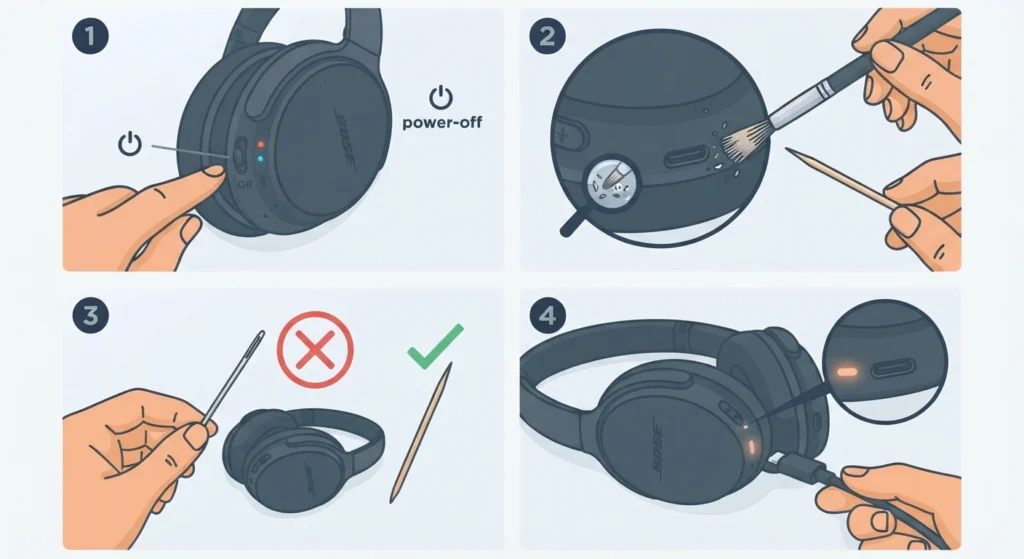
Dust, lint, and pocket debris build up inside the charging port over time and physically block the connection, even though the cable appears to be seated correctly.
- Step 1: Turn off the headphones completely
- Step 2: Use a dry, soft-bristled brush or a wooden toothpick to gently clear the port
- Step 3: Avoid metal tools, which can bend the internal contacts
- Step 4: Reconnect the charging cable and confirm the LED activates
Helpful Tips for Preventing This Issue
- Charge the headphones fully before long-term storage, since lithium batteries degrade faster when stored empty
- Avoid leaving the headphones plugged in for days at a time once fully charged
- Store the headphones in a cool, dry place away from direct sunlight
- Keep the firmware updated through the Bose Music app on a regular basis
- Wipe the charging port with a dry cloth every few weeks if used in dusty environments
Common Problems Related to Power Issues
Headphones Turn On But Will Not Charge
This usually points to a worn-out cable or a battery that has degraded from age rather than a power switch fault. Testing with a different certified cable typically confirms which one is at fault.
LED Flashes But the Headphones Stay Silent
A flashing LED with no sound often means the headphones are stuck in pairing mode rather than actually broken. Restarting the Bluetooth connection on the source device usually clears this.
Headphones Power Off Randomly During Use
This is commonly linked to a battery nearing the end of its usable life, particularly on units that are more than two to three years old with heavy daily use.
Microphone Stops Working After a Reset
After a factory reset or firmware update, the connected device sometimes fails to recognize the headset microphone correctly. On Windows 11, this is typically solved by resolving microphone detection problems through the sound settings panel.
Frequently Asked Questions
Why are the Bose QuietComfort headphones not turning on at all?
The most common cause is a fully drained battery combined with a frozen internal state. Charging for 20 minutes followed by a forced reset resolves this in most cases.
How long should Bose QuietComfort headphones charge before trying to turn them on?
At least 15 to 20 minutes on a wall adapter is recommended before expecting any response from the power button.
Does a factory reset erase all Bluetooth pairings?
Yes, a factory reset clears every saved device and requires the headphones to be paired again as new.
Can a bad USB cable cause the headphones to appear dead?
Yes, a damaged or low-quality cable is a frequent hidden cause and is often mistaken for a battery or hardware failure.
Is it normal for Bose QuietComfort headphones to take time to respond after charging?
Yes, headphones that were completely drained sometimes need a brief charging period before the power switch responds, since the battery needs a minimum charge level to boot the internal system.
What does a flashing red and blue LED mean on Bose QuietComfort headphones?
This pattern typically indicates the headphones are entering or have completed a factory reset and are ready to be paired as a new device.
Should a wall adapter or a computer USB port be used for charging?
A wall adapter is generally more reliable, since computer USB ports sometimes deliver inconsistent or reduced power that slows charging.
How often should firmware be updated on Bose QuietComfort headphones?
Checking for updates every few months through the Bose Music app helps prevent performance and power-related issues.
What should be done if none of these fixes work?
If the headphones remain unresponsive after charging, a forced reset, a cable swap, and a factory reset, the battery itself may have failed and professional repair or warranty support becomes the next step.
Are Bose QuietComfort headphones covered under warranty for power issues?
Power-related hardware failures are typically covered under the standard manufacturer warranty period, so checking the purchase date and warranty terms is worthwhile before pursuing paid repair options.