
Bose 700 headphones crackling sound is one of the most frustrating issues a user can run into, especially with a premium pair of headphones. The good news is that most crackling problems come down to a handful of fixable causes – software glitches, Bluetooth interference, outdated firmware, or a loose audio connection. This step-by-step guide covers the exact fixes that actually work, so there is no need to dig through forums or guess.
Quick Summary – Key Takeaways
- Crackling on Bose 700 is most commonly caused by Bluetooth interference or firmware bugs
- A simple power cycle or factory reset resolves the issue in most cases
- Outdated firmware is a leading cause – always keep the Bose Music app updated
- Wired connection crackling usually points to a damaged cable or dirty audio jack
- If audio distortion continues after all fixes, contact Bose Support for a warranty check
Fix 1: Power Cycle the Headphones
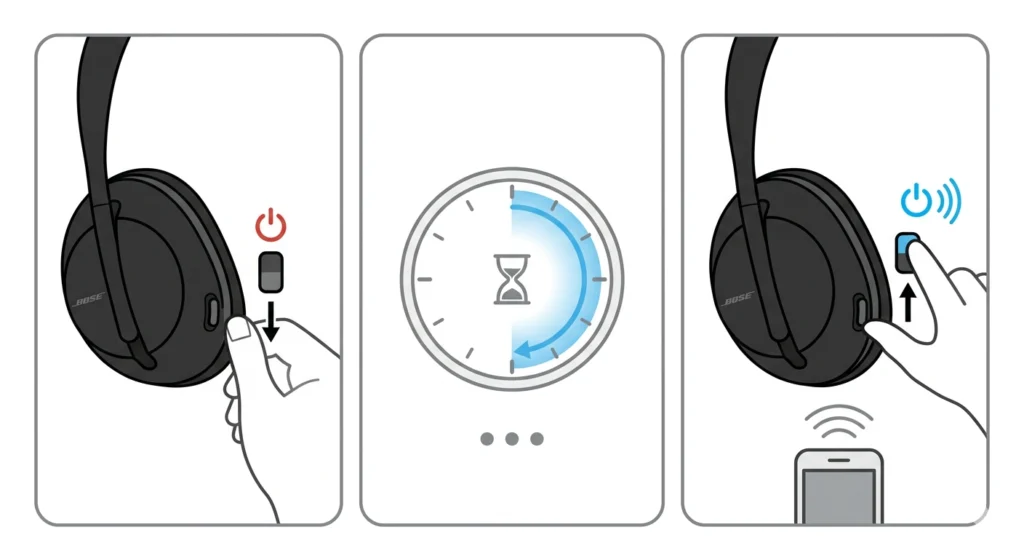
Before diving into anything complex, a simple restart clears temporary software glitches that often cause crackling or static sounds. This takes less than a minute and works surprisingly often.
- Step 1: Turn off the Bose 700 headphones by sliding the power switch to the off position
- Step 2: Wait at least 30 seconds before turning them back on
- Step 3: Reconnect to the audio source and test for crackling
Most people find that a quick power cycle clears up minor audio glitches right away. If the crackling is still there, move on to the next fix.
Fix 2: Check and Reseat the Audio Cable (Wired Mode)
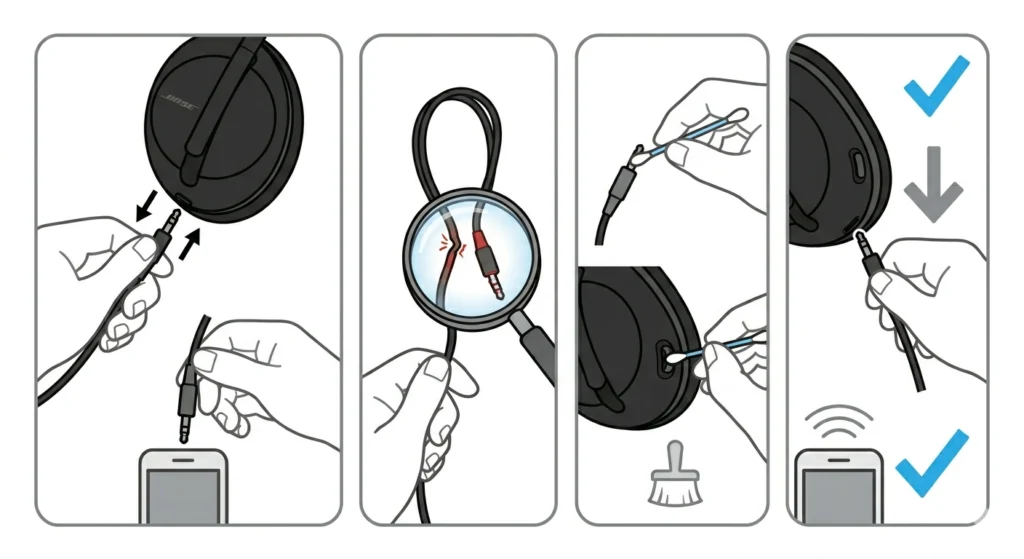
If the crackling only happens when using the 3.5mm audio cable, the cable itself is likely the culprit. This is especially common if the cable has been bent repeatedly or the connectors are dirty.
- Step 1: Unplug the 3.5mm cable from both the headphones and the audio source
- Step 2: Inspect the cable for any visible kinks, fraying, or bent connectors
- Step 3: Clean both ends of the cable and the audio jack using a dry cotton swab
- Step 4: Plug the cable back in firmly on both ends, making sure it is fully seated
- Step 5: Test with a different cable if available to rule out cable damage
The key is to eliminate the cable as a variable. A damaged or poorly seated cable almost always causes crackling or intermittent audio in wired mode.
Fix 3: Reduce Bluetooth Interference
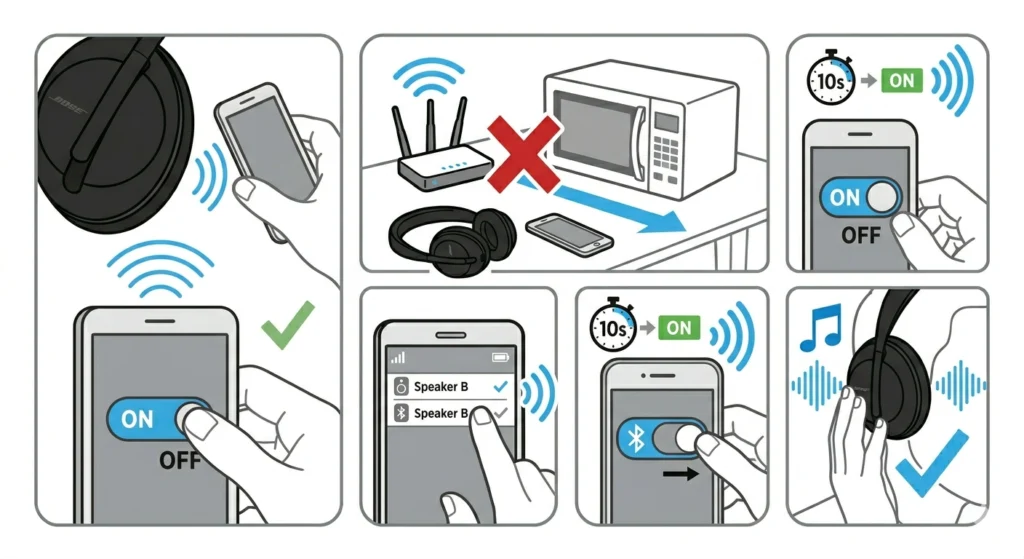
Bluetooth operates on the 2.4GHz frequency band, which is shared with Wi-Fi routers, microwaves, and other wireless devices. Heavy wireless traffic in the area can cause audio dropouts and crackling on Bose 700 headphones.
- Step 1: Move closer to the connected device – stay within 10 meters for a stable signal
- Step 2: Turn off or move away from nearby Wi-Fi routers, microwaves, or other Bluetooth devices
- Step 3: Disconnect any other Bluetooth devices paired to the same audio source
- Step 4: On the phone or computer, toggle Bluetooth off for 10 seconds, then turn it back on
- Step 5: Reconnect the Bose 700 and test audio playback
This works best when the headphones are used in an open area with minimal wireless interference. Apartments and offices with dense Wi-Fi networks are common hotspots for this issue.
Fix 4: Re-Pair the Bose 700 Headphones to the Device
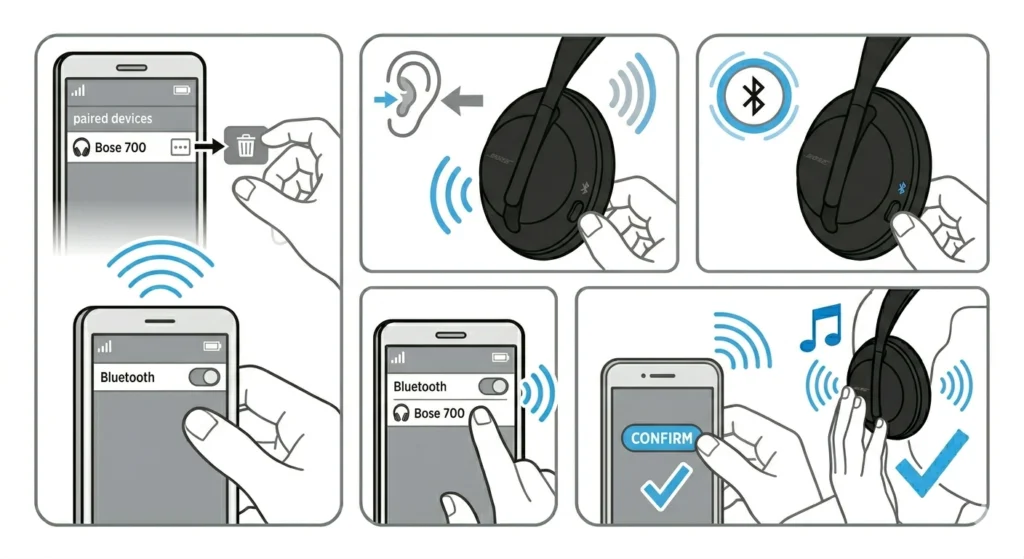
A corrupted Bluetooth pairing can cause persistent crackling that no amount of restarts will fix. Removing and re-pairing the headphones creates a fresh connection from scratch.
- Step 1: On the connected device, go to Bluetooth settings and find the Bose 700 in the paired devices list
- Step 2: Select ‘Forget’ or ‘Remove’ the device
- Step 3: On the Bose 700, press and hold the Bluetooth button until the voice prompt says ‘Bluetooth device list cleared’
- Step 4: Put the headphones into pairing mode by pressing and holding the Bluetooth button again
- Step 5: On the device, scan for Bluetooth devices and select Bose 700 to pair
For Windows users dealing with persistent Bluetooth audio issues, it can also help to re-pair Bluetooth audio devices for stereo sound on Windows using the correct audio format settings.
Fix 5: Update the Bose 700 Firmware
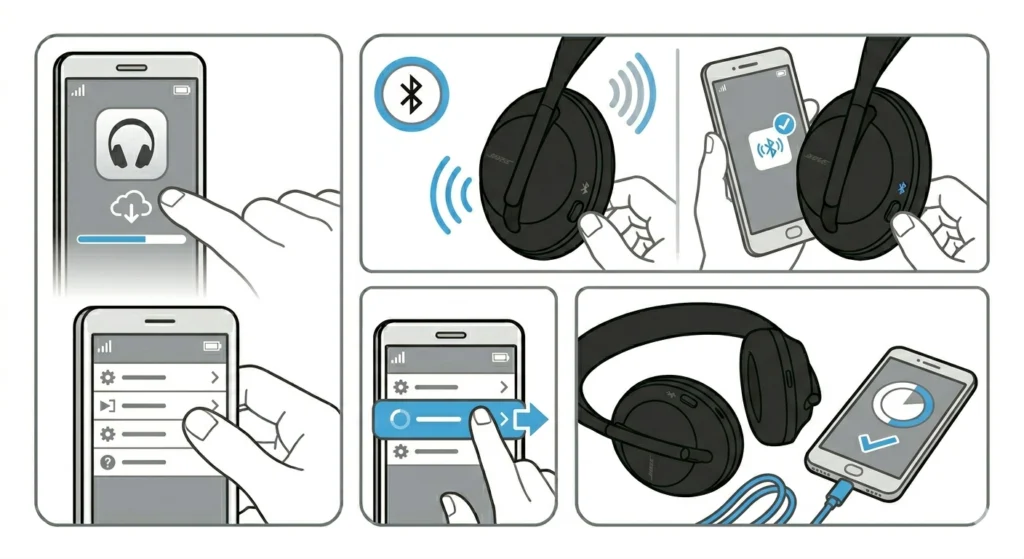
Outdated firmware is one of the most overlooked causes of crackling on the Bose 700. Bose regularly pushes updates that fix audio processing bugs, Bluetooth stability issues, and sound quality problems.
- Step 1: Download or open the Bose Music app on a smartphone
- Step 2: Connect the Bose 700 headphones to the app via Bluetooth
- Step 3: Navigate to ‘Product Settings’ and check for available firmware updates
- Step 4: If an update is available, tap ‘Update’ and keep the headphones nearby during installation
- Step 5: Once the update completes, test audio playback for crackling
Pro Tip: Always keep the Bose Music app updated alongside the headphone firmware. An outdated app sometimes fails to push firmware updates correctly, which leaves the headphones stuck on a buggy version. Check both the App Store or Google Play for app updates before running a firmware update.
Fix 6: Adjust Audio Quality Settings on the Source Device
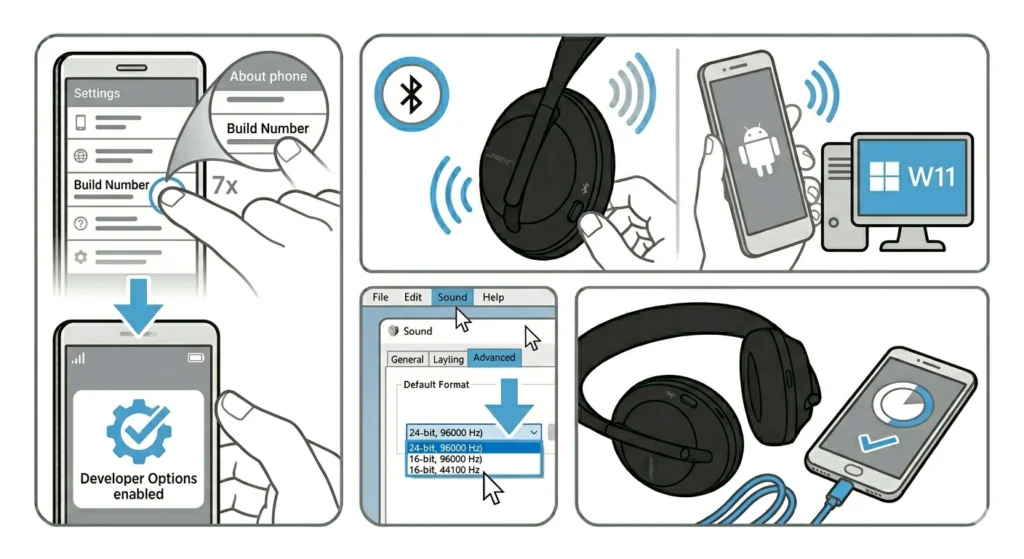
Some devices push audio data faster than the Bose 700 can process it over Bluetooth, which creates crackling or stuttering. Lowering the audio streaming quality or switching the audio codec often resolves this.
- Step 1: On an Android device, enable Developer Options (tap Build Number 7 times in About Phone)
- Step 2: Go to Developer Options, find ‘Bluetooth Audio Codec’, and switch from LDAC to AAC or SBC
- Step 3: On Windows 11, open Sound Settings, right-click the Bose 700, go to Properties, and check the audio format under the Advanced tab
- Step 4: Lower the sample rate or bit depth if it is set to the maximum
- Step 5: Test audio playback after each adjustment
Windows 11 users can also try adjusting audio output settings to make sure the correct Bluetooth audio format is selected for the headphones.
Fix 7: Factory Reset the Bose 700 Headphones
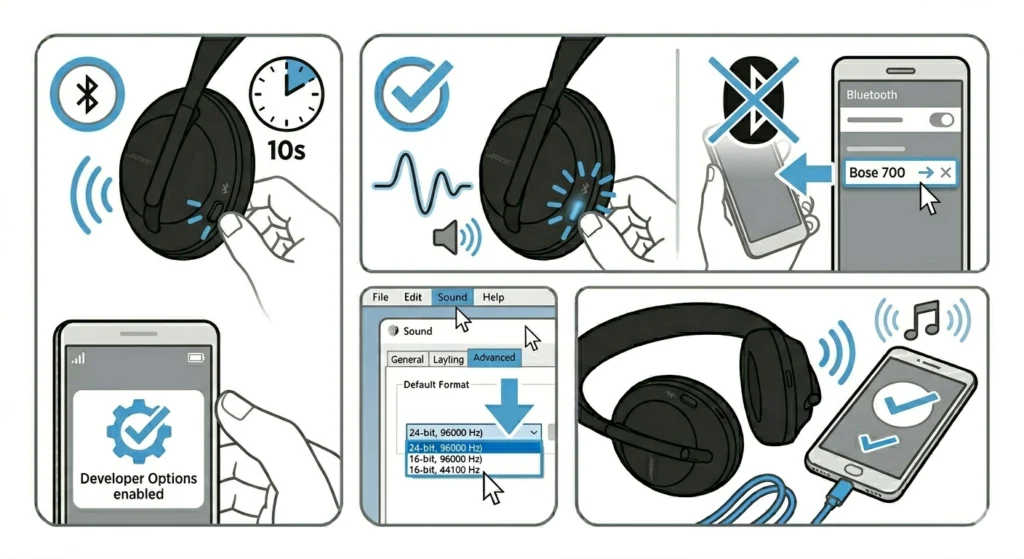
When nothing else works, a factory reset wipes all saved settings and paired devices, essentially giving the headphones a clean start. This fixes crackling caused by deep software corruption or bad stored settings.
- Step 1: Turn on the Bose 700 headphones
- Step 2: Press and hold the power button for about 10 seconds until the LED indicator blinks
- Step 3: Wait for the voice prompt confirming the reset is complete
- Step 4: Re-pair the headphones with the device as a new connection
- Step 5: Test audio for crackling after the reset and re-pairing
Pro Tip: After a factory reset, resist the urge to restore all Bluetooth pairings at once. Pair only the primary device first and test for crackling before adding more paired devices. This helps confirm whether a specific device pairing was the root cause of the issue.
Tips to Prevent Bose 700 Crackling Sound
- Keep firmware updated regularly through the Bose Music app
- Store the headphones in the included case to protect the 3.5mm jack from dust and debris
- Avoid using the headphones in areas with heavy wireless congestion like airports or offices with dozens of active Bluetooth devices
- Use the original Bose audio cable for wired connections – third-party cables are a common source of intermittent crackling
- Keep the headphones charged above 20% battery – low battery can sometimes affect Bluetooth signal stability
- Clean the audio jack port occasionally with a soft dry brush to prevent debris buildup
Common Problems and Troubleshooting
Crackling Only During Calls, Not Music
This usually points to a microphone feedback issue or the call app using a lower-quality audio codec during calls. Try switching to a different calling app, or check if the microphone sensitivity settings in the app can be adjusted. On Windows, it helps to check microphone detection settings to make sure the Bose 700 microphone is correctly recognized.
Crackling Only at High Volume
The Bose 700 can exhibit audio distortion at maximum volume, especially if the EQ is boosted in the bass frequencies through the Bose Music app. Lower the volume slightly and reduce bass boost if enabled – the crackling should stop at moderate volume levels.
Crackling After Firmware Update
Occasionally, a new firmware version introduces a bug. If crackling started right after an update, perform a factory reset and re-pair. If that does not resolve it, report the issue to Bose Support – they can push a corrected firmware version or provide a replacement unit under warranty.
Crackling When Moving the Head
If crackling seems to happen with head movement, the internal speaker cable inside the headband may have a loose connection. This is a hardware issue that cannot be fixed at home. Contact Bose Support for a repair or replacement, especially if the headphones are still under the two-year warranty.
Intermittent Crackling With No Clear Pattern
Random crackling with no consistent trigger is almost always Bluetooth interference. Try using the headphones in a different room or location to rule out local wireless congestion. If the crackling disappears in a different environment, the wireless congestion in the original location was the cause.
Frequently Asked Questions
Why are Bose 700 headphones crackling suddenly?
Sudden crackling often points to a Bluetooth interference spike, a new device causing wireless congestion, or an automatic firmware update that introduced a software bug. Start with a power cycle and re-pair to address the most common causes first.
Does low battery cause crackling on Bose 700?
Yes, in some cases. When battery drops below 15-20%, the Bose 700 may reduce Bluetooth transmission quality to conserve power, which can cause audio artifacts like crackling or stuttering. Charge the headphones and test again.
Can a factory reset fix Bose 700 crackling permanently?
A factory reset fixes crackling caused by corrupted firmware data or bad stored settings. However, if the crackling is caused by hardware damage or persistent Bluetooth interference in the environment, a reset alone will not provide a permanent fix.
Is Bose 700 crackling covered by warranty?
If the crackling is determined to be caused by a manufacturing defect or hardware failure – such as a loose internal speaker connection – it is typically covered under the standard two-year Bose warranty. Software-related crackling is usually resolved through firmware updates at no cost.
How do you know if the crackling is hardware or software?
Software-related crackling usually disappears after a firmware update, factory reset, or re-pairing. Hardware crackling persists regardless of software changes, often gets worse with physical movement, and typically stays consistent across all connected devices and volume levels.
Why does Bose 700 crackle only on certain songs?
Certain audio files with high bitrates, heavy bass, or loud transients can push the audio system harder, causing brief distortion that sounds like crackling. Try reducing the bass EQ in the Bose Music app and lower the volume slightly to see if the crackling only occurs during those audio peaks.
Does using an equalizer cause crackling on Bose 700?
Yes, aggressive EQ settings – especially large bass boosts – can cause clipping at the driver level, which sounds like crackling. Reset the EQ in the Bose Music app to flat or use a more conservative setting to check if the EQ is the cause.
Can third-party apps cause Bose 700 crackling?
Yes. Some streaming apps use audio processing or software equalizers that conflict with the Bose 700 signal chain. Test the headphones with a different app to see if the crackling disappears. If it does, check the audio settings within the problematic app and disable any sound enhancement features.
How often should Bose 700 firmware be updated?
Bose does not release firmware on a fixed schedule, but checking every few months through the Bose Music app is a good habit. Firmware updates address audio bugs, Bluetooth stability issues, and noise cancellation performance – all of which can relate to crackling if left outdated.
What should be done if crackling continues after all fixes?
If crackling persists after trying all software and connection fixes, contact Bose Support directly. Provide details about when the crackling started, what fixes were already tried, and whether it happens in both wired and wireless modes. Bose Support can run remote diagnostics or arrange a replacement under warranty.