
Tight headphones are one of the most common comfort complaints among daily listeners. Whether it’s that crushing pressure on the temples, soreness around the ears, or a headband that digs into the top of the head – the problem is real, and it gets worse the longer the session. The good news is that fixing tight headphones does not require any special tools or technical skills. Most fixes take just a few minutes and can make a massive difference in how a pair feels during extended use.
Quick Summary: Key Takeaways
- Tight headphones are almost always fixable without buying a new pair.
- The most effective fix is gradual stretching using a stack of books or a box slightly wider than the head.
- Adjusting the headband slider is the first thing to check before trying anything else.
- Adding thick ear cushion pads reduces clamping pressure significantly.
- Most headphones need 24 to 72 hours of stretching to loosen up noticeably.
- Consistent use over the first few weeks also naturally breaks in the headband spring.
How to Fix Headphones That Feel Too Tight on Your Head
Fix 1: Extend the Headband Adjustment Sliders
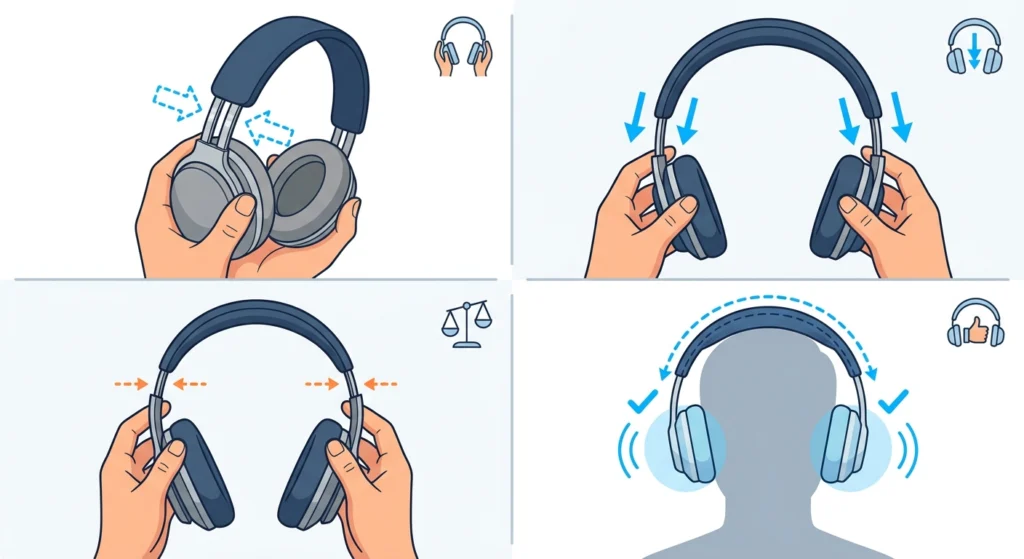
Before doing anything else, check if the headband is adjusted correctly. Many people use headphones straight out of the box without extending the sliders, which immediately causes a tight fit. The adjustment sliders are usually found on both sides of the headband where it connects to each ear cup.
- Step 1: Hold the headphones with both hands and locate the slider rails on each side.
- Step 2: Pull each side down evenly until the ear cups sit comfortably over the ears without pressing in.
- Step 3: Make sure both sides are extended to the same length to avoid uneven pressure.
- Step 4: Put the headphones on and check whether the ear cups fully enclose the ears without pressing the outer ear against the driver.
This works best when done while wearing the headphones so the fit can be felt in real time. Most people find that extending the band by just one or two notches makes an immediate difference.
Fix 2: Stretch the Headband Over a Wide Object
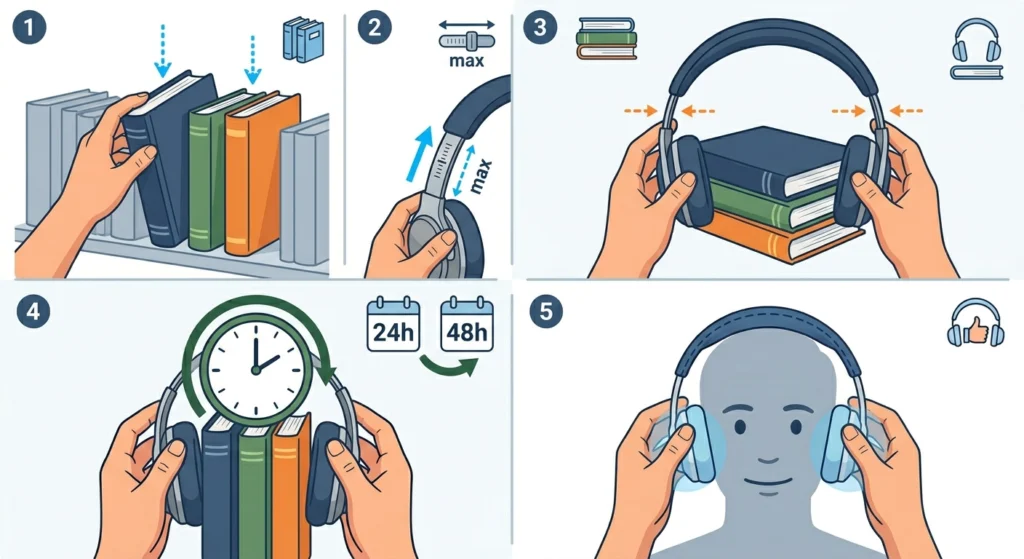
This is the most reliable method for headphones that still feel too tight even at full extension. The idea is simple – place something wider than the head inside the headband arc and leave it there for a period of time. This gradually loosens the metal or plastic spring inside the band.
- Step 1: Find a stack of hardcover books, a shoebox, or any rigid object that is slightly wider than the head (roughly 17 to 20 cm wide).
- Step 2: Extend the headband sliders to their maximum length before placing the headphones over the object.
- Step 3: Place the headphones over the object so it fits snugly inside the headband arc, with the band stretched outward.
- Step 4: Leave the headphones in this stretched position for at least 24 hours. For stiffer headbands, repeat for 48 to 72 hours.
- Step 5: Test the fit after each session. If still too tight, repeat with a slightly wider object.
Pro-Tip: Start with an object that is only slightly wider than the head. Going too wide too fast can over-stretch the headband and permanently loosen it beyond comfort. Gradual and consistent stretching gives the best results.
Fix 3: Replace or Upgrade the Ear Cushions
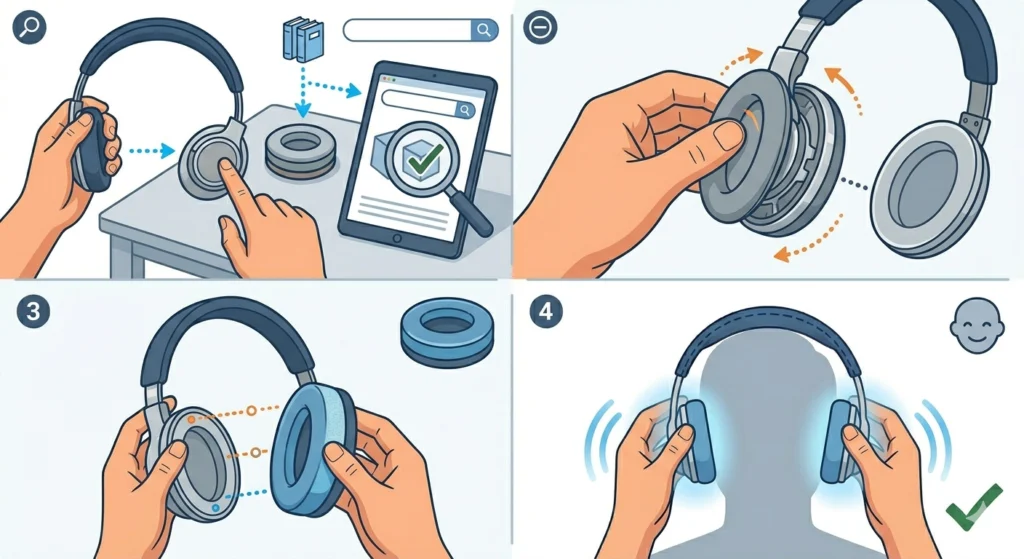
Thin or worn-out ear pads press the ear cups closer to the head, which increases the feeling of tightness even when the headband tension itself is fine. Swapping to thicker, memory foam ear cushions creates more distance between the driver and the ear, which naturally reduces clamping pressure.
- Step 1: Check the model of the headphones and search for compatible third-party ear cushions with a thicker profile.
- Step 2: Remove the existing pads by pulling them off gently. Most clip on and come off without tools.
- Step 3: Align the new pads with the ear cup ring and press them firmly into place until they click or seat evenly all the way around.
- Step 4: Put the headphones on and check the difference. Memory foam pads in particular conform to the shape of the head and distribute pressure more evenly.
This fix works especially well for over-ear headphones where the original pads have flattened over time from regular use.
Fix 4: Add Headband Padding
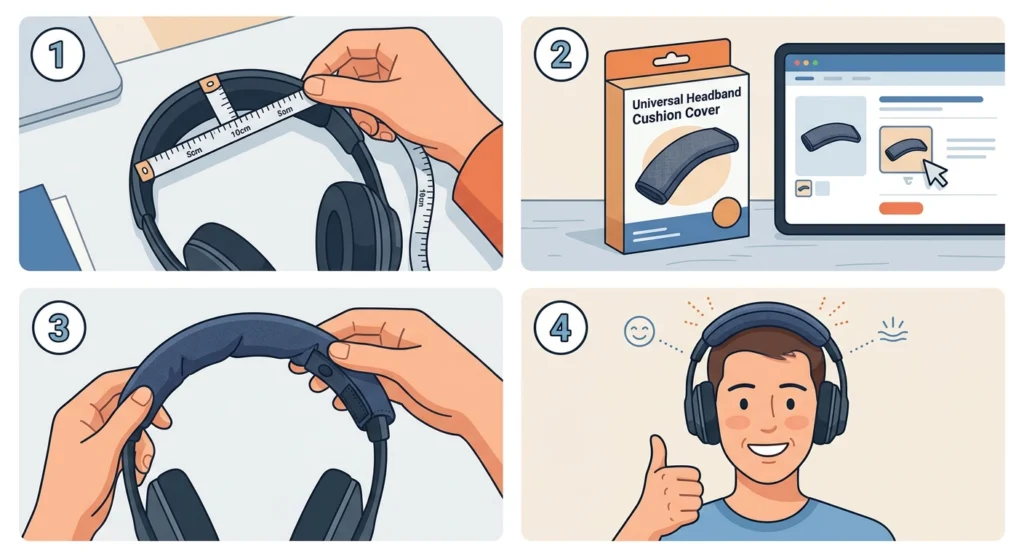
When the top of the head is getting the most pressure, the problem is usually a thin or hard headband rather than clamping force from the ear cups. Headband cushion covers are widely available and attach in seconds.
- Step 1: Measure the width and length of the top part of the headband.
- Step 2: Purchase a headband pad or cushion cover that matches the size – most universal options fit a wide range of headphones.
- Step 3: Slide or wrap the cushion over the top of the headband according to the product instructions.
- Step 4: Put the headphones back on and verify the pressure is distributed more comfortably across the top of the head.
Fix 5: Bend the Headband Manually
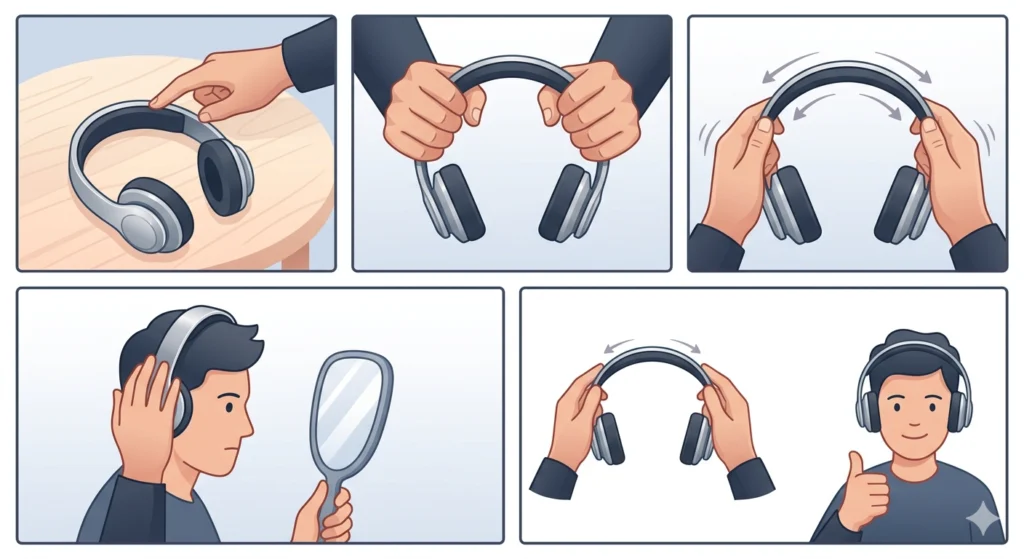
For metal-framed headphones, it is possible to carefully bend the headband arc outward to reduce the spring tension. This method requires patience – rushing it can crack plastic parts or crease metal unevenly.
- Step 1: Identify whether the headband frame is metal or plastic. Only attempt manual bending on metal frames. Plastic frames are better handled with the stretching method from Fix 2.
- Step 2: Hold the headphones firmly with both hands near the top of the arc.
- Step 3: Apply slow, even outward pressure to both sides of the arc simultaneously. Do not twist or bend from one side only.
- Step 4: Check the fit after each small adjustment. The goal is a slight outward curve, not a dramatic reshape.
- Step 5: Repeat in small increments until the clamping force feels comfortable.
Pro-Tip: Warming the headband slightly with a hairdryer on low heat for 20 to 30 seconds before bending makes the material more flexible and reduces the risk of cracking or snapping. Keep the heat moving and do not hold it too close.
Fix 6: Break Them In Through Regular Use
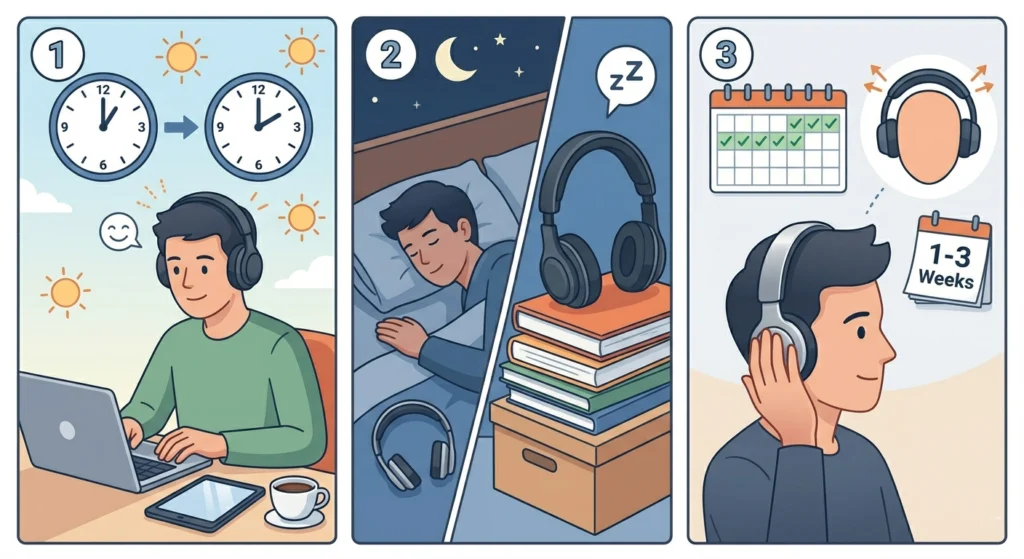
New headphones often loosen naturally within the first few weeks of use. The headband spring gradually adapts to the shape of the head through repeated wear. The key is to keep wearing them – even for short sessions throughout the day – to speed up this natural break-in process.
- Step 1: Wear the headphones for at least one to two hours each day.
- Step 2: Combine this with the stretching method overnight (Fix 2) to accelerate the process.
- Step 3: Check the fit every few days. Most headphones noticeably loosen within one to three weeks of consistent use.
Tips for Long-Term Headphone Comfort
- Store headphones on a wide headphone stand when not in use – this passively maintains the stretched shape over time.
- Avoid hanging headphones over narrow objects like thin monitor edges, which can cause the band to spring back tighter.
- Rotate between two pairs if possible to give the headband spring time to recover between long sessions.
- Check ear cushion condition every few months. Flat or cracked pads significantly increase clamping pressure and discomfort.
- For glasses wearers, look for ear cushions with a groove or channel designed to accommodate the arm of the glasses – this prevents extra pressure on the temples.
Common Problems and Troubleshooting
Headphones Feel Tight Again After Stretching
This usually means the stretching period was not long enough or the object used was not wide enough. Repeat the stretching process using a slightly wider object and leave the headphones on it for a full 48 to 72 hours. Consistency matters more than stretching aggressively in one session.
One Side Feels Tighter Than the Other
Uneven slider extension is the most common cause. Remove the headphones and check that both sliders are pulled down to exactly the same notch. If the sliders are even and the problem persists, the headband frame may have warped slightly – manual bending on the tighter side (Fix 5) can correct this.
Pressure on Top of Head Even With Correct Slider Length
This is a headband padding issue, not a clamping force issue. Adding a headband cushion cover as described in Fix 4 solves this directly. Alternatively, repositioning the headphones slightly forward or backward on the head can shift where the contact point sits.
Ear Cushions Feel Hot and Cause Sweating
Pleather (synthetic leather) pads trap heat much faster than velour or fabric options. Switching to breathable fabric ear cushion covers significantly reduces heat buildup during long sessions. This is especially noticeable during gaming or studio use where headphones are worn for several consecutive hours.
Headphones Keep Slipping Despite Feeling Tight
Paradoxically, headphones that slide around are sometimes too loose rather than too tight, despite the discomfort. If the ear cups are not making good contact with the ears, the weight distribution becomes uneven and the headphones shift. Check that the headband arc is sitting centered on top of the head and adjust sliders so the ear cups seal properly over the ears. For Bluetooth connection issues that might come alongside hardware adjustments, it can also help to re-pair Bluetooth earbuds for proper stereo sound after any physical repositioning.
Frequently Asked Questions
How long does it take to stretch tight headphones?
Most headphones loosen noticeably after 24 to 72 hours of being stretched over a wide object. Stiffer headbands – especially those with thick metal frames – may need several rounds of stretching over a week or two. Combining the stretching method with daily wear speeds up the process considerably.
Can stretching headphones damage them?
Stretching headphones gradually and carefully does not damage them. The risk comes from stretching too aggressively or too quickly. Using an object that is only slightly wider than the head and increasing width in small increments keeps the process safe. Avoid forcing the band open beyond what feels like a natural flex.
Why do new headphones feel so tight?
New headphones are manufactured with a relatively firm headband spring to ensure a secure fit across a wide range of head sizes. The material – whether metal or plastic – has not yet been shaped to an individual head. This is completely normal and almost always resolves with some combination of stretching and regular use.
Do all headphones loosen over time on their own?
Yes, to varying degrees. Headphones with more flexible headbands tend to break in faster. Stiffer, more premium studio headphones often maintain their clamping force longer but still soften with consistent use. Actively stretching the headband accelerates this process significantly compared to passive wear alone.
Is it safe to bend metal headphone headbands?
Yes, bending metal headbands is generally safe when done slowly and evenly. The key is to apply pressure to both sides simultaneously rather than bending from one point. Warming the metal slightly with a hairdryer before bending makes the process smoother and reduces the risk of creating sharp bends or stress points.
What type of ear cushions reduce tightness the most?
Memory foam ear cushions with a thick profile are the most effective for reducing the sensation of tightness. They conform to the shape of the head and ears, which distributes the clamping pressure across a wider surface area. Velour-covered memory foam pads also help with heat and comfort during extended wear.
Can tight headphones cause headaches?
Yes. Consistent pressure from tight headphones can cause tension headaches, particularly around the temples and top of the head. This is one of the main reasons to address the fit early rather than simply tolerating discomfort. Loosening the headband, adding padding, or switching to thicker ear cushions typically resolves headache-related issues caused by headphone pressure.
Does the headphone brand matter when trying to fix tightness?
The brand matters less than the headband construction. Metal-framed headphones respond well to manual bending and stretching. Plastic-framed models are better handled with the book-stretching method. Budget headphones sometimes have less flexible materials that respond more slowly to stretching, but the methods still work with patience.
What if the headphones are still too tight after trying all these fixes?
If none of the fixes above produce enough relief, the headphones may simply have a clamping force that is too high for the head size. In this case, checking whether the manufacturer offers a wider headband variant or a different model in the same product line is worth exploring. Some brands, especially in the audio and gaming space, offer ‘comfort edition’ versions with lower clamping force. It is also worth checking whether audio settings are correctly configured – an uncomfortable fit can sometimes make sound issues more noticeable, so reviewing the audio output settings on Windows 11 can rule out any software-side issues alongside physical comfort adjustments.
How do headphone stands help with tightness over time?
Storing headphones on a wide headphone stand maintains the stretched position passively every time they are not being worn. Over weeks and months, this consistently applies gentle outward pressure to the headband, reinforcing the stretched shape achieved during active stretching sessions. It is one of the easiest long-term habits for maintaining a comfortable fit.