
Beats Studio Pro noise cancelling not working can turn a quiet commute into a frustrating one, especially when the feature worked fine just days before. This issue usually comes down to a handful of common causes, and most of them can be fixed in a few minutes without a trip to a repair shop.
Quick Summary: Key Takeaways
- Loose ear cushions or a poor seal are the most common reason ANC stops working properly.
- Dirt or moisture blocking the microphones can disable noise cancelling entirely.
- Outdated firmware causes ANC glitches that a simple update resolves.
- A full headphone reset clears most software-related ANC bugs.
- Bluetooth connection problems sometimes mimic a broken ANC feature.
- Hardware damage is rare but possible if the issue only affects one ear.
Step-by-Step Guide to Fix Beats Studio Pro Noise Cancelling
Method 1: Check and Reseat the Ear Cushions
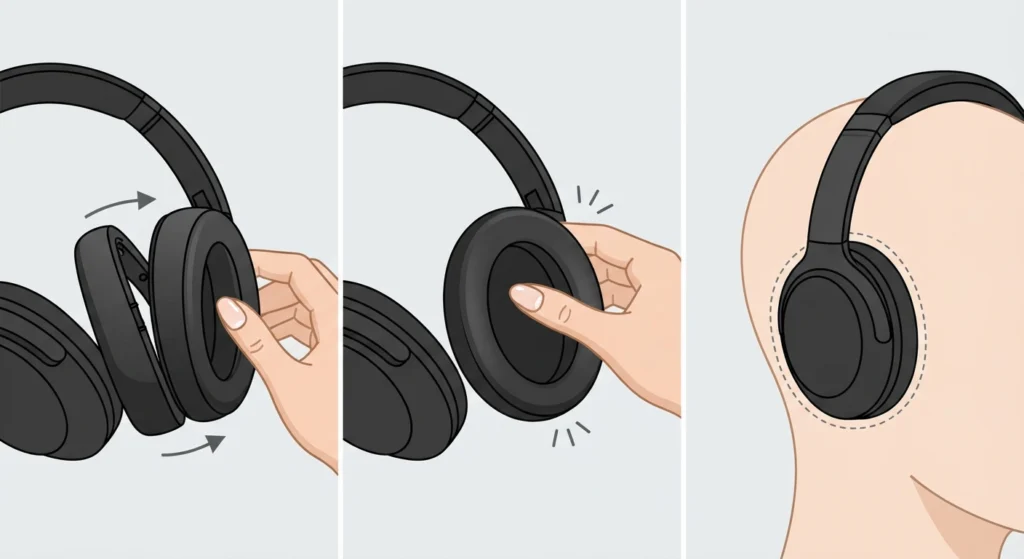
Active noise cancelling depends on a tight seal between the ear cushions and the ears. Even a small gap lets outside noise leak in, making it seem like ANC has stopped working when it is actually just losing its acoustic seal.
- Step 1: Gently pull each ear cushion away from the headphone shell to check if it is properly clipped in place.
- Step 2: Press the cushion back down evenly around the entire rim until it clicks or sits flush.
- Step 3: Put the headphones on and adjust the headband so the cushions sit snugly against the ears, not just resting on top of them.
This works best when the cushions are checked on both sides, since a seal problem on just one ear is often the real culprit behind uneven noise cancelling.
Method 2: Clean the Microphones and Vent Openings
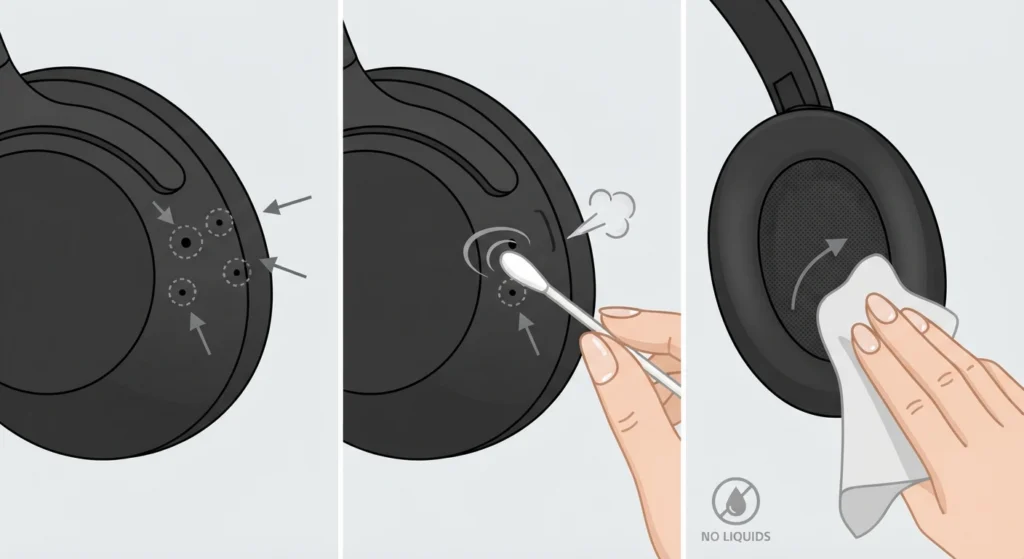
Beats Studio Pro uses external microphones to detect ambient noise and cancel it out. Dust, earwax, or lint blocking these tiny openings can weaken or completely disable ANC performance.
- Step 1: Locate the small microphone openings on the outer shell of each ear cup.
- Step 2: Use a soft, dry brush or a clean, dry cotton swab to gently clear away visible debris.
- Step 3: Wipe the ear cushions and the inner mesh with a dry microfiber cloth, avoiding liquids near the microphone ports.
Pro-Tip: Never use compressed air or liquid cleaners directly on the microphone vents. Moisture trapped inside these openings is one of the most common reasons ANC fails permanently, and it is not always covered under warranty.
Method 3: Toggle Noise Cancelling Off and Back On
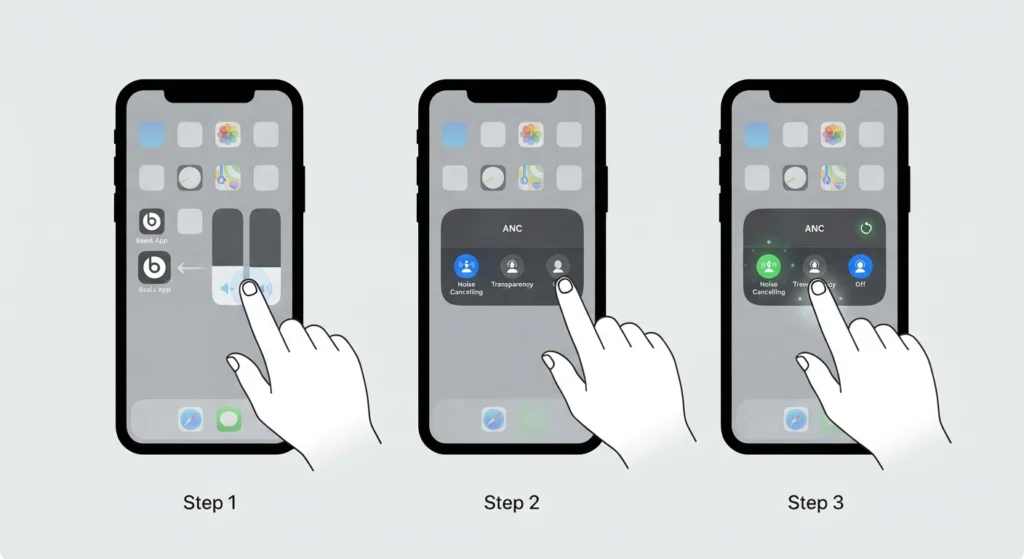
Sometimes ANC simply gets stuck in a glitched state rather than being broken. Restarting the feature manually often resolves this without needing a full reset.
- Step 1: Open the Beats app on the connected phone or tablet, or use Control Center on an iPhone by pressing and holding the volume slider.
- Step 2: Tap the noise control icon and switch it to Off, then wait five seconds.
- Step 3: Tap the icon again and select Noise Cancelling to re-enable it.
Method 4: Update the Beats Studio Pro Firmware
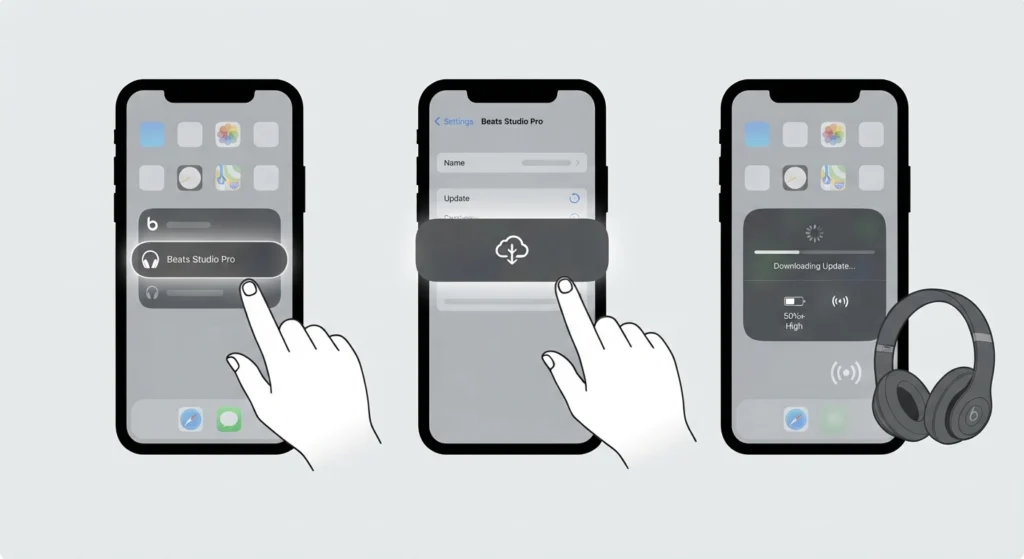
Firmware bugs are a documented cause of ANC issues, and Apple and Beats release periodic updates specifically to improve noise cancelling stability and battery performance.
- Step 1: Open the Beats app and select the connected Studio Pro headphones from the device list.
- Step 2: Scroll to the firmware or software update section and check for available updates.
- Step 3: Keep the headphones powered on, within Bluetooth range, and above 50 percent battery until the update finishes.
Pro-Tip: Firmware updates for Beats headphones are pushed silently in the background on iPhones with Bluetooth enabled. Leaving the headphones connected overnight, near the phone, is often enough for the update to install without manually checking anything.
Method 5: Perform a Full Reset of the Headphones
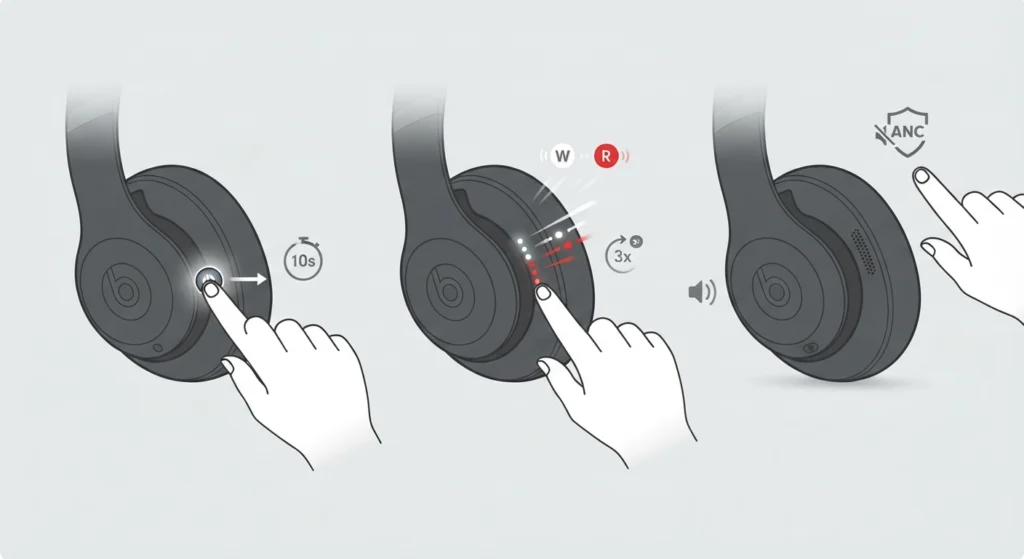
A reset clears temporary software errors that a simple restart cannot fix. This step resolves the majority of ANC complaints reported after a firmware update or a failed pairing attempt.
- Step 1: Press and hold the power button on the Beats Studio Pro for about 10 seconds.
- Step 2: Release the button once the fuel gauge lights blink white, then red, repeating three times.
- Step 3: Wait for the headphones to power back on automatically, then re-enable noise cancelling and test it.
Method 6: Re-Pair the Bluetooth Connection
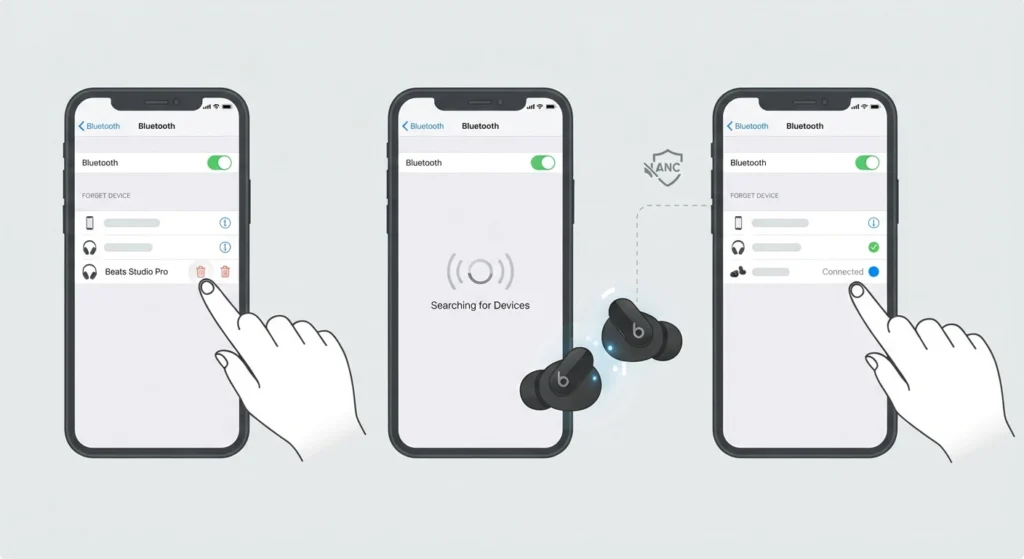
A weak or corrupted Bluetooth pairing can interfere with the signal processing that ANC relies on, especially when switching between multiple devices. Forgetting the device and pairing again from scratch, using a guide on how to re-pair Bluetooth earbuds for stereo sound, often restores full functionality including noise cancelling.
Method 7: Check Audio Output Settings on the Connected Device
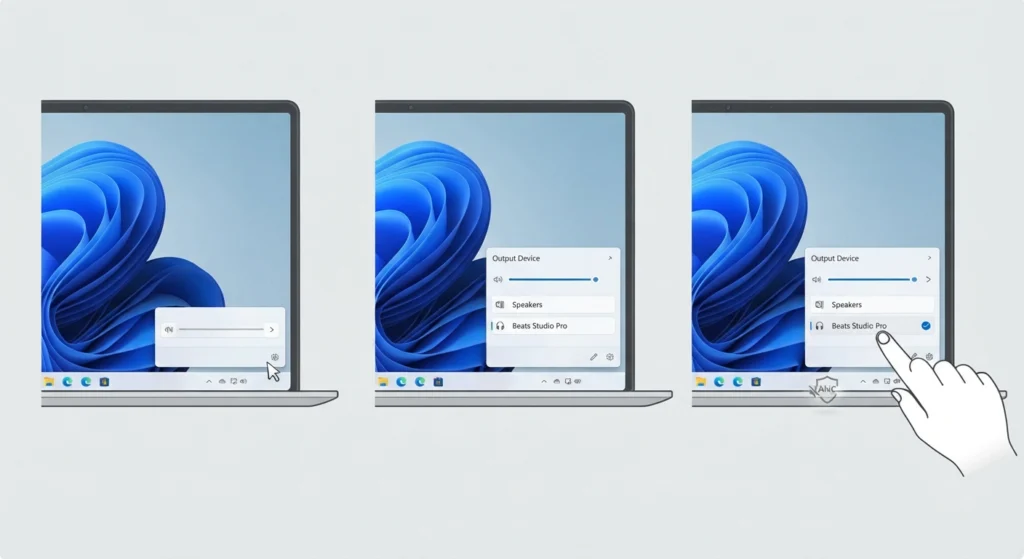
On a Windows 11 laptop or desktop, ANC can appear broken simply because the system is not routing audio correctly through the headphones. Reviewing how to adjust audio output settings, or performing a full reset of the sound configuration through resetting audio settings, clears conflicts that can make ANC seem unresponsive even when the headphones themselves are working fine.
Method 8: Rule Out Hardware Damage
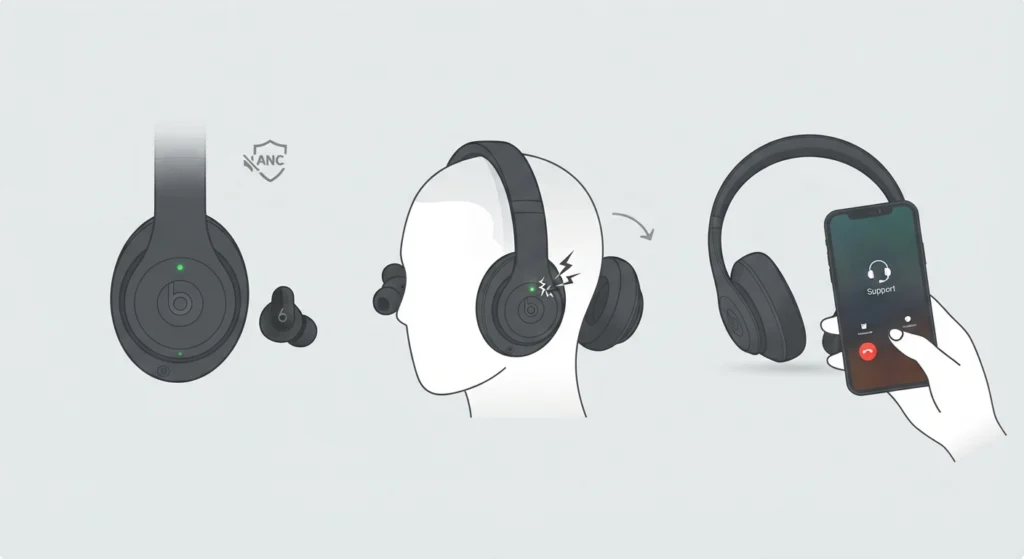
If noise cancelling only fails in one ear, or produces static and crackling instead of silence, the issue is likely hardware-related rather than a software glitch. This is more common after drops, exposure to moisture, or pressure damage to the internal driver.
- Step 1: Test noise cancelling in a completely quiet room to confirm whether the problem is consistent.
- Step 2: Switch ears by wearing the headphones reversed to see if the issue follows the ear cup or stays on the same side.
- Step 3: Contact Apple Support or an authorized Beats service center if the problem persists after the earlier steps, especially while the headphones are still under warranty.
Tips to Keep Noise Cancelling Working Properly
- Store the headphones in their case when not in use to keep dust away from the microphones.
- Avoid wearing the headphones in heavy rain or during intense workouts without a sweat-resistant cover.
- Charge the headphones regularly, since low battery levels can reduce ANC processing power on some firmware versions.
- Check for firmware updates every few weeks through the Beats app, especially after a new iOS or Android release.
- Clean the ear cushions monthly with a dry cloth to maintain a proper acoustic seal.
Common Problems With Beats Studio Pro Noise Cancelling
A few issues come up more often than others, and knowing which one matches the situation saves time troubleshooting.
- Static or hissing in one ear: Usually points to a hardware fault in that ear cup rather than a software issue.
- ANC works only when connected to one device: Points to a Bluetooth pairing or firmware mismatch, resolved by re-pairing.
- Noise cancelling turns off unexpectedly: Often linked to outdated firmware or a battery saving mode kicking in at low charge.
- No difference between ANC on and off: Typically caused by a broken ear seal rather than a failed component.
- ANC works on iPhone but not Android, or vice versa: Related to app settings rather than the headphones themselves, since the Beats app controls behave slightly differently across platforms.
Frequently Asked Questions
Why did Beats Studio Pro noise cancelling suddenly stop working?
The most common causes are a loose ear cushion seal, blocked microphones, or outdated firmware. Restarting the ANC feature or performing a full reset resolves the issue in most cases.
Does Beats Studio Pro need the Beats app to control noise cancelling?
The Beats app is not required on iPhone, since Control Center offers the same controls. Android users need the Beats app to toggle noise cancelling, transparency mode, or turn ANC off completely.
Can dirty ear cushions affect noise cancelling performance?
Yes. A weak or uneven seal caused by dirty or loose cushions lets outside sound leak in, which reduces how effective ANC feels even when the feature itself is functioning correctly.
How long does it take to update Beats Studio Pro firmware?
Firmware updates typically install within a few minutes as long as the headphones stay powered on, connected, and within range of the paired device.
Is static noise in one ear covered under warranty?
Manufacturing defects, including static noise limited to one ear with no signs of physical or liquid damage, are typically covered under the standard warranty period.
Why does noise cancelling work fine on one device but not another?
This usually points to a firmware or pairing inconsistency between devices rather than a hardware fault, and re-pairing the Bluetooth connection on the affected device often fixes it.
Does low battery affect Beats Studio Pro noise cancelling?
Yes. Some firmware versions reduce ANC processing power or disable it automatically when the battery drops to a critically low level to preserve remaining playback time.
How often should Beats Studio Pro firmware be updated?
Checking for updates every few weeks, or right after a major phone software update, helps avoid compatibility issues that can affect noise cancelling performance.
Can a factory reset fix noise cancelling permanently?
A reset fixes most software-related ANC problems. If the issue returns shortly after a reset, the cause is more likely hardware-related and worth having inspected by an authorized service provider.