
Anker Soundcore Life Q30 static noise usually shows up as a crackling, buzzing, or hissing sound that ruins music, calls, and movies. This happens more often than most people expect, and it’s almost always fixable without a trip to customer support. The fixes below are listed in the order that solves the problem fastest for most users.
Key Takeaways:
- Static or hissing on the Life Q30 is typically caused by outdated firmware, weak Bluetooth signal, or a driver conflict on the connected device.
- Updating firmware through the Soundcore app resolves the issue in a large number of cases.
- Re-pairing the Bluetooth connection clears out corrupted pairing data that causes crackling audio.
- A factory reset should only be used after the simpler fixes have been tried.
Fix 1: Update the Firmware Through the Soundcore App
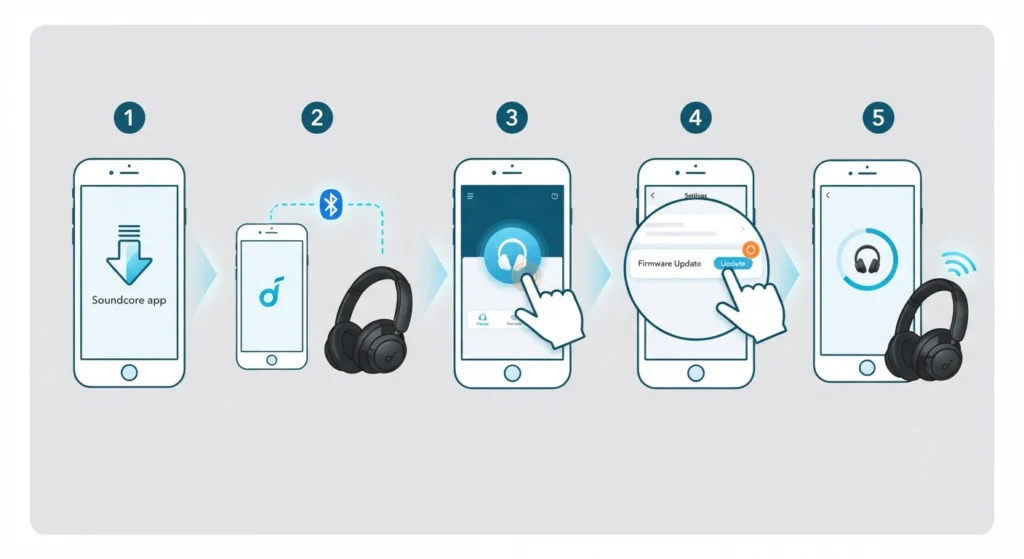
Outdated firmware is the single most common reason these headphones start hissing or crackling out of nowhere. Anker regularly pushes updates that patch Bluetooth stability bugs, and skipping them leaves the headphones running on older, less reliable code.
- Step 1: Download and open the Soundcore app on a smartphone.
- Step 2: Connect the Life Q30 to the phone via Bluetooth.
- Step 3: Tap the device icon inside the app to open the settings page.
- Step 4: Look for a firmware update notification and tap Update if one appears.
- Step 5: Keep the headphones powered on and within range until the update finishes completely.
Pro-Tip: Never turn off the headphones or close the app mid-update. An interrupted firmware update can cause the headphones to behave even more erratically than the original static issue.
Fix 2: Re-Pair the Bluetooth Connection
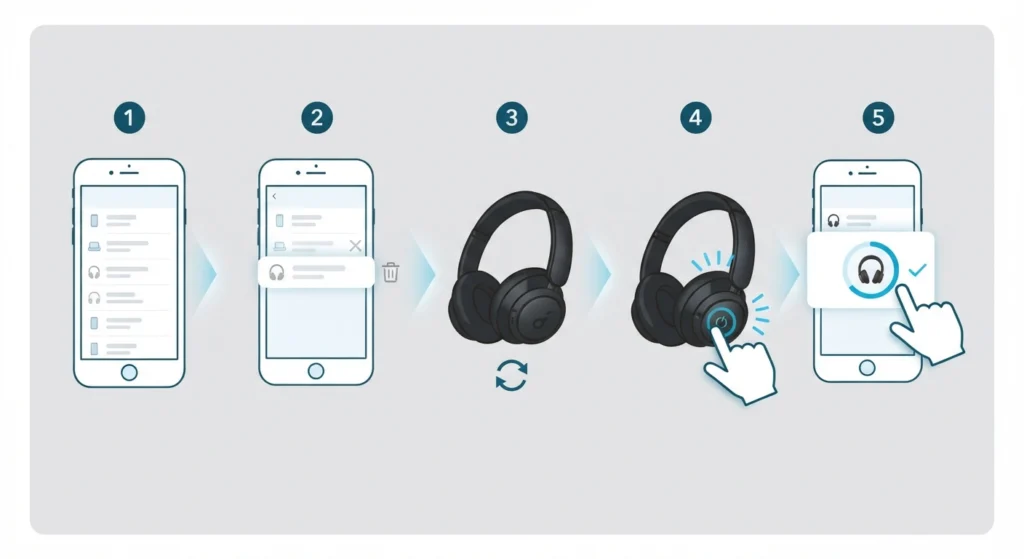
Corrupted pairing data is another frequent cause of hissing audio, especially if the headphones have been connected to several devices over time. Forgetting the device and reconnecting it from scratch usually clears this out. For a full walkthrough on reconnecting Bluetooth earbuds for stable stereo sound, follow the linked steps alongside the instructions below.
- Step 1: Open Bluetooth settings on the connected device.
- Step 2: Find Soundcore Life Q30 in the list and select Forget or Remove.
- Step 3: Turn the headphones off, then back on to reset the connection.
- Step 4: Put the headphones into pairing mode by holding the power button until the LED flashes.
- Step 5: Search for new devices on the phone or computer and select Soundcore Life Q30 to reconnect.
Fix 3: Reduce Bluetooth Interference
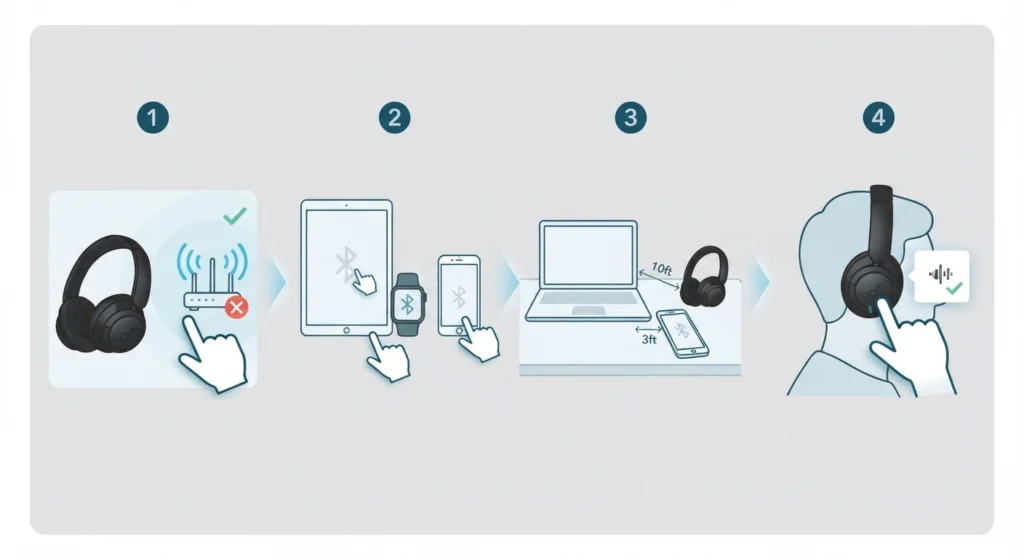
Wireless interference is easy to overlook, but it’s a very real cause of static, especially in offices, apartments with lots of neighboring Wi-Fi networks, or rooms packed with smart devices. Bluetooth operates on a crowded frequency band, and too many signals competing at once can turn clean audio into a hissing mess.
- Step 1: Move away from routers, microwaves, and other Bluetooth devices while using the headphones.
- Step 2: Disable Bluetooth on nearby devices that aren’t currently in use.
- Step 3: Keep the connected phone or laptop within a few feet of the headphones rather than across the room.
- Step 4: Turn off Active Noise Cancelling temporarily to check if the static is coming from the ANC circuit rather than the Bluetooth signal itself.
Fix 4: Adjust Audio Output Settings on the Connected Device
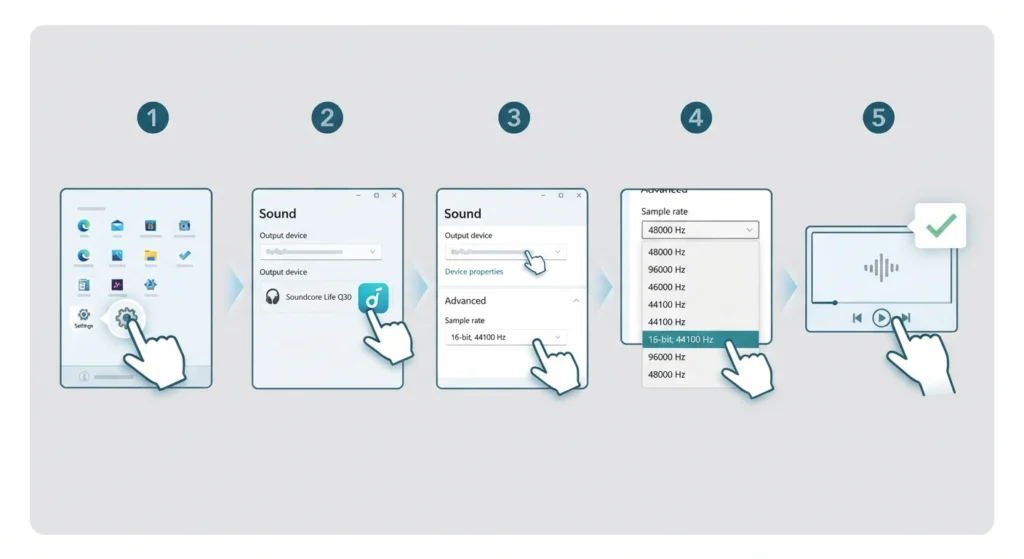
Sometimes the static isn’t coming from the headphones at all. Incorrect audio output settings, mismatched sample rates, or an outdated audio driver on a Windows 11 computer can all introduce hissing that sounds like a hardware fault. Reviewing and adjusting the audio output settings on Windows 11 often clears up crackling that seems to come and go randomly.
- Step 1: Open Sound settings from the Windows 11 Start menu.
- Step 2: Select Soundcore Life Q30 as the output device.
- Step 3: Click on the device properties and check the sample rate under Advanced settings.
- Step 4: Lower the sample rate to 16-bit, 44100 Hz if it’s currently set higher, since Bluetooth headphones often struggle with higher rates.
- Step 5: Play audio again to check whether the hissing has stopped.
Pro-Tip: A mismatched sample rate is one of the most overlooked causes of Bluetooth static. Most people assume it’s a hardware defect, when in reality the computer is simply sending more data than the Bluetooth connection can smoothly handle.
Fix 5: Reset the Audio Settings on the Computer
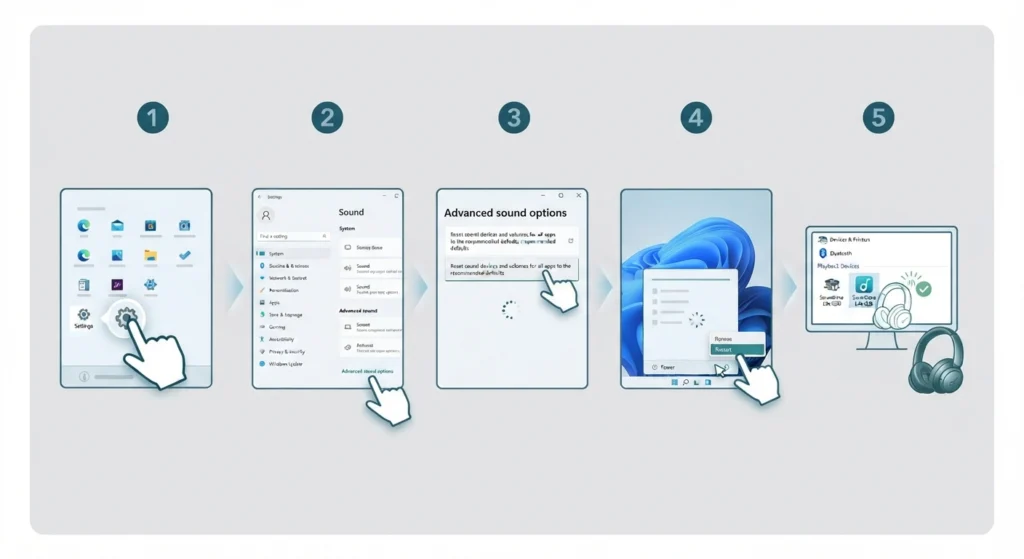
If the static only happens on one specific computer, the operating system’s audio configuration is likely the source rather than the headphones. Resetting the audio settings on Windows 11 restores the system’s sound configuration to default, which clears out corrupted settings that build up over time from app installs and driver changes.
- Step 1: Open Settings, then go to System and select Sound.
- Step 2: Scroll down to Advanced sound options.
- Step 3: Select the option to reset sound settings to default.
- Step 4: Restart the computer once the reset completes.
- Step 5: Reconnect the Life Q30 and test for static again.
Fix 6: Factory Reset the Headphones
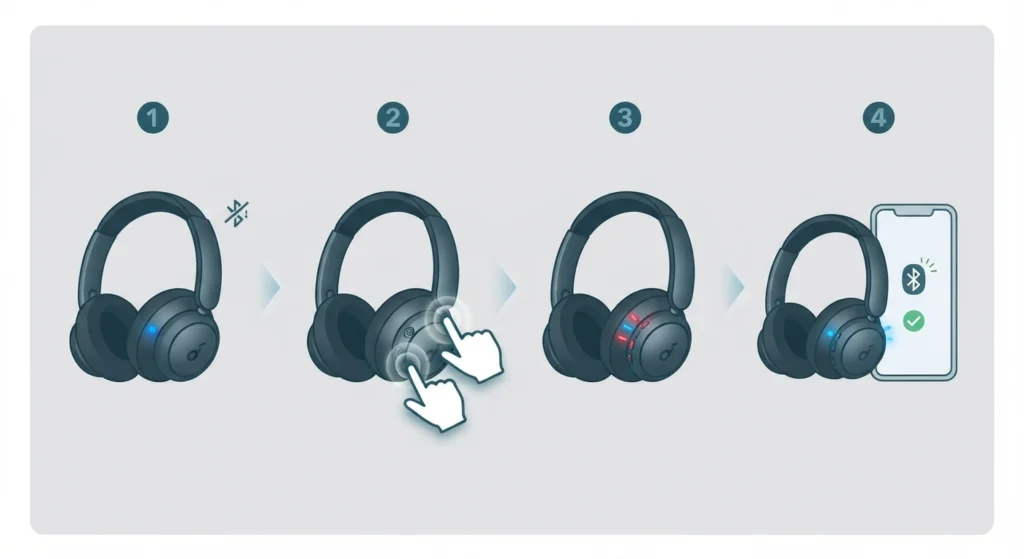
When none of the fixes above resolve the issue, a factory reset wipes any corrupted internal settings on the headphones themselves. This step should be treated as a last resort since it also clears any custom EQ profiles saved through the Soundcore app.
- Step 1: Turn the headphones on and make sure they’re not connected to any device.
- Step 2: Hold down the power button and volume down button together for about 10 seconds.
- Step 3: Wait for the LED indicator to flash a few times, confirming the reset has taken place.
- Step 4: Re-pair the headphones as if setting them up for the first time.
Tips to Prevent Static or Hissing Noise Going Forward
- Keep the Soundcore app installed and check for firmware updates every couple of months.
- Avoid connecting the headphones to more than two devices at once through multipoint pairing, since this can strain the Bluetooth connection.
- Store the headphones in their case when not in use to protect the internal components from dust and moisture.
- Charge the headphones fully before long listening sessions, since low battery can sometimes trigger audio distortion.
- Avoid placing the headphones near routers or other electronics that generate heavy wireless traffic.
Common Problems Related to Static and Hissing Noise
A few related issues tend to show up alongside static noise on the Life Q30, and they’re worth recognizing since the fix is often the same.
- Audio cutting in and out along with the static usually points to Bluetooth interference or distance from the connected device.
- Static that only happens with ANC turned on suggests the noise cancelling microphone or circuit needs a firmware update.
- Hissing that appears only on calls, not music, often relates to microphone settings rather than the headphone drivers themselves.
- Static appearing right after a software update on the phone or computer usually means the audio driver needs to be refreshed or reset.
Frequently Asked Questions
Why does the Anker Soundcore Life Q30 make a static noise?
Static noise is typically caused by outdated firmware, Bluetooth interference, corrupted pairing data, or an audio driver issue on the connected device.
How often should firmware be updated on the Life Q30?
Checking for updates every one to two months through the Soundcore app is enough to stay ahead of most stability issues.
Does turning off ANC help with static noise?
Yes, turning off Active Noise Cancelling temporarily helps identify whether the static is coming from the ANC circuit or the Bluetooth connection itself.
Can a factory reset fix static noise permanently?
A factory reset resolves static caused by corrupted internal settings, though it won’t fix interference-related static since that depends on the surrounding environment.
Is static noise a sign of hardware damage?
Not usually. Most cases trace back to software or connection issues rather than physical damage, especially if the static is inconsistent rather than constant.
Why does static only happen with one device but not another?
This points to a device-specific issue, such as an outdated audio driver or incorrect sample rate settings on that particular phone or computer.
Does distance from the connected device cause static?
Yes, moving too far from the paired phone or computer weakens the Bluetooth signal and can introduce static or dropped audio.
Should the headphones be reset before or after updating firmware?
Updating firmware first is recommended, since a reset without the latest firmware may reintroduce the same bug that caused the static in the first place.
Can multipoint connections cause static noise?
Yes, having the headphones connected to two devices at once can occasionally cause audio interruptions, including static or crackling.
Does battery level affect audio quality on the Life Q30?
Low battery can sometimes cause distorted or inconsistent audio, so keeping the headphones charged helps maintain stable sound quality.