
Amazon Echo Buds low volume in one earbud is a common complaint among users who otherwise love the fit and sound quality of these earbuds. Most of the time, the fix takes less than ten minutes and does not require a warranty claim or a replacement pair.
Quick Summary:
- A blocked speaker mesh is the most frequent cause of one earbud sounding quieter
- Balance settings on the connected phone or laptop can silently shift audio to one side
- A loose ear tip seal leaks sound and makes volume feel uneven
- Resetting the Echo Buds through the Alexa app clears most software-related volume glitches
- Firmware that has not updated in a while can also cause mismatched output between buds
Step-by-Step Guide to Fix Low Volume in One Echo Bud
Work through these fixes in order. Each one takes just a couple of minutes, and most people find that the very first fix solves the issue before they even get to the rest of the list.
Fix 1: Clean the Speaker Mesh and Ear Tip
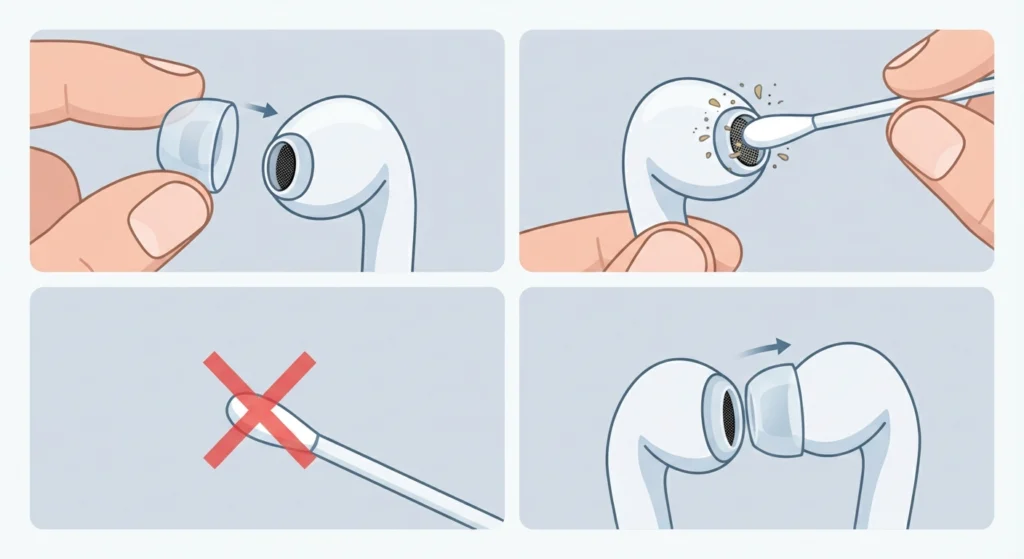
Earwax and pocket lint build up on the tiny mesh screen that covers the speaker, and this is usually the first place to check when one bud sounds noticeably quieter than the other.
- Step 1: Remove the silicone ear tip from the quieter earbud
- Step 2: Use a dry, soft-bristled brush or a clean, dry cotton swab to gently clear away debris from the mesh
- Step 3: Avoid poking anything sharp into the mesh, since this can damage the driver underneath
- Step 4: Reattach the ear tip and test the volume again before moving to the next fix
Pro-Tip: A clogged mesh does not always look dirty from the outside. This works best when the cleaning is done under good lighting with a magnifying glass or a phone camera zoomed in, since wax buildup can hide deep inside the tiny holes.
Fix 2: Check the Ear Tip Fit and Size
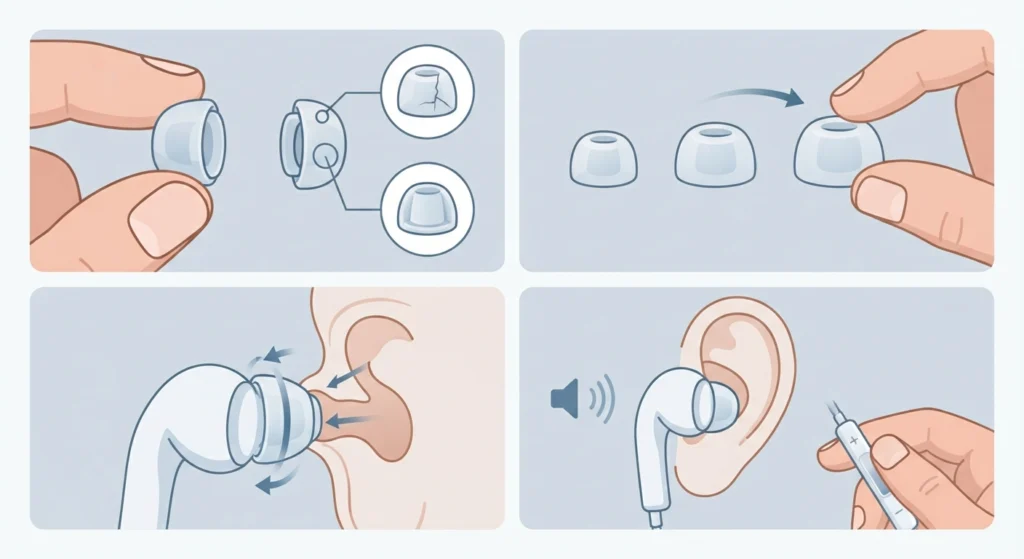
A loose seal changes how bass and mid tones reach the ear canal, and this often gets mistaken for a hardware fault.
- Step 1: Remove both ear tips and inspect them for cracks or stretching
- Step 2: Try a size up or down from the set that came in the box
- Step 3: Insert the earbud and gently twist until a snug seal forms
- Step 4: Compare volume between both buds at the same media playback level
Fix 3: Correct the Audio Balance on the Connected Device
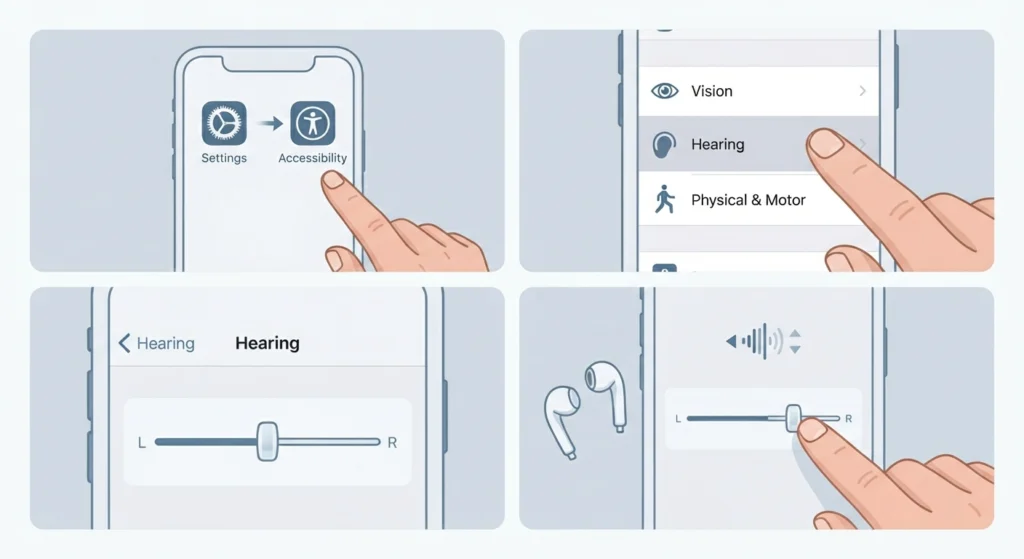
Most people forget that phones, tablets, and laptops all have a left-right balance slider buried in the accessibility settings. A single accidental tap can shift almost all the sound to one side.
- Step 1: Open the accessibility or sound settings on the connected phone or computer
- Step 2: Locate the audio balance slider and confirm it sits at the center
- Step 3: Play a test track and adjust the slider slightly if one side still sounds weaker
Anyone connecting the Echo Buds to a Windows 11 laptop instead of a phone can find the exact menu path in this guide on adjusting audio output settings, which walks through where Windows hides this control.
Fix 4: Re-Pair the Echo Buds With the Connected Device
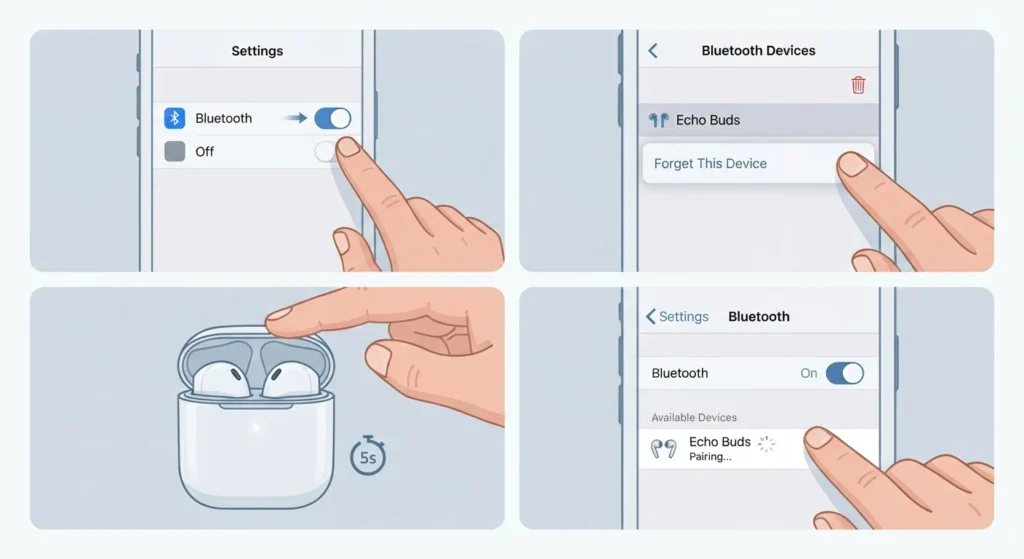
A weak or corrupted Bluetooth connection can cause one channel to drop in volume, especially after a recent software update on the phone or laptop.
- Step 1: Turn off Bluetooth on the connected device
- Step 2: Forget or remove the Echo Buds from the paired devices list
- Step 3: Place the Echo Buds back in the case, close it for five seconds, then reopen it
- Step 4: Turn Bluetooth back on and pair the Echo Buds again from scratch
Pro-Tip: Windows 11 users sometimes see this issue return after every restart. This step-by-step guide on re-pairing Bluetooth earbuds for stereo sound covers a setting that keeps the pairing stable between sessions.
Fix 5: Reset the Echo Buds to Factory Settings
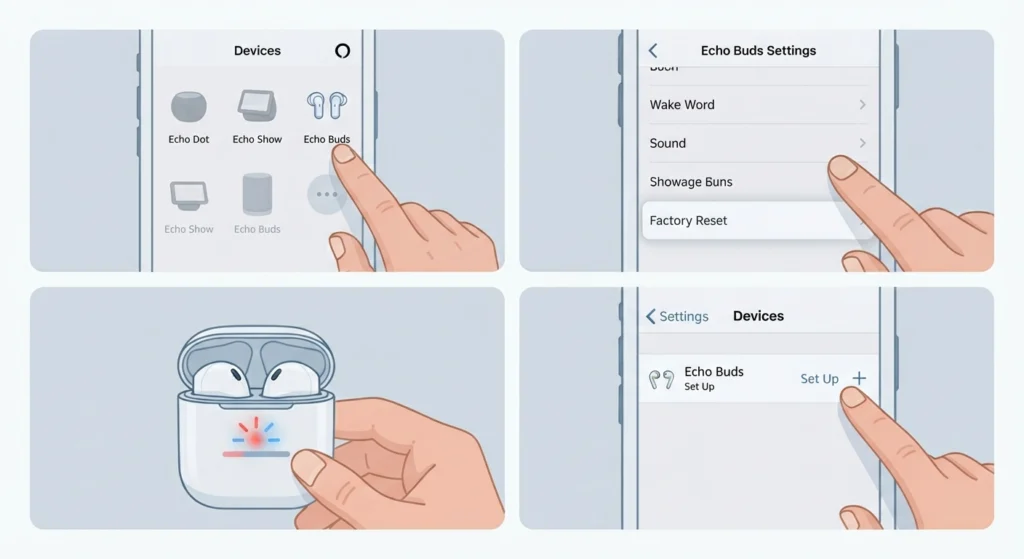
A factory reset clears out any stuck configuration that might be causing one bud to underperform.
- Step 1: Open the Alexa app and select Devices, then choose the Echo Buds
- Step 2: Tap the settings icon and scroll to the reset option
- Step 3: Confirm the reset and wait for both buds to power cycle
- Step 4: Set up the Echo Buds again as a new device inside the app
Fix 6: Check for a Firmware Update
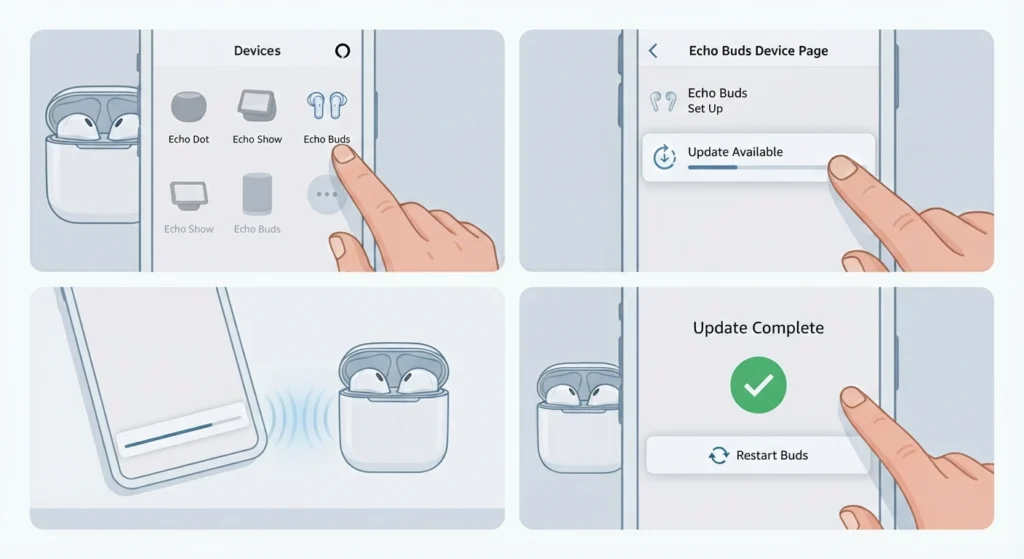
Amazon regularly ships small firmware patches that fix audio bugs, including uneven channel output.
- Step 1: Place the Echo Buds in the case and open the Alexa app
- Step 2: Go to the Echo Buds device page and look for a firmware notification
- Step 3: Keep the buds near the phone and connected until the update finishes
- Step 4: Restart the buds once the update completes and test the volume again
Fix 7: Reset the Equalizer Settings
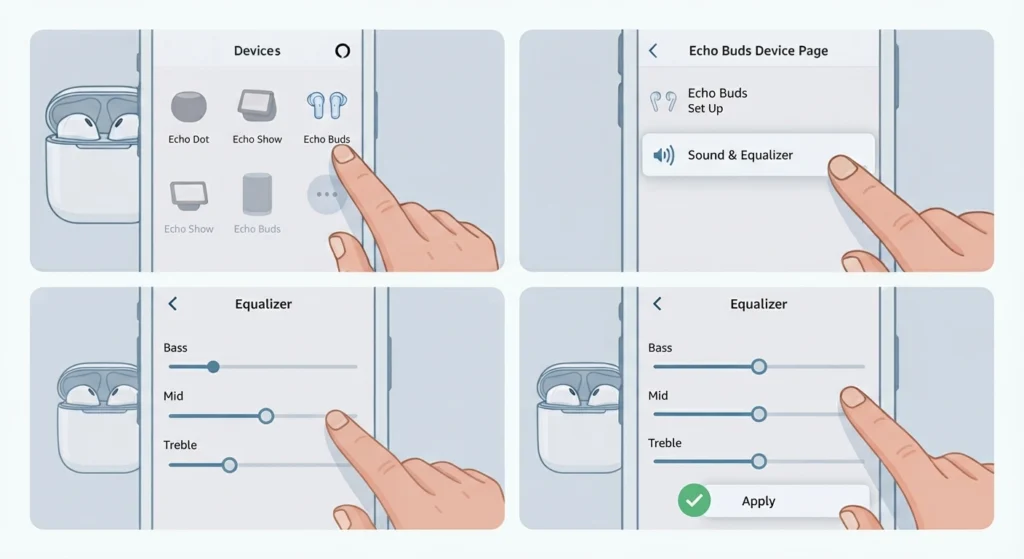
An unbalanced equalizer profile inside the Alexa app can make one earbud sound quieter even when the hardware is working fine.
- Step 1: Open the Alexa app and select the Echo Buds from the device list
- Step 2: Go to the Sound section and open the Equalizer
- Step 3: Set the Bass, Mid, and Treble sliders back to their default center position
- Step 4: Save the changes and play audio to confirm both buds now match
Tips to Keep Echo Buds Volume Balanced Long-Term
- Clean the speaker mesh once a week, especially after workouts or humid weather
- Store the Echo Buds in a dry case rather than a pocket full of lint or coins
- Check for firmware updates at least once a month through the Alexa app
- Avoid using alcohol-based cleaners on the mesh unless the manual specifically allows it
- Keep the accessibility balance slider centered as a habit after any phone software update
Common Problems Behind Uneven Echo Buds Volume
A handful of root causes explain nearly every case of one earbud sounding quieter than the other.
- Sweat or moisture trapped inside the mesh after gym sessions or running in the rain
- A worn-out ear tip that no longer forms a tight seal
- Bluetooth codec mismatches after switching between multiple paired devices
- An outdated firmware version that has a known audio bug
- A battery imbalance between the two buds, which can affect output power slightly as one bud drains faster than the other
Anyone who also notices the microphone cutting out during calls on a Windows 11 laptop can find a focused fix in this guide on resolving microphone detection problems, since the same Bluetooth driver issues sometimes affect both audio and mic quality together.
Frequently Asked Questions
Why is one Echo Bud quieter than the other all of a sudden?
The most common reason is a blocked speaker mesh or a shifted ear tip seal. Bluetooth balance settings on the connected phone are the second most common cause.
Can wax buildup really cause low volume in one earbud?
Yes. Earwax and skin oils gradually coat the tiny mesh over the speaker, muffling sound on that side even though the earbud itself is not damaged.
How often should the Echo Buds mesh be cleaned?
Once a week is a reasonable routine for regular use, with extra cleaning after workouts, humid days, or any noticeable drop in volume.
Does resetting the Echo Buds delete saved settings?
A factory reset clears paired device history and custom equalizer settings, so the Echo Buds need to be set up again afterward inside the Alexa app.
Is it safe to use alcohol to clean the earbud mesh?
A dry, soft-bristled brush or a clean, dry cotton swab is the safer default. Liquid cleaners should only be used if the product manual specifically approves them, since moisture can damage the internal speaker.
Why does one Echo Bud sound quieter only during calls?
This usually points to a Bluetooth balance issue on the connected device rather than a hardware fault, since call audio and media audio can route through slightly different channels.
Can a firmware update fix low volume in one earbud?
Yes, in many cases. Amazon regularly patches audio bugs through firmware, and an outdated version is a frequent cause of channel imbalance.
How long does the Echo Buds reset process take?
The reset itself takes under a minute, though setting the buds up again inside the Alexa app usually adds another two to three minutes.
Does battery level affect earbud volume?
A very low battery on one bud can occasionally cause slightly reduced output on that side, so charging both buds fully before troubleshooting further is worth doing.
When should the Echo Buds be sent in for warranty service?
If cleaning, resetting, re-pairing, and a firmware update all fail to fix the imbalance, and the issue persists across multiple devices, a hardware fault becomes likely and a warranty check is the next reasonable step.