
AirPods Max not connecting to Bluetooth is one of the most common complaints among owners of Apple’s premium headphones, and most of the time the fix takes only a few minutes. This guide walks through the exact steps that resolve the issue on iPhone, iPad, Mac, and Windows PC.
Key Takeaways
- Most connection failures come from a low battery, a stuck Bluetooth cache, or outdated firmware.
- Resetting the AirPods Max and forgetting the device before re-pairing solves the majority of cases.
- Windows users often need an extra step involving audio output settings and driver updates.
- Firmware updates install automatically, but only when the headphones are charging and near the paired device.
- A hard reset takes about 15 seconds and rarely causes any data loss on the headphones.
These steps apply whether the headphones refuse to appear in the Bluetooth list, connect and disconnect repeatedly, or show as connected without producing sound. The methods below are listed in the order that tends to work fastest, so working through them from top to bottom saves time.
Step-by-Step Guide to Fix AirPods Max Bluetooth Connection Issues
Method 1: Check the Battery and Charging Case Contact
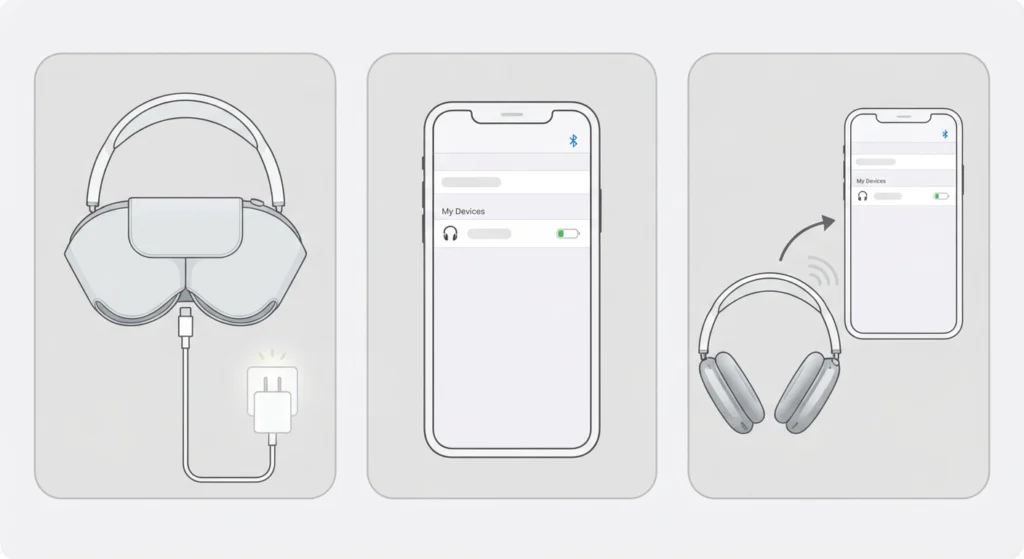
A partially charged AirPods Max can behave erratically with Bluetooth, dropping the connection or refusing to pair altogether. Low battery is often mistaken for a technical fault, when in reality the headphones are simply running out of power mid-handshake with the source device.
- Step 1: Connect the AirPods Max to a Lightning or USB-C charging cable, depending on the model, and let them charge for at least 15 minutes.
- Step 2: Check the battery status on iPhone by opening the Bluetooth settings and tapping the AirPods Max name once connected.
- Step 3: Attempt to reconnect once the battery shows above 20 percent.
Pro-Tip: The Smart Case for AirPods Max only puts the headphones into an ultra-low-power state; it does not charge them. Charging always requires a cable plugged into the left ear cup.
Method 2: Reset the AirPods Max
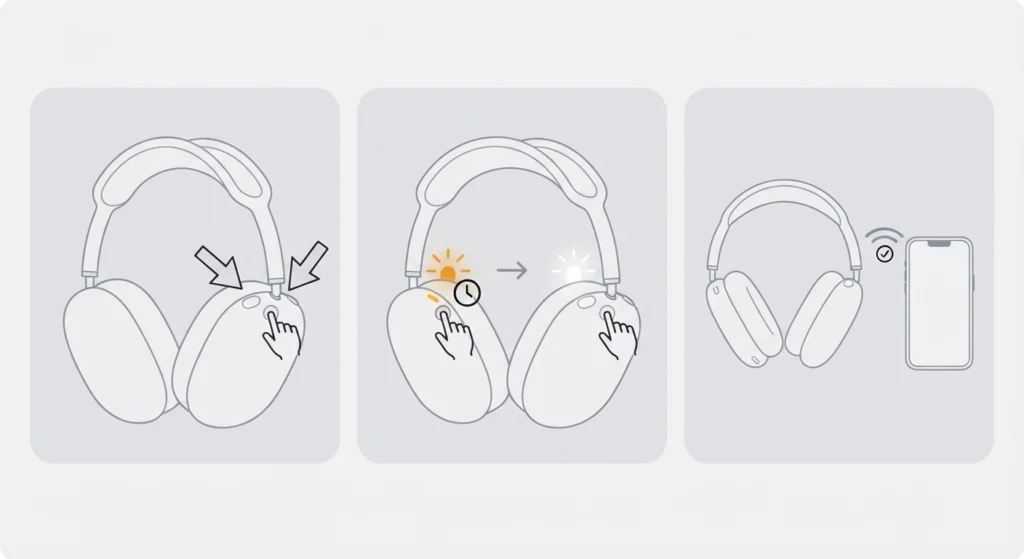
A reset clears the temporary Bluetooth pairing data stored inside the headphones without erasing any personal settings, and it fixes the majority of connection failures reported by users.
- Step 1: Press and hold the noise control button and the Digital Crown at the same time.
- Step 2: Keep holding both for about 15 seconds until the LED status light on the top of the right ear cup flashes amber, then white.
- Step 3: Release both buttons once the white flash appears, then bring the headphones close to the device to be paired.
Method 3: Forget the Device and Re-Pair From Scratch
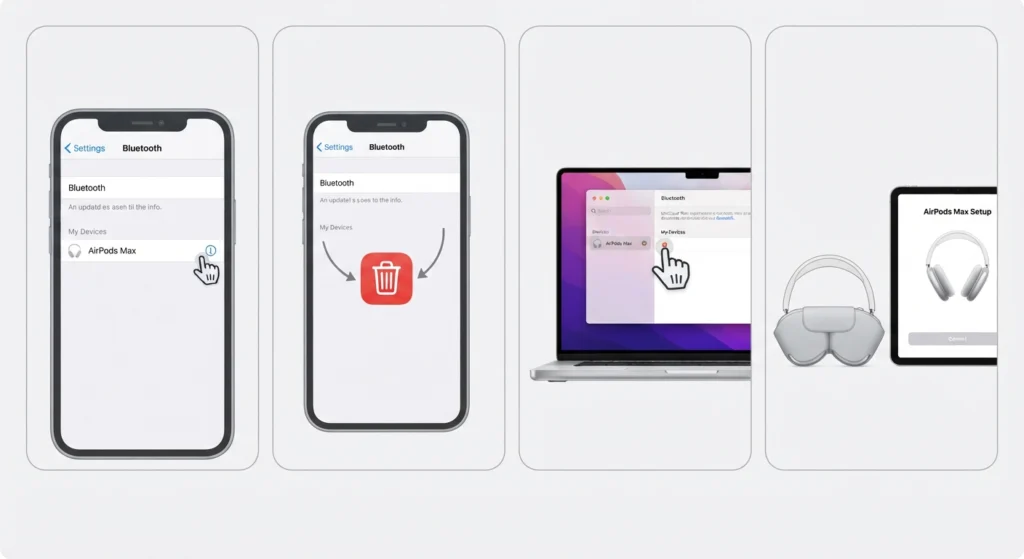
Sometimes the paired device is holding onto a corrupted Bluetooth profile for the AirPods Max, which blocks a fresh connection even after a reset on the headphone side.
- Step 1: On iPhone or iPad, go to Settings, then Bluetooth, find AirPods Max in the list, tap the info icon, and select Forget This Device.
- Step 2: On Mac, open System Settings, select Bluetooth, and remove the AirPods Max from the device list.
- Step 3: Reset the headphones using Method 2, then hold them close to the device with the lid of the Smart Case open, or manually select them from the Bluetooth device list.
- Step 4: Confirm the pairing animation appears on screen and tap Connect.
Method 4: Fix AirPods Max Not Connecting to Bluetooth on Windows
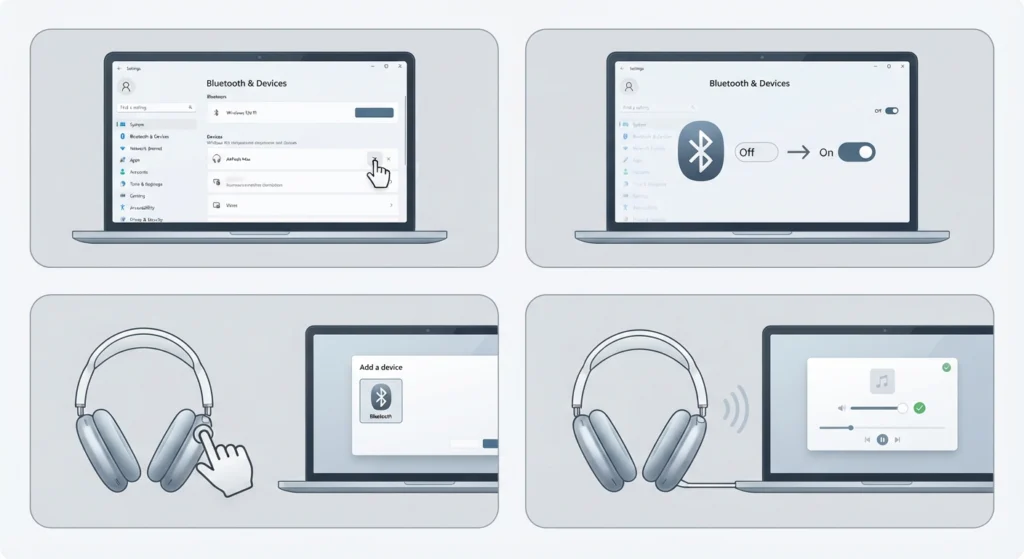
Windows handles Bluetooth audio devices differently than Apple’s own ecosystem, so a connection that pairs instantly on iPhone can still fail on a PC. Learning how to re-pair Bluetooth earbuds for proper stereo sound on Windows solves most of these mismatched-driver situations.
- Step 1: Open Settings, then Bluetooth and Devices, and remove AirPods Max if it already appears in the list.
- Step 2: Turn the Bluetooth adapter off and back on, or restart the PC to clear any stuck drivers.
- Step 3: Reset the AirPods Max using Method 2, then select Add Device on Windows and choose Bluetooth from the menu.
- Step 4: Once paired, check whether audio plays correctly through the default output. If it does not, resetting the audio settings usually restores normal playback.
Pro-Tip: AirPods Max does not support all Apple-exclusive features on Windows, such as automatic device switching or spatial audio, so a successful pairing without those extras is completely normal behavior, not a sign of a broken connection.
Method 5: Update Firmware
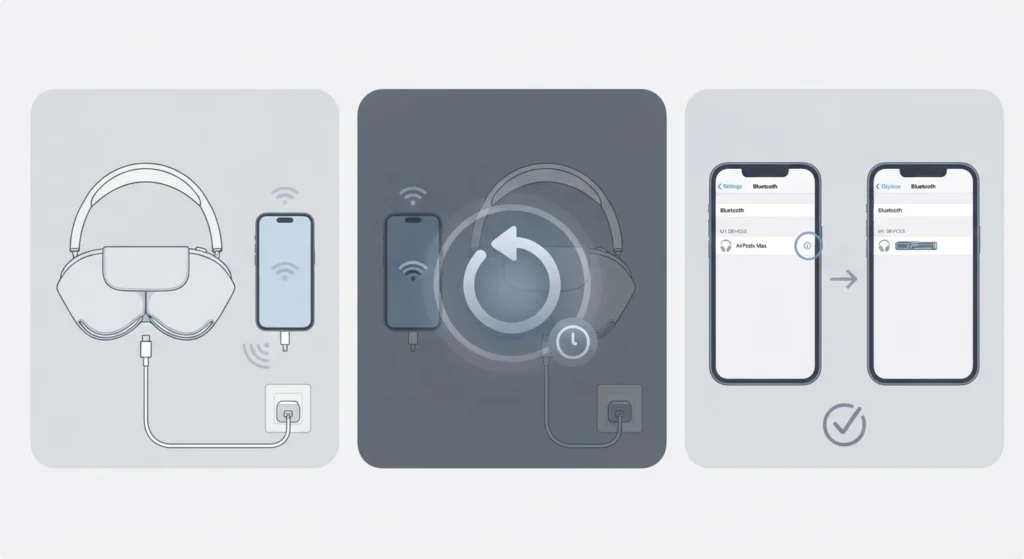
Outdated firmware is a frequent cause of intermittent Bluetooth drops, and Apple does not provide a manual update button for AirPods Max.
- Step 1: Connect the AirPods Max to a charger and place them within Bluetooth range of an iPhone that is connected to Wi-Fi.
- Step 2: Leave both devices idle overnight, since the update installs automatically in the background.
- Step 3: Confirm the update by going to Settings, Bluetooth, tapping the info icon next to AirPods Max, and checking the firmware version listed there.
Tips to Keep AirPods Max Connected Without Interruptions
- Keep the paired device within 30 feet and avoid thick walls or metal objects between the two devices, since Bluetooth signals weaken quickly through solid materials.
- Turn off Wi-Fi routers or other Bluetooth accessories that sit right next to the listening setup, since signal interference is a common but overlooked cause of dropped connections.
- Keep only one device actively connected at a time when troubleshooting, since AirPods Max can be paired to multiple devices but only plays through one at once.
- Restart the source device occasionally, since a phone or laptop that has been running for weeks tends to accumulate background processes that interfere with Bluetooth stability.
Common Problems When Pairing AirPods Max via Bluetooth
Beyond a complete failure to connect, a few related issues tend to show up alongside Bluetooth pairing trouble, and each one has a distinct cause worth knowing.
- Audio plays but the microphone does not work: this usually points to a device-side input setting rather than the headphones themselves. Windows users can resolve this by resolving microphone detection problems directly in the sound settings.
- Sound only plays through one ear cup: this is often a Bluetooth codec mismatch rather than a hardware fault, and reconnecting the headphones from scratch typically fixes it.
- Connection succeeds, then drops after a few seconds: this pattern is almost always linked to battery level or interference rather than a corrupted pairing.
- Device shows connected but volume stays muted: checking and adjusting the correct output device solves this in most cases, since the system sometimes defaults back to internal speakers.
Frequently Asked Questions
Why does AirPods Max fail to appear in the Bluetooth device list?
This usually happens when the headphones are still paired to another device or have not been reset. Performing a reset and confirming no other nearby device is actively connected to them typically brings them back into the list.
How long does it take to reset AirPods Max?
The reset process itself takes about 15 seconds of holding down the noise control button and the Digital Crown together, followed by a few seconds for the LED to flash white.
Can AirPods Max connect to a Windows laptop?
Yes, AirPods Max pairs with any Windows laptop or desktop that has Bluetooth support, though certain Apple-only features will not be available on that platform.
Why do AirPods Max keep disconnecting randomly?
Random disconnections are most often caused by low battery, physical interference from other wireless devices, or being out of effective Bluetooth range.
Does resetting AirPods Max delete any saved settings?
No, a standard reset only clears the Bluetooth pairing data. Personal settings such as noise control mode preferences remain intact.
Is it normal for AirPods Max to take a while to pair the first time?
A first-time pairing can take slightly longer since the device is registering the headphones for the first time, but it should still complete within about 10 to 15 seconds under normal conditions.
What causes one ear cup to stop producing sound?
This is typically a software-level Bluetooth glitch rather than a hardware failure, and it is usually fixed by disconnecting and reconnecting the headphones.
How can firmware issues be confirmed on AirPods Max?
Checking the firmware version through the Bluetooth settings info panel on a paired iPhone shows the currently installed version, which can then be compared against the latest release from Apple’s support page.
Does distance from the paired device affect connection stability?
Yes, Bluetooth performance drops sharply beyond roughly 30 feet, and physical obstructions such as walls further reduce that effective range.
Can AirPods Max be paired to two devices at the same time?
They can be paired to multiple devices, but audio will only play through whichever device is actively selected as the current output, not both simultaneously.