
Dealing with Anker Soundcore Sport X20 controls not responding is frustrating mid-workout, but the cause is usually press timing, a changed setting, or a glitch a quick reset clears. Plenty of people search for Sport X20 touch controls, but Soundcore lists this model with physical button controls, so the fixes below are built around that.
Quick Summary:
- Double presses must be fast, with the gap between presses within 400ms.
- Single presses need a gap of more than 1 second between them.
- Button actions can be changed in the Soundcore app, so a control may have been reassigned.
- A reset takes 10 seconds with the earbuds in the open charging case.
- Dirty charging contacts can cause a reset to fail.
Step-by-Step Guide to Fix Sport X20 Controls Not Responding
Fix 1: Correct Your Press Timing
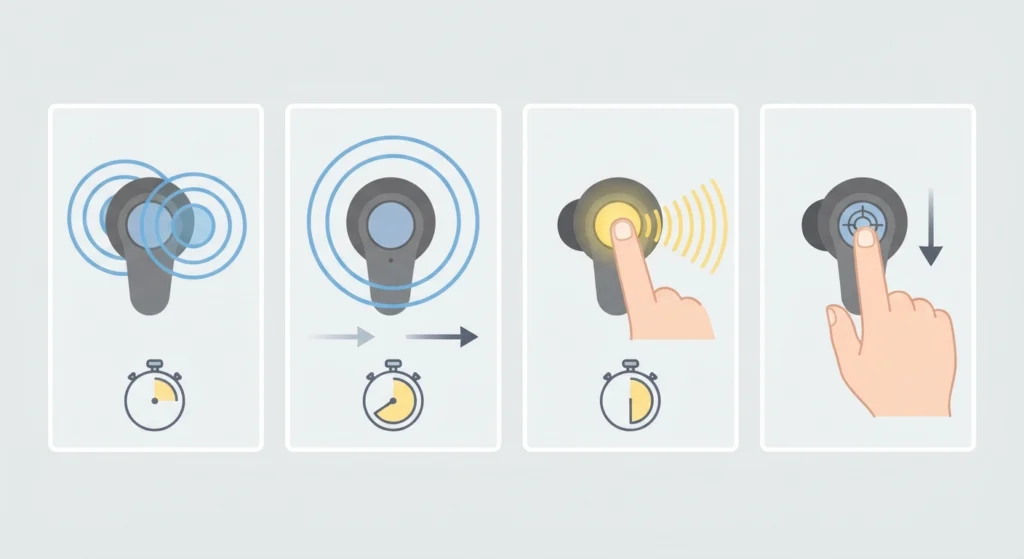
This is the most common reason the buttons seem dead. Soundcore’s support team points to timing first, and the rule is simple. Think of it like a doorbell versus a double knock. One is slow and deliberate, the other is quick and crisp.
- Step 1: For a double press, tap the button twice quickly. The gap between the two presses must be within 400ms.
- Step 2: For a single press, wait more than 1 second between presses. Pressing again sooner can be read as a double press.
- Step 3: For a long press, hold the button for 2 seconds. This hangs up a call or switches listening modes.
- Step 4: Press the button firmly and squarely. Pressing at an angle can make the earbud shift in the ear without registering the press.
Pro-Tip: Most people find that pressing too slowly is the real culprit. A double press that feels quick can still be too slow. Try it faster than feels natural, almost like a light flick of the fingertip.
Fix 2: Check the Button Actions in the Soundcore App
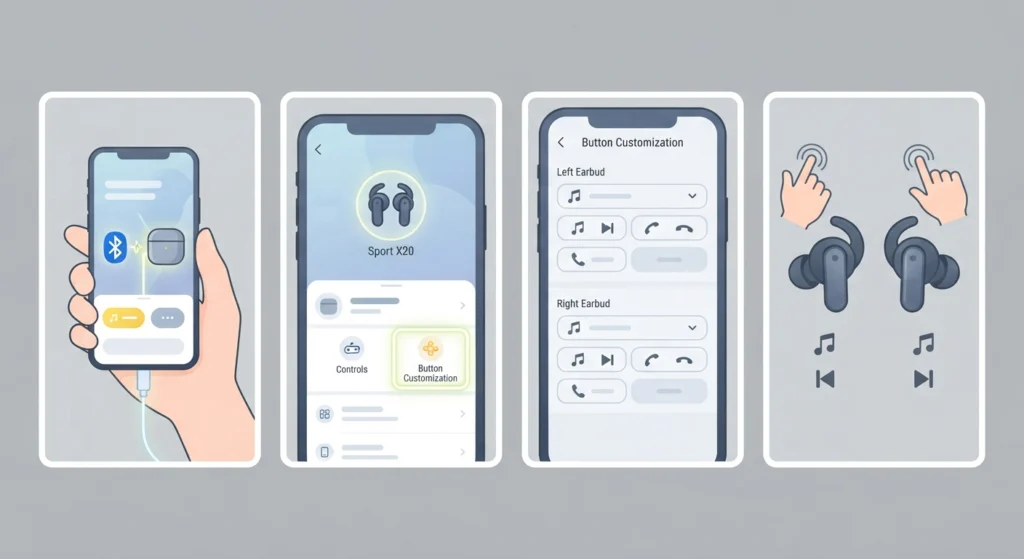
The Sport X20 lets button actions be customized in the Soundcore app. If a control suddenly does something different, a setting may have been changed, so the button is working but not doing what is expected. By default, a double press on the right earbud plays the next track and a double press on the left earbud plays the previous track. A single press on either earbud answers a call, and a long press of 2 seconds hangs up.
- Step 1: Connect the earbuds to the phone and open the Soundcore app.
- Step 2: Open the Sport X20 device page and go to the button or controls settings.
- Step 3: Review the action assigned to each press on the left and right earbuds.
- Step 4: Set the actions back to the ones needed, then test each button while music plays.
Fix 3: Reset the Earbuds and Re-Pair Them
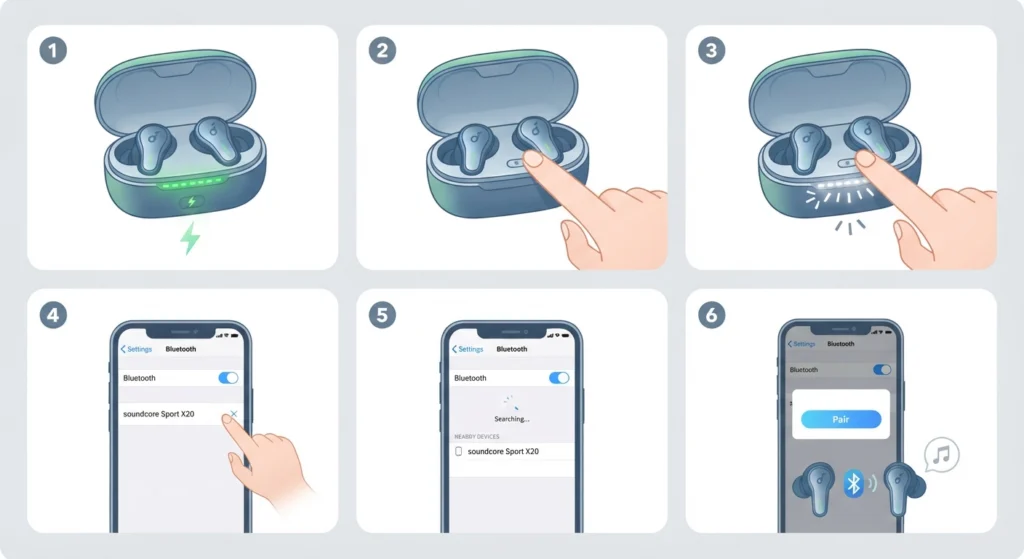
If the timing is right and the app settings look correct, a reset is the next move. It clears glitches between the earbuds and the case. For the Windows side of pairing, this guide on how to re-pair Bluetooth earbuds on Windows covers the process in detail.
- Step 1: Make sure the earbuds and the charging case have enough power.
- Step 2: Place both earbuds in the charging case and leave the case lid open.
- Step 3: Press and hold the charging case button for 10 seconds, until the LED strip flashes white rapidly three times. That confirms the reset.
- Step 4: Remove the old Sport X20 entry from the phone’s Bluetooth list.
- Step 5: Turn on Bluetooth, search for soundcore Sport X20, and select it. If a pairing pop-up appears, choose pair.
- Step 6: Test the controls again with music playing.
Pro-Tip: When putting the earbuds back in the case, line up the charging contacts carefully. If the earbuds are not seated properly, the reset can fail without any obvious sign.
Tips to Keep the Controls Working Smoothly
- Clean the earbuds after each workout. Sweat and grime around the buttons can make presses feel stiff.
- Clean the charging pins on the case and earbuds once or twice a month with a cotton swab or cloth dipped in rubbing alcohol.
- Test the buttons one earbud at a time to find out whether the left or right side is the problem.
- Avoid letting the earbuds or case sit fully drained for long periods, since Soundcore recommends using them at least once a month.
- On a Windows 11 PC, if playback goes to the wrong device when a button is pressed, check the audio output settings to confirm the earbuds are the selected output.
Common Problems and Quick Solutions
Double Press Keeps Registering as Two Single Presses
The gap between presses is too long. Tighten it to within 400ms and try again.
Single Press Triggers a Double-Press Action
Presses are coming too close together. Leave more than 1 second between single presses.
Only One Earbud Responds
Put the unresponsive earbud back in the case, then run the reset in Fix 3. Make sure its charging contacts are clean and aligned.
Reset Does Not Confirm
The earbuds may not be seated correctly in the case, or the case may be low on power. Charge everything, reseat both earbuds, and repeat the 10-second hold.
Frequently Asked Questions
Does the Soundcore Sport X20 have touch controls?
No. Soundcore lists the Sport X20 with button controls. Each earbud has a button that is pressed, not a touch-sensitive surface.
Why are the Sport X20 buttons not responding to double presses?
The gap between the two presses is usually too long. Soundcore advises keeping the interval within 400ms for a double press.
How long should the gap be between single presses?
More than 1 second. A shorter gap can be read as a double press.
What do the default button actions do?
A single press on either earbud answers a call, and a 2-second long press hangs up. A double press on the right earbud plays the next track, and a double press on the left earbud plays the previous track.
How do I switch between listening modes with the earbuds?
Long press the left or right button for 2 seconds. This switches the listening mode, and the actions can be customized in the Soundcore app.
Can the button controls be customized?
Yes. The button operations can be changed in the Soundcore app, so it is worth checking there if a button behaves differently than expected.
How do I reset the Sport X20?
Place the earbuds in the charging case with the lid open, then hold the case button for 10 seconds until the LED strip flashes white rapidly three times.
Why does the reset fail?
The most common reasons are a low case battery or earbuds that are not seated properly in the case. Make sure the charging contacts line up.
Can I use just one Sport X20 earbud?
Yes. Put one earbud in the charging case and close the lid, and the other earbud can be used on its own.
What should I do if the controls still do not work after a reset?
Contact Soundcore customer support for further help, especially if the earbuds are still under warranty.