
The JBL Live Pro 2 TWS not charging is one of the most frustrating issues earbuds owners run into – especially when everything looks fine on the outside. The case seems fine, the cable is plugged in, but nothing happens. Before assuming the worst, know that most charging problems on the JBL Live Pro 2 TWS come down to simple, fixable causes. This step-by-step guide covers every proven fix to get the earbuds and case charging properly again.
Quick Summary – Key Takeaways
- Dirty or misaligned charging contacts are the most common cause of JBL Live Pro 2 TWS not charging
- Always test with a different USB-C cable and a wall adapter (not USB hubs or laptops) before assuming hardware failure
- A firmware reset can resolve software-related charging failures
- Letting the battery fully drain and then charging for 2+ hours can revive an unresponsive case
- If only one earbud is not charging, the issue is almost always dirty contact pins or incorrect seating in the case
Fix 1: Clean the Charging Contacts on the Earbuds and Case
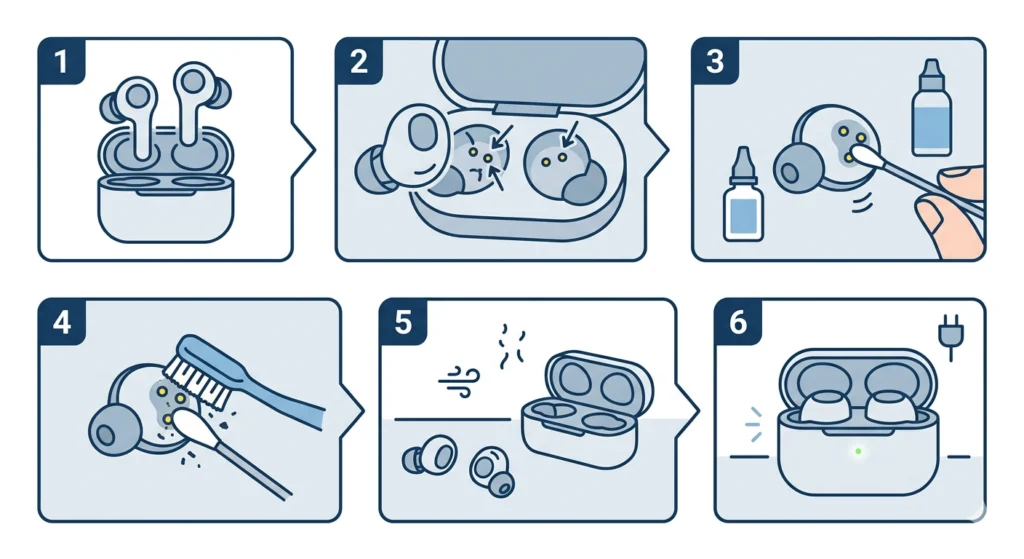
Dirty charging contacts are the number one reason the JBL Live Pro 2 TWS stops charging. Earwax, sweat, and pocket lint build up on the metal pins over time and block the electrical connection completely. This fix takes less than two minutes and solves the problem for most users.
- Step 1: Remove both earbuds from the case and set them on a flat surface.
- Step 2: Look at the small metal contact pins on the bottom of each earbud and the matching pins inside the charging case slots.
- Step 3: Dip a cotton swab lightly in isopropyl alcohol (70% or higher) and gently rub each contact pin in a circular motion.
- Step 4: Use a dry cotton swab or a soft toothbrush to remove any loosened debris.
- Step 5: Let everything dry completely for at least 60 seconds before placing the earbuds back in the case.
- Step 6: Connect the charging case to power and check if the LED indicator lights up.
The key is to avoid using excessive liquid. Just enough alcohol to dampen the swab tip is all that is needed. Flooding the contacts can cause damage.
Fix 2: Try a Different USB-C Cable and Power Adapter
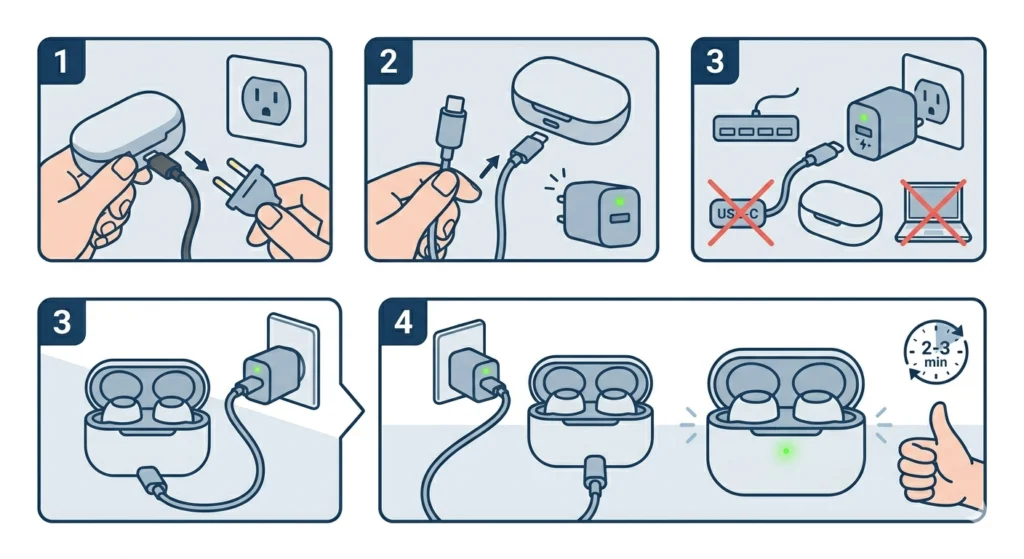
A faulty cable or underpowered adapter is another extremely common culprit. The JBL Live Pro 2 TWS uses a USB-C port on the case, and not all cables or chargers deliver consistent power – even if they appear to work fine with other devices.
- Step 1: Unplug the current cable from the charging case and the power source.
- Step 2: Try a known-working USB-C cable from another device such as a phone or tablet.
- Step 3: Plug the cable directly into a wall adapter rated at 5V/1A or higher – avoid USB hubs, laptop ports, or car chargers, which can deliver inconsistent voltage.
- Step 4: Connect the case and wait 2 to 3 minutes to see if the LED indicator changes.
Most people find that swapping to a quality wall adapter immediately resolves the problem when everything else looks fine. Laptop USB ports in particular often do not supply enough consistent current to charge the case reliably.
Pro Tip: Use a USB-C cable that supports data transfer, not charge-only cables. Some cheap charge-only cables work intermittently with the JBL Live Pro 2 TWS and cause inconsistent or failed charging sessions.
Fix 3: Reseat the Earbuds Correctly in the Case
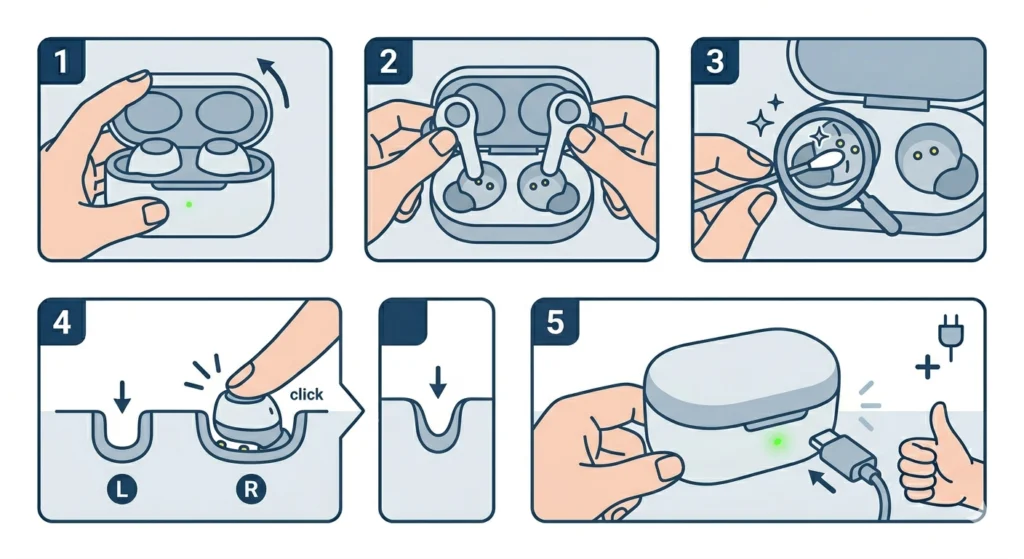
Sometimes the earbuds are simply not sitting flat in the case. Even a slight misalignment prevents the contact pins from making a proper connection. This is especially common after the case has been dropped or when placing the earbuds in quickly without checking alignment.
- Step 1: Open the charging case lid fully.
- Step 2: Remove both earbuds completely.
- Step 3: Look inside each earbud slot and make sure the contact pins are not bent or blocked by debris.
- Step 4: Place the left earbud into the left slot and the right earbud into the right slot, pressing them down firmly until they click or snap into position.
- Step 5: Close the lid and connect the case to power – check that the LED on the front of the case lights up.
This works best when checking that the ear tip or wing tip is not folded over and preventing the earbud from seating flat. Swapping to smaller ear tips temporarily can help confirm if the fit accessory is the issue.
Fix 4: Reset the JBL Live Pro 2 TWS
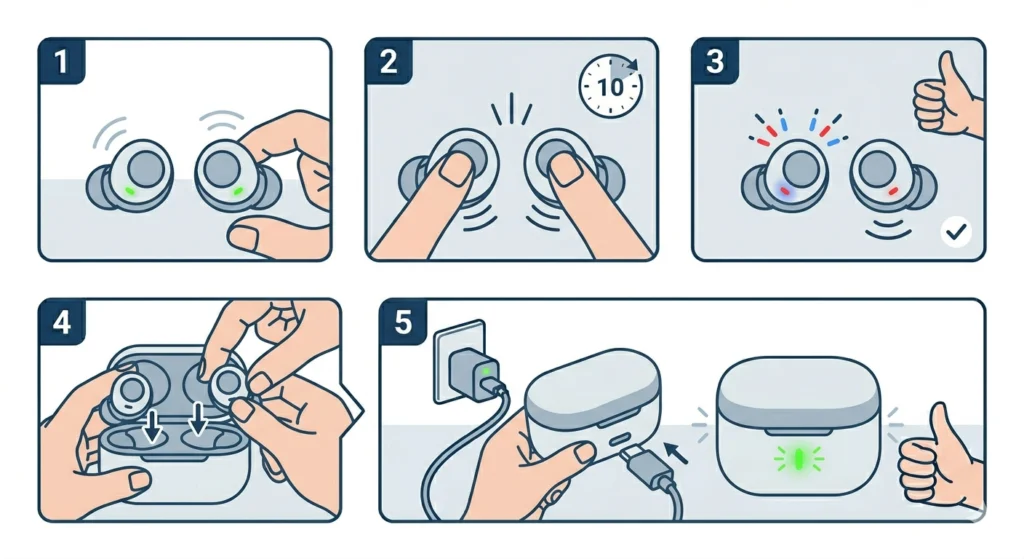
A software glitch can cause the JBL Live Pro 2 TWS to stop recognizing a charging signal entirely. Performing a factory reset clears these errors and restores normal charging behavior. Note that a reset will unpair the earbuds from all previously connected devices, so they will need to be paired again afterward.
- Step 1: Take both earbuds out of the case and make sure they are powered on.
- Step 2: Press and hold the touch control button on both earbuds simultaneously for about 10 seconds.
- Step 3: Wait for the earbuds to flash and power off, which confirms the reset is complete.
- Step 4: Place both earbuds back into the charging case and close the lid.
- Step 5: Connect the case to power and check if the charging indicator activates.
After the reset, re-pair the earbuds to the phone or device using Bluetooth settings. If previously connected to a Windows 11 machine and audio issues appear after re-pairing, it may help to review how to re-pair Bluetooth earbuds for stereo sound on Windows to restore full audio output.
Fix 5: Charge the Case Overnight with Earbuds Removed
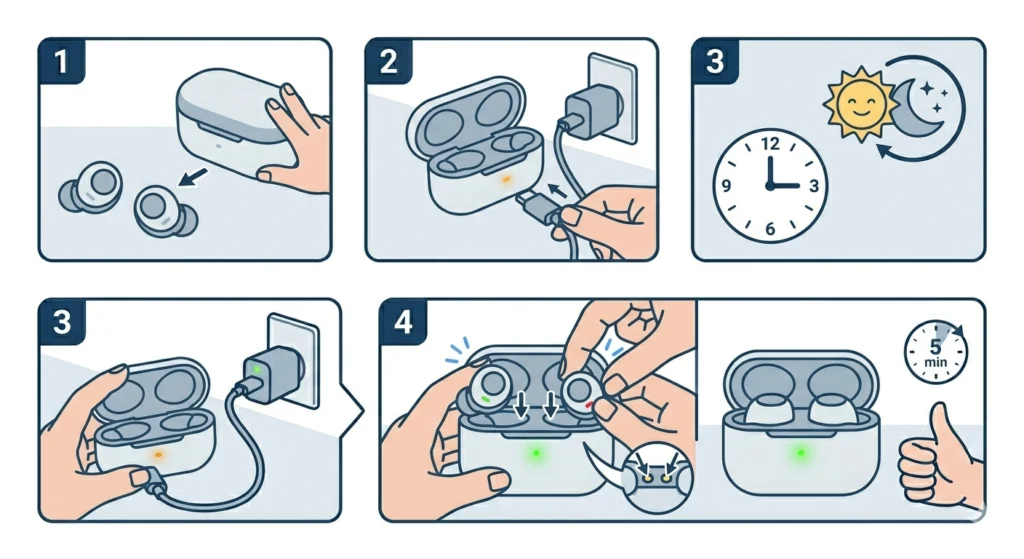
If the charging case battery has been completely depleted for an extended period, it can enter a deep discharge state where it appears completely unresponsive. The fix is to charge the empty case alone – without the earbuds inside – for a minimum of 2 to 3 hours straight.
- Step 1: Remove both earbuds from the case and set them aside.
- Step 2: Connect the empty case to a wall adapter using a USB-C cable.
- Step 3: Leave it charging undisturbed for at least 2 to 3 hours, or overnight if possible.
- Step 4: After charging, open the case and place the earbuds inside to see if they begin charging.
A deeply discharged lithium battery sometimes needs a sustained trickle charge before it shows any sign of life. This method restores the case battery enough to start normal charging cycles again.
Pro Tip: If the LED on the case flickers briefly when plugged in but then goes dark, this is a strong sign of deep discharge rather than a broken case. Keep charging without interruption – do not unplug and replug repeatedly, as this can interrupt the recovery process.
Fix 6: Update the JBL Live Pro 2 TWS Firmware
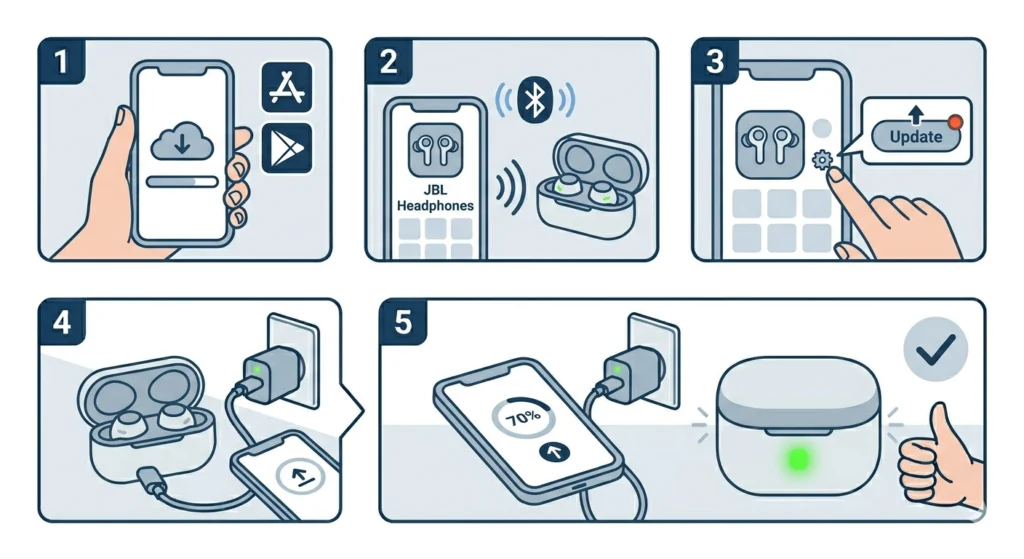
Outdated firmware has been linked to charging errors on JBL earbuds, including the Live Pro 2 TWS. JBL pushes firmware updates through the official app and these updates often include battery management fixes.
- Step 1: Download the JBL Headphones app from the App Store or Google Play Store on a smartphone.
- Step 2: Open the app and connect the JBL Live Pro 2 TWS via Bluetooth.
- Step 3: Navigate to the device settings inside the app and look for a firmware update option.
- Step 4: If an update is available, follow the on-screen instructions to install it with the earbuds in the case and the case connected to power.
- Step 5: Once the update is complete, test charging again.
Tips for Keeping JBL Live Pro 2 TWS Charging Properly
- Wipe down the charging contacts with a dry microfiber cloth after every workout or heavy-use session to prevent buildup
- Always use the original USB-C cable or a quality replacement rated for data and charging
- Avoid leaving the case in high-humidity environments like gym bags for extended periods
- Charge the case before it drops completely to 0% regularly – lithium batteries degrade faster from repeated full drain cycles
- Store the earbuds inside the case between uses to keep them topped up and the contacts aligned
- If using the earbuds with a Windows 11 device and experiencing audio or connectivity issues after troubleshooting, checking audio input device settings on Windows 11 can rule out software-side conflicts
Common Charging Problems with JBL Live Pro 2 TWS
Only One Earbud Is Not Charging
This almost always points to dirty or bent contact pins on the specific earbud slot or on the earbud itself. Follow Fix 1 and focus on the non-charging earbud side. Also check that the earbud is fully seated and not tilted.
Case LED Does Not Light Up When Plugged In
Try a different cable and adapter first. If the LED still does not respond, the case battery may be in a deep discharge state – follow Fix 5 and charge overnight without the earbuds inside.
Earbuds Show Charging in App but Stop at a Certain Percentage
This can indicate a battery calibration issue. Fully drain the earbuds until they power off on their own, then charge them inside the case to 100% without interruption. Repeat once more to recalibrate the battery sensor.
Case Charges but Earbuds Stay at 0%
Clean the contacts thoroughly using Fix 1. If that does not work, perform a full reset using Fix 4. A stuck firmware state can sometimes prevent the case from passing charge to the earbuds even when the case itself is charging fine.
JBL Live Pro 2 TWS Charges Slowly
Slow charging usually means the power adapter is underpowered. Switch to a wall adapter with a minimum 5V/1A output. Also check that the USB-C cable is not damaged – frayed or kinked cables reduce charging speed significantly.
Frequently Asked Questions
Why is the JBL Live Pro 2 TWS not charging at all?
The most common reasons are dirty charging contacts, a faulty USB-C cable, an underpowered adapter, or a completely depleted case battery in deep discharge. Start by cleaning the contacts and switching to a quality wall adapter before assuming the hardware is defective.
How do you reset JBL Live Pro 2 TWS to fix charging issues?
Press and hold the touch control button on both earbuds simultaneously for 10 seconds until they flash and power off. Then place them in the case, close the lid, and reconnect the case to power.
Can a bad USB-C cable stop JBL Live Pro 2 TWS from charging?
Yes, absolutely. Cheap or damaged USB-C cables frequently deliver inconsistent power that either fails to trigger charging or causes the charging cycle to stop intermittently. Always use a cable rated for both data and charging from a reputable brand.
How long does it take to fully charge the JBL Live Pro 2 TWS case?
The JBL Live Pro 2 TWS charging case takes approximately 2 hours to fully charge from empty using a proper 5V/1A wall adapter. The earbuds themselves charge inside the case in about 1.5 to 2 hours.
Why does only one JBL Live Pro 2 TWS earbud charge and not the other?
This is almost always a dirty or blocked contact pin issue on one side. Clean the contact pins on the non-charging earbud and the corresponding slot in the case using isopropyl alcohol and a cotton swab. Also verify the earbud is sitting completely flat and not tilted.
Is it safe to leave the JBL Live Pro 2 TWS charging overnight?
The JBL Live Pro 2 TWS has built-in overcharge protection, so leaving it to charge overnight occasionally will not damage the battery. However, regular overnight charging over many months can contribute to long-term lithium battery degradation. Charging to full and then unplugging is the best habit for battery longevity.
What does it mean when the JBL Live Pro 2 TWS case LED flickers and turns off?
A flickering LED that quickly turns off after plugging in usually indicates the case battery is in a deep discharge state. The fix is to connect the empty case (without earbuds) to a wall adapter and leave it charging for 2 to 3 hours without interruption until it recovers.
Can firmware cause JBL Live Pro 2 TWS not to charge?
Yes. Outdated or corrupted firmware can interfere with the battery management system. Updating the firmware through the JBL Headphones app often resolves charging anomalies that physical cleaning and cable swaps cannot fix.
Will resetting JBL Live Pro 2 TWS delete my saved settings?
Yes, a factory reset clears all paired devices and custom settings including EQ preferences and ANC configurations. After the reset, the earbuds need to be paired again from scratch on all devices.
When should JBL Live Pro 2 TWS be sent in for repair?
If all fixes have been attempted – cleaning contacts, trying different cables, resetting, updating firmware, and overnight charging of the case – and the JBL Live Pro 2 TWS still refuses to charge, it is time to contact JBL support. The earbuds carry a 1-year manufacturer warranty, and a hardware defect in the charging circuit or battery may qualify for a free replacement.