
Jaybird Vista 2 not charging in the case is a common issue that catches a lot of users off guard, especially right before a workout or a long commute. The earbuds sit in the case, the lights don’t turn on, and suddenly there’s no sound in sight. This guide walks through the exact steps needed to get the charging function working again, without wasting time on unrelated troubleshooting.
Quick Summary Table
- Clean the charging pins on both the earbuds and the case using a dry cloth or soft brush
- Check the charging cable and power source for damage or low output
- Confirm the earbuds are seated correctly and magnetically aligned in the case
- Reset the Jaybird Vista 2 earbuds if pins are clean but charging still fails
- Test the case battery itself using a different cable or wall adapter
- Update firmware through the Jaybird app once charging is restored
Step-by-Step Guide to Fix Jaybird Vista 2 Not Charging in the Case
Fix 1: Clean the Charging Contacts
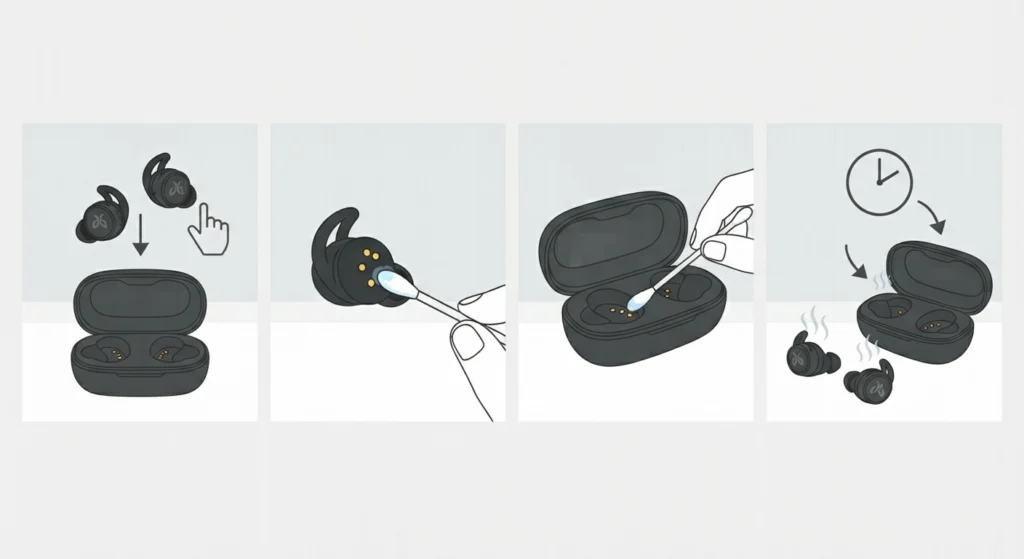
Dust, sweat, and earwax buildup on the metal charging pins are the number one reason Jaybird Vista 2 earbuds refuse to charge. Since these buds are built for workouts, sweat residue collects fast and creates a thin film that blocks the electrical connection.
- Step 1: Power off the earbuds and remove them from the case
- Step 2: Dip a cotton swab in isopropyl alcohol and gently wipe the gold contact pins on each earbud
- Step 3: Wipe the matching pins inside the charging case using the same method
- Step 4: Let everything air dry for two to three minutes before placing the earbuds back in the case
This works best when done weekly for anyone who trains outdoors or sweats heavily during use. A build-up of just a few days can be enough to interrupt the connection.
Fix 2: Check the Charging Cable and Power Source
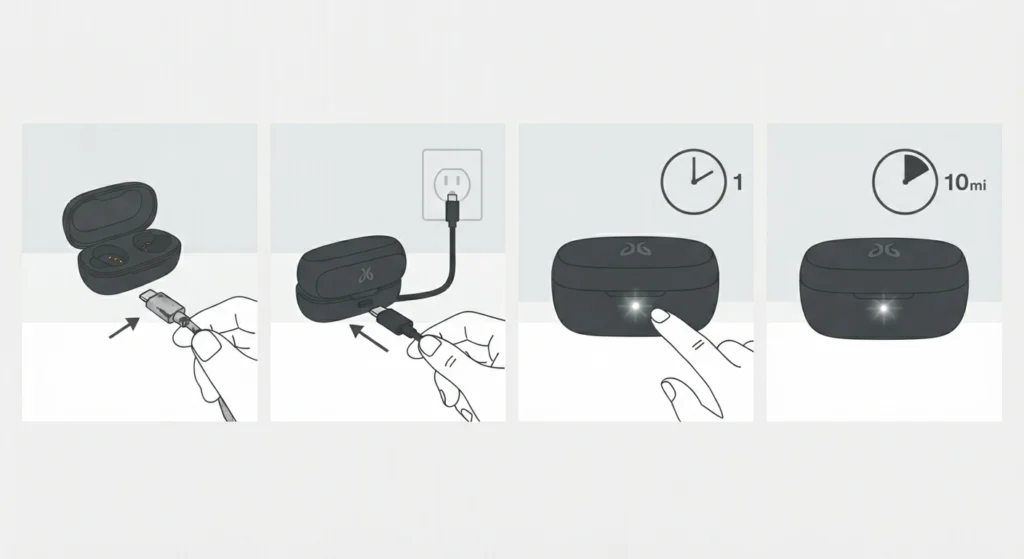
Most people find that the case looks completely unresponsive not because of the earbuds but because of a faulty cable or a weak power source. Cheap or worn-out USB-C cables often deliver inconsistent power, which the case may not register at all.
- Step 1: Swap the current cable for a different USB-C cable that is known to work with other devices
- Step 2: Plug the case into a wall adapter instead of a laptop or USB hub, since hubs sometimes limit power output
- Step 3: Watch for the LED indicator on the case, which should light up within a few seconds of connecting power
- Step 4: Leave the case connected for ten minutes and check again for a charging light
Fix 3: Reseat the Earbuds Properly
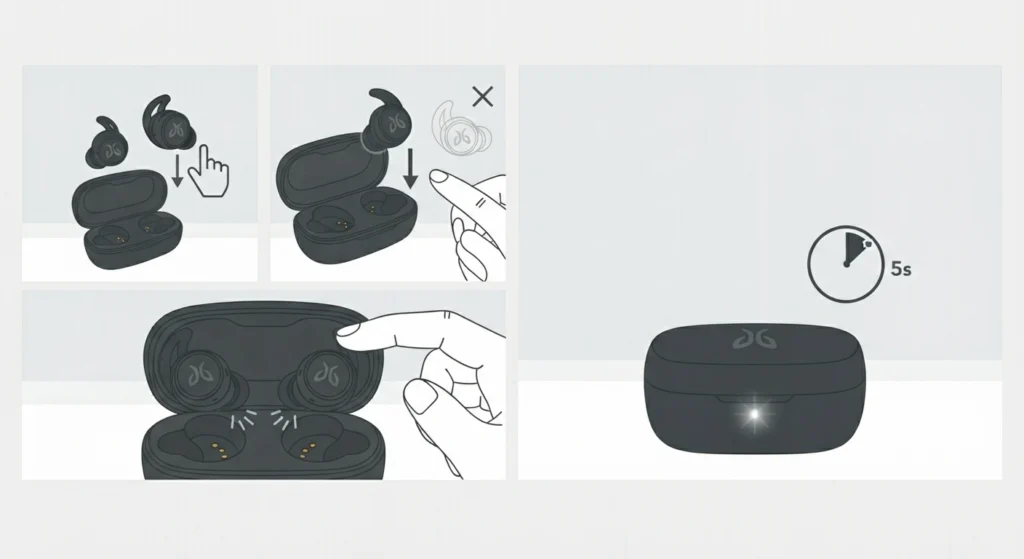
The Vista 2 case relies on magnetic alignment to make contact with the charging pins. If an earbud sits even slightly off-center, the connection breaks even though it visually looks placed correctly.
- Step 1: Remove both earbuds from the case completely
- Step 2: Lower each earbud straight down into its slot rather than sliding it in at an angle
- Step 3: Feel for the slight magnetic pull that confirms proper seating
- Step 4: Close the lid fully and wait for the charging indicator to activate
The key is to let the magnets do the work rather than forcing the earbuds into place, since forcing them often misaligns the pins.
Fix 4: Reset the Jaybird Vista 2 Earbuds
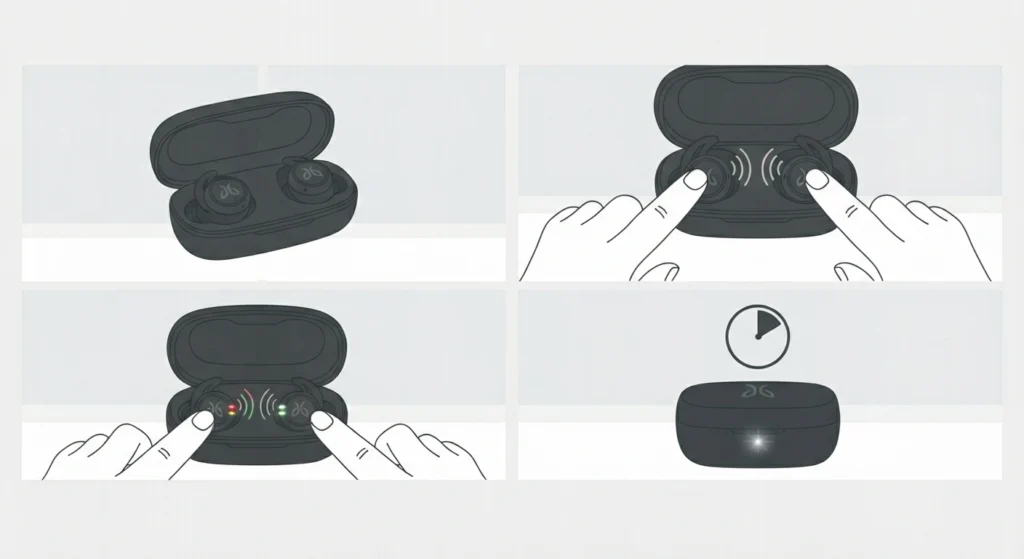
When pins are clean and the cable checks out but charging is still inconsistent, a factory reset often clears up internal syncing issues between the buds and the case.
- Step 1: Place both earbuds in the case but keep the lid open
- Step 2: Press and hold the buttons on both earbuds at the same time for around ten seconds
- Step 3: Release once the LED lights flash a few times, signaling the reset has completed
- Step 4: Close the case lid for a few seconds, then reopen and check for the charging light
Fix 5: Test the Case Battery Separately
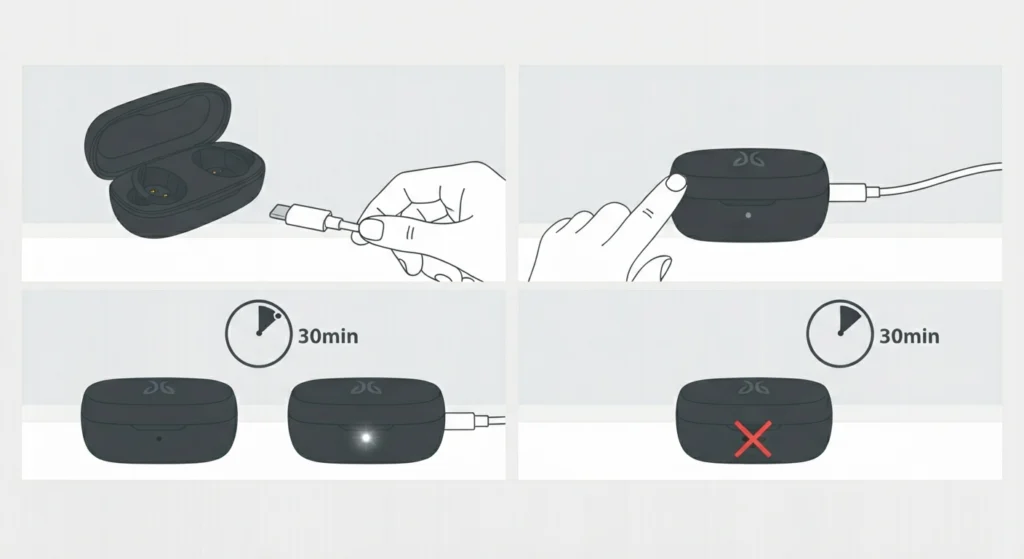
Sometimes the earbuds themselves are fine, but the case battery has degraded or drained completely. This is more common in units that are a year or two old.
- Step 1: Charge the empty case alone for at least 30 minutes using a verified working cable
- Step 2: Check for any LED response on the case during this time
- Step 3: If there is still no response after 30 minutes, the case battery may need professional inspection or replacement through Jaybird support
Pro-Tip: Always let the earbuds sit in the case for a solid 30 seconds before assuming charging has failed. The Vista 2 sometimes takes a moment to detect contact, and pulling the buds out too early can create a false impression that nothing is working.
Tips to Prevent Future Charging Problems
- Store the case in a dry pouch instead of a damp gym bag to avoid moisture buildup on the pins
- Avoid leaving the case in direct sunlight or a hot car, since heat degrades battery performance over time
- Wipe the earbuds down after every sweaty session before placing them back in the case
- Keep the firmware updated through the Jaybird app, since some charging-related bugs get resolved through updates
Common Charging Problems and Quick Solutions
A few charging complaints come up again and again among Vista 2 users. One earbud charges while the other does not, which almost always traces back to a dirty pin or uneven seating on one side. The case shows a light but the earbuds never reach full charge, which usually points to a cable delivering insufficient power rather than a hardware fault. The case itself won’t power on at all, even when plugged in, which typically signals a battery that has fully drained past its safe threshold and needs an extended charge before responding.
For anyone also dealing with connection issues on a Windows machine after solving the charging problem, checking how to re-pair Bluetooth earbuds for stereo sound can help rule out software-side pairing conflicts. If the microphone stops picking up sound afterward, reviewing steps for resolving microphone detection problems is a useful next stop.
Frequently Asked Questions
Why are the Jaybird Vista 2 earbuds not charging in the case?
The most common causes are dirty charging pins, a faulty cable, misaligned earbuds, or a drained case battery. Cleaning the contacts and testing with a different cable resolves the issue in most situations.
How long does it take to charge the Jaybird Vista 2 case fully?
A fully depleted case typically takes around two hours to reach a full charge when connected to a standard USB-C power source.
Why does only one earbud charge in the case?
This usually happens when one earbud is not seated correctly or when the pins on that specific slot have dirt or residue blocking the connection.
Can a bad cable stop the Jaybird Vista 2 case from charging?
Yes. Worn-out or low-quality USB-C cables often fail to deliver consistent power, which prevents the case from charging even though it appears connected.
How can the Jaybird Vista 2 earbuds be reset?
Place both earbuds in the open case and press and hold both buttons at the same time for about ten seconds until the LED lights flash to confirm the reset.
Is it safe to use a different charger for the Jaybird Vista 2 case?
Yes, as long as the charger outputs standard USB-C power. Using a verified working cable and adapter is actually a helpful way to rule out a faulty original cable.
Why does the Jaybird Vista 2 case LED not light up at all?
A completely unresponsive LED often points to a fully drained case battery. Leaving the case connected to power for at least 30 minutes usually brings the LED back to life.
Does sweat damage the Jaybird Vista 2 charging pins?
Sweat residue does not usually cause permanent damage, but it does create buildup that blocks the electrical connection. Regular cleaning prevents this from becoming a recurring issue.
How often should the Jaybird Vista 2 charging pins be cleaned?
For regular workout use, cleaning the pins once a week is a reasonable habit. Those who train daily in humid or sweaty conditions may benefit from cleaning every few days.
What should be done if none of the fixes restore charging?
If cleaning, cable swaps, reseating, and resetting all fail to restore charging, the case battery or internal charging circuit may need professional evaluation through Jaybird’s official support channels.