
If the Jabra Elite 10 charging case not working issue has left earbuds completely dead, there is no need to panic. This is one of the most common problems reported by Jabra Elite 10 users, and in most cases, it can be resolved without sending the unit in for repair. The fixes below are straightforward, proven, and arranged from the simplest to the more involved – so start from the top and work down.
Quick Summary Table
| Fix | Best For | Difficulty |
|---|---|---|
| Clean the charging contacts | Earbuds not charging in case | Easy |
| Check and reseat the USB-C cable | Case not charging at all | Easy |
| Use a different power adapter or cable | Slow or no charging | Easy |
| Reset the earbuds | Case charges but earbuds won’t | Easy |
| Factory reset via Jabra Sound+ app | Persistent charging or pairing issues | Medium |
| Update firmware | Bug-related charging failures | Medium |
Fix 1: Clean the Charging Contacts
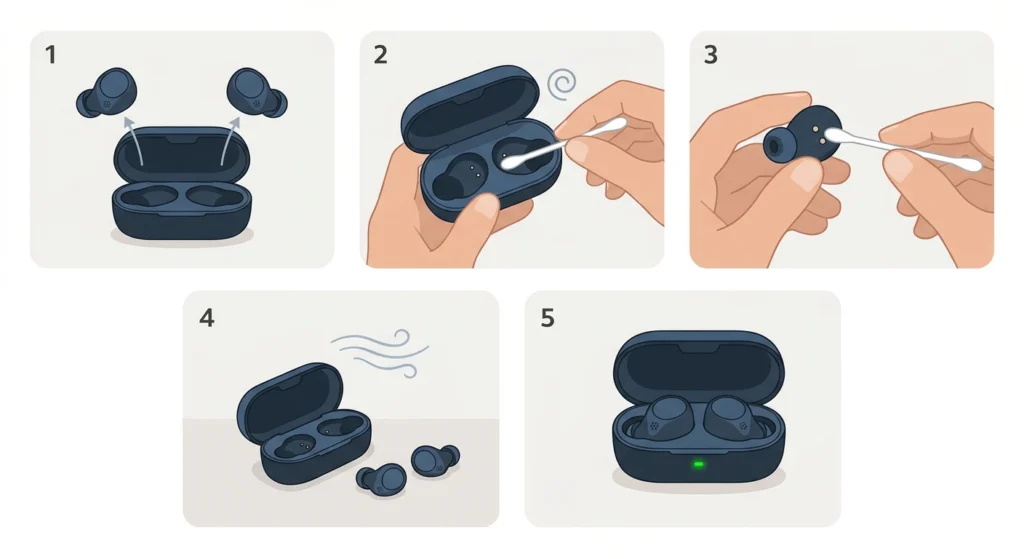
Dirty or oxidized charging pins are the number one cause of the Jabra Elite 10 charging case not working properly. Even a thin layer of earwax, dust, or moisture on the contacts can break the connection between the earbuds and the case.
- Step 1: Remove both earbuds from the case.
- Step 2: Use a dry cotton swab or a soft, lint-free cloth to gently clean the metal charging pins inside the case.
- Step 3: Wipe down the small metal dots on the earbuds themselves.
- Step 4: Let everything dry for 1-2 minutes before placing the earbuds back in the case.
- Step 5: Check if the charging LED lights up when the earbuds are seated properly.
This works best when the earbuds have been used during a workout or in a humid environment. Most people find that a simple contact cleaning resolves the issue immediately.
Pro-Tip: Avoid using alcohol wipes directly on the charging pins as this can corrode the metal over time. A dry cotton swab is the safest tool for regular cleaning.
Fix 2: Check the USB-C Cable and Power Source
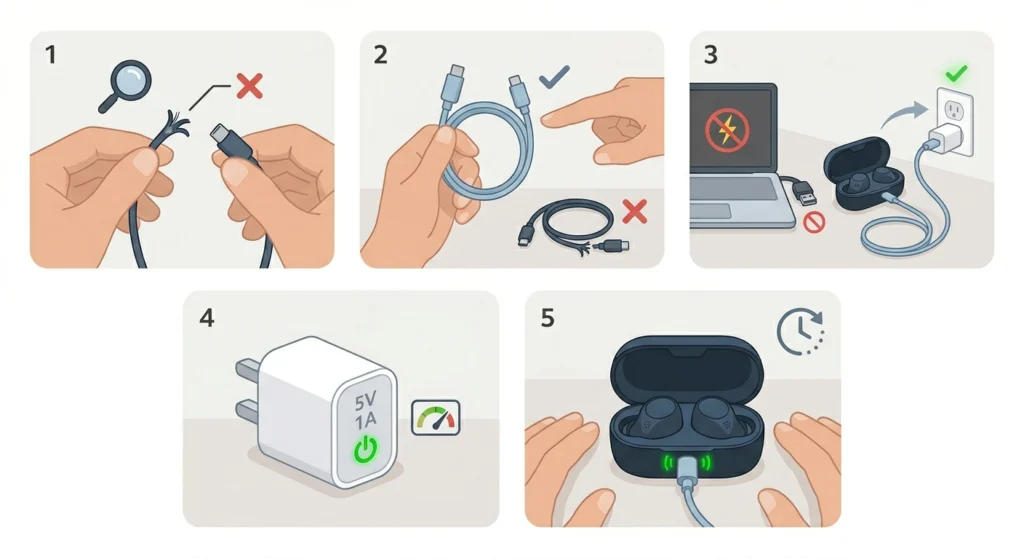
Before assuming the case is broken, verify the charging setup. A faulty cable or an underpowered USB port can make it look like the case itself is the problem.
- Step 1: Disconnect the USB-C cable from the case and inspect it for visible damage, fraying, or bent connectors.
- Step 2: Try a different USB-C cable – preferably one that is known to work with another device.
- Step 3: Plug the case into a wall adapter instead of a laptop or PC USB port. Some computer USB ports do not deliver enough power for the case to charge.
- Step 4: Use a 5V/1A or higher charger. The key is to avoid using cheap, low-wattage chargers that may not trigger the charging circuit.
- Step 5: Wait 10-15 minutes and check if the LED indicator on the case lights up.
Fix 3: Reseat the Earbuds in the Case
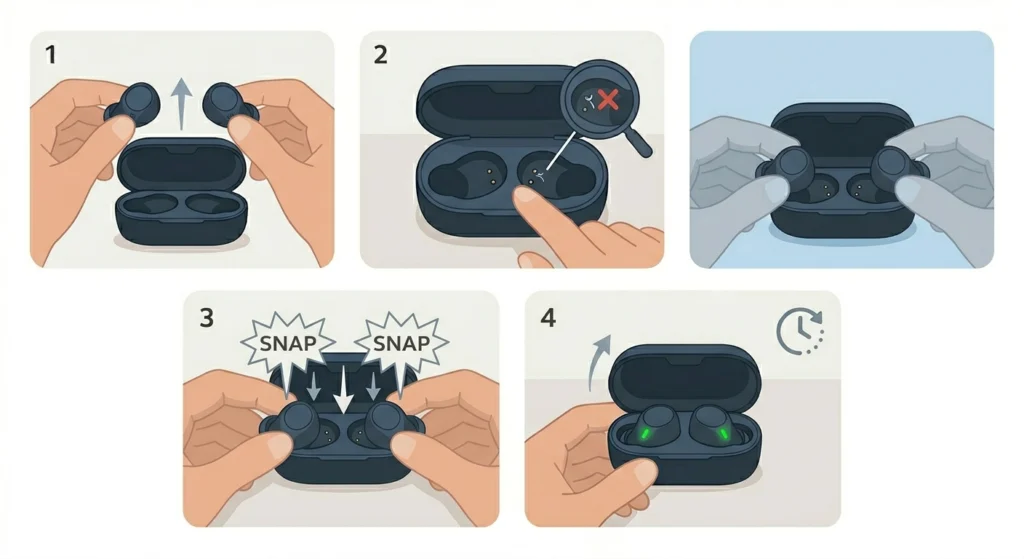
Sometimes the earbuds are simply not sitting correctly in the case. If they are even slightly misaligned, the charging pins will not make contact.
- Step 1: Take both earbuds out of the case completely.
- Step 2: Inspect the earbud cavities for any debris, lint, or foreign objects that might be preventing a flush fit.
- Step 3: Place each earbud back in firmly, making sure they click or snap into position.
- Step 4: Close the case lid and reopen it after 30 seconds to see if the charging indicator appears on the earbuds.
This step is easy to overlook but it is surprisingly effective, especially if the case was recently dropped or the earbuds were put away in a rush.
Fix 4: Reset the Jabra Elite 10 Earbuds
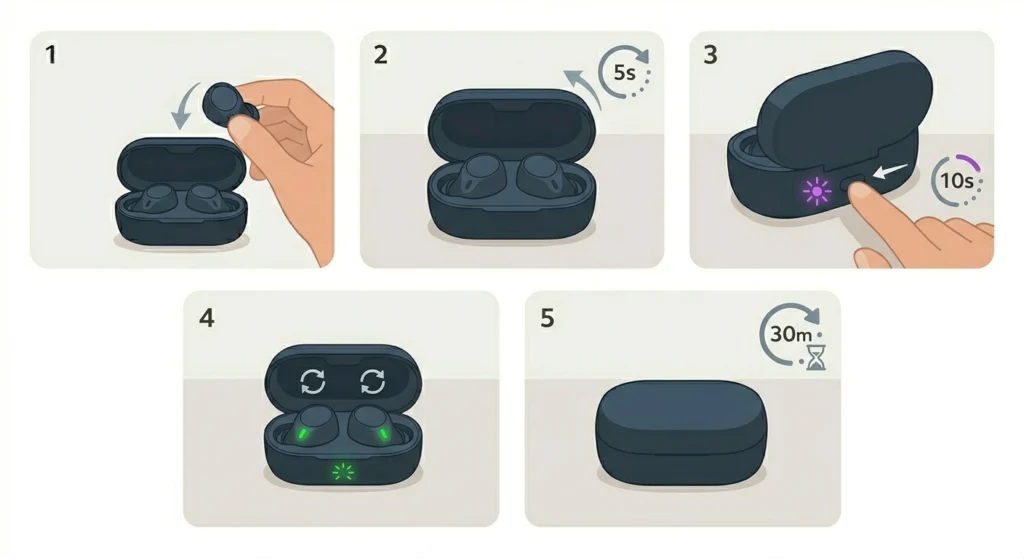
A soft reset can clear minor firmware glitches that prevent the earbuds from communicating correctly with the charging case. This does not erase any saved settings permanently – it simply restarts the internal processes.
- Step 1: Place both earbuds in the case and close the lid.
- Step 2: Open the lid after 5 seconds.
- Step 3: Press and hold the button on the back of the charging case for 10 seconds until the LED flashes purple.
- Step 4: Release the button. The earbuds will automatically reset and re-enter pairing mode.
- Step 5: Close the case and leave the earbuds to charge for at least 30 minutes before checking.
If the earbuds were previously paired to a device and you are experiencing audio issues alongside charging problems, it may also help to review how to re-pair Bluetooth earbuds for stereo sound on Windows after the reset.
Fix 5: Perform a Factory Reset via Jabra Sound+ App
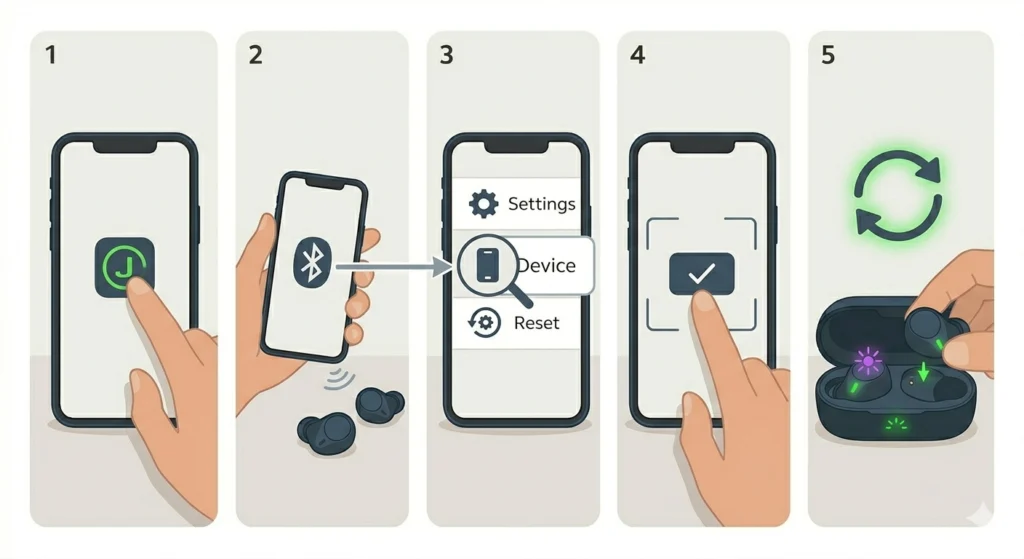
A factory reset wipes all saved settings and device pairings, returning the earbuds to their original state. This is worth trying when the case appears to charge but the earbuds simply do not respond.
- Step 1: Download and open the Jabra Sound+ app on a smartphone.
- Step 2: Connect the Jabra Elite 10 earbuds to the app via Bluetooth.
- Step 3: Navigate to ‘Device’ then ‘Factory Reset’ within the app menu.
- Step 4: Confirm the reset. The earbuds will restart and flash a light sequence to confirm the reset is complete.
- Step 5: Place the earbuds back in the case and check if charging resumes normally.
Pro-Tip: Before running a factory reset, make note of any custom EQ or ANC settings currently in use. These will all be erased and will need to be set up again after the reset.
Fix 6: Update the Firmware
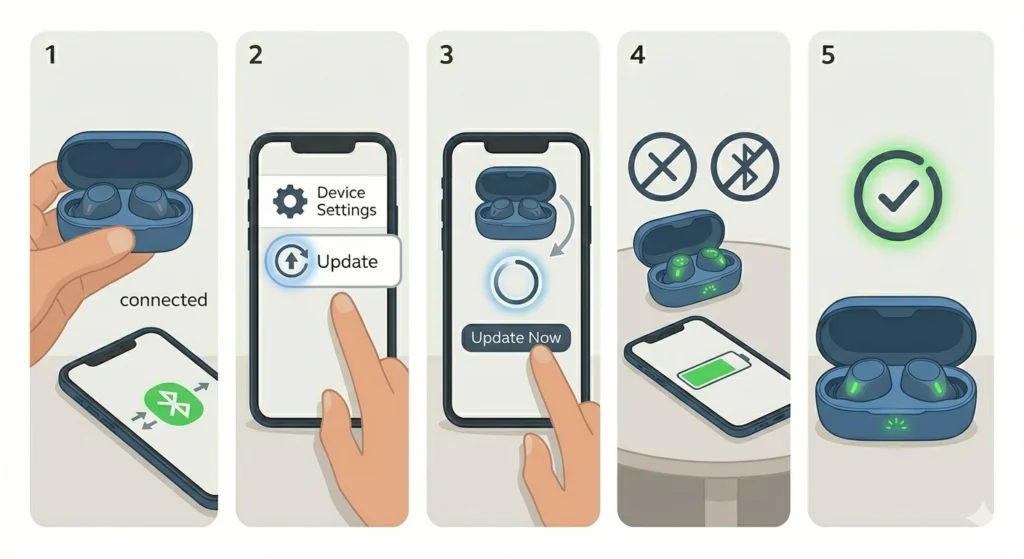
Jabra regularly releases firmware updates that address known bugs – and charging case communication errors have been patched in past updates. Running outdated firmware can sometimes cause the case to stop registering the earbuds correctly.
- Step 1: Open the Jabra Sound+ app and connect the earbuds.
- Step 2: Tap on the ‘Device’ section and look for a ‘Firmware Update’ or ‘Software Update’ option.
- Step 3: If an update is available, tap ‘Update Now’ and keep the earbuds in the case during the update process.
- Step 4: Do not close the app or disconnect Bluetooth while the update is in progress.
- Step 5: Once the update is complete, restart both the earbuds and the app, then test charging again.
Tips for Keeping the Jabra Elite 10 Charging Case Working Well
- Store the case in a cool, dry place – heat and moisture are the biggest enemies of lithium-ion charging cases.
- Clean the charging contacts at least once a week, especially after gym sessions or outdoor use.
- Always use a USB-C cable rated for data and charging, not just charging-only cables, as these can sometimes cause charging detection issues.
- Keep the Jabra Sound+ app updated to ensure firmware updates are pushed automatically.
- Avoid using the case while it is plugged in and charging, as repeated charge-discharge cycles can degrade the battery faster.
- If the case is stored for a long period without use, make sure to charge it to at least 50% before putting it away to prevent battery drain damage.
Common Problems and Troubleshooting
Case LED Does Not Light Up At All
This usually points to a completely drained case battery or a faulty cable connection. Try leaving the case plugged in for at least one hour before checking again. If there is still no LED activity, test with a different USB-C cable and adapter.
One Earbud Charges But the Other Does Not
This is almost always a dirty or misaligned contact issue on the affected earbud side. Clean the contacts and try reseating the earbud several times to ensure a firm connection.
Case Shows Charging But Earbuds Are Still Dead
This suggests the case has power but is not transferring it to the earbuds. Perform the soft reset described in Fix 4 above. If the issue persists after a reset, the charging pins inside the case cavities may be physically damaged and will require service.
Earbuds Drain Faster Than Normal After Charging
A sudden drop in battery life after charging is often a firmware issue. Update to the latest firmware via the Jabra Sound+ app. Also, make sure Active Noise Cancellation is not set to maximum if battery longevity is a priority.
Case Not Recognized When Plugged Into a Computer
This is not unusual since the Jabra Elite 10 case charges via USB-C power only, not data. If using the case with a Windows 11 PC and experiencing broader audio device recognition problems, it is worth checking the guide for resolving microphone detection problems on Windows 11 to rule out any system-level audio conflicts.
Frequently Asked Questions
Why is the Jabra Elite 10 charging case not working even with a new cable?
The cable is only one part of the equation. If a new cable does not help, the issue is likely dirty charging contacts, a completely drained case battery, or misaligned earbuds. Work through the fixes above starting with cleaning the contacts.
How long does it take to fully charge the Jabra Elite 10 case?
The Jabra Elite 10 charging case takes approximately 2 hours to fully charge from empty using a 5V/1A USB-C charger. A 10-minute quick charge in the case can provide around 1 hour of additional earbud playtime.
Can the Jabra Elite 10 case be wirelessly charged?
Yes, the Jabra Elite 10 case supports Qi wireless charging. If the USB-C charging is not working, placing the case on a Qi-compatible wireless charging pad is a good way to verify if the case battery itself is the problem or if it is a cable and port issue.
What does the LED color on the Jabra Elite 10 case mean?
A solid white or green LED indicates the case is fully charged. A flashing or fading LED during charging is normal. A red LED often means the battery is critically low. A purple flash during reset is expected and indicates the reset was successful.
How do I know if the earbuds are properly seated in the case?
When the earbuds are seated correctly, a small LED indicator on each earbud will light up briefly to confirm charging has started. If there is no light response within 30 seconds of placing them in the case, they are likely not making proper contact.
Will resetting the Jabra Elite 10 delete all pairings?
A factory reset will erase all previously paired Bluetooth devices from the earbuds’ memory. After the reset, the earbuds will need to be re-paired with each device. The soft reset described in Fix 4 is less disruptive and does not remove pairings.
Can moisture damage the Jabra Elite 10 charging case?
The Jabra Elite 10 earbuds are rated IP57, meaning they are protected against dust and can handle submersion in water up to 1 meter for 30 minutes. However, the charging case itself does not share this water resistance rating, so it should be kept away from liquids. Moisture inside the case can corrode the charging pins.
How often should the Jabra Elite 10 charging contacts be cleaned?
For regular users, cleaning the contacts once a week is a good habit. For those who use the earbuds during workouts or in humid environments, cleaning after every few uses will help prevent buildup that leads to charging failures.
What should be done if none of the fixes resolve the charging issue?
If all of the above fixes have been tried without success, the charging case may have a hardware fault. Contact Jabra support directly through the official Jabra website to check warranty status and arrange a repair or replacement. The Jabra Elite 10 typically comes with a 2-year warranty.
Does using fast charging damage the Jabra Elite 10 case battery over time?
The Jabra Elite 10 case supports standard USB-C charging. Jabra does not recommend using high-wattage fast chargers above what is specified, as these can generate excess heat that degrades the battery over repeated cycles. A standard 5V/1A or 5V/2A charger is ideal for regular use.