
Learning how to fix headphones that overheat while charging usually takes just a few minutes, and the cause is often something simple like trapped heat, a worn cable, or a dirty charging port. The steps below go straight to what works.
Key Takeaways
- Unplug the headphones right away and let them cool at room temperature.
- Remove cases, covers, and anything else that traps heat during charging.
- Use the original cable and a standard, certified charger.
- Clean the charging port gently with a dry, non-metal tool.
- Stop using the headphones if they keep getting hot or the battery looks swollen.
Step-by-Step Guide to Fix Headphones That Overheat While Charging
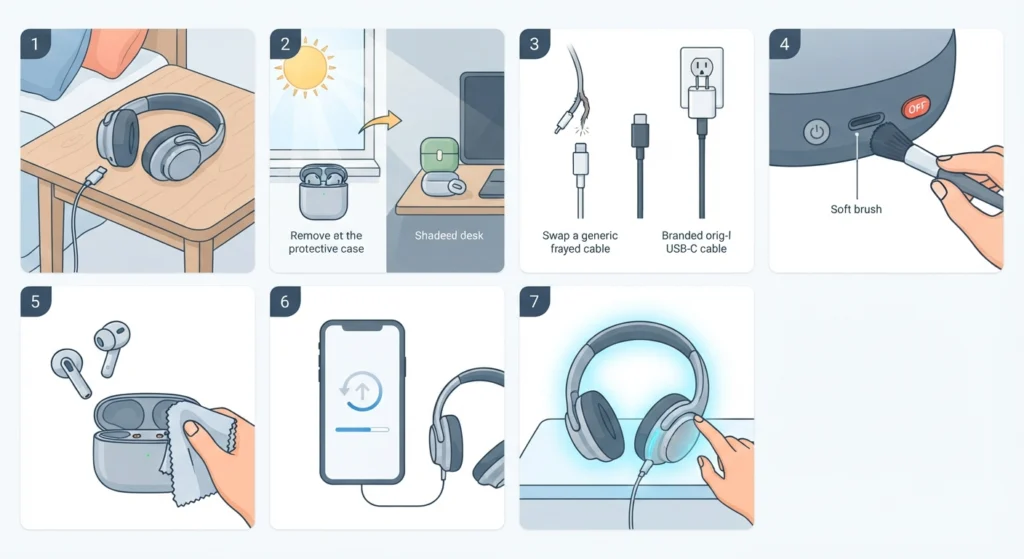
Work through these steps in order. Most people find that the first three solve the problem.
- Step 1: Unplug the headphones immediately. Place them on a hard, flat surface such as a table, and keep them away from beds, sofas, and blankets. Let them sit until they feel normal to the touch before doing anything else.
- Step 2: Remove any case, cover, or sleeve, and move the headphones out of direct sunlight. Charging inside a bag, under a pillow, or on a sunny windowsill traps heat the same way a closed car does on a summer day.
- Step 3: Swap in the original cable and a certified charger. Damaged or cheap cables and unbranded adapters can deliver unstable power, which creates extra heat. A standard low-power USB adapter or a computer USB port is a safe choice for most earbuds and headphones.
- Step 4: Power the headphones off and inspect the charging port. If lint or dust is visible, clear it with a dry, soft brush or a wooden toothpick. Never use metal pins, liquids, or compressed air at close range. Poor contact between the plug and the port can cause uneven charging and extra heat.
- Step 5: For earbuds, wipe the metal contacts on both the earbuds and the charging case with a dry, lint-free cloth. Make sure the earbuds sit fully in their slots so the contacts line up properly.
- Step 6: Restart the headphones and update the firmware through the manufacturer’s app if an update is available. Updates sometimes include battery and charging improvements.
- Step 7: Test with a short charging session in a cool, open area and check the temperature after 10 to 15 minutes. If the headphones stay warm only slightly, the fix worked. If they turn hot again, unplug them and contact the manufacturer.
Pro-Tip: Never keep using headphones that feel too hot to hold comfortably. Overheated lithium-ion batteries can swell or fail, so unplugging first and troubleshooting second is always the safer order.
When Warmth Is Normal and When It Is Not
A little warmth during charging is normal because the battery converts electrical energy while it fills up. Think of it like a phone that feels slightly warm after a few minutes on the charger. The problem starts when the headphones or case become uncomfortable to hold, give off a strange smell, or look warped. That is the point to stop charging and work through the steps above.
Tips to Prevent Headphones From Overheating While Charging
- Charge at room temperature and avoid leaving headphones in a hot car, because heat shortens battery life.
- Avoid playing music at high volume while the headphones are plugged in, since that adds extra load on the battery.
- Unplug once the battery is full rather than leaving headphones on the charger for long stretches.
- Keep the original cable for the headphones and replace it as soon as it frays or bends at the connector.
- After a factory reset, re-pair the earbuds for stereo sound on Windows so both sides connect properly.
- If sound seems off after resetting or updating, resetting audio settings in Windows 11 is a quick way to clear leftover configuration problems.
Pro-Tip: Check the manual for the exact charging temperature range and charging time of the model. Those numbers differ between brands, and they are the most reliable way to judge whether the heat is normal.
Common Problems After Fixing Overheating Headphones
Fix 1: Headphones Only Get Hot With One Cable
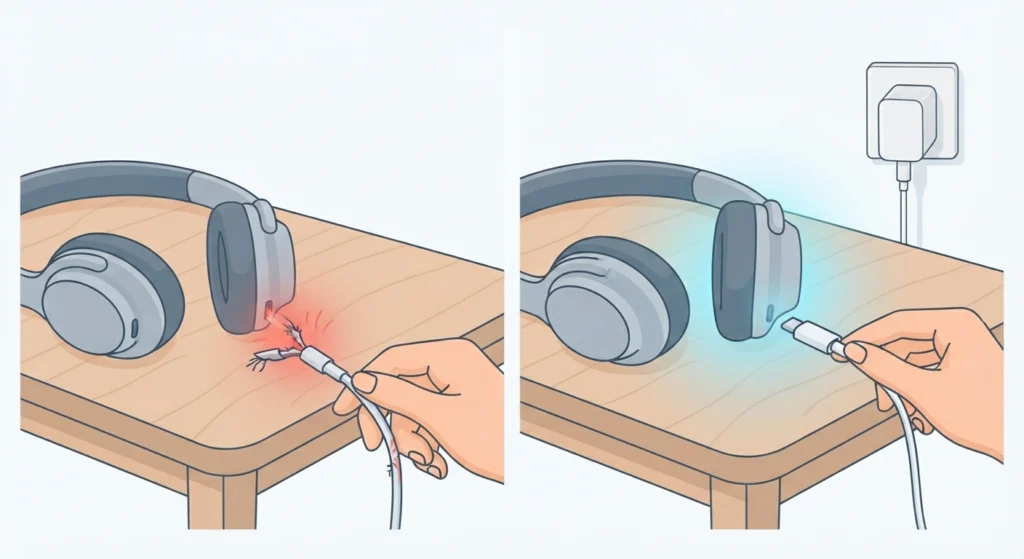
This points to a faulty cable or adapter. Replace it with the original or a certified one and retest.
Fix 2: The Charging Case Is Hot but the Earbuds Feel Fine
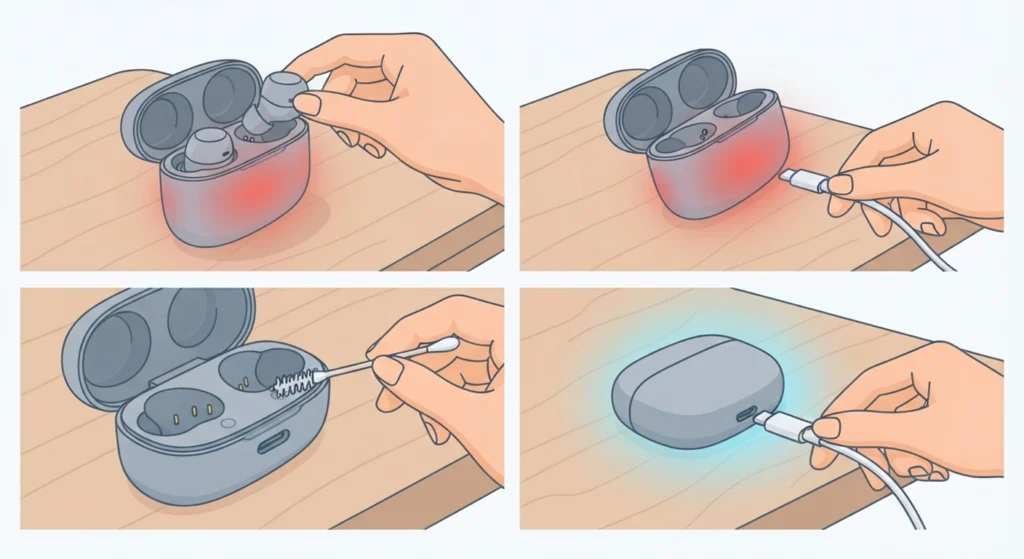
Remove the earbuds, unplug the case, and let it cool. Clean the case contacts and the port, then charge it alone with a certified cable.
Fix 3: The Battery Drains Fast and the Headphones Still Get Hot
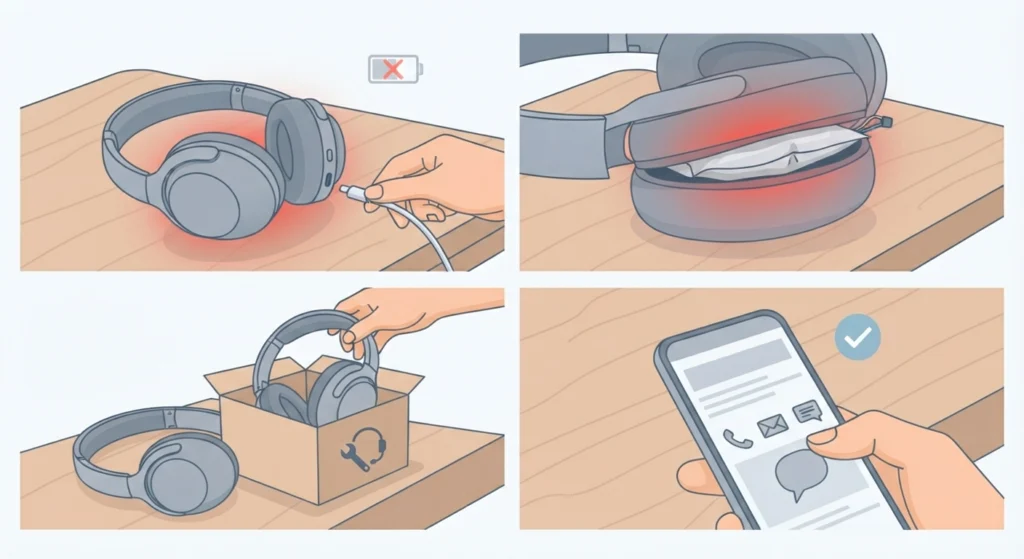
An aging battery may be the cause. Stop using the headphones and contact the manufacturer or an authorized repair service, especially if the battery looks swollen or the housing has gaps.
Frequently Asked Questions
Is it normal for headphones to get warm while charging?
Mild warmth is normal. If the headphones or case become too hot to hold comfortably, unplug them and follow the steps in this guide.
Can overheating headphones be dangerous?
In rare cases, damaged or overheated lithium-ion batteries can swell or catch fire. That is why unplugging promptly and avoiding use of a hot, damaged unit is important.
Is it safe to use headphones while they are charging?
Some models allow it and others do not, so the manual is the best guide. Even when it is allowed, using them while charging adds heat, so it is better to avoid it.
Can a fast charger make headphones overheat?
A low-quality or mismatched charger can. Using the original cable with a certified adapter, or a standard computer USB port, is the safer option.
Can cleaning the charging port stop headphones from overheating?
It can when dust or lint is causing poor contact. Use a dry soft brush or a wooden toothpick with the headphones powered off, and never use liquids.
Is it okay to charge headphones overnight?
Many models have built-in protection, but unplugging once the battery is full is gentler on it. Never charge headphones under a pillow or blanket.
Does a firmware update help with charging heat?
Updates sometimes include battery and charging improvements, so installing the latest version through the manufacturer’s app is worthwhile.
Why do headphones get hot in a hot car?
High outside temperatures add to the heat generated during charging, and batteries do not handle that well. Charging at room temperature in a shaded, open area is best.
When should overheating headphones be repaired or replaced?
Contact the manufacturer if the headphones keep getting hot after the fixes above, if the battery looks swollen, or if there is a burning smell, discoloration, or a gap in the housing.