
A Focal Bathys not turning on is a frustrating problem, especially right before a flight, a work call, or a quiet listening session at home. The good news is that most power issues on these headphones come down to a handful of common causes, and each one has a simple fix that takes just a few minutes to try.
Quick Summary Table
- Most common cause: Fully drained battery from extended storage
- Fastest fix: Charge for at least 15 minutes using the original USB-C cable
- Second most common cause: Power switch stuck in an in-between position
- Advanced fix: Perform a full reset using the multifunction button
- When to contact support: LED shows no response after a full charge cycle
Method 1: Charge the Battery Fully Before Troubleshooting Further
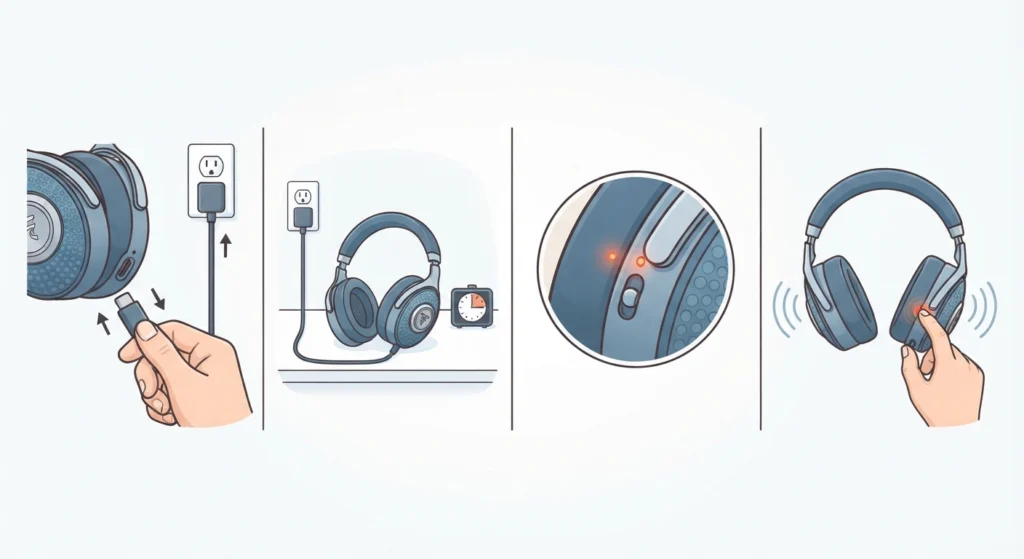
Most people find that a headphone which appears dead is simply out of charge. Focal Bathys headphones use a built-in battery that can drain completely if the unit sits unused for several weeks, and a fully drained battery will not respond to the power switch right away.
- Step 1: Connect the Bathys to a USB-C cable and plug the other end into a wall adapter, not a laptop USB port, since laptop ports often deliver less power.
- Step 2: Leave the headphones charging for at least 15 to 20 minutes before attempting to power them on.
- Step 3: Check for the charging LED near the power switch. A steady or pulsing light confirms the headphones are receiving power.
- Step 4: After the initial charging window, slide the power switch to the on position and wait a few seconds for the startup tone.
This works best when the headphones have been unused for more than a week, which is the most frequent reason owners report a Bathys that will not turn on.
Method 2: Check the Power Switch Position
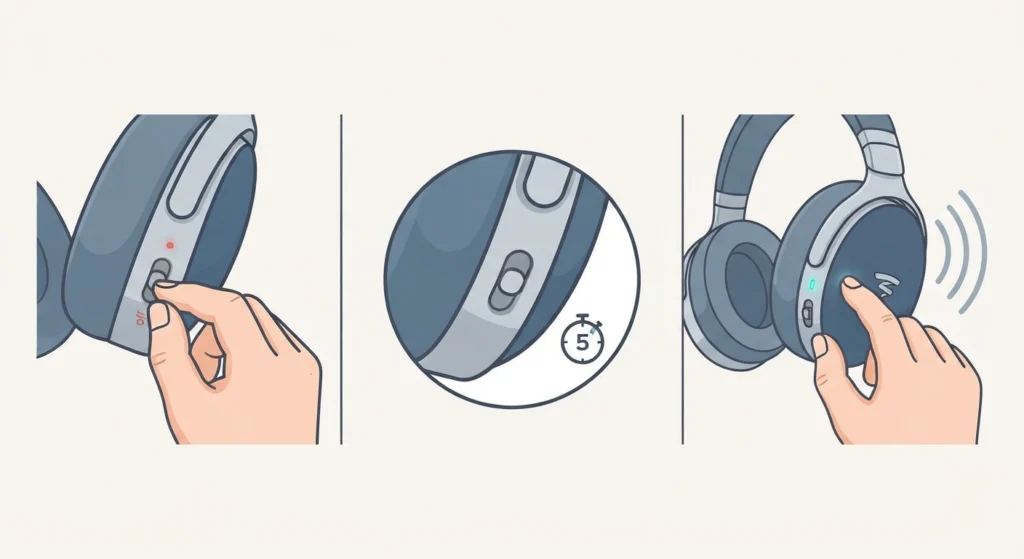
The power switch on the Bathys is a physical slide switch, and it can sometimes rest in a middle position where it looks off but is not making full contact. This is easy to miss, especially in low light or when the headphones are being controlled by feel inside a bag or case.
- Step 1: Slide the power switch firmly all the way to the off position first.
- Step 2: Wait five seconds, then slide it firmly all the way to the on position.
- Step 3: Listen for the audio startup chime, which confirms the headphones have powered on correctly.
Pro-Tip: Always slide the switch with a deliberate motion rather than a light tap. A partial slide is one of the most overlooked reasons headphones seem unresponsive even when the battery is fine.
Method 3: Try a Different USB-C Cable and Power Source
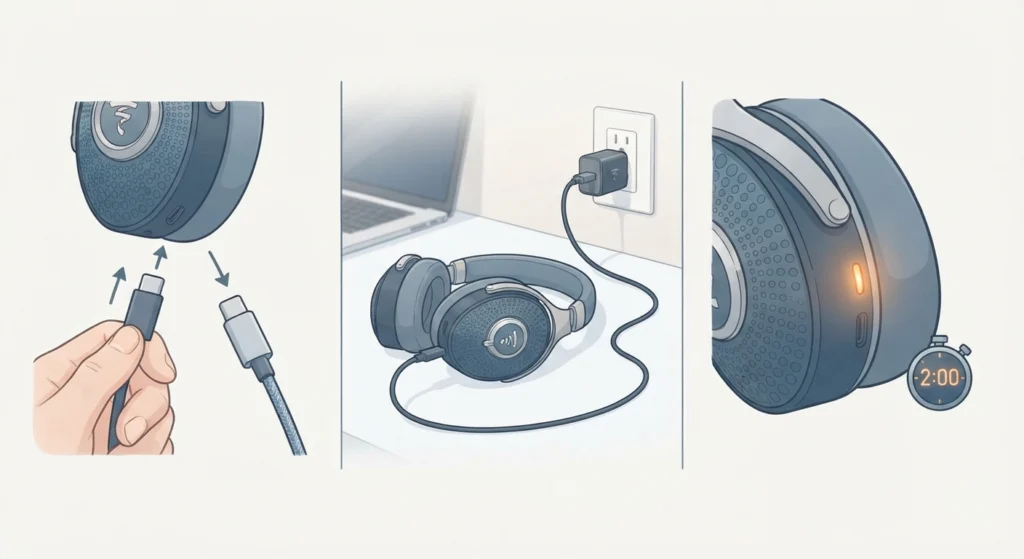
A faulty cable or a weak power source can prevent the Bathys from charging at all, which then makes the headphones appear to be dead. Cables that came bundled with other electronics do not always support the same charging output, and that difference matters more than most people expect.
- Step 1: Swap the current USB-C cable for a different one that is known to work with another device.
- Step 2: Plug the headphones into a wall charger instead of a computer or USB hub.
- Step 3: Watch for the LED indicator within the first two minutes to confirm the new setup is delivering power.
If the LED lights up on the new cable and source but not the old one, the original cable was the root of the problem.
Method 4: Perform a Full Reset
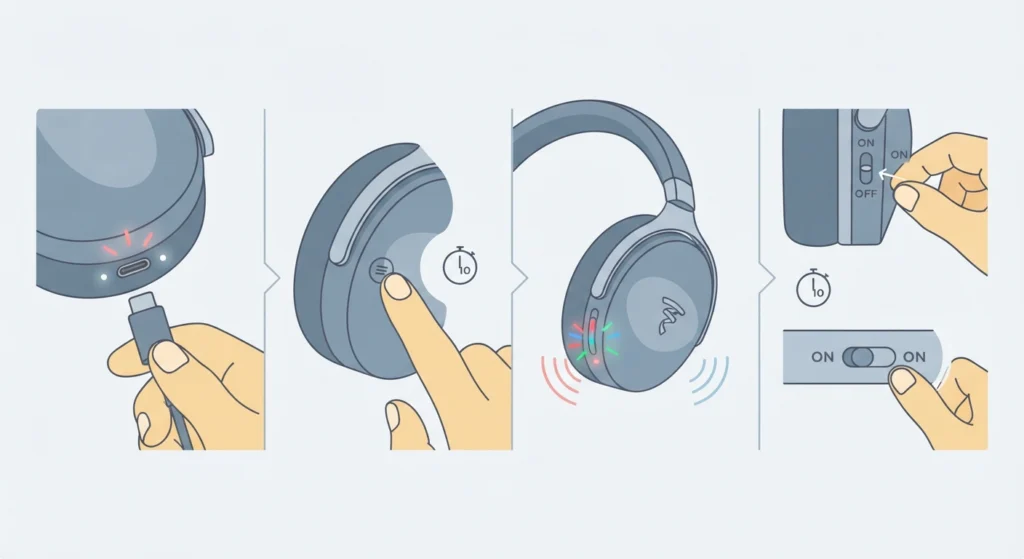
When charging looks normal but the headphones still will not respond, a reset often clears whatever minor software hiccup is blocking startup. This is the same kind of fix that resolves stubborn Bluetooth issues, similar to the process described in this guide on resetting audio settings for other wireless devices.
- Step 1: Make sure the headphones are connected to power via the USB-C cable.
- Step 2: Press and hold the multifunction button for approximately ten seconds.
- Step 3: Release the button once the LED indicator flashes or a reset tone plays.
- Step 4: Slide the power switch off, wait ten seconds, then turn it back on.
Pro-Tip: Keep the headphones plugged in during the entire reset process. Attempting a reset on a completely empty battery often fails silently, which leads owners to believe the reset did not work at all.
Method 5: Update the Firmware Through the Focal and Naim App
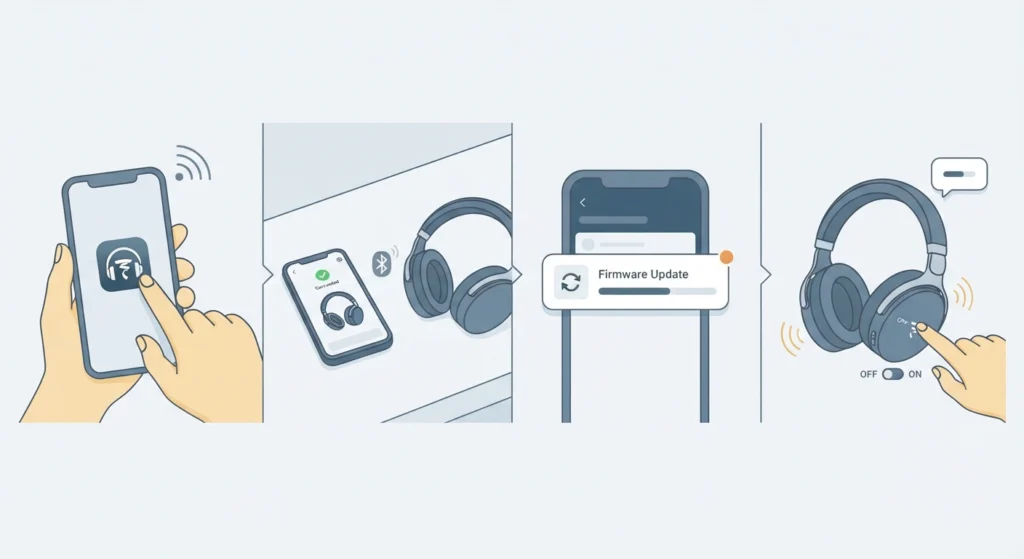
Outdated firmware has been linked to headphones that power off unexpectedly or fail to start correctly. Focal regularly releases updates through the companion app, and running the latest version resolves many startup quirks that have nothing to do with the battery or hardware.
- Step 1: Install or open the Focal and Naim app on a paired phone or tablet.
- Step 2: Connect the Bathys headphones to the device once they show any sign of power.
- Step 3: Navigate to the firmware section within the app and install any available update.
- Step 4: Restart the headphones once the update finishes installing.
Tips to Prevent This Issue in the Future
- Charge the Bathys to at least 50 percent before placing it into long-term storage.
- Avoid leaving the power switch in the on position inside a bag, since accidental battery drain is a common cause of a headphone that seems dead later.
- Check for firmware updates every few months through the companion app rather than waiting for a problem to appear.
- Store the headphones in a moderate temperature environment, since extreme heat or cold can affect battery performance over time.
- Use the original charging cable whenever possible to avoid inconsistent power delivery.
Common Problems and Troubleshooting
A few related issues tend to show up alongside power problems, and knowing the difference helps narrow down the actual cause faster.
Headphones Turn On but Will Not Connect to Any Device
This is usually a pairing issue rather than a power issue. Clearing the Bluetooth cache on the connected device and re-pairing from scratch, similar to the approach in this guide on re-pairing Bluetooth earbuds, typically resolves this quickly.
Headphones Power Off Automatically After a Few Seconds
This often points to a battery that holds a small charge but cannot sustain active use. A full charge cycle followed by the reset in Method 4 usually corrects this behavior.
Only One Side Produces Sound After Powering On
This points to an internal wiring issue rather than a charging problem, and it typically requires contacting Focal support directly, since the headphones are not designed to be opened by the owner.
LED Indicator Does Not Light Up at All
If the LED stays completely dark even after 30 minutes of charging with a different cable and power source, the battery or charging port itself may need professional inspection.
Frequently Asked Questions
Why is the Focal Bathys not turning on after charging overnight?
An overnight charge should fully restore the battery. If the headphones still will not turn on, the issue is more likely tied to the power switch or a reset is needed rather than the charge level itself.
How long does it take to charge the Focal Bathys from completely dead?
A full charge from empty typically takes around two to three hours using the original USB-C cable and a standard wall adapter.
Can the Focal Bathys be used while charging?
Yes, the headphones support simultaneous charging and use through the USB-C connection, which also works as a wired audio input.
Does a factory reset erase paired Bluetooth devices?
Yes, a full reset clears the list of previously paired devices, so each device will need to be paired again afterward.
Is there a way to check the battery percentage on Focal Bathys?
Battery percentage is visible through the Focal and Naim companion app once the headphones are connected to a paired device.
Why does the LED light stay on even when the headphones are switched off?
This usually indicates the headphones are still charging rather than powered on for use. The LED behavior differs between charging mode and active mode.
What should be done if the multifunction button does not respond at all?
Confirm the headphones are receiving power through the USB-C cable first, since a completely drained battery can temporarily prevent any button from registering input.
Can extreme cold weather prevent the Focal Bathys from turning on?
Yes, very low temperatures can temporarily reduce battery performance. Allowing the headphones to reach room temperature before charging often resolves this.
Is professional repair available if none of the fixes work?
Yes, Focal offers official support and repair services for hardware issues that are not resolved through charging, resetting, or firmware updates.
Does using a third-party USB-C cable damage the Focal Bathys?
A low-quality cable is unlikely to cause permanent damage, but it can lead to slow or inconsistent charging, which sometimes mimics a power failure.