
Learning how to fix earbuds that charge unevenly usually takes less than ten minutes and a few household items. One bud sits at full power while the other barely has a bar left, and the cause is almost always something small: dirty contacts, a loose fit in the case, or a glitch that needs a quick reset.
Key Takeaways
- Dirty charging contacts are the most common reason one earbud charges slower than the other.
- Cleaning the contacts on both the earbuds and the case solves most uneven charging.
- A reset and a firmware update fix many cases where the contacts are clean.
- Big gaps that stay after every fix usually point to battery wear, which needs a repair or replacement.
Step-by-Step Guide to Fix Earbuds That Charge Unevenly
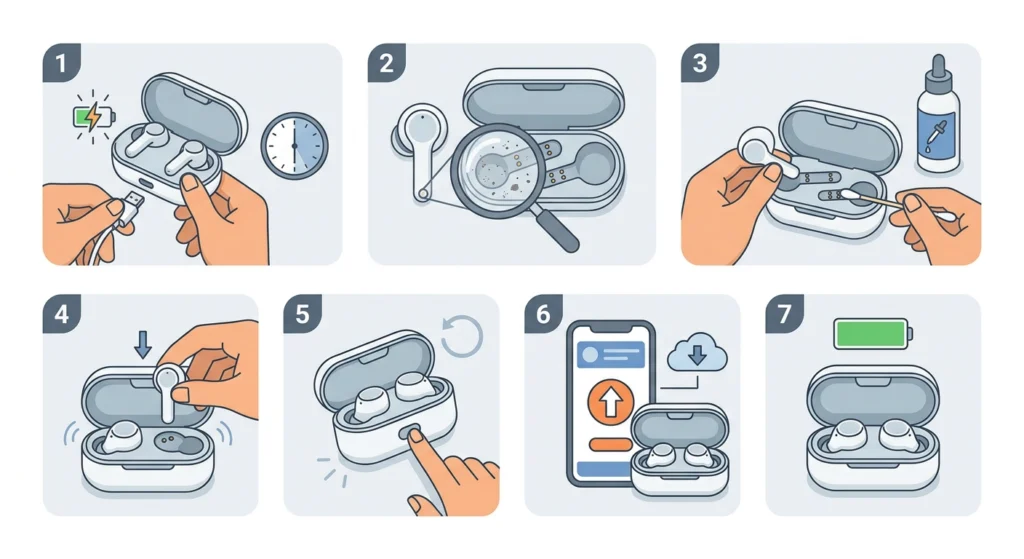
The steps below go from the quickest, safest fix to the more involved ones. Test the charge after each step so it is clear which one worked.
- Step 1: Remove both earbuds from the case and check that the case itself has enough power. A nearly empty case can charge one bud and run out before the other gets its turn. Plug the case in and let it charge for at least 30 minutes first.
- Step 2: Look closely at the metal charging contacts on each earbud and inside the case. Dust, earwax, skin oil, and lint build up here faster than most people expect, and a thin film is enough to interrupt charging on one side.
- Step 3: Clean the contacts. Turn the case off or leave it unplugged, then wipe the earbud contacts and the case pins with a dry, soft brush or a dry microfiber cloth. For stubborn residue, lightly dampen a cotton swab with isopropyl alcohol (70 percent or higher), wipe the metal, and let everything air dry for a few minutes. Never pour liquid into the case.
- Step 4: Check the earbud seating. Place each bud in its slot and press gently until it sits flat. Many cases use magnets to hold the buds, and a slightly tilted bud can lose contact. Check that nothing, such as a case cover or debris, blocks the slot.
- Step 5: Reset the earbuds. Put both buds in the case, close the lid, and follow the reset method listed in the manual for that brand and model. Reset steps differ between models, so the manufacturer’s instructions are the reliable source here. After the reset, the earbuds will need to be paired again, and this guide on how to re-pair Bluetooth earbuds for stereo sound on Windows covers that process.
- Step 6: Update the firmware. Open the companion app from the earbud maker, connect the earbuds, and install any available update. Manufacturers release updates that improve battery behavior and charging stability.
- Step 7: Charge both earbuds together without using them. Place both buds in the case, plug the case into a known good cable and wall adapter, and leave everything for one to two hours. Using one bud while the other charges makes the gap look worse than it is.
Pro-Tip: Clean the contacts before trying anything else. Most people jump straight to resetting the earbuds, but a quick wipe with a dry brush fixes the problem more often than any reset and carries no risk of losing the pairing.
Tips to Keep Both Earbuds Charging Evenly
A few small habits keep the problem from coming back. The key is to treat the case like a charging dock that needs the same care as the earbuds themselves.
- Wipe the earbud contacts after workouts or long listening sessions, since sweat and earwax are the main culprits.
- Store the earbuds in the case whenever they are not in use so both start from the same charge level.
- Use the original cable or a quality certified one and a standard wall adapter rather than a loose, worn cable.
- Avoid leaving the case in hot places such as a car dashboard, because heat speeds up battery wear.
- Run a full charge cycle for the case and earbuds every few weeks so the battery readings stay accurate.
On a Windows 11 computer, battery readings and audio behavior can also depend on system settings, so it helps to know how to reset audio settings if the earbuds act strangely after pairing again.
Pro-Tip: Some earbud models use one bud as the main unit that handles most of the connection work, which makes that bud drain a little faster. A small, steady difference in battery use between the two can be normal, so judge the result by whether both buds reach full power in the case.
Common Problems After Trying the Fix
One earbud still charges slower after cleaning
Repeat the cleaning with a cotton swab and isopropyl alcohol, then check for bent or pressed-in pins inside the case. If the pins look damaged, the case may need service.
One earbud will not charge at all
Try charging it in the case with a different cable and adapter. If it still shows no charging light, the battery or the contacts on that bud may be faulty, and the manufacturer’s support team can confirm warranty options.
The gap returns after a few days
A returning gap often points to an aging battery in one earbud. Lithium-ion batteries lose capacity over time, and they rarely wear at the same rate in both buds.
Frequently Asked Questions
Why do my earbuds charge unevenly?
The most common causes are dirty charging contacts, a poorly seated bud, a low case battery, or a software glitch. Battery wear is another possible cause when the earbuds are older.
Is it normal for one earbud to have less battery than the other?
A small difference can be normal because some models assign extra tasks to one bud. A large gap that shows up right after charging is not normal and should be fixed.
Can dirty contacts really cause uneven charging?
Yes. Earwax, sweat, and dust form a thin layer on the metal contacts that blocks the flow of power, and this affects one side more than the other.
What is the safest way to clean the charging contacts?
Use a dry, soft brush or a microfiber cloth first. If more cleaning is needed, use a cotton swab lightly dampened with isopropyl alcohol and let the parts dry fully before charging.
Will resetting the earbuds fix uneven charging?
A reset fixes cases caused by software or connection glitches. It will not help if the problem comes from dirt or a worn battery, so cleaning should come first.
How long should both earbuds take to charge fully?
Most earbuds reach a full charge in about one to two hours inside the case, though this varies by model. The manual lists the exact time for each product.
Can a firmware update help with uneven charging?
It can. Manufacturers release updates that improve battery handling and charging behavior, so installing the latest version through the companion app is a worthwhile step.
Does using one earbud at a time cause uneven charge levels?
Yes. The bud in use drains while the other stays full, and the two end up at different levels. Switching sides now and then keeps wear and charge more balanced.
Can a bad charging cable cause one earbud to charge less?
A worn or low quality cable can deliver weak power to the case, which means the buds may not charge fully. Testing with a different cable and adapter rules this out quickly.
When should the earbuds be repaired or replaced?
If the gap stays after cleaning, resetting, updating, and trying a new cable, the battery in one bud is likely worn. Contact the manufacturer about warranty coverage or a replacement bud.