
Learning how to connect Bluetooth headphones to a treadmill takes about a minute once the right method is clear, and it turns a dull run into a much better workout. The trick is knowing whether the machine can send audio over Bluetooth or only talks to fitness apps. Picture a gym where every treadmill has a different console – the steps below cover all of them in a simple, direct way.
Key Takeaways
- Treadmills with Bluetooth audio pair with headphones directly through the console settings.
- Machines without Bluetooth audio work with a phone or tablet paired to the headphones.
- A Bluetooth transmitter can add wireless audio when the console has a headphone output jack.
- Bluetooth built only for fitness apps usually does not send sound to headphones.
- After the first successful pairing, headphones usually reconnect on their own when switched on.
Step-by-Step Guide to Connect Bluetooth Headphones to a Treadmill
Method 1: Pair the Headphones Directly With the Treadmill Console
This works best when the treadmill has a touchscreen or a console with a Bluetooth audio option. Most people find that it takes less than a minute.
- Step 1: Charge the headphones and switch them on.
- Step 2: Put the headphones in pairing mode. This usually means holding the power or Bluetooth button until a light flashes or a voice prompt announces pairing. The exact button varies by model, so check the headphone manual if nothing happens.
- Step 3: Turn on the treadmill console and open its settings menu.
- Step 4: Select Bluetooth or Audio settings and turn Bluetooth on.
- Step 5: Start a scan for nearby devices.
- Step 6: Select the headphones from the list of available devices.
- Step 7: Confirm the pairing if the console asks for it. A confirmation tone or a steady light on the headphones shows the connection worked.
- Step 8: Play something through the treadmill, such as its built-in music or entertainment option, and adjust the volume until it sounds comfortable.

Pro-Tip: Many treadmills include Bluetooth only for heart rate straps and workout apps, and that kind of Bluetooth does not send sound to headphones. A Bluetooth audio option in the console settings or the owner manual is the sign that direct pairing is supported. If it is missing, skip to Method 2 or Method 3.
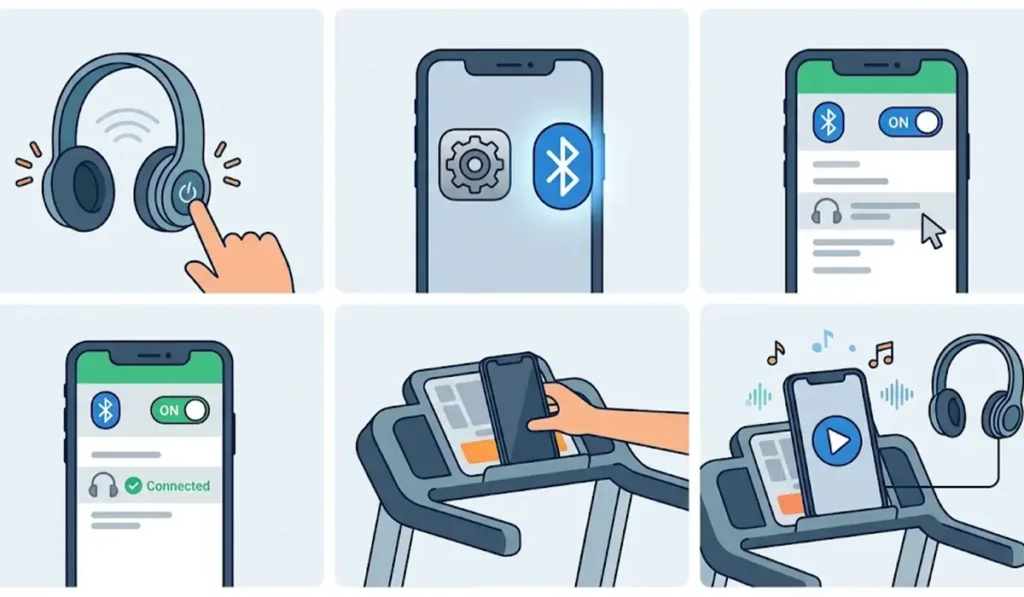
Method 2: Pair the Headphones With a Phone or Tablet on the Treadmill
This is the simplest route when the treadmill has no Bluetooth audio at all. The phone does the work, and the treadmill simply holds it.
- Step 1: Put the headphones in pairing mode.
- Step 2: On the phone or tablet, open Settings and turn on Bluetooth.
- Step 3: Select the headphones from the list of available devices.
- Step 4: Wait until the device shows the headphones as Connected.
- Step 5: Place the phone or tablet in the treadmill holder or on the console shelf.
- Step 6: Start a music, podcast, video, or workout app. The sound plays through the headphones as long as they are the active audio output on the device.
Method 3: Use a Bluetooth Transmitter on the Treadmill Audio Output
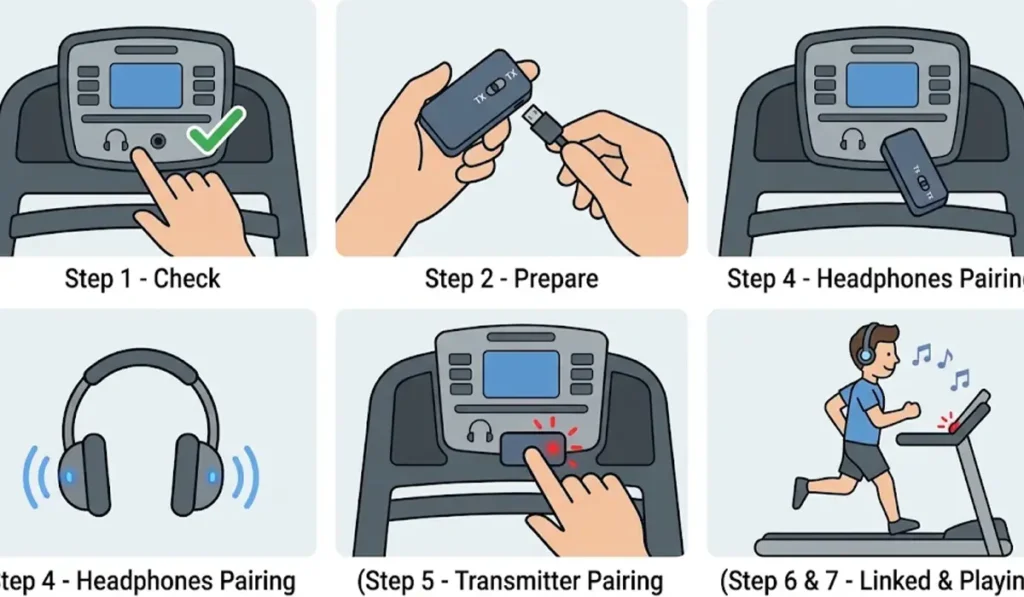
Some consoles have a 3.5 mm headphone jack but no Bluetooth audio. A small Bluetooth transmitter plugged into that jack adds the missing wireless link.
- Step 1: Check what the 3.5 mm port does. A port marked with a headphone icon or labeled output can feed a transmitter. A port labeled Aux or Audio In is an input for playing a phone through the treadmill speakers, and it will not work for this method.
- Step 2: Charge the transmitter and, if it has a TX and RX switch, set it to TX so it sends audio.
- Step 3: Plug the transmitter into the headphone output of the console. An included cable or adapter can help if the jack is hard to reach.
- Step 4: Put the headphones in pairing mode.
- Step 5: Put the transmitter in pairing mode, usually by holding its button until the light flashes.
- Step 6: Wait until the transmitter light changes to a steady state, which means the headphones are linked.
- Step 7: Start audio on the treadmill and adjust the volume on the headphones and the console.
Pro-Tip: Sound can lag slightly behind the picture when a transmitter is used with a treadmill screen that plays video. Music and podcasts are not affected, so this only matters for shows and movies.
Tips for a Smoother Workout With Bluetooth Headphones
- Charge the headphones before the workout. A battery that dies halfway through a run is an easy problem to avoid.
- Pick a secure fit. Ear hooks, ear fins, or a neckband keep earbuds in place when the pace picks up.
- Look for a sweat-resistance rating such as IPX4 or higher, which protects against splashes and sweat.
- Keep the volume moderate so footsteps, announcements, and other people in the gym stay audible.
- Keep the phone on the same side as the main headphone unit, because a body in the way can weaken the Bluetooth signal.
- Keep the treadmill safety key clip attached while walking or running, no matter how absorbing the playlist is.
- Wipe the headphones with a dry cloth after each session to keep sweat away from the charging contacts.
Common Problems and Fixes
Fix 1: The Headphones Do Not Appear in the Bluetooth List
Start by putting the headphones back in pairing mode and moving them within a foot of the console. Switch off Bluetooth on nearby phones and laptops that might grab the connection first. Headphones last used with a Windows computer can reconnect to it automatically, so turning off that computer’s Bluetooth helps. If the headphones act up on the computer too, this guide on re-pairing Bluetooth earbuds on Windows walks through a clean reset. To rule out a fault in the headphones themselves, troubleshooting headphone detection on Windows shows how to test them on another device.
Fix 2: The Headphones Connect but There Is No Sound
Confirm that the treadmill Bluetooth supports audio, since app-only Bluetooth will show a connection without playing anything. Raise the volume on both the headphones and the console, then check that the music source is actually playing. Disconnecting and reconnecting the headphones from the console menu often clears the issue.
Fix 3: The Audio Cuts Out or Stutters
Move the phone or transmitter closer to the headphones and clear anything blocking the signal, such as a gym bag or a towel over the console. Make sure the headphone battery is not low, and turn off other Bluetooth devices nearby.
Frequently Asked Questions
Can any Bluetooth headphones connect to a treadmill?
Any standard Bluetooth headphones can connect when the treadmill supports Bluetooth audio output. If it does not, a phone, a tablet, or a Bluetooth transmitter bridges the gap.
Do all treadmills have Bluetooth built in?
No. Many newer treadmills include Bluetooth, but it is often meant for heart rate monitors and fitness apps rather than headphones. The owner manual states whether Bluetooth audio is supported.
Why does the treadmill not show the headphones in the Bluetooth list?
The headphones are usually not in pairing mode, or they are already connected to another device. Put them back in pairing mode and turn off Bluetooth on nearby devices.
Do headphones need to be paired again for every workout?
Usually not. After the first successful pairing, the headphones normally reconnect automatically when switched on and within range, as long as the console keeps the pairing saved.
How far can the headphones be from the treadmill?
Most Bluetooth headphones work within about 10 meters in open space. On a treadmill the distance is only a few feet, so range is rarely an issue.
Can two pairs of headphones connect to one treadmill at the same time?
That depends on the treadmill model. The owner manual states whether more than one Bluetooth audio device is supported.
Does a Bluetooth transmitter cause audio delay?
A small delay can appear when watching video on a treadmill screen. Music and podcasts are not noticeably affected.
How can headphones be removed from the treadmill?
Open the Bluetooth menu in the console settings, select the headphones, and choose the option to forget or unpair the device.
Is it safe to wear headphones while using a treadmill?
Yes, when the volume stays moderate and the safety key clip is attached. Staying able to hear the gym around you helps prevent accidents.