
Learning how to connect Bluetooth headphones to a Nikon or Sony camera comes down to one small accessory: a Bluetooth transmitter that plugs into the camera’s headphone jack. Bluetooth on these cameras is built for smartphone apps, so the transmitter acts as the bridge between camera audio and wireless headphones.
Key Takeaways:
- A camera with a 3.5 mm headphone jack is required.
- A Bluetooth transmitter with a 3.5 mm plug carries the camera audio to the headphones.
- The headphones pair with the transmitter, not with the camera.
- Bluetooth adds a small delay, so it suits monitoring levels better than judging timing.
Method 1: Connect Bluetooth Headphones With a Bluetooth Transmitter
This works on any Nikon or Sony camera that has a headphone jack. Think of the transmitter as a tiny wireless cable: the camera sends sound into it, and it passes that sound on to the headphones.
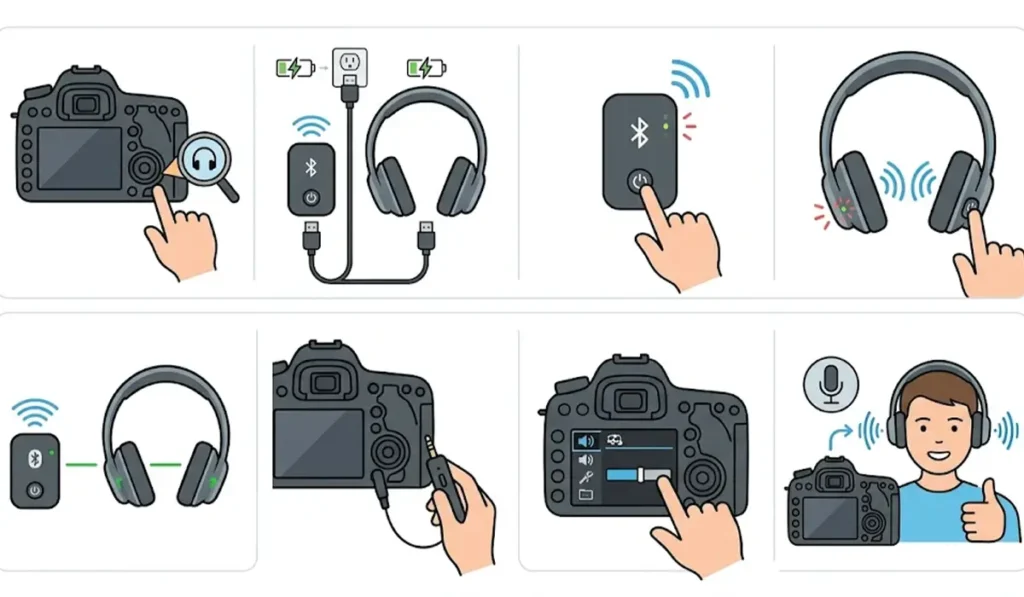
- Step 1: Check that the camera has a headphone jack. It is a 3.5 mm port, usually marked with a headphone icon. Some models do not have one, including the Nikon Z 30 and Nikon Z fc, and a transmitter cannot be used on those.
- Step 2: Charge the Bluetooth transmitter and the headphones so neither runs out of power mid-shoot.
- Step 3: Turn on the transmitter and put it in pairing mode. The indicator light usually flashes when pairing mode is active.
- Step 4: Put the headphones in pairing mode, usually by holding the power button until the light flashes. The exact button press is listed in the headphone manual.
- Step 5: Wait until the transmitter and headphones connect. The indicator lights typically turn solid or change pattern once pairing is complete.
- Step 6: Plug the transmitter’s 3.5 mm plug into the camera’s headphone jack.
- Step 7: Switch the camera to video mode and open the menu. Find the headphone volume option in the movie or audio settings and raise it to a comfortable level.
- Step 8: Speak or tap near the camera microphone to confirm the sound is coming through the headphones.
Pro-Tip: Pair the headphones and transmitter at home before heading out to shoot. Pairing in the field wastes time, and a pairing that is already saved usually reconnects within seconds when both devices are switched on.
Method 2: Use a Sony Wireless Microphone System With Compatible Sony Headphones
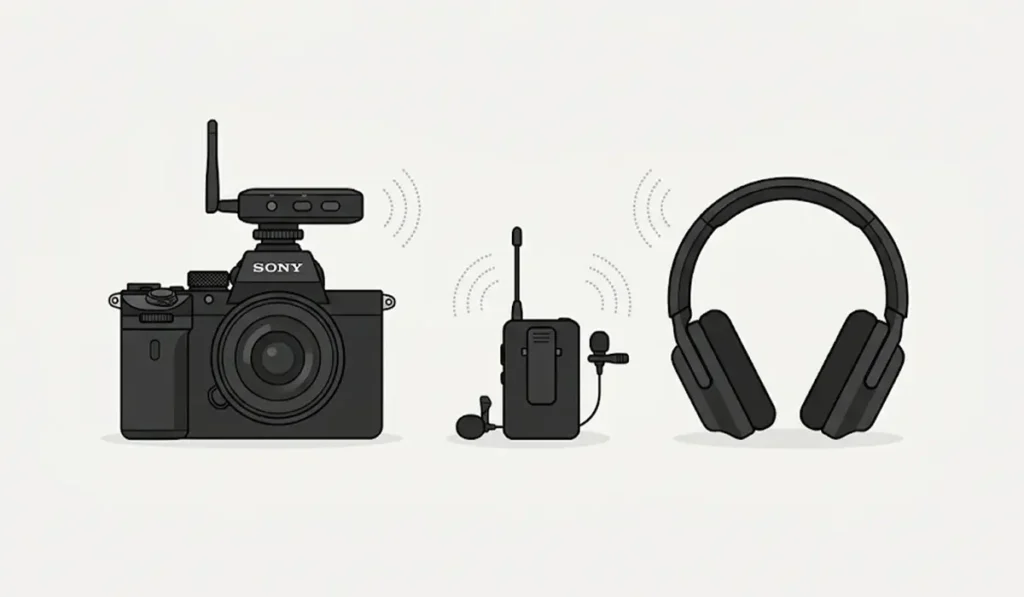
Sony’s ECM-W5 wireless microphone system supports compatible Sony wireless headphones for cable-free monitoring while recording. It works with compatible Sony cameras through the Multi Interface Shoe. This route suits Sony users who already record with a wireless microphone setup, and the pairing steps for the headphones are listed in the receiver’s manual.
Tips for Better Wireless Monitoring
- Keep the transmitter close to the headphones. A clear line of sight gives the steadiest connection.
- Choose a transmitter that supports low latency. The headphones need to support the same low-latency codec for it to make a difference.
- Use the headphones to check volume levels and background noise rather than lip-sync timing. Bluetooth delay means the sound arrives slightly late.
- Carry a short wired pair of headphones as a backup for shoots where timing matters.
Pro-Tip: The transmitter only carries playback sound from the camera to the headphones. Recorded audio still comes from the camera’s built-in microphone or an external microphone, never from the headphone microphone.
Common Problems and Fixes
Fix 1: No Sound in the Headphones
Confirm the transmitter is fully plugged into the headphone jack and that the camera is in video mode. Then raise the headphone volume in the camera menu and on the headphones. On some Sony models, headphone output is unavailable during high frame rate shooting.
Fix 2: The Headphones Will Not Pair With the Transmitter
Make sure both devices are in pairing mode at the same time and sit within a few inches of each other. If the headphones were recently paired with a phone or computer, switch off that device’s Bluetooth first. A guide on re-pairing Bluetooth earbuds on Windows shows how to clear an old pairing.
Fix 3: The Sound Is Delayed
A short delay is normal with standard Bluetooth. A low-latency transmitter and matching headphones reduce it, and wired headphones remove it entirely.
Fix 4: The Sound Cuts Out or Crackles
Move the transmitter closer to the headphones and keep both charged. Crowded wireless areas can also interrupt the signal. If the headphones are not detected at all, the steps for troubleshooting headphone detection on Windows help confirm the headphones themselves are working.
Frequently Asked Questions
Can Nikon or Sony cameras connect directly to Bluetooth headphones?
Bluetooth on these cameras is designed for smartphone connections such as image transfer and remote control, not for sending audio to headphones. A Bluetooth transmitter on the headphone jack is the usual solution.
What is needed to use Bluetooth headphones with a camera?
A camera with a 3.5 mm headphone jack, a Bluetooth transmitter with a 3.5 mm plug, and a pair of Bluetooth headphones.
Does every Nikon or Sony camera have a headphone jack?
No. Some models leave it out, including the Nikon Z 30 and Nikon Z fc. The camera’s spec sheet or manual confirms whether a headphone jack is present.
Will there be a delay in the headphones?
Usually a small one. Standard Bluetooth adds a short delay, and a low-latency transmitter paired with compatible headphones can reduce it.
Can the headphone microphone record audio on the camera?
No. The transmitter only sends sound from the camera to the headphones. Recording uses the camera’s own microphone or an external one.
Does headphone monitoring work while recording video?
Yes, headphone output is meant for monitoring during recording. Some modes, such as high frame rate shooting on certain Sony models, can switch headphone output off.
Are wired headphones better than Bluetooth for video work?
Wired headphones have no delay, which makes them the safer choice when audio timing matters. Bluetooth is more convenient when moving around.
Can Sony wireless headphones be used with Sony microphones?
The Sony ECM-W5 wireless microphone system supports compatible Sony wireless headphones for cable-free monitoring on compatible Sony cameras.