
Bose QuietComfort SE not charging is a common issue that leaves earbuds stuck at a dead battery when they are needed most. This problem usually comes down to a loose connection, a dirty charging contact, or a case that has stopped communicating with the earbuds properly. The good news is that most charging issues can be fixed in a few minutes without any special tools or a trip to a repair shop.
Key Takeaways
- Charging problems are often caused by dirty contacts, a faulty cable, or misaligned earbuds in the case.
- A soft reset of the earbuds and case solves the majority of charging failures.
- Cleaning the charging pins with a dry cloth restores connection in seconds.
- A different USB-C cable or power adapter should always be tested before assuming a hardware fault.
- Extreme temperatures can temporarily stop the battery from charging correctly.
Step-by-Step Guide to Fix Bose QuietComfort SE Not Charging
The steps below follow the order most people find effective, starting with the simplest fix and moving toward deeper solutions. Working through them in sequence usually resolves the issue before reaching the final method.
Method 1: Check the Cable and Power Source
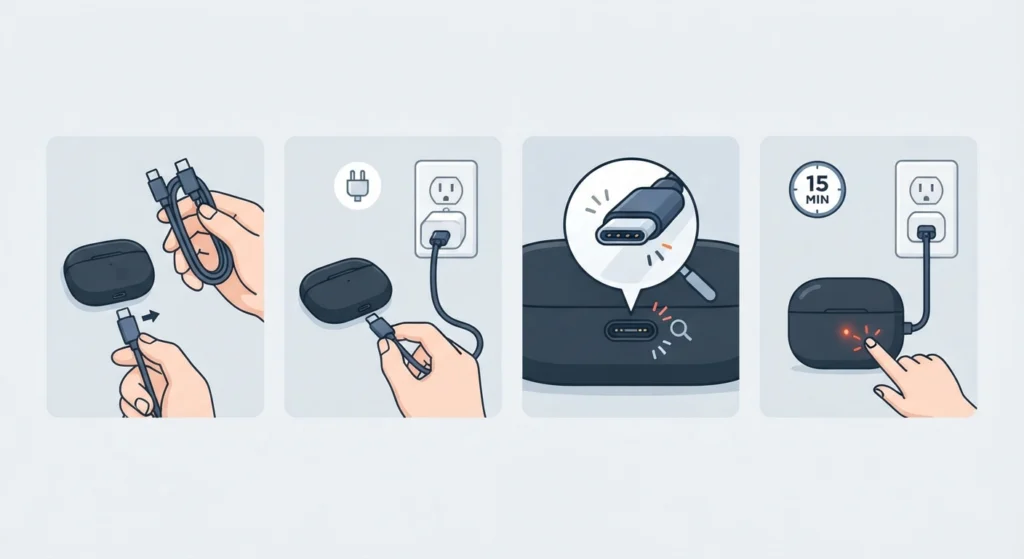
A weak or damaged cable is one of the most overlooked reasons a case refuses to charge.
- Step 1: Unplug the current USB-C cable and swap it for a different one that is known to work with another device.
- Step 2: Plug the case directly into a wall adapter instead of a laptop or USB hub, since some hubs do not supply enough power.
- Step 3: Inspect the cable and port for visible damage, bent pins, or lint buildup that could block a proper connection.
- Step 4: Leave the case connected for at least 15 minutes and check whether the status light turns on.
Method 2: Clean the Charging Contacts
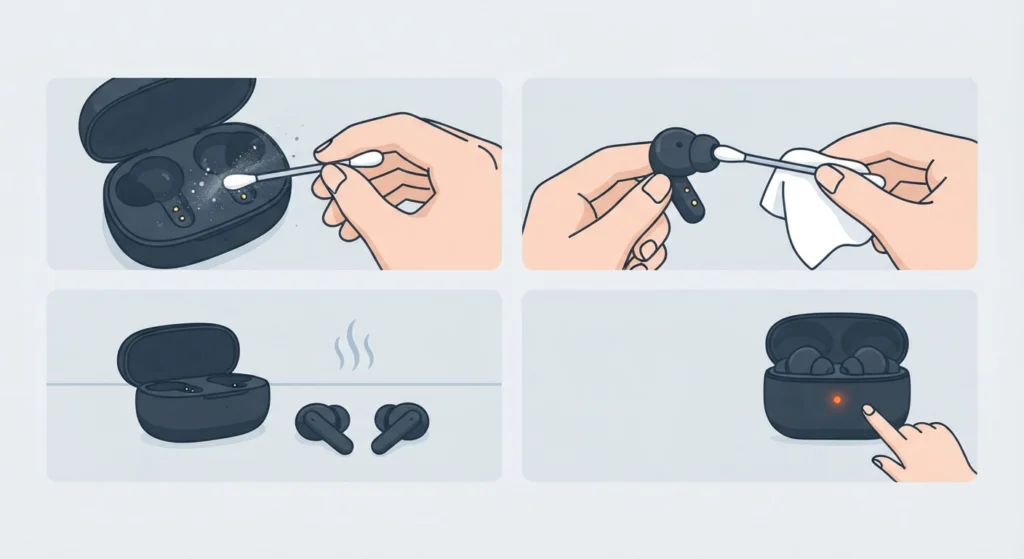
Dust, earwax, and lint collect on the metal contacts inside the case over time, and this buildup blocks the electrical connection needed to charge the earbuds.
- Step 1: Use a dry, lint-free cloth or a cotton swab to gently wipe the metal pins inside the case.
- Step 2: Wipe the matching metal contacts on the earbuds themselves, avoiding any liquid or cleaning spray.
- Step 3: Let everything air dry for a minute before placing the earbuds back in the case.
- Step 4: Watch for the charging light to confirm the connection has been restored.
Pro-Tip: Never use alcohol, water, or compressed air directly on the charging contacts. A dry microfiber cloth is enough, and moisture trapped near the pins can cause a short instead of fixing the problem.
Method 3: Reseat the Earbuds Properly in the Case
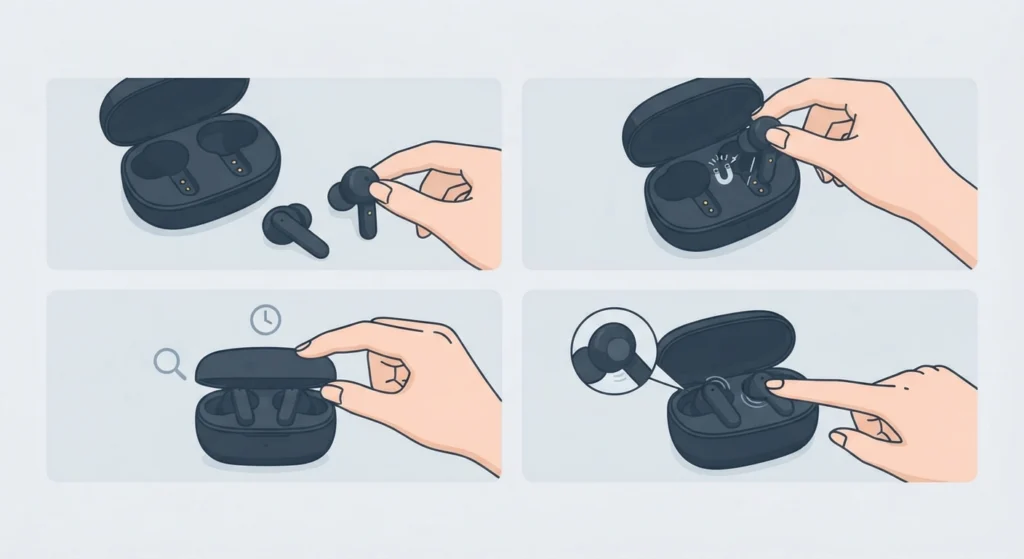
Earbuds that are not fully seated will show no charging indicator at all, even though the case itself is receiving power.
- Step 1: Remove both earbuds completely from the case.
- Step 2: Place each earbud back in slowly until a slight click or magnetic pull is felt, confirming contact with the pins.
- Step 3: Close the lid fully and wait a few seconds before reopening it to check the light status.
- Step 4: Gently press down on each earbud while it sits in the case to confirm it has not popped out of alignment.
Method 4: Reset the Earbuds and Charging Case
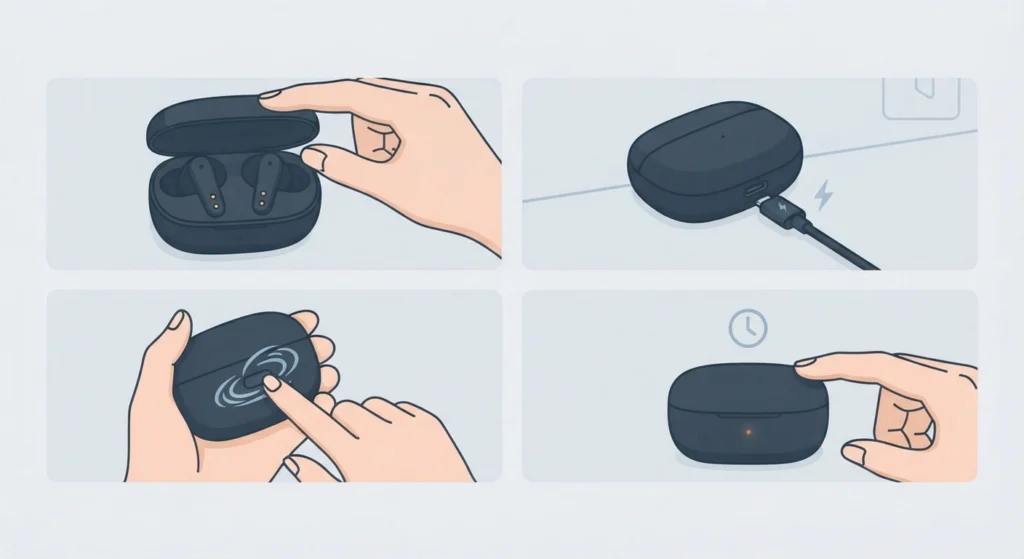
A reset clears temporary software glitches without deleting any paired devices, and it solves charging issues that cleaning alone cannot fix.
- Step 1: Place both earbuds in the case and close the lid.
- Step 2: Connect the case to power using a USB-C cable.
- Step 3: Locate the small button on the back of the case and press and hold it for about 30 seconds.
- Step 4: Release the button once the case light turns off, then wait a few minutes before opening the lid again.
Once the earbuds power back on after a reset, they may need to be reconnected to a Windows computer for stereo sound since a reset can temporarily disrupt an existing Bluetooth link.
Tips to Keep Bose QuietComfort SE Charging Properly
Preventing charging issues is much easier than fixing them repeatedly.
- Store the case in a dry place away from direct sunlight, since heat affects battery performance over time.
- Wipe the charging contacts once a week if the earbuds are used daily, especially in dusty environments.
- Charge the case fully at least once a month even during periods of light use, since lithium batteries degrade faster when left empty for long stretches.
- Use the original charging cable or a certified replacement, since low-quality cables often deliver inconsistent power.
- Avoid charging in temperatures below 32°F or above 95°F, as the battery pauses charging outside its safe range.
Common Charging Problems and Troubleshooting
A few specific symptoms point to particular causes, which makes diagnosing the issue faster.
- Case light does not turn on at all – this usually points to a dead case battery or a faulty cable rather than an earbud issue.
- Only one earbud charges – this is almost always a seating or contact problem isolated to the earbud that is not charging.
- Earbuds charge but will not turn on – the battery may simply need more time, since a fully drained battery can take several minutes before showing signs of life.
- Case feels warm during charging – mild warmth is normal, but excessive heat means charging should be stopped and the case allowed to cool before trying again.
If charging is restored but audio still sounds off afterward, checking the computer’s audio output settings on Windows 11 can rule out a software-related cause rather than a hardware one.
Frequently Asked Questions
Why is the Bose QuietComfort SE not charging even when plugged in?
This is typically caused by a bad cable, a dirty charging contact, or earbuds that are not seated correctly in the case. Testing a different cable and cleaning the contacts resolves most cases.
How long does it take for Bose QuietComfort SE to fully charge?
A fully drained case usually takes around one to two hours to reach a full charge, while the earbuds themselves charge faster once placed correctly in the case.
Why does only one earbud charge and not the other?
This points to a seating or contact issue specific to that earbud. Cleaning its charging pins and reseating it firmly in the case usually fixes the imbalance.
Can a damp charging case cause charging problems?
Yes. Moisture on the charging pins interferes with the electrical connection. The case and earbuds should be completely dry before attempting to charge.
Does resetting the earbuds delete Bluetooth pairings?
No. A standard reset restores the case and earbuds to normal function without erasing any paired devices. A factory reset is a separate, more drastic step.
Why does the case light not turn on during charging?
No light usually means the case itself is not receiving power. This points to the cable, power adapter, or a completely drained case battery that needs more time.
Is it normal for the case to feel warm while charging?
Slight warmth is expected during normal charging. If the case becomes hot to the touch, charging should be paused and the case checked for damage.
Can extreme weather affect charging?
Yes. Lithium batteries pause charging in very cold or very hot conditions to protect the battery. Letting the case reach room temperature before charging solves this.
What should be done if none of these fixes work?
If the case and earbuds still will not charge after trying every method above, the battery itself may have failed, and contacting Bose support for a warranty check is the next step.
How can charging issues be prevented in the future?
Regular cleaning of the contacts, using a reliable cable, and avoiding full battery drain all extend the life of the charging system and reduce the chance of future issues.