
The Anker Soundcore Liberty 4 NC not pairing is one of the most common complaints from users, and the good news is that it is almost always fixable without any special tools. Whether the earbuds stopped connecting after an update, refuse to show up on a device, or only one earbud connects, this guide covers every proven fix in a clear, step-by-step format.
Quick Summary Table
| Problem | Quick Fix |
|---|---|
| Earbuds not visible on Bluetooth list | Put earbuds in case, close lid, reopen and hold button |
| Previously paired but suddenly stopped | Forget device on phone, re-pair from scratch |
| Only one earbud connects | Reset earbuds fully, re-pair both |
| App not recognizing earbuds | Clear Soundcore app cache, reconnect |
| Nothing works | Factory reset the earbuds |
How to Fix Anker Soundcore Liberty 4 NC Not Pairing
Fix 1: Put Earbuds Back in the Case and Restart Pairing
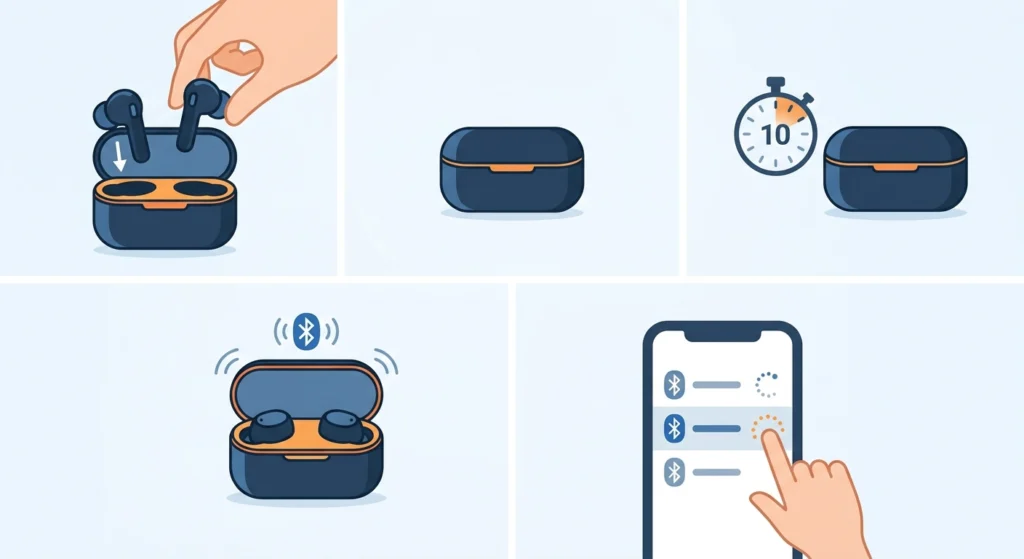
This is the first thing to try. Sometimes the earbuds get stuck in a non-discoverable state and simply need a fresh start.
- Step 1: Place both earbuds back into the charging case.
- Step 2: Close the lid and wait for 10 seconds.
- Step 3: Open the lid – the earbuds will automatically enter pairing mode.
- Step 4: On the device, go to Bluetooth settings and look for ‘Soundcore Liberty 4 NC.’
- Step 5: Tap to connect.
This works best when the earbuds were taken out of the case too quickly or when Bluetooth was toggled off mid-connection.
Fix 2: Forget the Device and Re-Pair
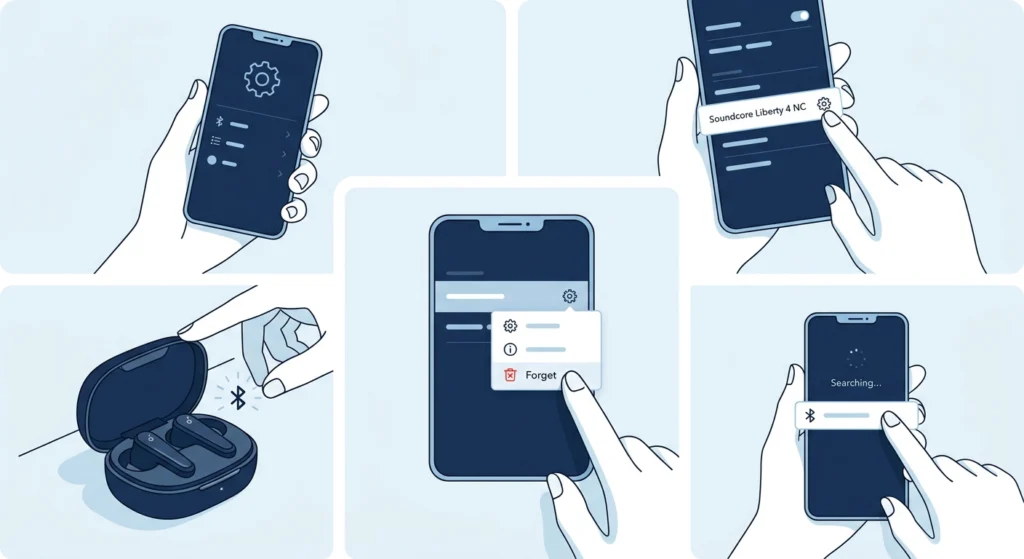
If the earbuds paired before but suddenly stopped connecting, the saved Bluetooth profile on the phone might be corrupted. Clearing it out and starting fresh usually solves this.
- Step 1: Open Bluetooth settings on the phone or tablet.
- Step 2: Find ‘Soundcore Liberty 4 NC’ in the paired devices list.
- Step 3: Tap the gear icon or ‘i’ symbol next to it and select ‘Forget’ or ‘Unpair.’
- Step 4: Place earbuds in the case, open the lid, and put them into pairing mode.
- Step 5: Search for them again in Bluetooth and reconnect.
Most people find that this alone fixes the issue after a phone software update or after the earbuds were previously connected to a different device.
Fix 3: Manually Enter Pairing Mode
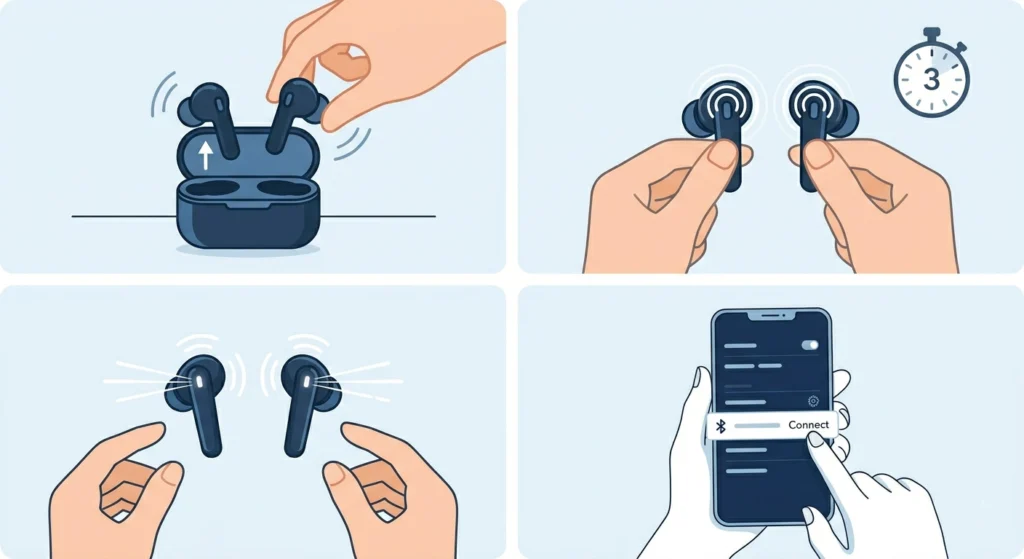
If the earbuds do not automatically enter pairing mode when taken out of the case, they can be forced into it manually.
- Step 1: Remove both earbuds from the case.
- Step 2: Touch and hold the touchpad on both earbuds simultaneously for about 3 seconds.
- Step 3: The LED should flash white rapidly, indicating pairing mode is active.
- Step 4: Open Bluetooth on the device and connect.
If the earbuds are already connected to another device, they will not be discoverable. Make sure to disconnect from any other source first, or use the method in Fix 2 to clear old pairings.
Fix 4: Disconnect from Other Connected Devices
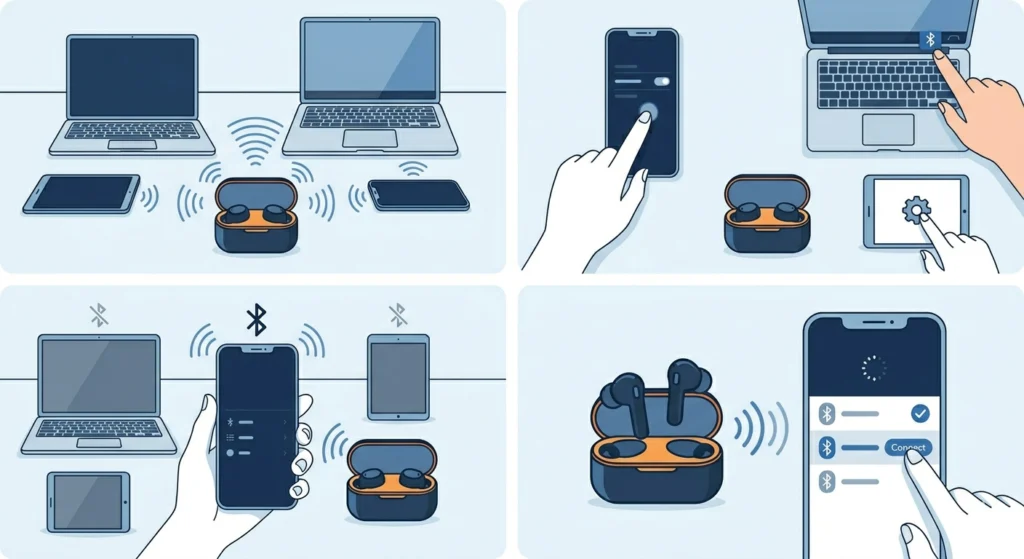
The Soundcore Liberty 4 NC supports multipoint connection (two devices at once), but this can sometimes cause pairing confusion when trying to add a third device or when one of the connected devices is nearby.
- Step 1: Check all other phones, tablets, laptops, or computers the earbuds might still be connected to.
- Step 2: Turn off Bluetooth on those devices temporarily, or forget the earbuds from their list.
- Step 3: Try pairing again on the target device.
The key is to make sure the earbuds are not already occupied with another active connection. The Liberty 4 NC has a device memory limit, and when it is full, new pairing attempts may fail silently.
If this happens frequently when switching between devices, it may help to learn how to re-pair Bluetooth earbuds properly for stereo sound on Windows to avoid conflicts.
Fix 5: Toggle Bluetooth Off and On
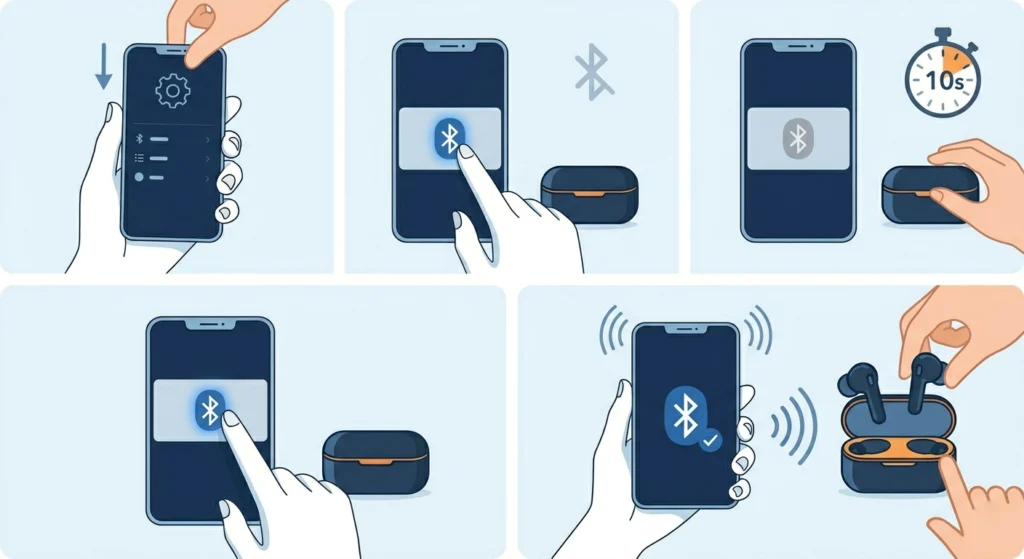
A quick Bluetooth restart on the phone can clear temporary connection errors that block new pairings.
- Step 1: Pull down the notification shade or go to Settings.
- Step 2: Turn Bluetooth off.
- Step 3: Wait 10 seconds.
- Step 4: Turn Bluetooth back on.
- Step 5: Attempt to pair the earbuds again.
Fix 6: Reset the Anker Soundcore Liberty 4 NC
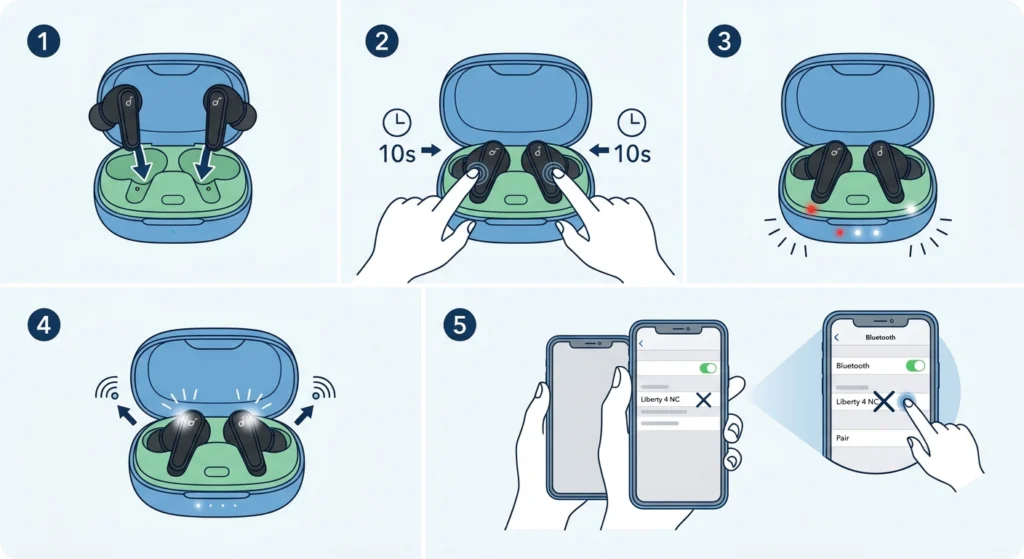
When basic fixes do not work, a full reset clears all stored device pairings and returns the earbuds to factory default pairing behavior. This is one of the most effective solutions.
- Step 1: Place both earbuds in the charging case and open the lid.
- Step 2: Touch and hold both earbud touchpads simultaneously for about 10 seconds.
- Step 3: The LED indicators will flash red three times, then white – this confirms the reset.
- Step 4: The earbuds will automatically enter pairing mode after the reset.
- Step 5: Go to Bluetooth settings on the device, forget the old listing, and reconnect fresh.
Pro-Tip: After a reset, the Liberty 4 NC erases all previously paired devices. Make sure to re-pair every device that regularly uses the earbuds. Also, open the Soundcore app after reconnecting to restore any custom EQ or ANC settings that were saved before.
Fix 7: Update Firmware via the Soundcore App
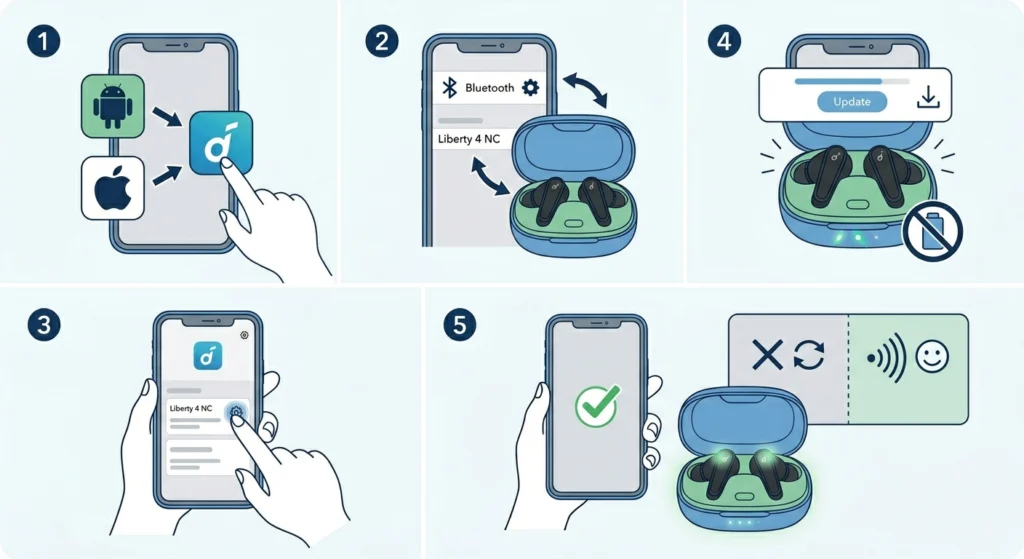
Outdated firmware can cause Bluetooth pairing instability. Anker regularly releases updates that fix connectivity bugs.
- Step 1: Download the Soundcore app on Android or iOS if not already installed.
- Step 2: Connect the earbuds to the phone using Bluetooth (even if pairing is unstable, try this step).
- Step 3: Open the app and navigate to the device settings for Liberty 4 NC.
- Step 4: If a firmware update is available, tap ‘Update’ and keep earbuds in the case during the update.
- Step 5: Once updated, reconnect and test pairing.
Fix 8: Clear Soundcore App Cache (Android)
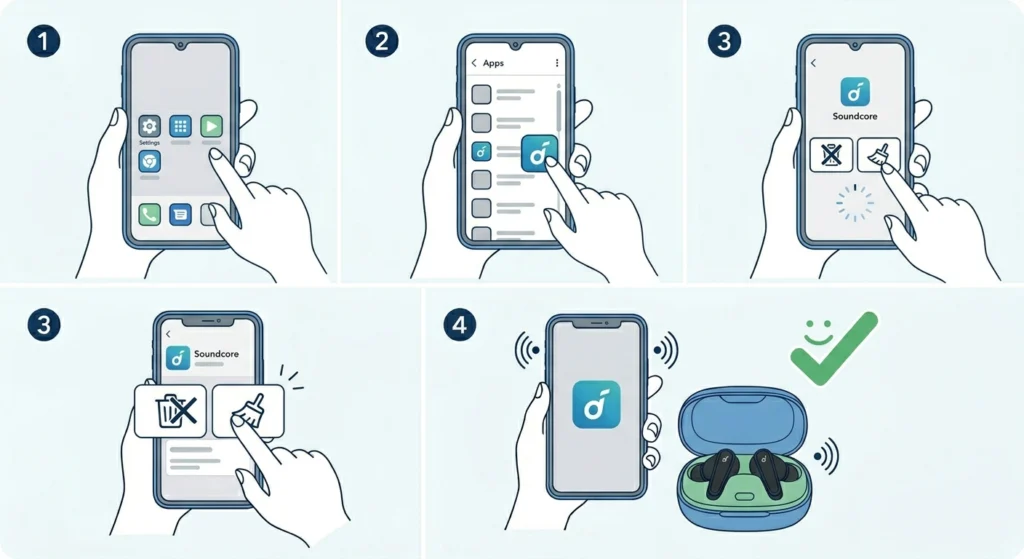
A corrupted Soundcore app cache can interfere with how the earbuds are recognized. Clearing it takes about 30 seconds and often resolves app-related pairing issues.
- Step 1: Go to phone Settings and open ‘Apps’ or ‘Application Manager.’
- Step 2: Find the Soundcore app and tap on it.
- Step 3: Select ‘Storage’ then tap ‘Clear Cache.’
- Step 4: Reopen the app, reconnect the earbuds, and try pairing again.
Fix 9: Restart the Phone or Device
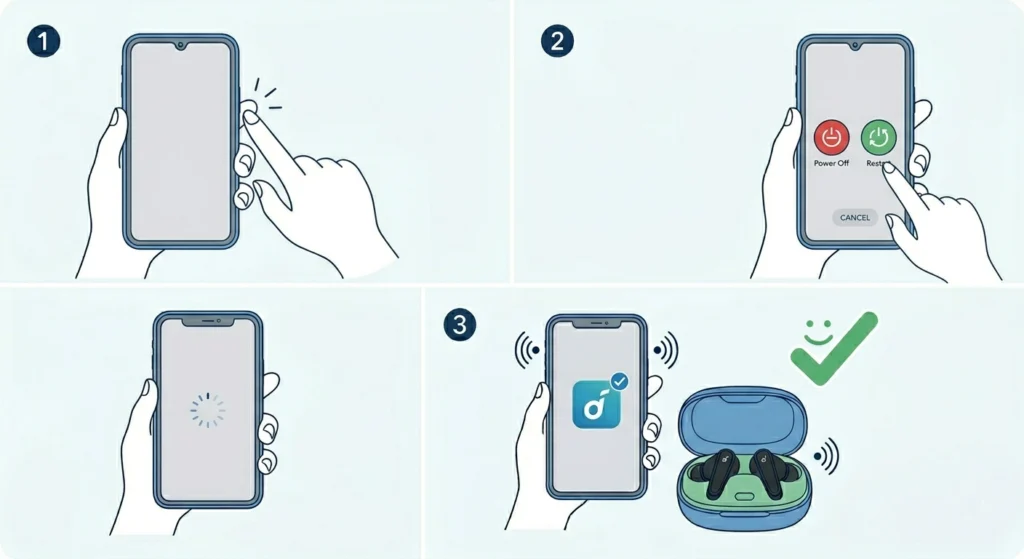
This sounds simple, but a full device restart clears temporary system-level Bluetooth bugs that a Bluetooth toggle alone cannot fix.
- Step 1: Hold the power button on the phone or device.
- Step 2: Select ‘Restart’ or ‘Reboot.’
- Step 3: Once the device is back on, enable Bluetooth and try pairing again.
Fix 10: Check for Interference and Move Closer
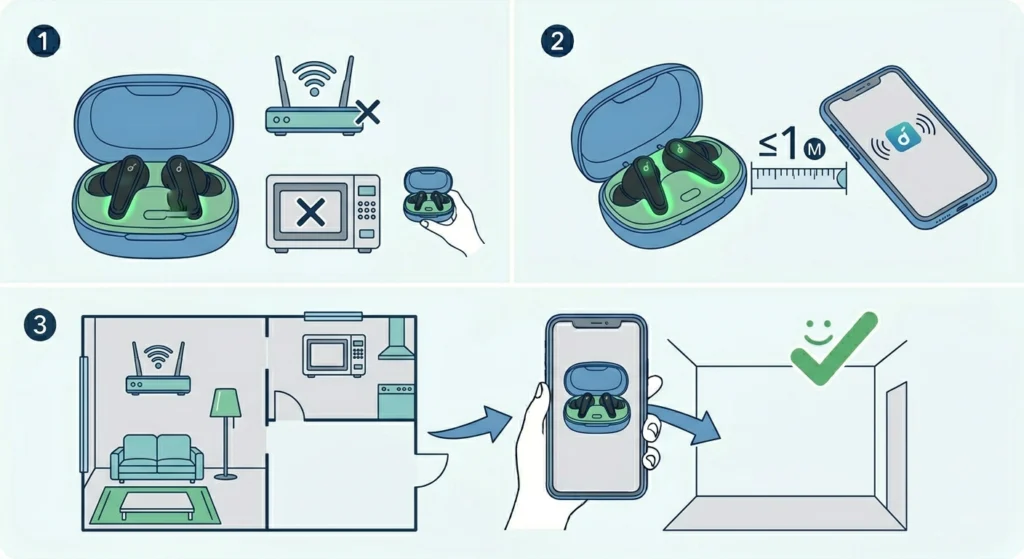
Bluetooth operates on the 2.4GHz frequency band, which is shared with Wi-Fi routers, microwaves, and other wireless devices. Heavy interference can prevent stable pairing.
- Step 1: Move away from Wi-Fi routers, microwaves, or other Bluetooth devices.
- Step 2: Stay within 1 meter of the phone during the initial pairing attempt.
- Step 3: Try pairing in a different room or location if the issue persists.
Pro-Tip: Concrete walls, metal objects, and even the human body can block Bluetooth signals. Always do the initial pairing with the phone in hand and earbuds within arm’s reach for the most reliable connection.
Tips for Keeping the Liberty 4 NC Connected
- Always store the earbuds in the charging case when not in use – it keeps their Bluetooth state fresh.
- Keep the Soundcore app updated to the latest version to benefit from bug fixes.
- If using multipoint connection, do not exceed two active simultaneous connections.
- Avoid connecting the earbuds to more than 5-7 devices total, as the memory can cause confusion in device priority.
- Check the battery level before troubleshooting – earbuds below 10% battery may have unstable Bluetooth behavior.
Common Pairing Problems and Solutions
Only One Earbud Connects
This usually means the two earbuds lost sync with each other. Place both in the case, close and reopen the lid, and let them reconnect to each other first before connecting to the phone. If it still happens, perform a full reset using Fix 6 above.
Earbuds Connect But No Audio Plays
The device may have connected the earbuds as a hands-free device rather than a stereo audio device. On Windows, this is a known issue – checking the audio output settings and selecting the correct playback profile resolves it. More details on adjusting audio output settings on Windows 11 can help in these situations.
Earbuds Disconnect Randomly After Pairing
Random disconnects after pairing usually point to low battery, outdated firmware, or interference. Update the firmware via the Soundcore app, check battery, and try using the earbuds in a less crowded wireless environment.
Soundcore App Does Not Recognize Earbuds
Make sure Bluetooth is enabled and the earbuds are connected before opening the app. If the app still does not recognize them, clear the app cache (Android) or reinstall the app (iOS). Reconnecting via Bluetooth settings first, then opening the app, usually resolves this.
Frequently Asked Questions
How do you put the Anker Soundcore Liberty 4 NC into pairing mode?
Place both earbuds in the charging case and open the lid – they will enter pairing mode automatically. Alternatively, remove both earbuds and touch-hold both touchpads simultaneously for 3 seconds until the LED flashes white rapidly.
Why won’t my Soundcore Liberty 4 NC show up on Bluetooth?
The earbuds may already be connected to another device, have a full device memory, or need a reset. Try forgetting old devices, resetting the earbuds, and then searching again. Also make sure the earbuds are charged above 20%.
How do you reset the Anker Soundcore Liberty 4 NC?
With both earbuds in the open case, touch and hold both earbud touchpads for 10 seconds until the LED flashes red three times then white. This clears all pairings and restores factory settings.
Can the Liberty 4 NC connect to two devices at the same time?
Yes, the Liberty 4 NC supports multipoint Bluetooth connectivity, allowing it to be connected to two devices simultaneously. However, this can sometimes cause pairing issues when adding a new device, so temporarily disconnecting one of the existing connections may help.
Do the Liberty 4 NC earbuds remember multiple devices?
Yes, the earbuds can store pairing information for multiple devices. The exact limit is around 5 to 7 devices. If the memory is full, new pairing attempts may be ignored until an old device is cleared by performing a reset.
Why does only one earbud connect when pairing?
This happens when the two earbuds lose their internal sync. Placing both back in the case, closing the lid, and reopening it allows them to resync before connecting to a phone. A full reset also resolves this permanently in most cases.
Does updating firmware fix Soundcore Liberty 4 NC pairing issues?
Yes, firmware updates from Anker frequently include Bluetooth stability improvements and bug fixes. Keeping the firmware up to date through the Soundcore app is one of the best ways to prevent pairing issues from recurring.
Why do the Liberty 4 NC keep disconnecting after pairing?
Random disconnects after pairing are usually caused by low battery, wireless interference, or outdated firmware. Charge the earbuds fully, move away from wireless routers, and update firmware via the Soundcore app to resolve this.
Can interference affect Soundcore Liberty 4 NC pairing?
Yes. Bluetooth uses the 2.4GHz band, which is shared with many other devices. Heavy interference from nearby routers, microwaves, or other Bluetooth gadgets can prevent stable pairing. Pairing in an open area close to the device improves success rate significantly.
What should be done if nothing fixes the Liberty 4 NC pairing issue?
If all fixes including a full factory reset fail, the issue may be hardware-related. Contact Anker support directly or check warranty status. The Liberty 4 NC comes with an 18-month warranty that covers manufacturing defects including Bluetooth hardware failures.