
Key Takeaways
- AirPods 4 with ANC not charging in the case is usually caused by dirty contacts, a faulty cable, or a weak power source.
- Cleaning the charging pins with a dry brush solves the problem in most cases within minutes.
- A different cable, adapter, or wall outlet often confirms whether the issue is with the case or the power supply.
- Resetting the AirPods clears minor software glitches that block charging.
- Persistent charging failures after these fixes usually point to a hardware issue that needs Apple support.
AirPods 4 with ANC not charging in the case is a common frustration, especially since this model relies on precise contact points and a case that fits snugly around each earbud. Most of the time, the fix takes less than ten minutes once the actual cause gets identified. This guide walks through the exact steps that resolve charging failures, starting with the simplest fix and moving toward the ones that address deeper hardware problems.
Fix 1: Clean the Charging Contacts
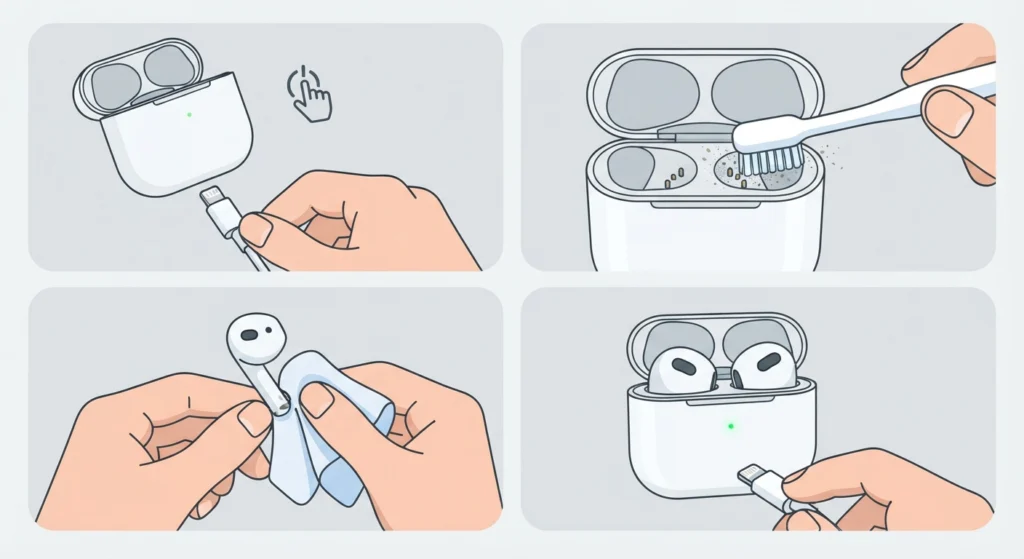
Dust, lint, and earwax buildup on the metal charging pins are the number one reason AirPods 4 stop charging inside the case. Since the ANC version has a tighter seal around the earbuds, debris tends to collect faster than people expect.
- Step 1: Turn off the case and unplug it from any power source.
- Step 2: Use a dry, soft-bristled brush (a clean toothbrush works fine) to gently sweep the charging pins inside the case.
- Step 3: Wipe the metal contacts on the bottom of each AirPod with a dry microfiber cloth.
- Step 4: Place the AirPods back in the case and check whether the LED lights up when connected to power.
Pro-Tip: Never use liquid cleaners or alcohol wipes directly on the charging pins. Moisture trapped between the contacts often causes charging failures that are harder to fix than dust ever was.
Fix 2: Test With a Different Cable and Power Source
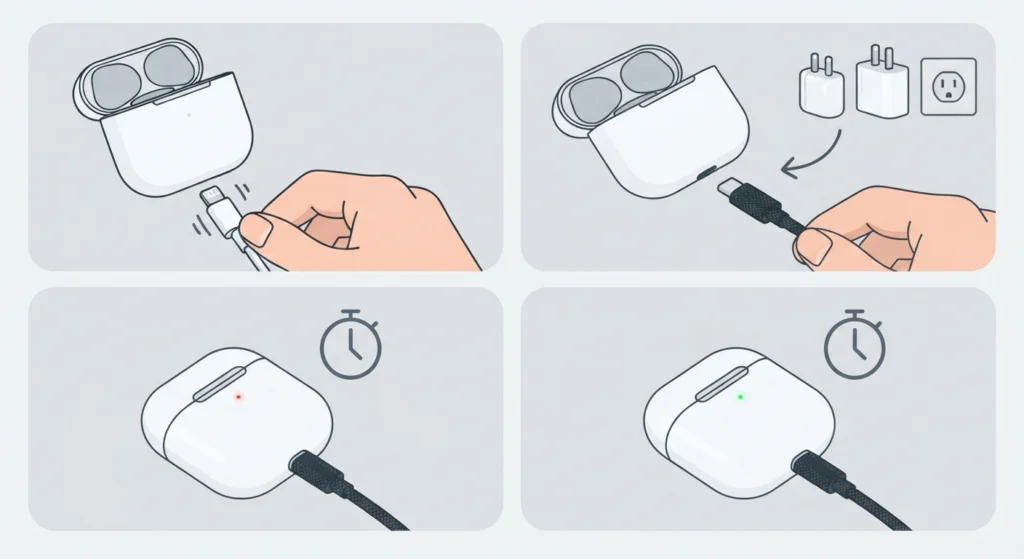
A cable that looks fine on the outside can still fail to deliver enough power. This is one of those situations where swapping parts quickly narrows down the actual problem.
- Step 1: Disconnect the current charging cable from the case.
- Step 2: Connect the case using a different certified Lightning or USB-C cable, depending on the AirPods 4 model.
- Step 3: Plug that cable into a different wall adapter or USB port rather than reusing the same outlet.
- Step 4: Leave the case connected for at least fifteen minutes and check for the amber charging light.
Low-power USB ports on laptops or older adapters are often the hidden culprit. A wall adapter rated at 5W or higher usually delivers more consistent results than charging through a computer.
Fix 3: Reset the AirPods 4
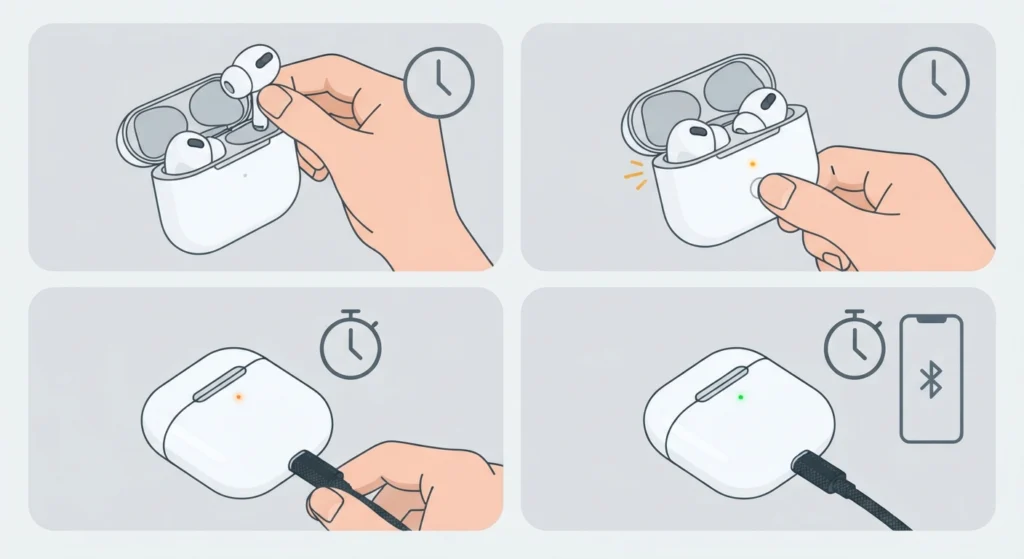
Software glitches inside the AirPods firmware sometimes block the charging process even when the hardware is completely fine. A reset clears this without deleting any pairing history permanently.
- Step 1: Place both AirPods in the case and close the lid for about thirty seconds.
- Step 2: Open the lid and press and hold the setup button on the back of the case for around fifteen seconds, until the status light flashes amber then white.
- Step 3: Reconnect the case to a power source and check the charging indicator after a few minutes.
- Step 4: Once charging resumes, re-pair the AirPods with the connected device from the Bluetooth settings.
Pro-Tip: After a reset, forget the AirPods from the device’s Bluetooth list before pairing again. Skipping this step is one of the most common reasons people think the reset didn’t work, when in reality the old pairing profile is just conflicting with the refreshed connection.
Fix 4: Check the Case Lid and Magnetic Alignment
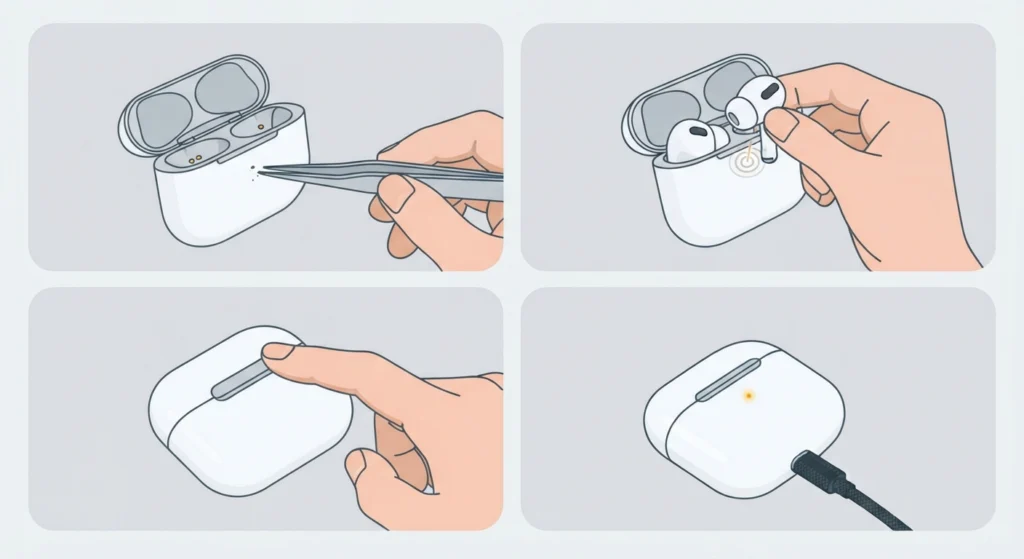
The case for AirPods 4 with ANC uses magnets to hold each earbud in the exact spot needed for charging contact. A lid that doesn’t close fully, or earbuds that sit slightly off-center, can prevent a connection even when everything else works correctly.
- Step 1: Remove both AirPods and inspect the inside of the case for any warping or foreign objects near the magnets.
- Step 2: Place the AirPods back in, making sure each one clicks into place rather than resting loosely.
- Step 3: Close the lid fully and confirm it latches without gaps.
- Step 4: Reconnect to power and watch for the charging light within the first minute.
Tips for Keeping AirPods 4 Charging Reliably
A little routine maintenance goes a long way with any wireless earbuds, and AirPods 4 are no exception. Wiping down the case once a week prevents the kind of buildup that leads to charging issues in the first place. Storing the case somewhere dry, rather than a gym bag or pocket full of lint, also helps.
Once charging is working again, it’s worth checking the connection quality on a computer too. Windows 11 users who plan to pair earbuds for stereo audio can find a full walkthrough for that process, and if audio sounds off after reconnecting, resetting the audio settings on the system often resolves lingering glitches faster than reinstalling drivers.
Common Problems and Troubleshooting
Most charging complaints fall into one of the categories already covered, but a few specific scenarios come up often enough to mention directly.
- One AirPod charges while the other does not – this usually means only one charging pin is dirty or misaligned, so cleaning that specific side first is worth trying before anything else.
- The case charges but the AirPods inside stay at 0% – this points to a firmware glitch, and the reset process in Fix 3 resolves it in the majority of cases.
- The case gets warm but nothing charges – this is often a sign of a failing internal battery inside the case itself, which typically requires a service replacement.
- Charging works only when the case is tilted a certain way – this indicates a loose internal connector, and continuing to use it that way tends to make the problem worse over time.
Frequently Asked Questions
Why are AirPods 4 with ANC not charging in the case at all?
The most common causes are dirty charging contacts, a faulty or underpowered cable, or a case that isn’t closing fully around the earbuds. Working through the cleaning and cable checks above resolves the majority of these cases.
How long does it take to charge AirPods 4 with ANC fully?
A full charge from empty typically takes around one hour for the earbuds themselves, while the case takes slightly longer depending on the charger used.
Can a dirty charging port cause AirPods 4 to stop charging?
Yes. Even a thin layer of dust or lint on the pins is enough to break the connection, which is why cleaning is always the first step to try.
Does resetting AirPods 4 delete saved settings?
A reset clears the pairing information but does not affect firmware or ANC settings permanently. Those return to default and can be adjusted again after re-pairing.
Is it normal for the AirPods 4 case to feel warm while charging?
Mild warmth during charging is normal, but a case that becomes noticeably hot or charges inconsistently may have a battery issue that needs professional service.
What cable should be used to charge the AirPods 4 case?
A certified Lightning or USB-C cable, matching whichever port the specific AirPods 4 case uses, delivers the most reliable charging results.
Why does only one AirPod show a charging light?
This usually points to a dirty or misaligned contact on the side that isn’t charging. Cleaning that specific earbud and its matching slot in the case often fixes it.
Can wireless charging pads be used with AirPods 4 with ANC?
Yes, as long as the case supports wireless charging and is placed directly in the center of the pad. Misalignment on a wireless pad is a frequent reason charging fails to start.
How can it be confirmed that the AirPods case itself is faulty?
If charging still fails after cleaning the contacts, trying a different cable and outlet, and resetting the AirPods, the case is likely the source of the problem and may need a replacement.
Should AirPods 4 be left in the case when not in use?
Yes, keeping them in the closed case when not being worn protects the charging contacts from dust and helps maintain battery health over time.