
Adaptive Noise Cancelling on the JBL Live Pro 2 TWS gives the earbuds the ability to sense surrounding noise and adjust cancellation strength on their own, without constant manual tweaking. This guide breaks down the exact steps needed to turn it on, switch modes, and fine-tune it through the JBL Headphones app for the most consistent results during everyday use.
Key Takeaways
- Adaptive Noise Cancelling on the JBL Live Pro 2 TWS turns on with a single tap on the left earbud or through the JBL Headphones app.
- A snug seal from the oval silicone ear tips has a direct effect on how well the noise cancelling performs.
- One tap on the left earbud cycles between Adaptive Noise Cancelling and Smart Ambient (Ambient Aware) mode.
- The JBL Headphones app allows deeper control, including switching modes and checking firmware status.
- Keeping firmware updated through the app helps Adaptive Noise Cancelling behave consistently across sessions.
Step-by-Step Guide to Turn On Adaptive Noise Cancelling
Method 1: Using Touch Control on the Earbuds
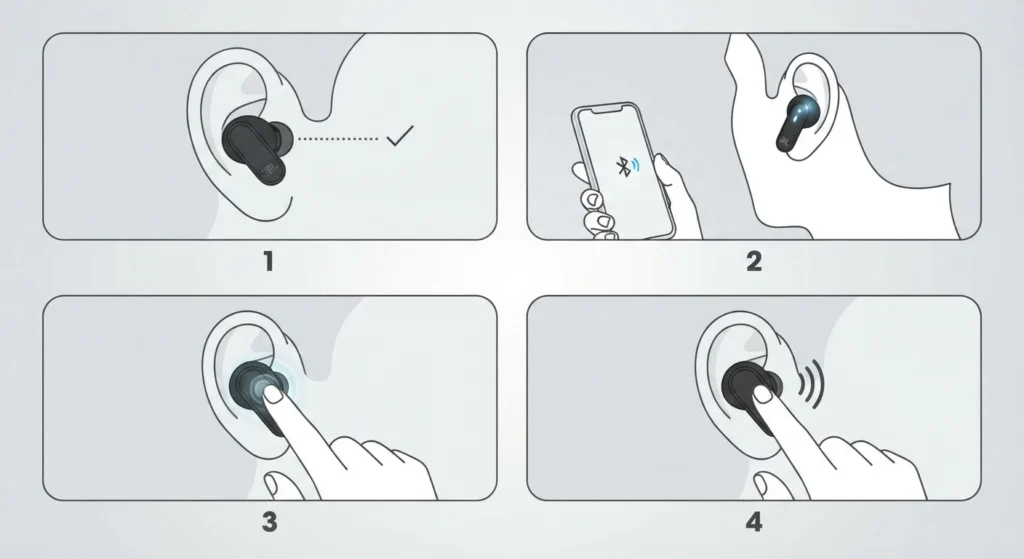
- Step 1: Insert both earbuds and confirm a snug, sealed fit using the correct size of oval silicone tips.
- Step 2: Power on the JBL Live Pro 2 TWS and let them reconnect to the paired phone or device.
- Step 3: Tap the touch surface on the left earbud once to activate Adaptive Noise Cancelling.
- Step 4: Tap the same spot again to switch to Smart Ambient (Ambient Aware) mode when outside sound needs to come through.
Pro-Tip: The seal formed by the ear tips matters just as much as the software behind Adaptive Noise Cancelling. A loose fit lets low-frequency noise leak in around the edges, which makes even a properly working ANC system feel weak. Testing all three included tip sizes before settling on one is worth the extra two minutes.
Method 2: Using the JBL Headphones App
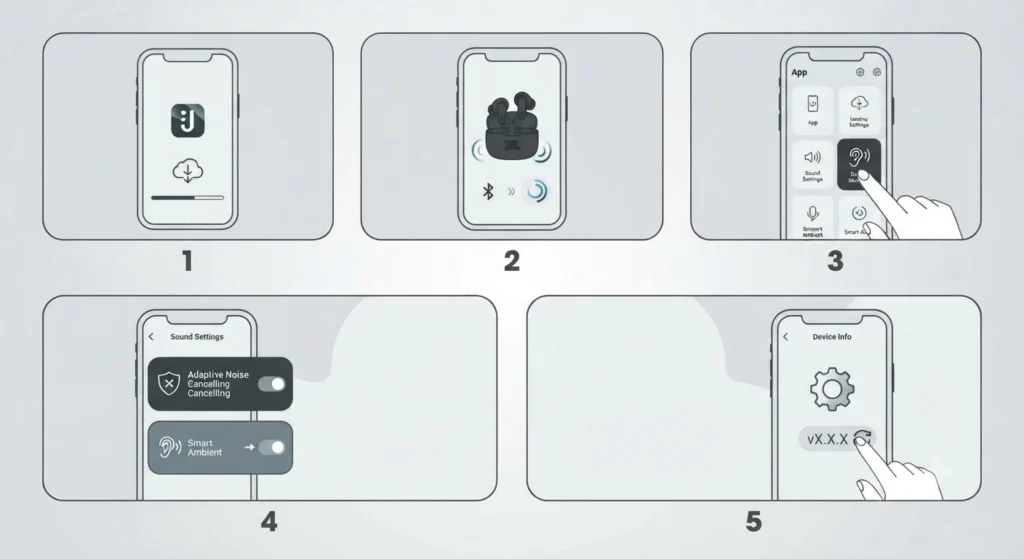
- Step 1: Download the JBL Headphones app from the device app store and open it.
- Step 2: Connect the JBL Live Pro 2 TWS to the app if they are not already paired.
- Step 3: Open the sound settings section for the connected earbuds.
- Step 4: Select Adaptive Noise Cancelling to switch it on, or choose Smart Ambient if a transparency mode is needed instead.
- Step 5: Check the device info screen in the app and update the firmware if a newer version is listed.
Pro-Tip: Firmware updates are easy to skip, but they often carry stability fixes for Adaptive Noise Cancelling specifically. Checking for an update the first time the app is opened, and again every few weeks, avoids the frustration of ANC that randomly drops out mid-listen.
Tips for Getting the Most Out of Adaptive Noise Cancelling
- Clean the mesh over the microphone ports on each earbud with a soft, dry brush. Blocked mics reduce how accurately the system reads outside noise.
- Replace ear tips every few months, since worn-out silicone loses its grip and its seal at the same time.
- When the earbuds connect to a Windows 11 laptop for calls or media, adjusting audio output settings helps prevent the system from processing sound in a way that fights against ANC.
- Avoid running Adaptive Noise Cancelling and a phone case or headwear that presses directly on the ear, since pressure can shift the seal and change how the cancellation sounds.
- If the earbuds are shared between a phone and a Windows 11 PC, managing audio input devices keeps the microphone from defaulting to the wrong source after switching.
Common Problems With Adaptive Noise Cancelling and How to Fix Them
Fix 1: Adaptive Noise Cancelling Will Not Turn On
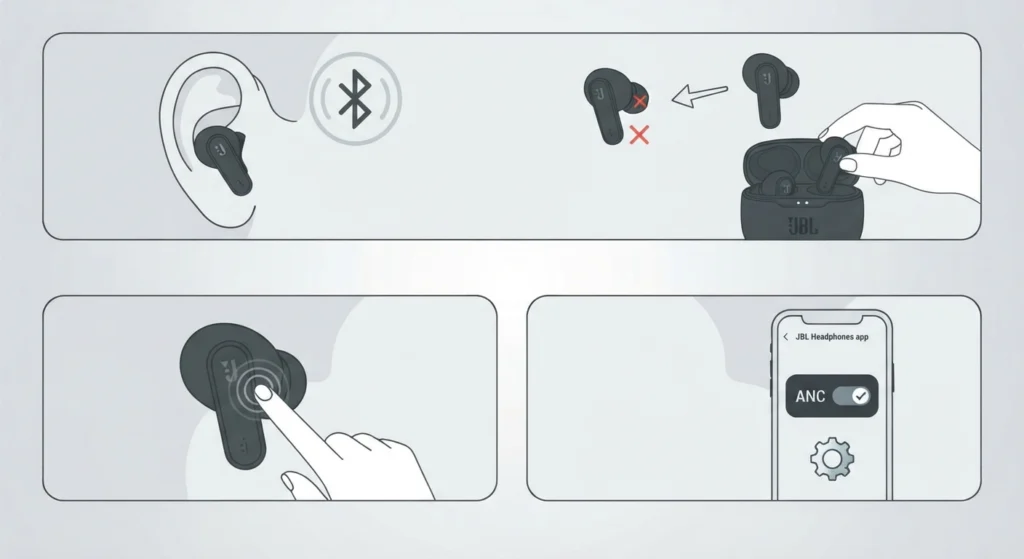
This usually points to a fit issue or a connection problem rather than a hardware fault. Reseat both earbuds, confirm they show as connected in the JBL Headphones app, and tap the left earbud again. If the app still does not register the earbuds, resetting audio settings on the connected device clears out conflicting Bluetooth profiles that sometimes block the ANC toggle from registering.
Fix 2: Noise Cancelling Feels Weak or Inconsistent
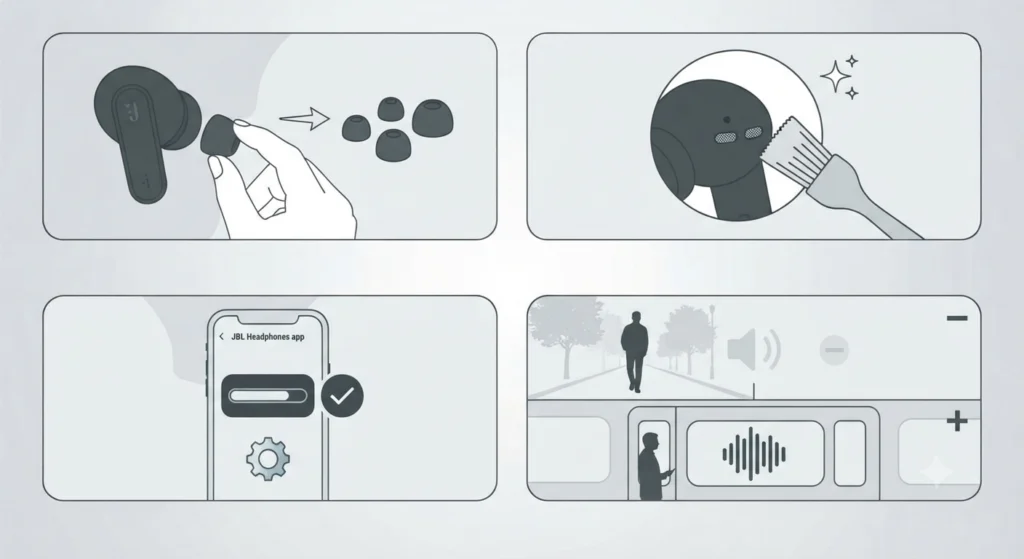
Weak-feeling ANC is most often a seal problem. Swapping to a different ear tip size, cleaning the mic ports, and confirming firmware is current usually resolves it. Environmental factors also play a role, since Adaptive Noise Cancelling responds to real-time surroundings, so it naturally reduces less on a quiet street than inside a moving train.
Fix 3: Only One Earbud Seems to Have Noise Cancelling
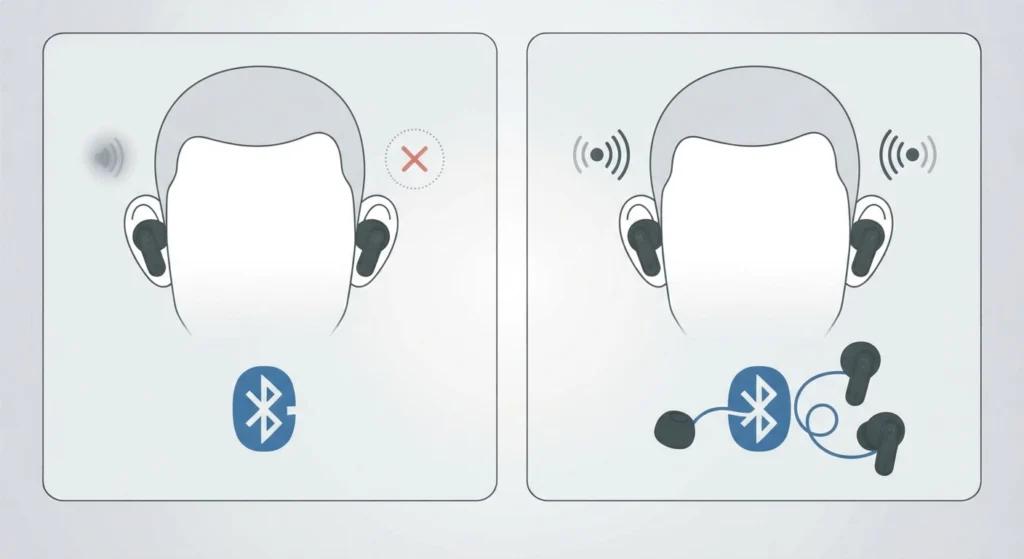
An uneven ANC feel between earbuds is frequently a stereo pairing issue rather than a defect. Re-pairing the bluetooth earbuds for stereo sound on the connected device often restores balanced performance across both sides.
Frequently Asked Questions
What does Adaptive Noise Cancelling mean on the JBL Live Pro 2?
It refers to a system that continuously reads surrounding noise and fit conditions, then adjusts cancellation strength automatically instead of applying one fixed level at all times.
Does turning on Adaptive Noise Cancelling reduce battery life?
Yes. Running ANC requires extra processing power, so total playtime is shorter with it active compared to having it switched off.
Can Adaptive Noise Cancelling be used without the JBL Headphones app?
Basic on and off control is available through touch control on the earbuds. The app is mainly needed for firmware updates and checking connection status.
What is the difference between Adaptive Noise Cancelling and Smart Ambient?
Adaptive Noise Cancelling reduces outside sound, while Smart Ambient lets outside sound in through the microphones so conversations or announcements can be heard without removing the earbuds.
Why does Adaptive Noise Cancelling stop working during phone calls?
Some noise cancelling behavior shifts during calls because the system prioritizes microphone clarity for the other person over cancellation strength.
Does firmware version affect Adaptive Noise Cancelling performance?
Yes. Outdated firmware can cause inconsistent behavior, so checking the JBL Headphones app for updates is a useful first step whenever ANC feels off.
Can Adaptive Noise Cancelling be turned off completely?
Yes, it can be switched off through touch control on the earbud or through the sound settings in the JBL Headphones app.
Why does Adaptive Noise Cancelling feel weaker in one earbud than the other?
This is often related to fit or a stereo pairing mismatch rather than a hardware issue, and reseating the tips or re-pairing the earbuds typically resolves it.