
Key Takeaways
- Adaptive ANC on Soundcore Liberty 4 NC automatically adjusts noise cancellation strength based on the surrounding environment and ear fit.
- The feature is turned on through the Soundcore app, not through the earbuds alone.
- A proper ear tip fit and an updated firmware version make Adaptive ANC perform noticeably better.
- Touch controls can be customized to switch between Adaptive ANC, Transparency, and Normal modes without opening the app every time.
- Manual noise cancellation levels remain available for situations where Adaptive ANC feels too strong or too light.
Adaptive ANC on Soundcore Liberty 4 NC is one of the standout features that separates these earbuds from cheaper alternatives, since it constantly reads the environment and adjusts noise cancellation strength on its own instead of relying on one fixed setting. Anyone who has switched between a quiet office and a noisy train platform on the same commute knows how frustrating a static ANC mode can be. This guide walks through exactly how to turn it on, fine-tune it, and get the most consistent results from it.
Method 1: Turn On Adaptive ANC Through the Soundcore App
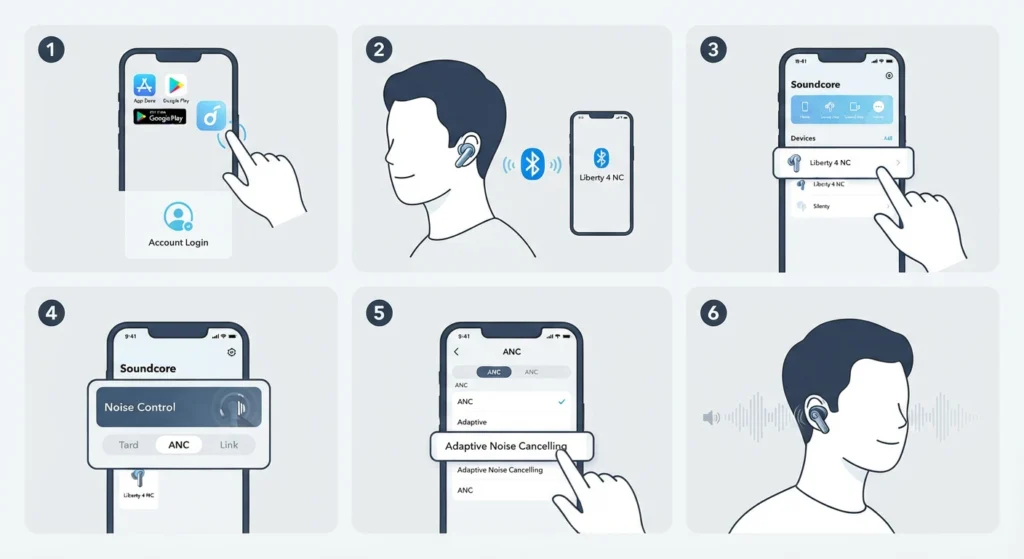
Adaptive ANC is not a setting hidden inside the earbuds themselves. It lives inside the Soundcore app, so the app has to be installed and paired with the earbuds before anything else. This method usually takes less than two minutes once the app is open.
- Step 1: Download the Soundcore app from the App Store or Google Play, then open it and create or sign in to an account.
- Step 2: Place the Liberty 4 NC earbuds in the ears and make sure they are already connected over Bluetooth.
- Step 3: Open the app and select Liberty 4 NC from the device list on the home screen.
- Step 4: Tap on the Noise Control card, then choose the ANC tab from the options shown.
- Step 5: Select Adaptive Noise Cancelling from the list of ANC modes.
- Step 6: Wear both earbuds for a few seconds without touching anything, since the earbuds need a short moment to read the ear canal shape and the surrounding noise level.
Pro-tip: The very first time Adaptive ANC is selected, keep both earbuds in for at least ten seconds in a normal environment. This lets the algorithm calibrate to the ear canal properly, and skipping this step is one of the main reasons some users feel the noise cancellation seems weaker than expected.
Method 2: Fine-Tune Adaptive ANC for Better Accuracy
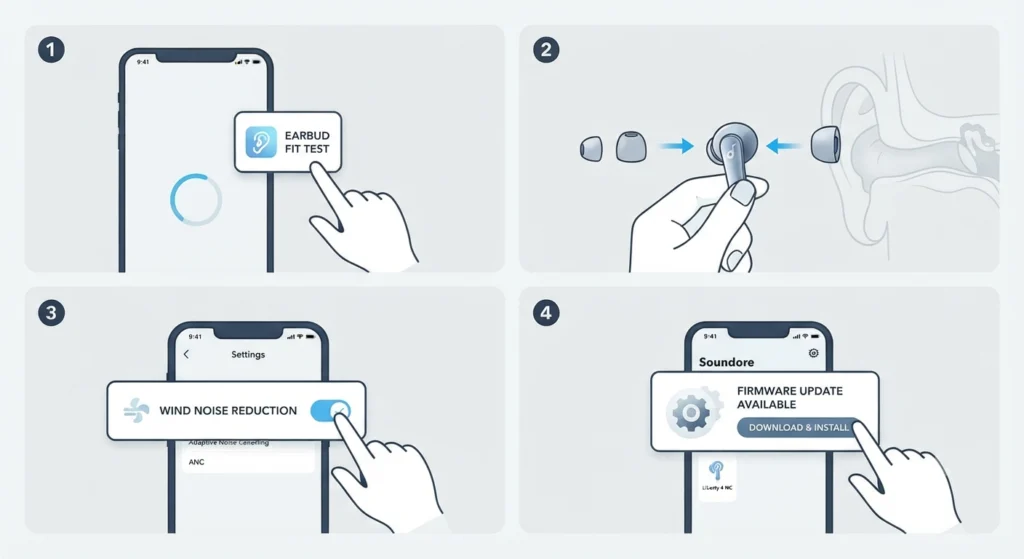
Turning the feature on is only half the job. A few small adjustments inside the app make Adaptive ANC noticeably more accurate for daily use.
- Step 1: Run the Fit Test found under the earbuds settings menu in the app, since a loose seal reduces how well Adaptive ANC can measure outside noise.
- Step 2: Switch to a smaller or larger ear tip size if the Fit Test reports a poor seal on either side.
- Step 3: Turn on Wind Noise Reduction from the Settings tab if outdoor use is common, since strong wind can confuse the adaptive algorithm.
- Step 4: Check for firmware updates from the app home screen and install any available update, since Anker regularly refines the Adaptive ANC algorithm through firmware.
Most people find that a firmware update alone solves inconsistent behavior, which is why checking for one should always come before assuming the earbuds are faulty. Anyone who has also had trouble getting stereo sound to register correctly across both earbuds can look into how to re-pair Bluetooth earbuds for proper stereo output before blaming the ANC feature itself.
Method 3: Switch to Adaptive ANC Using Touch Controls
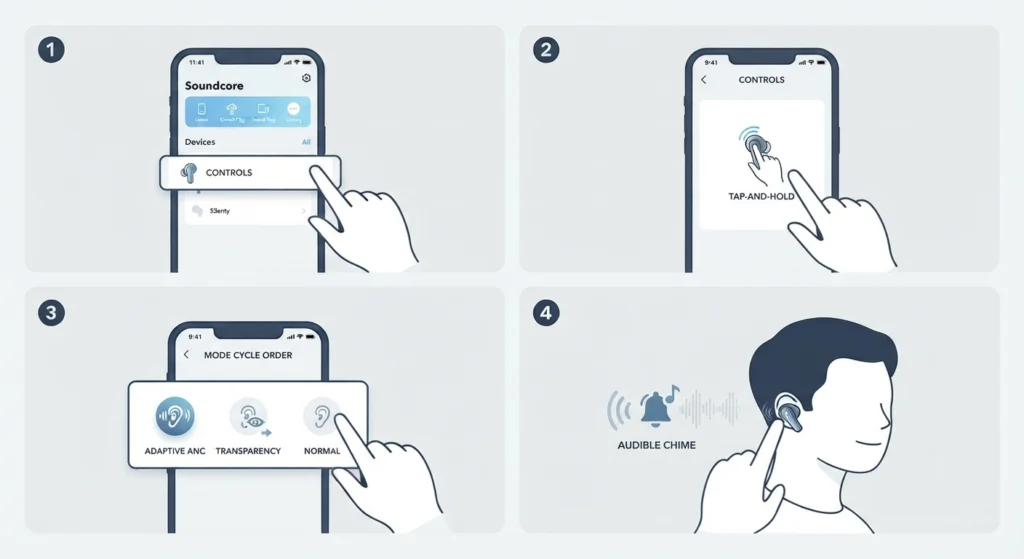
Opening the app every time to change modes gets tiring fast. Customizing the touch controls turns mode switching into a two-second action.
- Step 1: Open the Soundcore app and go to the Controls section for Liberty 4 NC.
- Step 2: Select the touch gesture to use for mode switching, typically a tap-and-hold for two seconds.
- Step 3: Set the mode cycle order to include Adaptive ANC, Transparency, and Normal so all three are reachable with repeated presses.
- Step 4: Save the settings, then test the gesture on the earbuds to confirm the mode changes with an audible chime.
Tips for Getting the Most Out of Adaptive ANC
- Use the correct ear tip size, since Adaptive ANC depends heavily on an airtight seal to measure ambient noise accurately.
- Keep the Soundcore app installed even after setup, since new firmware occasionally improves how quickly the algorithm reacts to changing environments.
- Avoid touching or adjusting the earbuds constantly while Adaptive ANC is active, since repeated movement can briefly interrupt the calibration.
- Switch to manual noise cancellation levels temporarily in extremely loud environments like construction sites, where a fixed maximum level may work better than adaptive adjustment.
- Restart the earbuds by placing them back in the case for a few seconds if Adaptive ANC feels sluggish after a long listening session.
Pro-tip: Adaptive ANC recalibrates more frequently when no audio is playing, so a brief pause in music during a sudden change in surroundings, like stepping onto a busy street, helps the earbuds adjust faster than they would while continuously streaming audio.
Common Problems With Adaptive ANC on Liberty 4 NC
A handful of recurring issues show up with Adaptive ANC, and most have simple explanations.
- Adaptive ANC feels weak in loud environments: this is expected behavior at very high ambient volumes, since no consumer ANC earbud fully blocks extreme noise. Selecting a manual high noise cancellation level temporarily helps in these situations.
- Mode does not switch when tapping the earbud: this usually points to a Bluetooth or audio routing issue rather than the ANC feature itself, and checking the audio output settings on the connected device often resolves it.
- Adaptive ANC sounds different between the left and right earbud: this typically means one ear tip is not sealing properly, so running the Fit Test again and trying a different tip size is the quickest fix.
- Setting does not save after selecting Adaptive ANC: closing and reopening the Soundcore app, then reconnecting the earbuds, generally resolves this without needing a factory reset.
- Earbuds are not recognized as an input device after enabling ANC settings: on Windows 11, this is often related to how the system is managing the audio input devices list rather than a fault with the earbuds.
Frequently Asked Questions
What does Adaptive ANC actually do on the Liberty 4 NC?
Adaptive ANC continuously measures the surrounding noise and the seal of the ear tips, then adjusts the noise cancellation strength automatically instead of using one fixed level.
Is Adaptive ANC better than manual noise cancellation levels?
Adaptive ANC works well for most everyday situations since it removes the guesswork of picking a level. Manual levels still have a place in extreme environments, such as construction sites or airplane cabins, where a fixed maximum setting can outperform automatic adjustment.
Why is Adaptive ANC only available in the app and not on the earbuds directly?
The earbuds have limited onboard controls, so detailed noise cancellation settings, including Adaptive ANC, are managed through the Soundcore app where more precise adjustments are possible.
Does Adaptive ANC drain the battery faster than regular ANC?
Adaptive ANC uses a similar amount of power to standard ANC modes, since the earbuds are already processing noise cancellation continuously in either case.
Can Adaptive ANC be turned off temporarily without switching to Transparency mode?
Yes, selecting Normal mode inside the Soundcore app turns off active noise cancellation entirely while still keeping music playback active, without switching to Transparency.
Why does Adaptive ANC feel weaker after a software update?
This sometimes happens when the ear tip fit was not reverified after an update. Running the Fit Test again inside the app usually restores the expected performance.
Does wind affect how well Adaptive ANC performs?
Yes, strong wind can interfere with the microphones used for noise detection. Turning on Wind Noise Reduction from the Settings tab reduces this interference significantly.
How long does it take for Adaptive ANC to calibrate after switching modes?
Calibration typically completes within a few seconds of wearing both earbuds, though it recalibrates more frequently while no audio is playing.
Can Adaptive ANC be used on only one earbud?
Adaptive ANC can technically function with a single earbud, though noise cancellation accuracy is generally better when both earbuds are worn together.
What should be checked first if Adaptive ANC stops responding altogether?
Confirming the earbuds are on the latest firmware and reconnecting them through Bluetooth resolves most cases. If the issue continues, resetting the audio settings on the connected device is a reliable next step before considering a factory reset of the earbuds.