
The Technics EAH-AZ80 supports multipoint Bluetooth connection, which lets it stay paired to up to three devices at once. But getting all three to connect and stay connected can be frustrating if the setup is not done correctly. The good news is that this is almost always a configuration issue, not a hardware problem, and it can be resolved in just a few steps.
Quick Summary
- The EAH-AZ80 supports multipoint Bluetooth for up to 3 devices simultaneously
- Multipoint must be enabled in the Technics Audio Connect app before use
- Each device must be individually paired using the correct pairing mode method
- Clearing the pairing list and re-pairing all three devices often resolves persistent issues
- Only two devices can actively stream audio at the same time, but all three stay connected
How to Fix Technics EAH-AZ80 Not Connecting to Three Devices
Fix 1: Enable Multipoint Connection in the App
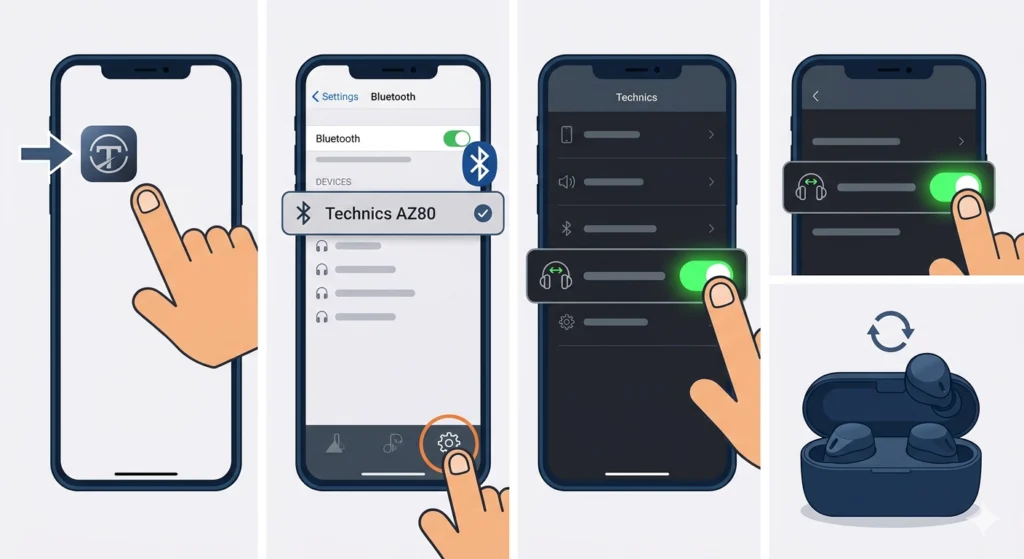
Before anything else, multipoint needs to be turned on. The EAH-AZ80 does not enable this feature by default in all firmware versions, so this is the first place to check.
- Step 1: Download and open the Technics Audio Connect app on a smartphone or tablet.
- Step 2: Connect the earbuds to the phone via Bluetooth.
- Step 3: Go to ‘Settings’ inside the app.
- Step 4: Look for ‘Multipoint Connection’ or ‘Multi-Device Connection’ and make sure it is toggled on.
- Step 5: Restart the earbuds after enabling this setting.
This single step resolves the issue for a large number of users. If multipoint was already on, move to the next fix.
Fix 2: Pair All Three Devices from Scratch
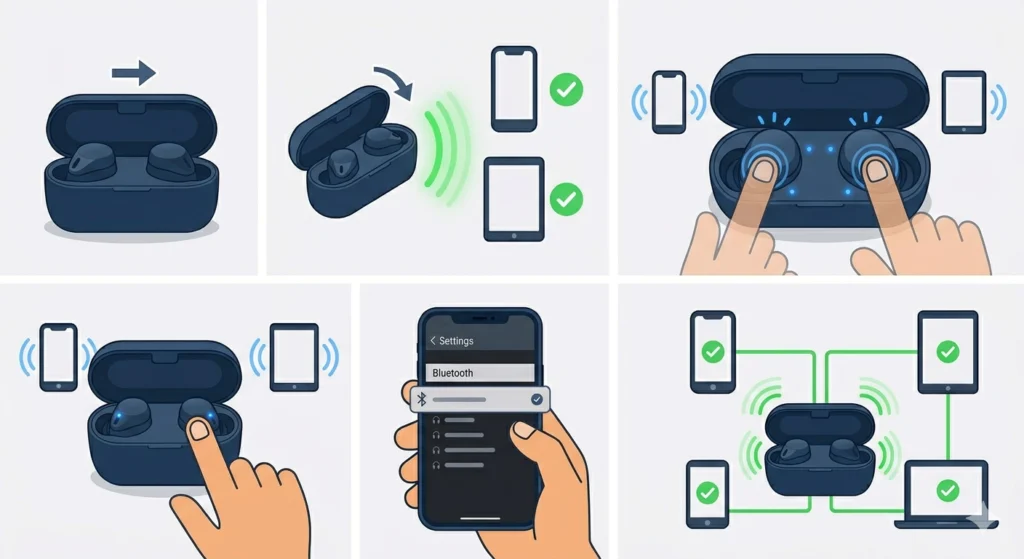
The EAH-AZ80 stores a pairing list. For multipoint to work properly with three devices, all three need to be properly paired and saved in that list. Here is how to add a new device when two are already paired:
- Step 1: Put the earbuds in the charging case and close the lid.
- Step 2: Open the lid. The earbuds will reconnect to the last paired device.
- Step 3: To enter pairing mode for a new device, press and hold the touch sensor on both earbuds for about 3 seconds until the LED flashes and a voice prompt announces pairing mode.
- Step 4: On the third device, open Bluetooth settings and search for ‘Technics EAH-AZ80’ and select it to pair.
- Step 5: Confirm the pairing is successful. The earbuds will then manage all three paired connections automatically.
The key is making sure each device is individually paired through this process, not just recognized from a previous pairing session that may have been dropped.
Fix 3: Reset and Re-Pair All Three Devices
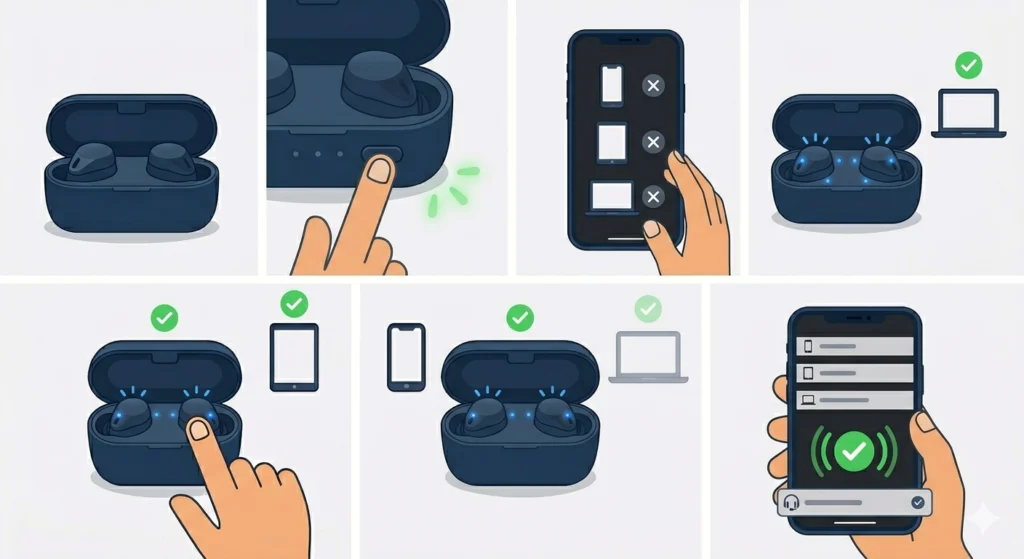
If the earbuds have been paired with too many devices in the past or the pairing list got corrupted, a full reset clears everything and gives a clean start. This works best when two out of three connections are working but the third keeps failing.
- Step 1: Place both earbuds in the charging case and open the lid.
- Step 2: Press and hold the button on the charging case for about 7 seconds until the LED flashes three times. This clears all paired devices.
- Step 3: On each of the three devices, go to Bluetooth settings and forget or remove ‘Technics EAH-AZ80’ from the paired device list.
- Step 4: Put the earbuds in pairing mode and pair Device 1 first.
- Step 5: Enter pairing mode again and pair Device 2.
- Step 6: Enter pairing mode one more time and pair Device 3.
- Step 7: Once all three are paired, open the Technics Audio Connect app and confirm multipoint is enabled.
After re-pairing, the earbuds should automatically connect to all three devices the next time they come out of the case.
Pro-Tip: Always pair devices in the order of priority. The EAH-AZ80 connects to the most recently paired devices first, so pair the most-used device last for faster auto-connection.
Fix 4: Update Firmware via the Technics App
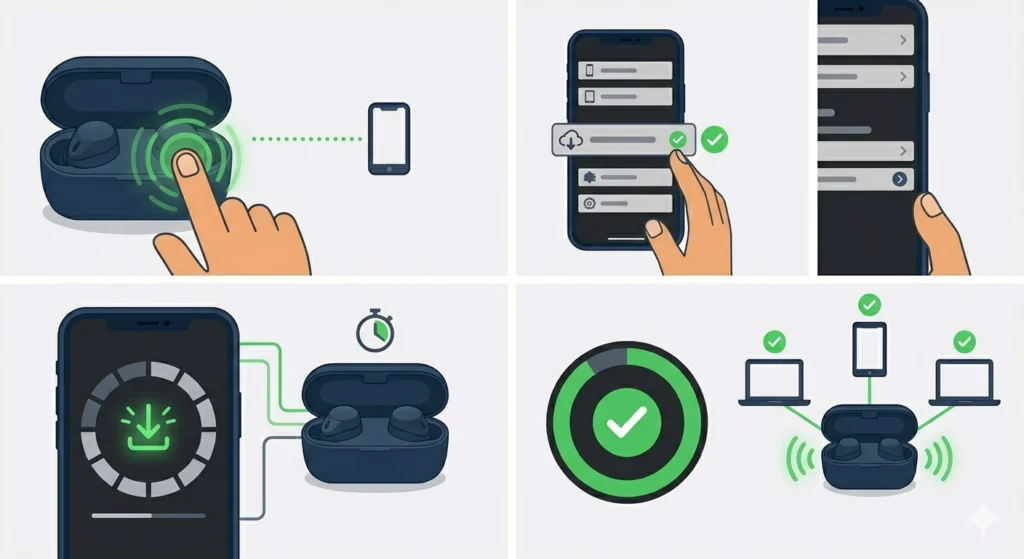
Older firmware versions on the EAH-AZ80 had known bugs with multipoint stability. Updating to the latest firmware often fixes connection drops and three-device pairing issues without any additional steps.
- Step 1: Open the Technics Audio Connect app with the earbuds connected.
- Step 2: Navigate to ‘Settings’ and then ‘Software Update’ or ‘Firmware Update’.
- Step 3: If an update is available, follow the on-screen prompts to install it. Keep the earbuds in the case during the update.
- Step 4: After the update completes, test the three-device connection again.
Firmware updates are easy to overlook, but they make a real difference in multipoint performance.
Fix 5: Check Bluetooth Settings on Each Connected Device
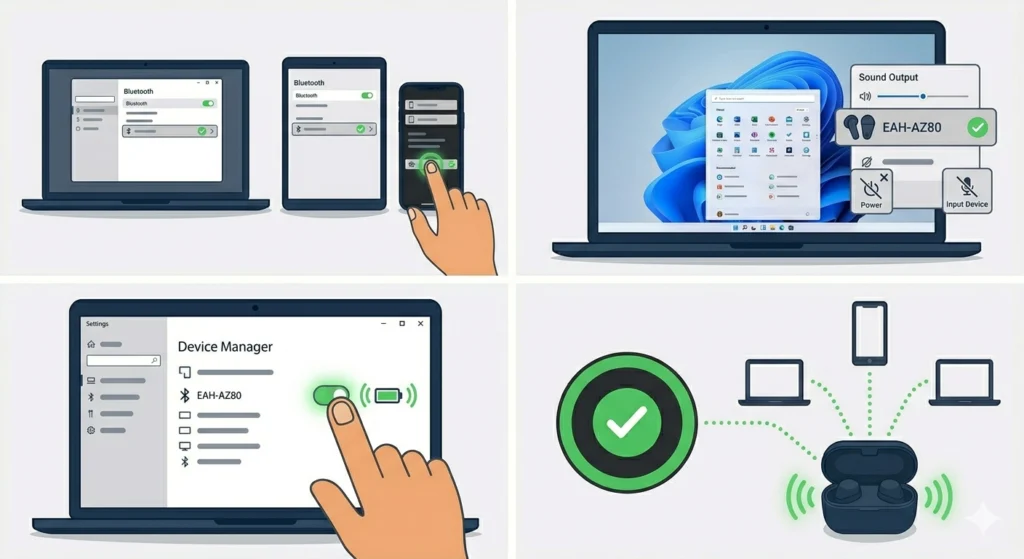
Sometimes the issue is not with the earbuds themselves but with how each device handles Bluetooth connections. This is especially common on Windows 11 PCs, which can have audio output settings that prevent a second or third Bluetooth device from staying active.
- Step 1: On each device, go to Bluetooth settings and check that the EAH-AZ80 shows as ‘Connected,’ not just ‘Paired.’
- Step 2: If a device shows ‘Paired’ but not ‘Connected,’ tap or click ‘Connect’ manually.
- Step 3: On Windows 11, check that the earbuds are set as the active audio output device. Issues here are sometimes linked to how the system manages audio input devices when multiple Bluetooth connections are active.
- Step 4: Disable any Bluetooth power saving features on laptops or PCs that may be dropping the connection in the background.
Tips for Getting the Best Multipoint Performance
- Keep devices within a reasonable range of the earbuds. Multipoint connections are more sensitive to interference than single-device connections.
- Avoid having too many active Bluetooth devices nearby, as signal congestion can cause one of the three connections to drop.
- If using a Windows PC as one of the three devices and the earbuds keep dropping from that connection, try re-pairing the Bluetooth earbuds for stereo sound on Windows to ensure the correct Bluetooth profile is being used.
- For Android and iOS devices, toggle Bluetooth off and back on if a device is not showing as connected after taking the earbuds out of the case.
- The EAH-AZ80 can only actively stream audio from two devices at a time. The third device stays connected but audio switches when playback starts on it. This is normal behavior, not a bug.
Pro-Tip: If all three devices are paired but the earbuds keep connecting to only one or two automatically, try manually connecting the third from its Bluetooth settings while the others are already connected. This trains the earbuds to recognize the priority order.
Common Problems and Fixes
Earbuds Only Connect to One Device Instead of Three
This almost always means multipoint was not enabled in the Technics Audio Connect app. Go to the app settings and turn on multipoint connection, then restart the earbuds.
Third Device Keeps Getting Dropped
Clear the full pairing list on the earbuds and re-pair all three devices in sequence. Make sure to pair the third device last using the manual pairing mode hold gesture.
Earbuds Not Appearing in Bluetooth List on New Device
The earbuds may not be in pairing mode. They need to be manually put into pairing mode for a new device – reconnecting to already-paired devices happens automatically, but a new pairing requires the hold gesture on both earbuds.
Audio Cuts Out When Three Devices Are Connected
This is common when all three devices are trying to maintain an active audio stream. Only two can actively play audio at once. Pause playback on one device so the other two have a stable connection.
Connection Works at First But Drops After a Few Minutes
Check for firmware updates. Early firmware had stability issues with multipoint that were addressed in later updates. Also check that no device has Bluetooth power saving enabled.
Frequently Asked Questions
Can the Technics EAH-AZ80 connect to three devices at the same time?
Yes. The EAH-AZ80 supports multipoint Bluetooth connection for up to three devices simultaneously. However, this feature must be enabled through the Technics Audio Connect app before it works.
How do you put the EAH-AZ80 into pairing mode for a new device?
With the earbuds out of the case, press and hold the touch sensor on both earbuds for approximately 3 seconds until the LED flashes and a voice prompt confirms pairing mode. Then search for the earbuds on the new device’s Bluetooth settings.
Why does the EAH-AZ80 only connect to two devices and not the third?
The most common reasons are that multipoint is not enabled in the app, the third device was not properly paired using the manual pairing mode, or the pairing list has too many old devices saved. Reset the list and re-pair all three devices to resolve this.
Do all three connected devices play audio at the same time?
No. The EAH-AZ80 can actively stream audio from two devices at once. The third device stays connected but does not actively stream audio until playback begins on it, at which point it takes priority or one of the other streams pauses.
Does resetting the EAH-AZ80 delete all paired devices?
Yes. A full reset clears the entire pairing list. All previously paired devices will need to be removed from their Bluetooth settings and re-paired from scratch.
How many devices can the EAH-AZ80 store in its pairing list?
The EAH-AZ80 can store up to 10 paired devices in its memory. Only three can be actively connected at once through multipoint, but the earbuds remember up to 10 for future connections.
Why do the earbuds connect to different devices each time instead of all three?
The EAH-AZ80 automatically connects to the most recently used paired devices. If the priority order changes because a device was unpaired and re-paired, the connection order shifts. Re-pair all three devices in the preferred order to establish a consistent connection routine.
Is multipoint available without the Technics Audio Connect app?
The multipoint feature needs to be toggled on at least once in the app. Once it is enabled, the setting stays active even without the app open. But the initial activation requires the Technics Audio Connect app.
Can the EAH-AZ80 connect to both a phone and a laptop as two of the three devices?
Yes. Any Bluetooth-capable device is compatible, including smartphones, tablets, laptops, and PCs. The earbuds do not distinguish between device types when establishing multipoint connections.
What should be done if the Technics Audio Connect app does not show the multipoint option?
Make sure the app is updated to the latest version and that the earbuds are connected to the app via Bluetooth during the session. Also check that the earbuds firmware is up to date, as older versions may not fully support all app features.